



Contents: TEMPOMATH system ↡ SPEEDTRONIC system ↡
With the help of the TEMPOMAT and SPEEDTRONIC systems you can regulate the speed of the car.
TEMPOMATH system
This system keeps the vehicle speed constant.
Use TEMPOMAT only if you can drive at a constant speed for a long time. You can record any speed above 30 km/h into memory.
Please note: TEMPOMAT is only an auxiliary device that makes it easier for you to drive the vehicle. Responsibility for driving speed and braking in time always lies with you. Do not turn on the TEMPOMAT on a slippery road. There is a risk of skidding. The system regulates the vehicle's speed without taking into account road and weather conditions. The wheels may spin, causing the vehicle to skid. Turn off the system in icy or foggy conditions.
The cruise control lever is the top left lever on the steering column.
Activating TEMPOMAT
The system is activated by pressing the switch lever in direction 6. When the system is activated, the LIM indicator light (3) located on the switch lever does not light.
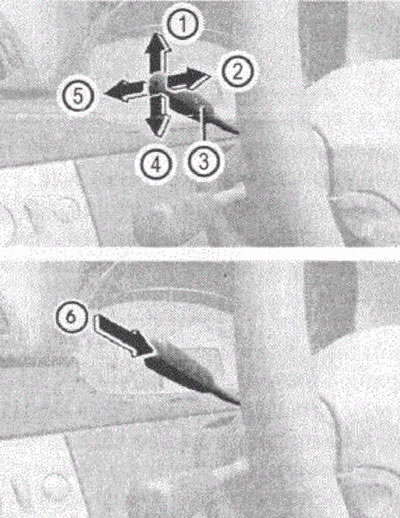
Figure 55
1. Entering the current or higher speed into memory
2. Recalling the last speed recorded in memory
3. LIM indicator
4. Entering the current or lower speed into memory
5. Turning off the TEMPOMAT
6. Switching between TEMPOMAT and SPEEDTRONIC system
Entering the current speed into memory
Accelerate the car to the desired speed.
Briefly press the cruise control lever up (arrow 1) or down (arrow 4). The speed reached will be recorded in the memory.
Release the accelerator pedal. At this point, TEMPOMAT is activated.
When driving uphill or downhill, it is possible that TEMPOMAT cannot maintain speed. When the climb or slope ends, the stored speed is reset.
Turning off the TEMPOMAT
To switch off the system, you must perform one of the following actions: you have several options for switching off: brake, press the accelerator pedal or briefly press the TEMPOMAT switch lever in the direction of arrow 5. After this, the TEMPOMAT will be switched off. The last set speed will remain in memory.
The last recorded speed is erased if you turn off the engine.
Setting the speed
Briefly press the TEMPOMAT switch lever in the direction of arrow 2. The TEMPOMAT then sets the last speed stored in memory. Release the accelerator pedal.
Setting a higher speed
Briefly press the cruise control lever in the direction of arrow 1 and keep it pressed until you reach the desired speed.
Release the cruise control lever. The new speed value is stored in the memory.
If you accelerate the car using the cruise control lever, the speed is remembered after releasing the cruise control lever.
Please note: it is not possible to switch off the cruise control by pressing the accelerator pedal. If you accelerate briefly to overtake, TEMPOMAT then resets to the last recorded speed.
Setting a lower speed
Press the cruise control lever in the direction of arrow 4 and keep it pressed until you reach the desired speed.
Release the cruise control lever. The new speed will be stored in memory.
If you slow down the car using the cruise control lever, the speed is remembered after releasing the cruise control lever.
In vehicles with automatic transmission, when decelerating significantly using the cruise control lever (by pressing in the direction of arrow 4) The automatic transmission shifts to a lower gear.
Precise setting in 1 km/h increments
To accelerate, press the cruise control lever in the direction of arrow 1.
To slow down, press the cruise control lever in the direction of arrow 4.
The last recorded speed is erased if you turn off the engine.
Short-term increase in speed
With the TEMPOMAT system activated, the vehicle can be accelerated briefly. After releasing the accelerator pedal, the recorded speed is restored.
Improving the convenience of gearbox control
Press the accelerator pedal lightly if you engage the clutch.
This increases the ease of operating the gearbox.
If you release the accelerator pedal again, the recorded speed is set again.
If the transmission control lever is in neutral after you disengage the clutch, the engine speed may increase briefly.
SPEEDTRONIC system
The SPEEDTRONIC system ensures that the set speed is not exceeded.
Speed can be limited in two ways:
- variable limit - to limit speed, for example in built-up areas;
- permanent restriction - for long-term speed limitation, for example for winter use.
The speed indicated on the speedometer may differ slightly from the set speed.
You can change the unit of speed measurement using the control system.
The SPEEDTRONIC shift lever is the topmost lever on the left side of the steering wheel.
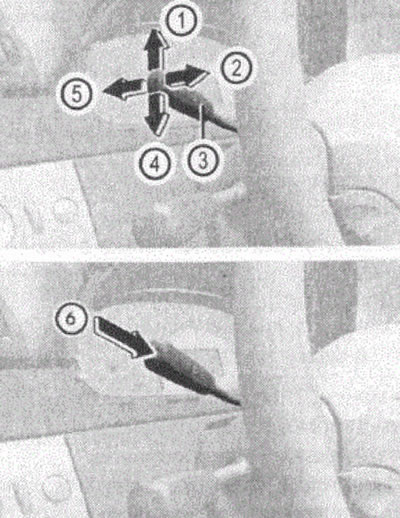
Figure 56
1. Entering the current or higher speed into memory
2. Recalling the last speed recorded in memory
3. LIM indicator
4. Entering the current or lower speed into memory
5. Turning off the TEMPOMAT
6. Switching between TEM POM ATOM and SPEEDTRONIC system
Switching between the SPEEDTRONIC variable speed limiter system and the TEMPOMAT system
Switching is carried out by pressing the switch lever in the direction of arrow b. If the LIM indicator light (3) does not light, this means that the TEMPOMAT system is activated; if it lights, the SPEEDTRONIC system is activated and the set speed limit will be displayed on the instrument cluster display.
Please note: you cannot turn off SPEEDTRONIC by braking. Use SPEEDTRONIC only if you are sure that you will not suddenly have to drive faster than the posted speed limit.
Note: The set speed limit can be exceeded if the accelerator pedal is pressed beyond the resistance point (as when implementing the kick-down mode for cars with automatic transmission). When changing drivers, pay attention to the set speed.
Saving the current speed limit to memory
Briefly press the shift lever up (direction 1, figure 52). In this case, the indicated speed is remembered with rounding to the value of the next higher ten.
By briefly pressing the switch lever (direction 4) the displayed speed is stored rounded to the next lower ten.
On descents, despite the limiter, the speed may be exceeded.
In this case, a sound signal is heard and the set speed value flashes on the display in the instrument cluster.
In this case, brake yourself if necessary.
Calling up the indication of the stored speed limit
Briefly press the switch lever in the direction of arrow 2.
If the vehicle speed exceeds the last stored limit by no more than 30 km/h, the limiter sets this stored speed again.
Fine adjustment is made in 10 km/h increments.
Setting a higher speed limit
This is done by briefly pressing the switch lever in the direction of arrow 1 or by holding the lever in the pressed position until the desired speed is reached.
Setting a lower speed limit
This is done by briefly pressing the switch lever in the direction of arrow 4 or by holding the lever in the pressed position until the desired speed is reached.
Precise setting in 1 km/h increments
Setting a higher speed limit
This is done by briefly pressing the TEMPOMAT switch lever in the direction of the arrow or by holding the lever in the pressed position until the desired speed is reached.
Switching off the SPEEDTRONIC variable speed limiter
To turn off the SPEEDTRONIC system, perform one of the following actions: briefly press the switch lever in the direction of arrow 5 (the speed limiter will be turned off) or by pressing the switch lever in the direction of arrow 6, switch the system to the TEMP mode.
The system will also be switched off when the accelerator pedal is pressed beyond the resistance point, if the vehicle speed is at least 20 km/h below the set speed.
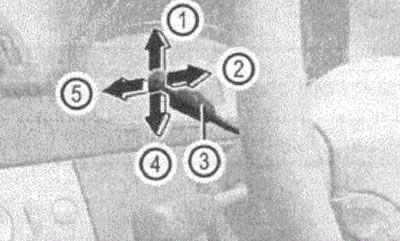
Figure 57
1. Entering into memory the current or higher speed
2. Recalling the last speed recorded in memory
3. LIM indicator
4. Entering into memory the current or lower speed
5. Turning off the TEMPOMAT
Long-term speed limitation by the SPEEDTRONIC system
With the help of the control system you can set a constant speed limit value in the range from 160 km/h (for example, for operating a car with tires with a winter tread pattern) up to maximum speed.
Please note: in this case, you will not be able to exceed the set speed limit, even if you press the accelerator pedal past the resistance point (kickdown).
Shortly before the set speed is reached, its value is displayed on the multi-function display.
The SPEEDTRONIC long-term speed limiter remains active even when the variable speed limiter is switched off.
Setting a long-term speed limit SPEEDTRONIC
Turn the ignition key to position 1 or 2.
[Article text obtained from the website: www.mercedesman.ru]
Press the button
 or
or  until the EINSTELLUNGEN (settings) menu appears on the display.
Press the button
 or
or  until the FAHRZEUG submenu is highlighted (automobile).
Press the button
 or
or  until the GESCHW. BEGRENZUNG menu appears on the display (WINTERREIFEN) (Speed Limit (winter tires). The light strip is located on the operating installation.
Select using the button
 or
or  desired value of the constraint.
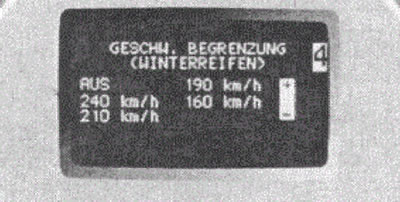
Figure 58
In this case, you can choose between the following options:
- AUS (OFF), SPEEDTRONIC constant speed limiter is off;
- 160 km/h;
- 190 km/h;
- 210 km/h;
- 240 km/h.