



General information
The cruise control system (tempostat) is included in the standard package of the models under consideration. The system allows you to automatically maintain the selected cruising speed of the car without using the gas pedal. The cruising speed should be no lower than 40 km/h. Using the cruise control becomes especially convenient during long trips on lightly loaded straight country highways. For safety reasons, it is not recommended to turn on the cruise control when driving in the city, on winding roads with many turns, on slippery road surfaces, in heavy rain and in other adverse weather conditions. In the above cases, the driver must be able to fully control the car's driving mode.
Warning! Incorrect use of cruise control may cause a traffic accident! Only use the cruise control system when driving on free motorways and in favorable weather conditions.
Attention! During the operation of the system, the gas pedal may move automatically, but do not hold it with your foot to avoid damage to the support and axle mechanisms!
The lever switch for controlling the cruise control is located on the left side of the steering column, above the combined steering column switch assembly.
the system is switched on/off using the main cruise control switch button, which is equipped with a built-in control lamp, and is accompanied by the activation of the corresponding control lamp on the vehicle's instrument panel.
Tempostat Operation Management
Standard design tempostat
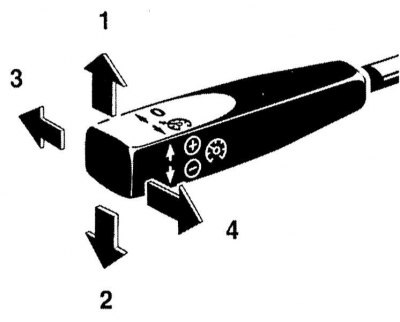
The cruise control switch is located on the right side of the steering column
1 - Entering the current speed value into the system memory (briefly press the lever)/increase speed (keep the lever depressed)
2 - Entering the current speed value into the system memory (briefly press the lever)/reduce speed (keep the lever depressed)
3 - Turn off (the cruising speed value remains in the system memory)
4 - Retrieving the cruising speed value from the system memory
The design of the cruise control switch allows you to enter any current vehicle speed into the system memory as a cruising speed if it exceeds 40 km/h - just briefly press the lever up or down. After entering the cruising speed, release the gas pedal.
The cruising speed value is increased and decreased by pressing the lever up/down respectively.
Brief acceleration of the vehicle, for example when overtaking, can be achieved by pressing the gas pedal - after releasing the pedal, the speed will automatically decrease to the cruising value stored in the cruise speed setting.
After accelerating the vehicle to a speed above 40 km/h, the cruising speed stored in the cruise control memory can be recalled by briefly pulling the lever towards you.
Warning! Activate the recall of the cruising speed from the system memory only if you know its value and are ready to move with it.
Note: When driving with cruise control on, deviations from the set cruising speed may occur downhill or uphill.
When the ignition key is turned to position 1 or 0, the cruise value stored in the cruise control memory is reset.
Cruise control with speed limiter
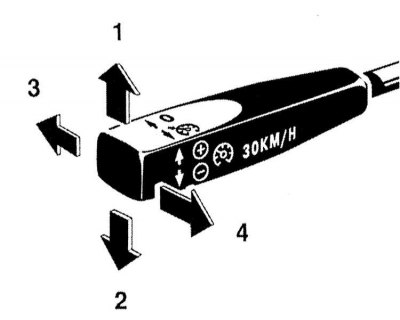
How to use the cruise control switch with speed limiter
1 - Increase speed
2 - Turning on/activating the limiter
3 - Turn off
4 - Decrease speed
The cruise control is turned on by pressing the switch lever down.
The operating principle of the temperature controller in normal mode is similar to that described above for standard systems.
At the current speed below 35 km/h, the design of the cruise control allows the introduction of a speed limit by entering the maximum permissible speed of 30 km/h into the cruise control memory. To activate the speed limiter, you should also pull the switch lever down - the display screen shows the value 30 km/h.
Note: When driving downhill, the current speed may slightly exceed the maximum permissible value (30 km/h).
Speedtronic system
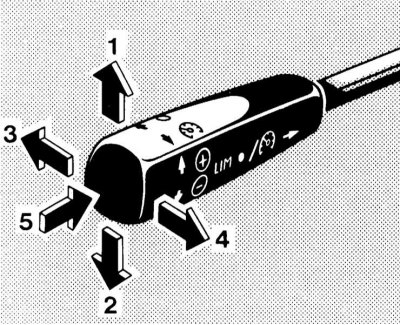
How to use the cruise control switch on models equipped with the Speedtronic system
1 - Activate the speed limiter/increase the cruising speed value in 10 km/h increments
2 — Activation of the speed limiter/reduction of the cruising speed value in 10 km/h increments
3 - Switching off the speed limiter
4 — Recalling the stored speed limit value/fine speed adjustment in 1 km/h increments
5 — Switching between Tempostat/Speedtronic modes
The Speedtronic system is a cruise control system with variable and constant speed limiters.
The steering column control switch allows switching from cruise control mode to speed limiter mode with a change in its own functions. Switching is done by pressing the end of the switch lever handle.
In the tempostat mode, the rules for using the switch are similar to those described above for standard systems.
Attention! Variable speed limiter
A variable speed limiter allows you to limit engine speed without exceeding a certain speed threshold, for example, when it is necessary to comply with traffic regulations.
Attention! Do not forget that the driver is always responsible for exceeding the speed limit!
The variable speed limit mode is activated by pressing the end of the cruise control lever handle and is accompanied by the yellow LIM indicator on the handle coming on, and a similar message is displayed on the display screen.
Note: The limiter is activated only if the current vehicle speed differs from the limit value stored in the system memory by no more than 30 km/h.
The speed limit value is changed by pressing the selector lever up or down. The selected value is displayed on the information display screen. When the engine is running, any speed limit can be entered, starting from 30 km/h.
The set speed limit can only be exceeded by pressing the accelerator pedal all the way down (enable kickdown mode).
The limitation mode can be exited by briefly pushing the lever away from you, or by pressing the end of its handle - the LIM indication should disappear from the display screen. The limiter is automatically disabled when the car accelerates in kickdown mode to a speed exceeding the limit value by more than 20 km/h.
If the limiter fails to cope with its task, for example when driving downhill, a warning buzzer is activated and the word LIM on the information display screen begins to flash.
Note: Due to design features, the speedometer readings may differ slightly from the speed limiter settings.
Unlike cruise control mode, pressing the foot brake pedal does not disable the speed limiter.
Permanent speed limiter
Using a permanent limiter, the maximum speed of the vehicle can be limited, for example when using it with winter tires.
The limit can be set in the range from 190 km/h to the maximum possible speed of the car. The set constant speed limit remains in effect even if the variable limit is activated.
To activate the mode, press the end of the switch. Move the AT selector lever to position "P" and the ignition key to position 2 (do not start the engine). Then, after waiting for about a second, pull the lever towards you - the speed value will appear on the display screen. When you release the lever, the indication will start flashing - the speed is set by pulling the lever up or down. Entering the selected value into the system memory is done by pulling the lever towards you - a confirmation sound signal should sound.
If necessary, the setting can be reset by increasing the input value until a triple dash (- - -) appears on the screen, then pulling the lever towards you until you hear a beep.
When the current vehicle speed approaches the set limit value, the latter is displayed on the information display screen in combination with the LIM mark.
Note: Brief indication in flashing mode of the speed limit value entered into the device memory also occurs when the ignition is turned on.
If the limiter fails to cope with its task, for example when driving downhill, a warning buzzer is activated and the word LIM on the information display screen begins to flash.
Note: Due to design features, the speedometer readings may differ slightly from the speed limiter settings.