The general appearance of the display is shown in the figure 31.
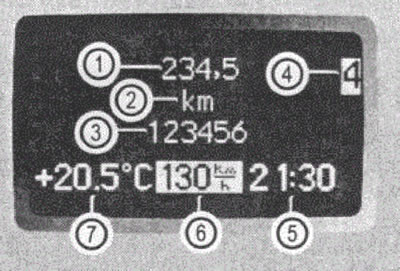
Figure 31
1. Daily mileage counter
2. Speedometer
3. Total mileage counter
4. Position of the automatic transmission control lever (for cars with automatic transmission)
5. Clock
6. SPEEDTRONIC
7. Outside air temperature
Multifunctional steering wheel
The display indications and the settings in the control system are controlled using the buttons on the multi-function steering wheel (see figure 32).
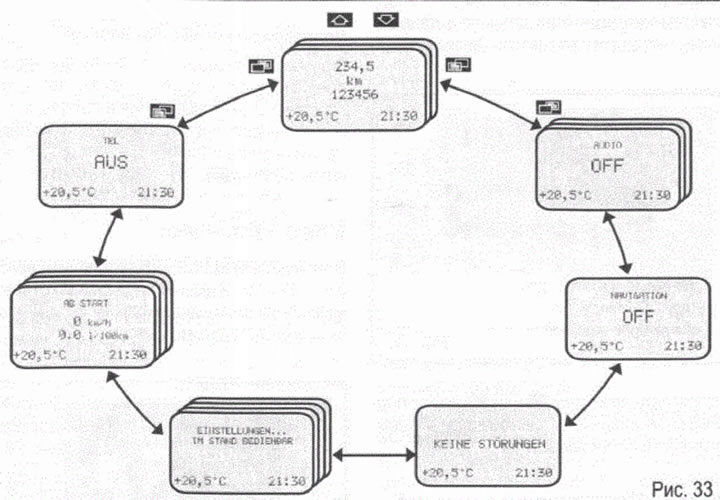
The controls are based on a simple navigation system containing a number of menus and submenus, the diagram of which is shown in the figure 33.
If the menu is divided into submenus, then movement within the submenu is carried out using the buttons
 and
and  (see figure 32).
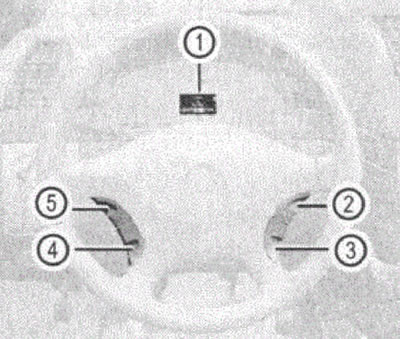
Figure 32
1. Multifunctional display
2. Volume control
quiet
 louder
3. Using the phone
 receiving a telephone conversation
  end of telephone conversation
4. Moving from menu to menu
 forward
  back
back
5. Navigate within the menu
 forward
  back
backThe number of menus depends on the vehicle's equipment, in particular on whether your vehicle is equipped with a navigation system or an Audio 20 audio system.
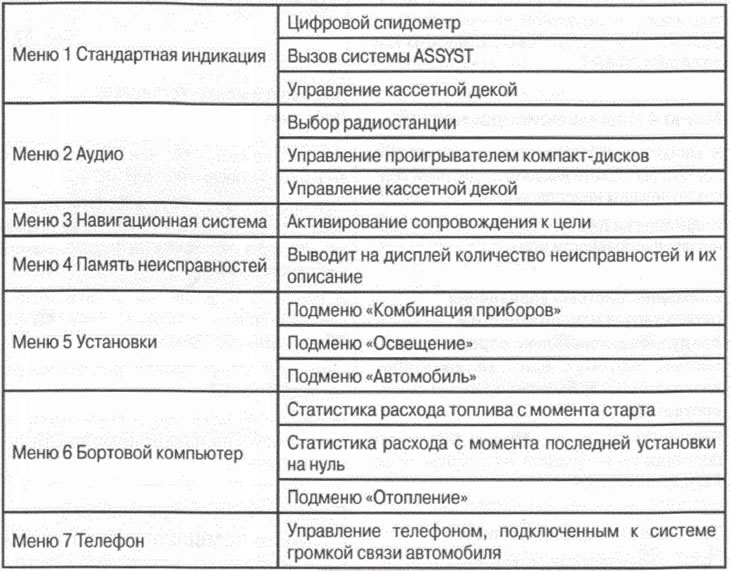
Menu overview
(Article obtained from this portal MercedesMAN)