



Contents: Audio systems ↡ Radio receiver - indication for…↡ CD Player - Indication for Audio…↡ CD player - display for COMAND system ↡ Cassette recorder - indication for…↡ Navigation system - display for…↡ Fault indication memory ↡ Custom installation ↡ Resetting the "SETTINGS" menu (2): ↡ Menu "INSTRUMENT BOARD" ↡ Reset menu "INSTRUMENT CLUSTER"…↡ Menu "LIGHTING" ↡ Resetting the "LIGHTING" menu (3-6)…↡ Menu "CAR" ↡ Resetting the "VEHICLE" menu…↡ Menu "Heating" ↡ Resetting the "HEATING" menu (3-6)…↡ Installation menu "INDEPENDENT…↡ Setting and selecting the required…↡ Menu "Comfort control" (models with…↡ Reset menu "CONVENIENCE"…↡ Trip computer ↡ Resetting the trip meter since…↡ Telephone ↡ Subscriber Recall - Indication for…↡ Subscriber Recall - Indication for…↡ Incoming call ↡ Volume control ↡ Coolant temperature gauge ↡
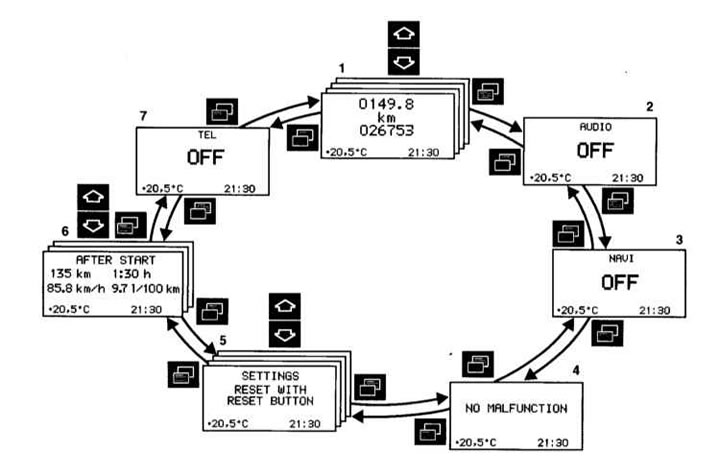
Depending on the configuration of your vehicle, the buttons on the multifunctional steering wheel can be used to call up the following systems on the universal display, control them and set their parameters:
- 1 — Odometer since reset and total mileage counter
- Coolant temperature gauge
- Digital speed indication
- Scheduled Maintenance Due Date Indicator (ASSYST)
- Engine oil level indicator
- 2 - Audio systems
- Radio
- CD player
- Cassette deck
- 3 - Navigation system
- 4 — Fault indication memory
- 5 - Custom installation
- 6 - Trip computer
- Since the start
- Since the reset
- Power reserve
- 7 — Telephone
Button
 or
or  press until the desired system is displayed. Each time you press the button, the next system is displayed.
In some systems, additional indications can be called up by pressing a button
 or
or  .
.
Note: Depending on the installation, the indications on the universal display are in German, English, French, Italian or Spanish. Switching to another language - see menu "INSTRUMENT CLUSTER" (DASHBOARD) "Individual installation" systems, "TEXT" installation menu (TEXT LANGUAGE).
Regardless of the language set, on models with Audio 10, Audio 10 CD or Audio 30 APS radios, the audio system indicators (radio, compact disc player, cassette deck), and the indications on the phone appear in English.
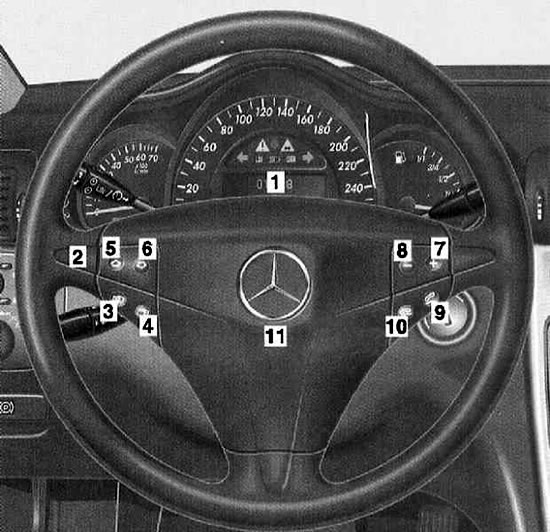
1 - Universal display
2 - Multifunctional steering wheel
Turn the key in the ignition switch to position 1 or 2.
Click the button:
3 - Next system
4 - Previous system
5 - Next indication within the system
6 - Previous indication within the system
7 - Increase volume
8 - Volume down
9 - Dialing a telephone number, receiving an incoming telephone conversation
10 - Ending a telephone conversation, refusing to accept an incoming telephone conversation
11 - Sound signal on the soft cover
Button
 or
or  press until the desired system is displayed.
With each new press of the button, the next system is displayed.
In some systems, additional indications may be called up by pressing a button
 or
or  .
.
Mileage meters, service life indicators and indicators - speed, coolant temperature and oil level
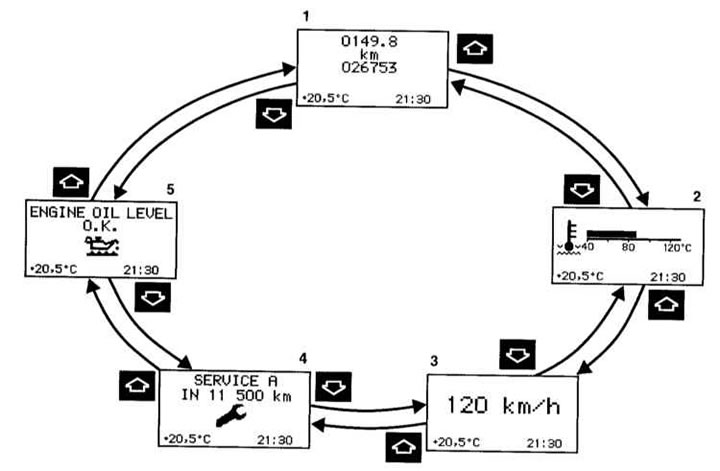
1 - Reset the trip meter from the moment of reset (see below)
2 - Coolant temperature gauge (see below)
3 — Digital speed indication - if in the system "Individual setting" in the menu "INSTRUMENT CLUSTERS" (DASHBOARD), in the installation menu "SELECT DISPLAY" (SELECTING INDICATION), the "SPEED" setting is selected (see below)
Outdoor temperature indication ¹ - if in the system "Individual installation", in the menu "INSTRUMENT CLUSTERS" (DASHBOARD), in the installation menu "SELECT DISPLAY" (SELECTING INDICATION), installation selected "OUTSIDE TEMPERATURE" (OUTSIDE AIR TEMPERATURE) (see below)
4 — Scheduled Maintenance Due Date Indicator (ASSYST) (Chapter Routine maintenance)
5 — Engine oil level indication (Chapter Routine maintenance)
¹) Except UK
Button
 or
or  press until the odometer since reset and total odometer indication (1) appear.
Button
 or
or  press until the desired indication appears (2, 3, 4, 5, 1).
At the push of a button
 or
or  the next or previous system is indicated.
Audio systems
Depending on the audio system that is switched on, a corresponding indication appears on the display.
Radio receiver - indication for audio devices and COMAND system
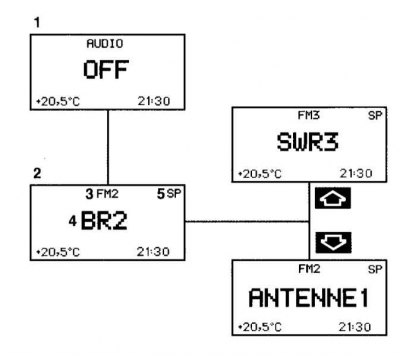
1 - No audio system is turned on
2 — The radio is turned on
3 — The frequency band is set and, if necessary, the memory cell number is also set
4 - The name of the tuned radio station or its frequency
5 — "SP" (memory) - if in the system "Individual installation", in the menu "VEHICLE" (AUTOMOBILE), in the installation menu "PRESS BUTTON IN AUDIO MODE" (PRESSING A BUTTON IN AUDIO MODE), the "MEMORY" setting is selected, NOT "STATION SEARCH" (SEARCH FOR RADIO STATION)
Turn on the radio (separate "Operating Manual").
Button
 or
or  press until the indicator (2) appears.
Button
 or
or  press until the desired radio station or frequency is displayed.
With the button
 or
or  the radio station frequency or the stored radio station can be selected. This depends on the setting in the setup menu "PRESS BUTTON" "IN AUDIO MODE" (PRESSING THE BUTTON IN "AUDIO" MODE) (see "Custom Installation", "VEHICLE" menu (AUTOMOBILE)
At the push of a button
 or
or  the next or previous system is indicated.
CD Player - Indication for Audio Equipment
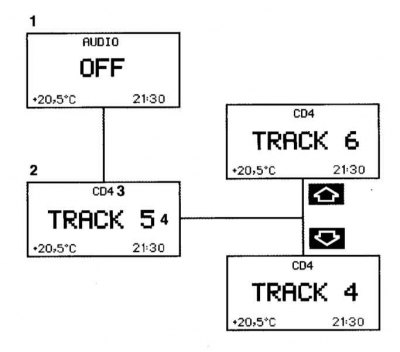
CD player - display for COMAND system
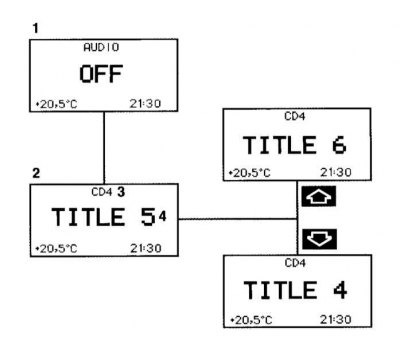
1 - No audio system is turned on
2 - The CD player is on
3 - The CD changer displays the number of the CD being played
4 — Musical piece number
Turn on the CD player (separate "Operating Guide").
Button
 or
or  press until the indicator (2) appears.
Button
 or
or  press until the desired music number is displayed (4).
At the push of a button
 or
or  the next or previous system is indicated.
Cassette recorder - indication for Audio 10
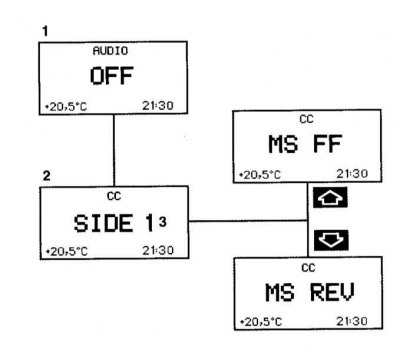
1 - No audio system is turned on
2 - The cassette deck is on
3 - The side being played
Turn on the cassette deck (separate "Operating Guide").
Button
 or
or  press until the indicator (2) appears.
Click the button
 - rewinding is performed until the beginning of the next piece of music.
Click the button
 - rewinding is performed until the beginning of the musical piece being played.
At the push of a button
 or
or  the next or previous system is indicated.
Navigation system - display for Audio 30 APS and COMAND system
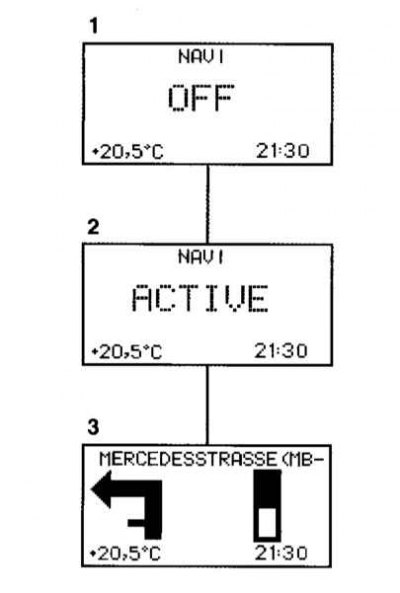
1 - Navigation system is off
2 - The navigation system is on, but target tracking is not performed
3 - The navigation system is on and target tracking is activated
Button
 or
or  press until the desired system is displayed.
(Navigation system - separate "Operating Manual" for COMAND systems (Cockpit Management and Data System) or Audio 30 APS).
At the push of a button
 or
or  the next or previous system is indicated.
Fault indication memory
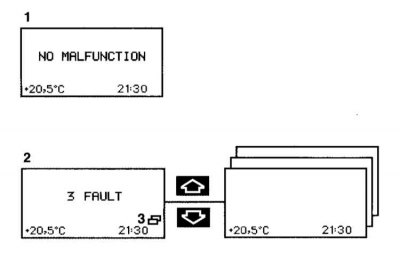
1 - No faults
2 - Number of faults
3 — Malfunctions are stored in the fault indication memory
Button
 or
or  press until the fault indication memory is displayed.
If the indication (2) appears, press the button
 or
or  . After this, a sequential indication of faults is performed.
Information copied from the website: MercedesMAN.ru
(Warning system and fault signaling - see Section Warning and indicator lamps, as well as information display messages about registered faults)
Once all fault indications have been completed, indication (2) appears again.
If faults occur while driving, the display (2) appears again when the key in the ignition switch is turned to position 0 or removed. A repeat display of faults on the instrument panel can be called up by pressing the reset button (Section Dashboard).
Turning the key in the ignition switch to position 1 or 2 resets the fault indication memory.
If faults occur again, they are again displayed in the fault indication memory.
At the push of a button
 or
or  the next or previous system is indicated.
Custom installation
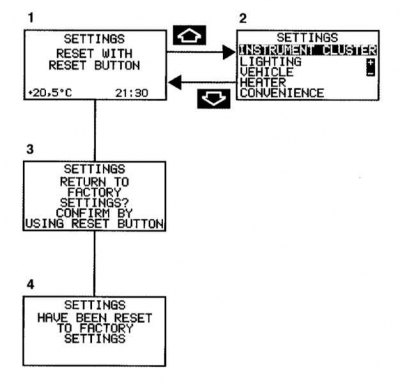
1 - Basic indication of individual installation
2 — "SETTING" - in this additional menu you can call up the required menu: "INSTRUMENT CLUSTER" (DASHBOARD) (see below)
"LIGHTING" (see below)
"VEHICLE" (AUTOMOBILE) (see below)
"HEATER" (see below)
"CONVENIENCE" (COMFORTABLE CONTROL) (see below)
Each menu has in turn additional submenus - settings menus. In them, the corresponding settings can then be made.
3 - Reset additional menu "SETTINGS", confirmation request (see below)
4 - Confirmation message Button
 or
or  press until the basic display of the "Individual installation" system (1) appears.
Button
 or
or  press until the additional menu "SETTINGS" (2) is displayed
Button
 or
or  press until the desired menu is highlighted:
- "INSTRUMENT CLUSTER" (DASHBOARD) (see below)
- "LIGHTING"
- "VEHICLE" (AUTOMOBILE) (see below)
- "HEATER" (see below)
- "CONVENIENCE" (COMFORTABLE CONTROL) (see below)
At the push of a button
 or
or  the next or previous system is indicated.
Resetting the "SETTINGS" menu (2):
If you reset the "SETTINGS" menu (2), all settings will return to the factory settings.
Call up the basic system display "Individual setting" (1) or "SETTINGS" (2).
The reset button on the instrument panel (Section Dashboard) Press and hold for approximately 3 seconds. The display (3) appears.
Press the reset button again. The display (4) appears for confirmation.
If the reset button is not pressed, the basic display of the "Individual setting" system (1) appears after approximately 5 seconds. In this case, the setting menus are not reset.
Note: When resetting while driving, for safety reasons, in the "LIGHTING" and "VEHICLE" menus (AUTOMOBILE) not all settings menus are reset (see below).
Menu "INSTRUMENT BOARD"
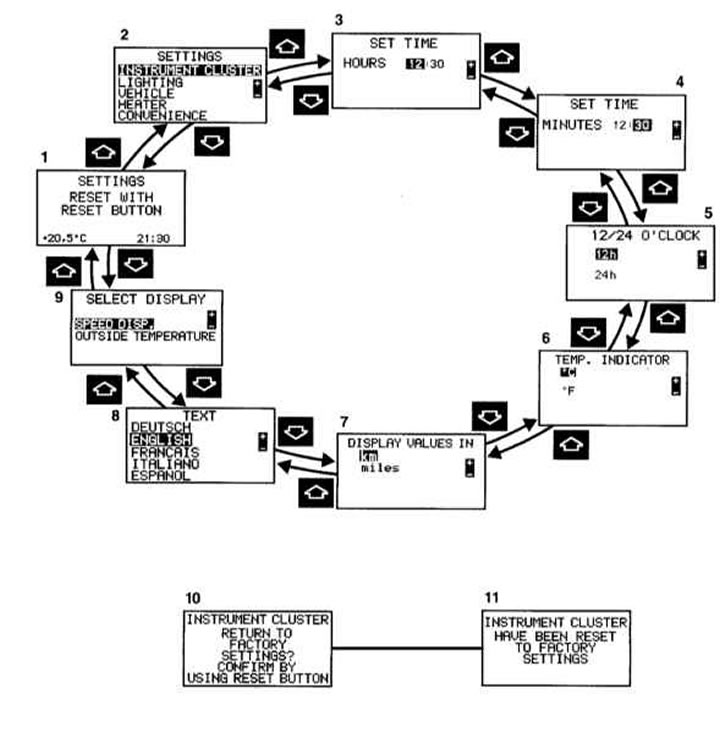
1 - Basic indication of individual installation
2 — "SETTINGS" - additional menu for menu selection
3 — "SET TIME" (SETTING THE TIME) "HOURS" ¹
4 — "SET TIME" (SETTING THE TIME) "MINUTES"
5 — "12/24 O'CLOCK" - 12 or 24 hour indication
6 — "TEMP. INDICATOR" (TEMPERATURE INDICATOR) - the set unit of measurement is displayed on the outside air temperature indicator on the instrument panel, and on models with an automated air conditioner with comfort control also on the display of this system
7 — "DISPLAY VALUES IN" (VALUES ON THE DISPLAY IN) - the setting is valid for all indications on the universal display (not for speedometer)
8 — "TEXT" (TEXT LANGUAGE) - setting the language for indication on the universal display
9 — "SELECT DISPLAY" (SELECTING AN INDICATOR)² - selected option "SPEED DISP." (SPEED) or "OUTSIDE TEMPERATURE" (OUTSIDE AIR TEMPERATURE) is constantly displayed on the universal display.
"SPEED DISP." (SPEED), for example, can be used to additionally display the speed in miles if the settings menu (7) "SPEEDOMETER" (SPEEDOMETER) is set to "MILES"
10 - Reset menu "INSTRUMENT PANEL", confirmation request (see below)
11 - Confirmation message
Note: The block diagram shows an example of a possible installation.
¹ Only models without COMAND system or without Audio 30 APS. (COMAND system or Audio 30 APS - separate "Operating Manual").
² Except UK.
Button
 or
or  press until the basic display of the "Individual installation" system (1) appears.
Button
 or
or  press until the additional menu "SETTINGS" (2) is displayed
Button
 or
or  press until the menu is highlighted "INSTRUMENT CLUSTER" (DASHBOARD).
Button
 or
or  press until the required setup menu (2-9) is displayed.
In the settings menu (3, 4) by pressing the button
 or
or  the time is set and the required setting is selected in the settings menu (5-9).
The selected setting is marked.
The settings made are remembered and executed immediately.
After going through all the settings menus, the basic display of the "Individual setting" system (1) is displayed again.
At the push of a button
 or
or  the next or previous system is indicated.
Reset menu "INSTRUMENT CLUSTER" (DASHBOARD) (5-9) for factory installation:
Call up one of the settings menus (5-9).
The reset button on the instrument panel (Section Dashboard), press and hold for approximately 3 seconds. The display (10) appears.
Press the reset button again. The display (11) appears for confirmation.
If the reset button is not pressed, the additional menu "SETTINGS" (2) is displayed after approximately 5 seconds. In this case, the settings menus are not reset.
Menu "LIGHTING"
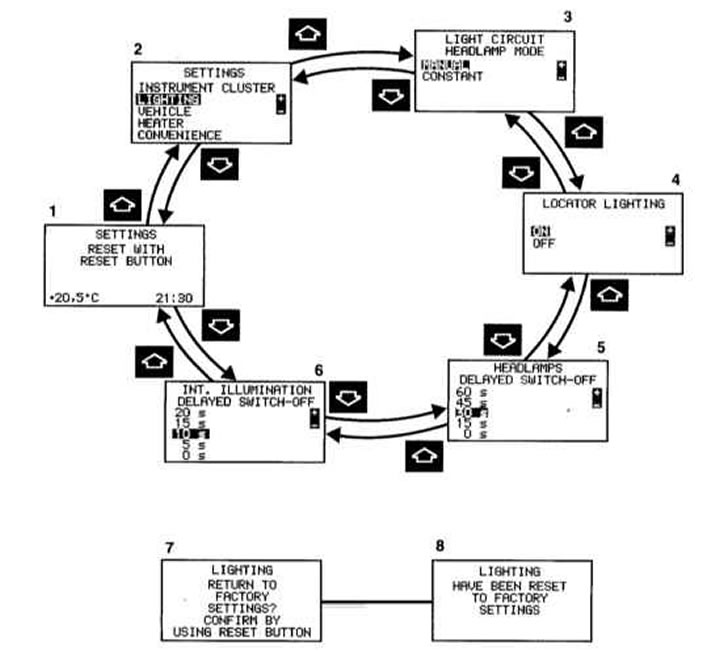
1 - Basic indication of individual installation
2 — "SETTINGS" - additional menu for menu selection
3 — "LIGHT CIRCUIT HEADLAMP MODE" (HEADLIGHT SWITCHING) (Chapter Switches)
4 — "LOCATOR LIGHTING" (ORIENTATION LIGHTING) (Chapter Switches)
5 — "HEADLAMPS DELAYED SWITCH-OFF" (SLOW DOWN HEADLIGHTS (Section Switches)
6 — "INT. ILLUMINATION DELAYED SWITCH-OFF" (INTERIOR LIGHTING TURN-OFF WITH TIME DELAY) (Chapter Power windows, sunroof)
7 - Reset "LIGHTING" menu, confirmation prompt (see below)
8 - Confirmation message
Note: The block diagram above shows an example of a possible installation.
Button
 or
or  press until the basic display of the "Individual installation" system (1) appears.
Button
 or
or  press until the additional menu "SETTINGS" (2) is displayed.
Button
 or
or  press until the "LIGHTING" menu is highlighted.
Button
 or
or  press until the required installation menu (2-6) is displayed.
In the settings menu (3-6) the setting is selected by pressing the button
 or
or  . The selected setting is marked.
The settings made are remembered and executed immediately.
After going through all the settings menus, the basic display of the "Individual setting" system (1) is displayed again.
By pressing the or button the next or previous system is displayed.
Resetting the "LIGHTING" menu (3-6) to factory settings:
Call up one of the settings menus (3-6).
The reset button on the instrument panel (Section Dashboard) Press and hold for approximately 3 seconds. The display (7) appears.
Press the reset button again. The display (8) appears for confirmation.
If the reset button is not pressed, the additional menu "SETTINGS" (2) is displayed after approximately 5 seconds. In this case, the settings menus are not reset.
Note: When resetting the readings while driving, for safety reasons, the installation menu "HEADLAMP MODE" (HEADLIGHT SWITCHING) does not reset. A message appears "LIGHTING CANNOT BE COMPLETELY RESET TO FACTORY SETTINGS WHILE DRIVING" (LIGHTING WHILE DRIVING IS NOT RESET TO FULLY FACTORY SETTINGS).
Menu "CAR"
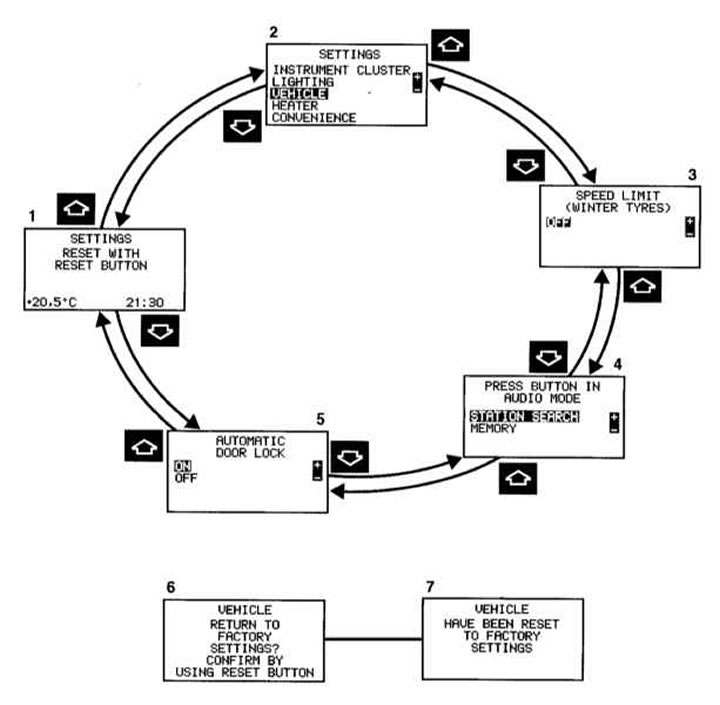
1 - Basic indication of individual installation
2 — "SETTINGS" - additional menu for menu selection
3 — "SPEED LIMIT (WINTER TYRES)" (SPEED LIMIT, WINTER TYRES)" 1, - constant speed limiter (Section Vehicle control and auxiliary systems).
Possibility to select for models with a petrol engine: "Off", "240 km/h" to "160 km/h" in steps of 10 km/h.
Possibility to choose for models with diesel engine: "Off", "210 km/h", "190 km/h", "160 km/h".
4 — "PRESS BUTTON IN AUDIO MODE" (PRESSING A BUTTON IN AUDIO MODE) - installation of a radio receiver
"STACION SEARCH" (SEARCH FOR RADIO STATION) - button
 or
or  frequency is selected
"MEMORY" - button
 or
or  the stored radio station is selected
5 — "AUTOMATIC DOOR CLOCK" (AUTOMATIC DOOR LOCKING) (Chapter Locks, keys and bolts. Single lock)
6 - Reset menu "CAR", confirmation request (see below)
7 - Confirmation message
Note: The block diagram above shows an example of a possible installation.
Button
 or
or  press until the basic display of the "Individual installation" system (1) appears.
Button
 or
or  press until the additional menu "SETTINGS" (2) is displayed.
Button
 or
or  press until the "VEHICLE" menu is highlighted (AUTOMOBILE).
Button
 or
or  press until the required installation menu (2-5) is displayed.
In the settings menu (3-5) the required setting is selected by pressing the button
 or
or  . The selected setting is marked. The settings made are remembered and executed immediately.
After going through all the settings menus, the basic display of the "Individual setting" system (1) is displayed again.
At the push of a button
 or
or  the next or previous system is indicated.
Resetting the "VEHICLE" menu (AUTOMOBILE) (3-5) for factory installation:
Call up one of the settings menus (3-5).
Press and hold the reset button on the instrument panel for approximately 3 seconds. The display (6) appears.
Press the reset button again. The display (7) appears for confirmation.
If the reset button is not pressed, the additional menu "SETTINGS" (2) is displayed after approximately 5 seconds. In this case, the settings menus are not reset.
Note: When resetting the readings while driving, for safety reasons, the installation menu "SPEED LIMIT (WINTER TYRES)" (SPEED LIMIT, WINTER TYRES) does not reset. A message appears "VEHICLE CANNOT BE COMPLETELY RESET TO FACTORY SETTINGS WHILE DRIVING!" (THE CAR IS NOT RESET TO FULLY FACTORY SETTINGS WHILE DRIVING).
Menu "Heating"
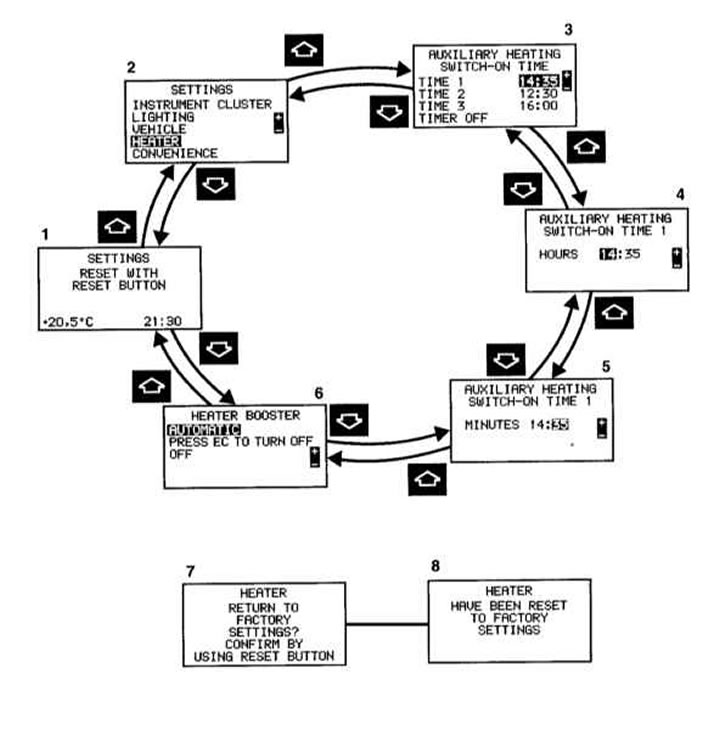
1 - Basic indication of individual installation
2 — "SETTINGS" - additional menu for menu selection
3 — "AUXILIARY HEATING" (INDEPENDENT HEATER)
4 — "AUXILIARY HEATING SWITCH-ON TIME 1 HOURS" (INDEPENDENT HEATER, SWITCH-ON TIME 1 - HOURS) 1, 2
5 — "AUXILIARY HEATING SWITCH-ON TIME 1 MINUTS" (INDEPENDENT HEATER, SWITCH-ON TIME 1 - MINUTE)
6 — "HEATER BOOSTER" (ADDITIONAL HEATING DEVICE)³
7 - Reset menu "HEATER", confirmation request
8 - Confirmation message
Note: The block diagram above shows an example of a possible installation.
- 1) Only models with independent heating
- 2) Appears only if in the settings menu (3) "AUXILIARY HEATING" (INDEPENDENT HEATER) "TIME" is selected.
- 3) Diesel engine models only.
Button
 or
or  press until the basic display of the "Individual installation" system (1) appears.
Button
 or
or  press until the additional menu "SETTINGS" (2) is displayed.
Button
 or
or  press until the "HEATING" menu is highlighted.
Button
 or
or  press until the required settings menu (2-6) is displayed.
In the settings menu (4, 5) by pressing the button
 or
or  the time is set and the required setting is selected in the setup menu (3, 6). The selected setting is marked.
The settings made are remembered and executed immediately.
After going through all the settings menus, the basic display of the "Individual setting" system (1) is displayed again.
At the push of a button
 or
or  the next or previous system is indicated.
Resetting the "HEATING" menu (3-6) to factory settings.
Call up one of the settings menus (3-6).
The reset button on the instrument panel (Section Dashboard) Press and hold for approximately 3 seconds. The display (7) appears.
Press the reset button again. The display (8) appears for confirmation.
If the reset button is not pressed, the additional menu "SETTINGS" (2) is displayed after approximately 5 seconds. In this case, the settings menus are not reset.
Installation menu "INDEPENDENT HEATER"
Do not turn on the independent heater at filling stations and in closed rooms without an exhaust hood (for example, in garages).
Setting and selecting the required switching time
Call up the installation menu (3) "AUXILIARY HEATING" (INDEPENDENT HEATER).
By pressing the button
 or
or  check, for example, "TIME 1".
Call the installation menu (4) "AUXILIARY HEATING" (INDEPENDENT HEATER) "SWITCH-ON TIME 1 HOURS" (ON TIME 1, HOURS) and by pressing a button
 or
or  set the required hours.
Call the installation menu (5) "AUXILIARY HEATING" (INDEPENDENT HEATER) "SWITCH-ON TIME 1 MINUTES" (SWITCH ON TIME 1, MINUTES) and by pressing a button
 or
or  set the required minutes.
The time for switching on the independent heater is set and selected.
Selecting the required turn-on time:
Call up the installation menu (3) "AUXILIARY HEATING" (INDEPENDENT HEATER).
By pressing the button
 or
or  check the required "TIME" menu.
The time for switching on the independent heater has been selected.
Note: Only one switching time can be selected at a time (for more information, see "Independent heater", Section Automatic heater and air conditioner. Ventilation. Independent heater).
Menu "Comfort control" (models with memory function)
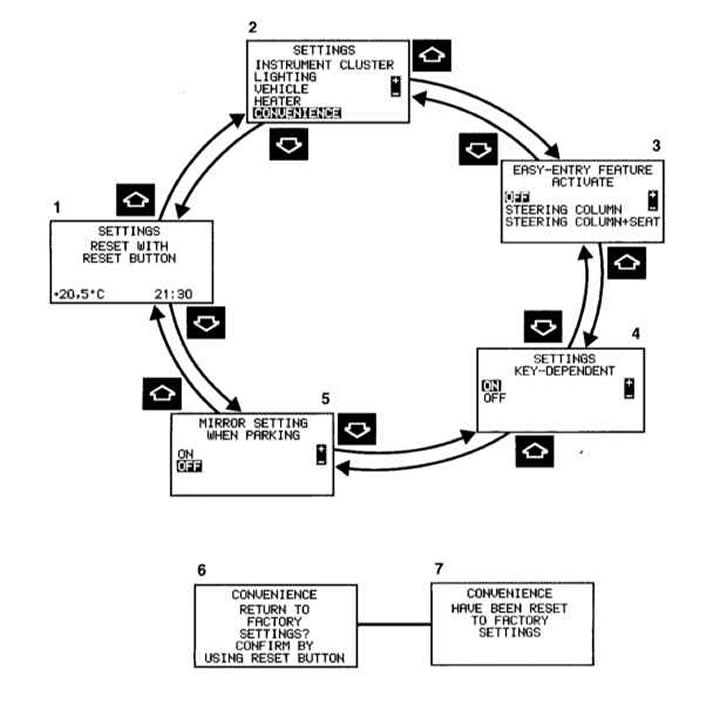
1 - Basic indication of individual installation
2 — "SETTINGS" - additional menu for menu selection
3 — "EASY-ENTRY FEATURE ACTIVATE" (ACTIVATE LANDING ASSISTANCE SYSTEM) (Chapter Making it easier to get in and out of the car)
4 — "SETTINGS" "KEY-DEPENDENT" (DEPENDING ON THE KEY) - If the "ON" setting is selected, all settings made in the "Individual Setting" system menu can be entered into the memory depending on the key. (Memory function - see Section Memory for seat, steering wheel and exterior mirror positions)
5 — "MIRROR SETTING WHEN PARKING" (ADJUSTING THE POSITION OF MIRRORS WHEN PARKING) (Chapter Steering wheel, rear view mirrors)
6 - Reset menu "CONVENIENCE" (COMFORTABLE CONTROL), confirmation request (see below)
7 - Confirmation message
Note: The block diagram above shows an example of a possible installation.
Button
 or
or  press until the basic display of the "Individual installation" system (1) appears.
Button
 or
or  press until the additional menu "SETTINGS" (2) is displayed.
Button
 or
or  press until the menu is highlighted "CONVENIENCE" (COMFORTABLE CONTROL).
Button
 or
or  press until the required installation menu (2-5) is displayed.
In the settings menu (3-5) the required setting is selected by pressing the button
 or
or  . The selected setting is marked. The settings made are remembered and executed immediately.
After going through all the settings menus, the basic display of the "Individual setting" system (1) is displayed again.
At the push of a button
 or
or  the next or previous system is indicated.
Reset menu "CONVENIENCE" (COMFORTABLE CONTROL) (3-5) for factory installation:
Call up one of the settings menus (3-5).
The reset button on the instrument panel (Section Dashboard) Press and hold for approximately 3 seconds. The display (6) appears.
Press the reset button again. The display (7) appears for confirmation.
If the reset button is not pressed, the additional menu "SETTINGS" (2) is displayed after approximately 5 seconds. In this case, the setting menus are not reset.
Trip computer
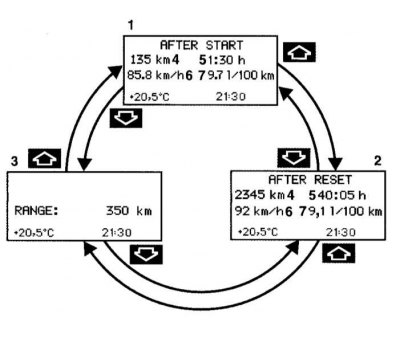
1 — "AFTER START" - mileage meter since launch
2 — "AFTER RESET" - mileage meter since reset
3 — "RANGE" (POWER RESERVE) - indication of the presence of fuel in the fuel tank with an approximate indication of the distance that can be traveled with the available fuel supply
4 — Mileage since start or reset in km "AFTER START" or "AFTER RESET"
5 — Time since startup or reset "AFTER START" or "AFTER RESET"
6 - Average speed since start or reset "AFTER START" or "AFTER RESET"
7 — Average fuel consumption since start or reset "AFTER START" or "AFTER RESET"
Button
 or
or  press until the indication appears (1, 2 or 3).
Button
 or
or  press until the odometer display since start appears "AFTER START" (1), mileage meter since reset "AFTER RESET" (2) or fuel reserve indication (3).
At the push of a button
 or
or  the next or previous system is indicated.
Note: When the trip computer is called up again, the meter indication from the moment of startup always appears "AFTER START" (1).
Resetting the trip meter since launch "AFTER START" (1) or odometer since reset "AFTER RESET" (2)
With the button
 or
or  call up the appropriate indication (1 or 2) and, by pressing the reset button on the instrument panel (Section Dashboard), wait until the readings reset to "0".
Note: When the ignition switch key is turned to position 0 or removed after approximately 4 hours, the trip odometer is automatically reset from the start "AFTER START" (1) if within this time the key is not turned back to position 1 or 2.
Telephone
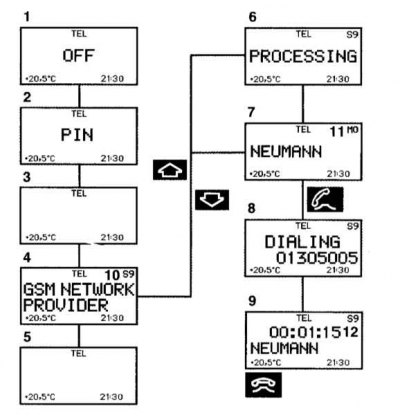
Phonebook - indication for audio devices
Phone book - indication for COMAND system
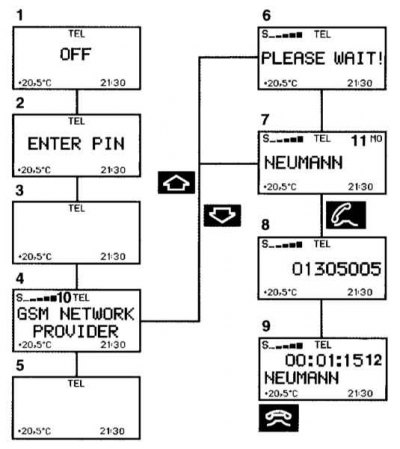
1 - The phone is turned off
2 - Enter the PIN code (personal identification code) sIM cards - a separate "Phone Operating Guide" or, respectively, "Operating Guide" for the system "Linguatronic"
3 - The corresponding telephone network is searched for
4 — The phone is ready for use. The corresponding GSM network provider is displayed
5 - The vehicle is currently out of transmit or receive range
6 — The phone book stored on the phone card or in the phone is read. Duration - about 30 seconds
7 - Last name selected from the phone book
8 - The number of the selected subscriber, the dialing process begins
9 — The dialing process is complete and the last name is displayed. The display remains for the entire duration of the telephone conversation
10 — Signal strength - on the right side of the display on models with audio devices: the higher the number, the stronger the received GSM network signal
Signal strength - on the left side of the display on models with the COMAND system: the more bars are displayed, the stronger the received GSM network signal
11 — Memory cell number
12 — Call duration indication
The telephone and audio device or COMAND system must be switched on.
Button
 or
or  press until the corresponding GSM network provider appears (4). When the display (2) appears, first enter the PIN code (separate "Phone Operation Manual" or, respectively, "System Operation Manual "Linguatronic").
Click the button
 or
or  , the phone book is "scrolled" forward or backward alphabetically. The corresponding selected surname appears on the display.
Models with Audio 10 CD radio or Comand system:
If the button
 or
or  if pressed for more than one second, the phone book will scroll through quickly.
Note: If you decide not to call, press the button. The process is interrupted and the indication (4) appears.
Click the button
 , if the display shows the name of the required subscriber (7). The telephone number is dialed (8).
When the dialing process is complete, the last name (9) is displayed. The display (9) remains active throughout the entire telephone conversation.
Click the button
 , the telephone conversation ends, the indicator (4) appears.
At the push of a button
 or
or  the next or previous system is indicated.
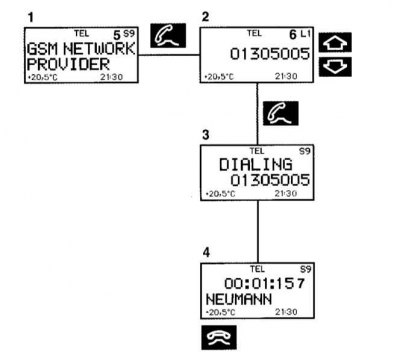
Subscriber Recall - Indication for Audio Devices
Subscriber Recall - Indication for COMAND System
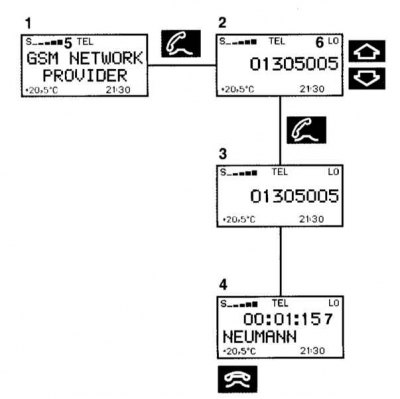
1 — The phone is ready for use. The corresponding GSM network provider is displayed
2 — Number or surname in the subscriber's repeat call memory
3 — Number in subscriber's recall memory - dialing process started
4 — The dialing process is completed and the subscriber's last name stored in the phone book or the dialed number is displayed if the subscriber's last name is not stored. The display remains for the entire duration of the telephone conversation
5 — Signal strength - on the right side of the display on models with audio devices:
the higher the number, the stronger the received GSM network signal
Signal strength - on the left side of the display on models with the COMAND system:
the more bars are displayed, the stronger the received GSM network signal
6 — COMAND system memory cell number: the last 10 numbers dialed are remembered.
L0, last dialed number,
L1-L9, previously dialed numbers
Audio device memory cell number:
the last 9 dialed numbers are remembered,
LO, last number dialed,
L1-L9, previously dialed numbers
7 — Call duration indication
The telephone and audio device or COMAND system must be switched on.
Button
 or
or  press until the appropriate GSM network provider appears (1).
Click the button
 - the subscriber's repeat call memory is activated and the subscriber's last dialed number is displayed.
Click the button
 or
or  - the subscriber's repeat call memory is "scrolled" forward or backward. The corresponding selected number appears on the display.
Note: If you decide not to call, press the button. The process is interrupted and the indication (1) appears.
Click the button
 , if the display (2) shows the required number or the surname of the required subscriber.
The telephone number is dialed (3).
If the dialing process is completed, the last name (4) is displayed if it is stored in the phone book; otherwise, the telephone number indication is retained. The indication is retained for the duration of the telephone conversation.
Click the button
 , the telephone conversation ends, the indicator (1) appears.
At the push of a button
 or
or  the next or previous system is indicated.
Incoming call
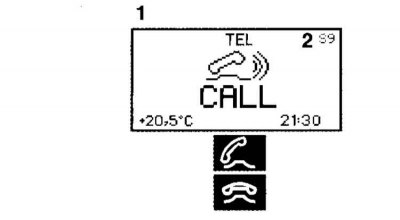
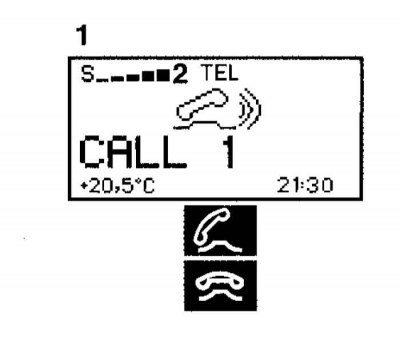
1 - You are being called
2 - Signal strength - on the right side of the display on models with audio devices:
the higher the number, the stronger the received GSM network signal
Signal strength - on the left side of the display on models with the COMAND system:
the more bars are displayed, the stronger the received GSM network signal.
The phone must be turned on.
Click the button
 and accept the challenge.
Click the button
 - the conversation ends, an indication with the corresponding telephone network appears.
Note: If you do not want to accept the incoming call, press the button.
Volume control
Click the button
 - increase volume,
  - decrease volume.
Only the volume of the activated or selected system can always be adjusted.
These include audio systems, telephone, radio traffic information service, navigation system voice output and voice control system voice output "Linguatronic".
Note: On models with the COMAND system, the volume adjustment made is remembered for each system separately.
Coolant temperature gauge
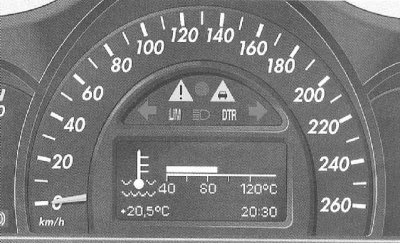
Turn the key in the ignition switch to position 1 and 2;
If the mileage since reset and total mileage counter are not displayed, press the button
 or
or  on the multifunction steering wheel, press until the indicator appears (see above).
Button
 or
or  press until the coolant temperature indicator appears.
When properly filled with antifreeze with anti-corrosion additives, the boiling point of the coolant in a pressurized cooling system is reached at a temperature of approximately 130°C.
At high outside temperatures and when driving in the mountains, it is permissible to increase the coolant temperature to the end of the scale.
Note: Excessive coolant temperature is indicated automatically (see "Warning and fault signaling system", Section Warning and indicator lamps, as well as information display messages about registered faults).