



Contents: Recording to memory ↡ Recall from memory ↡
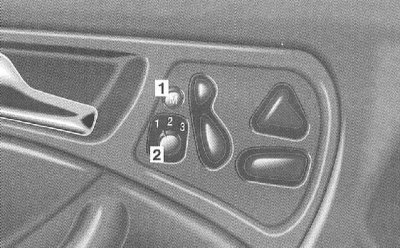
The controls are located in the doors.
1 - Memory button
2 - Position switch
The memory buttons are used to store individually selected seat positions.
On the driver's side, in addition to the seat position, the positions of the steering wheel and outside rear-view mirrors are stored in the memory.
For a maximum of 3 keys, there are 3 memory cells near the driver's seat. The memory recording function can be switched on and off depending on the key (see "SETTING KEY-DEPENDENT" (SETTINGS - DEPENDING ON THE KEY), Chapter Multifunctional steering wheel, universal display).
Recording to memory
The key in the ignition switch is in position 1 or 2, or the corresponding door is open.
Set the seat to the desired position. For this driver's seat position, additionally adjust the steering wheel and outside rearview mirrors.
(Adjusting the position of the outside rearview mirrors is discussed in Section Steering wheel, rear view mirrors).
(Steering wheel position adjustment is discussed in Section Steering wheel, rear view mirrors).
Turn the position switch (2) to the required memory cell.
Press and release the memory button (1) and hold down the position switch (2) for 3 seconds.
Recall from memory
Turn the position switch (2) to the desired memory cell and press it.
For safety reasons, the position adjustment process is interrupted immediately if the position button is released.
From the lying position, first lift the seat back up and then recall the position from memory. Otherwise, the seats may be damaged.