



Contents: Activate the display ↡ Speedometer ↡ Resetting the trip meter ↡ Setting the time ↡ Translation of some of the text that…↡ Selecting units of measurement for…↡ Selecting units of measurement for…↡ Tachometer ↡ Car control system ↡
The display is controlled using the keys located on the left and right sides of the instrument cluster trim (figure 29, pos. 1,2,4,5).
Activate the display
The display is activated when one of the following actions is performed:
- when opening the driver's door;
- when turning the ignition key to position 1 or 2;
- by briefly pressing one of the control buttons (figure 29);
- when the outside lighting is turned on.
The display brightness can be adjusted using the buttons when the light is on
 or
or 
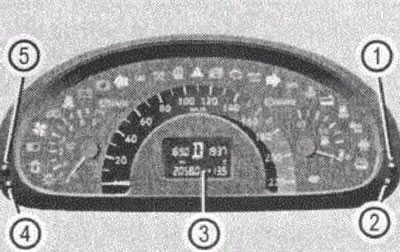
Figure 29
1. SL control button
2. EZ control button
3. Multifunctional display (standard)
4. Multifunctional display control button "RESET"
5. Multifunctional display control button "MENU"
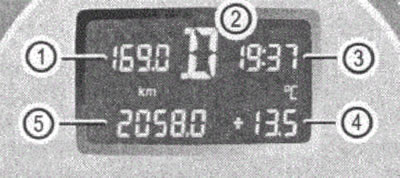
Figure 30
1. Daily mileage counter
2. Position of the automatic transmission control lever (for cars with automatic transmission)
3. Clock
4. Outside air temperature
5. Total mileage counter
Switching the display indication type is done by pressing more than 1 second of the menu call button 5. In this case, the daily mileage indication is replaced by a digital speed indication. The reverse switching is carried out in the same way.
To change the display briefly, press the menu button briefly 5.
Speedometer
In some countries, a warning signal sounds when the legally permitted speed limit is reached, for example when 120 km/h.
Resetting the trip meter
Setting the trip meter to zero is done by holding down the button 4 with the daily mileage indication activated.
Setting the time
Press the menu button in sequence 5 until the digits indicating the units and tens of hours start flashing. The value is set using the buttons
 or
or  .
.
While holding the button down, the value changes sequentially and continuously.
The minutes value is set after pressing button 4 (the minute digits will start flashing) using buttons
 or
or  .
.
Translation of some of the text that appears on the display (when installing the German language)
| STANDARD-ANZEEGE | Standard indication |
| AUS | Turn off (off) |
| AUBENTEMPERATUR | Outside air temperature |
| AUDIO AUS | Audio OFF |
| AUFFINDBELEUCHTUNG | Lighting for orientation |
| BELEUCHTUNG | Lighting |
| DIEBSTAHLWARNUNG ANHANGEFt | Trailer Theft Warning |
| DISPLAY AUSWAHL | Selecting a display |
| ESN | Turn it on (turn it on) |
| EINSTELLUNGEN | Installations |
| EINSTELLUNGEN SCHLUSSELAB-HANGIG | Settings depending on the key |
| FAHRZEUG | Automobile |
| FEHLERSPE1CHER | Fault memory |
| FREQUENZ | Frequency |
| GESCHW1NDIGKEIT | Speed |
| GESCHW BEGRENZUNG (WINTERREIFEN) | Speed limit for winter tyres |
| HEIZUNG | Heating |
| KOMBIINSTRUMENT | Instrument cluster |
| KEINE STORUNGEN | There are no faults |
| UCHTSCHALTUNG FAHRLICHT | Turning on the headlights |
| REISERECHNER | On-board computer |
| SCHEINWERFER-AUFSCHALTUNG | Turning off the headlights |
| SCHEINWERFER-AUFSCHALTUNG | Turning off the headlights |
| SPEICHER | Memory |
| SUCHLAUF EM AUDIOMODUS EINSTELLEN | Setting up radio station search in AUDIO mode |
| TASTENDRUCK IN AUDIOMODUS | Pressing the button in AUDIO mode |
| TEMPERATURANZElGE | Temperature indication |
| UHRZEIT EINSTELLEN MINUTEN | Setting the minutes |
| UHRZEIT EINSTELLEN STUNDEN | Setting the clock |
Selecting units of measurement for outside air temperature
Activate the display.
Press menu button 5 repeatedly until the digital digits of the temperature indicator start flashing.
- Select using the button
 or
or  temperature indication in degrees Celsius (°C) or degrees Fahrenheit (°F).
Selecting units of measurement for speed
Activate the display.
Press menu button 5 repeatedly until the digital digits of the speed indicator start flashing.
- Select using the buttons
 or
or  display of speed in kilometers per hour (km) or miles per hour (miles).
Speed units (and distances) are installed for the following functions in one installation:
- total mileage counter;
- daily mileage counter;
- digital speed indicator;
- sPEEDTRONIC systems.
Tachometer
The red marking on the tachometer indicates the engine overspeed range.
Avoid operating the engine in the overspeed range. Otherwise, you will damage the engine.
Original material on the website: MercedesMan.ru
When the red mark is reached, the speed is limited automatically to protect the engine.
Note: Engine braking may cause overspeeding. In this case, you need to choose the correct manual transmission gear.
Car control system
The control system is activated after turning the ignition key to position 1 or 2,
Using the control system, you can call up information about your vehicle and make settings.
You can call up (change) not only the next maintenance date, but also, for example, the language for messages on the instrument cluster and much more.