



Contents: Checking brake pads and brake discs ↡ Removal, checking and installation…↡ Checking brake pads and brake discs ↡ Removal and installation front brake…↡ Geometric characteristics of front…↡ Removal and installation rear brake…↡
Based on the inspection results, replace the brake pads and brake discs.
1. Checking the thickness of the brake shoe linings.
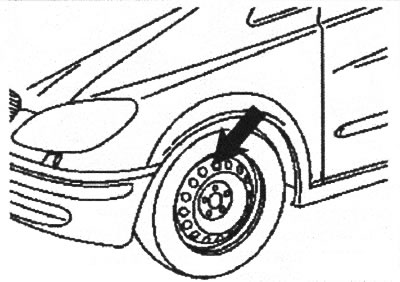
VN 1.015
Note: The thickness of the front outer brake pad can be checked through the ventilation holes of the steel wheel rim. The thickness of the inner lining can be checked by accessing the vehicle from below.
Brake pad wear limit: 3.5 mm.
If the initial check shows that the thickness of the pad is insufficient, the thickness of all pads should be checked by removing the wheels.
1. Removal, checking and installation the front brake pads
1.1. Unscrew the cap (1) of the expansion tank (2).
Before tightening the cap, check the brake fluid level. After the brake pads are completely pressed together, the fluid level may drop.
1.2. Remove the front wheels.
1.3. Disconnect the electrical connector (3) from the floating bracket (6).
Before installation, check that the wire is laid correctly.
1.4. Unscrew the lower screw (2) securing the floating bracket (6) and turn the bracket upwards.
Note: When installing the floating bracket, use a new mounting screw.
1.5. Remove the brake pads (10) from the bracket (7).
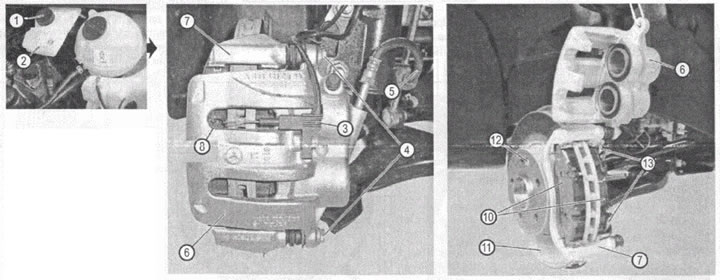
VN 1.016
1. Expansion tank cap.
2. Expansion tank of the brake system.
3. Electrical connector.
4. Screw for fastening the front caliper floating bracket.
5. Brake pipe.
6. Floating caliper bracket.
7. Caliper bracket.
8. Brake pad wear sensors.
10. Brake pads.
11. Brake disc.
12. Brake disc fixing screw.
13. Bracket mounting screws.
When installing pads with wear sensors, install them so that the sensors face outward. Before installation, apply a thin layer of special paste for brake pads to the side guide surfaces of the pads.
Checking brake pads and brake discs
1.6. Check the thickness of the brake pads and visually inspect the condition of the brake discs.
Brake pad wear limit: 3.5 mm.
1.7. Inspect the brake hoses for damage (cracks, delamination, fluid leakage), If there are any defects, the brake hoses should be replaced.
1.8. Press the brake cylinder piston inward; if the piston sticks when pressed in, replace the floating caliper assembly. To remove the bracket, simply unscrew the lower and upper screws securing the bracket to the bracket.
1.9. Clean the contact surface of the floating caliper with the pads from dirt and scale.
1.10. Perform installation in reverse order. Tightening torque of the screw securing the floating bracket to the bracket: 30 Nm.
Removal, checking and installation rear brake pads
1.11. Unscrew the cap (1) of the expansion tank (2).
1.12. Remove the rear wheels.
1.13. Disconnect the connector (3) of the brake pad wear sensor.
1.14. Unscrew the screws (4) securing the floating bracket (6) of the caliper, remove the floating bracket and move it to the side.
1.15. Remove the brake pads (10) from the caliper bracket (7).
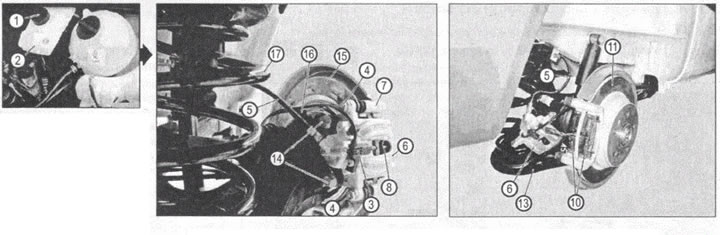
VN 1.017
1. Expansion tank cap
2. Expansion tank of the brake system
3. Electrical connector
4. Front caliper floating bracket mounting screw
5. Brake pipe
6. Floating caliper bracket
7. Caliper bracket
8. Brake pad wear sensors
10. Brake pads
11. Brake disc
13. Rear suspension arm
14. Caliper bracket mounting screws
15. Brake disc protection
16. ABS sensor
17. Rear suspension spring
When installing pads with wear sensors, install them so that the sensors face outward. Before installation, apply a thin layer of special paste for brake pads to the side guide surfaces of the pads.
Checking brake pads and brake discs
1.16. Check the thickness of the brake pads and visually inspect the condition of the brake discs.
Brake pad wear limit: 3.5 mm.
1.17. Inspect the brake hoses for damage (cracks, delamination, fluid leakage). If there are any defects, the brake hoses should be replaced.
1.18. Press the brake cylinder piston inward; if the piston sticks when pressed in, replace the floating caliper assembly. To remove the bracket, simply unscrew the lower and upper screws securing the bracket to the bracket.
1.19. Clean the contact surface of the floating caliper with the pads from dirt and scale.
1.20. Perform installation in reverse order. Tightening torque of the screw securing the floating bracket to the bracket: 32 Nm.
2. Checking the condition of the brake discs
The disc must be replaced without fail if there are through cracks and burrs deeper than 0.5 mm.
Removal and installation front brake discs
2.1. Remove the caliper assembly with the floating bracket and temporarily secure it to the side.
When installing it, the tightening torque of the mounting screws is 172 Nm.
2.2. Loosen the brake disc fixing screw (12) and remove the brake disc (11). Removing and installing the brake disc may be difficult. Therefore, it is permissible to use a light hammer when removing and installing the brake disc.
When installing the disc, use a new fixing screw (12), tightening torque: 22 Nm.
2.3. Clean all contact surfaces, especially the contact surfaces of the brake disc with the hub flange. Even small foreign particles getting between the disc and the hub flange can cause unacceptable runout of the working surface of the disc.
2.4. Check the condition of the brake disc.
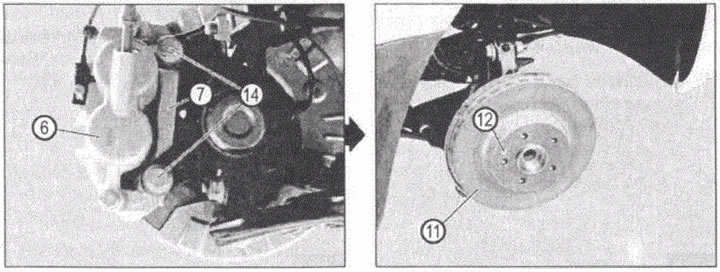
VN 1.018
6. Floating caliper bracket
7. Caliper bracket
11. Brake disc
12. Brake disc fixing screw
14. Caliper bracket mounting screws
Geometric characteristics of front brake discs
| Thickness of the new disc | 28 mm |
| Minimum allowable thickness | 25 mm |
| Maximum runout of the working surface of the disk | < 0.01 mm |
| Non-flatness of the working surface | < 0.04 mm |
| Minimum allowable thickness after turning | Grooving is not allowed |
2.6. Perform installation in reverse order.
Removal and installation rear brake discs
2.7. Remove the floating caliper assembly and secure it to the side. When installing it, the tightening torque of the mounting screws is 172 Nm.
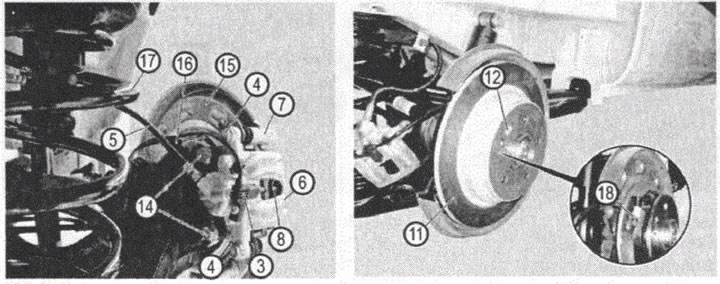
VN 1.019
3. Electrical connector
4. Front caliper floating bracket mounting screw
5. Brake hose
6. Floating caliper bracket
7. Caliper bracket
8. Brake pad wear sensors
11. Brake disc
12. Brake disc fixing screw
14. Caliper bracket mounting screws
15 Brake disc protection
16. ABS sensor
17. Rear suspension spring
18. Ratchet for adjusting the position of the parking brake shoes
2.8. Rotate the brake disc to provide access (with a thin screwdriver) to the parking brake shoe adjustment ratchet. By turning the ratchet with a screwdriver, increase the gap between the parking brake shoes and the brake disc on the inside (parking brake drum). If you cannot determine which way the ratchet should be turned, then determine this empirically: if the ratchet was turned in the wrong direction, then the parking brake shoes will block the rotation of the brake disc (parking brake drum). In this case, the operation should be repeated, rotating the ratchet in the opposite direction.
2.9. Lock the rotation of the brake disc and unscrew the locking screw (12).
2.10. Clean all contact surfaces, especially the contact surfaces of the brake disc with the hub flange. Even small foreign particles getting between the disc and the hub flange can cause unacceptable runout of the working surface of the disc.
2.11. Check the condition of the brake disc.
| Thickness of the new brake disc | 10 mm |
| Minimum disc thickness | 8 mm |
| Maximum radial runout of the disc | 0.15 mm |
| Maximum axial runout of the working surface of the disk | 0.03 mm |
| Minimum disc thickness after turning the working surface | Disc turning is not allowed |