



Contents: Checking the brushes and brush holder ↡ Checking the rotor ↡ Stator check ↡ Checking rectifier diodes ↡ Assembly ↡ Possible generator faults ↡
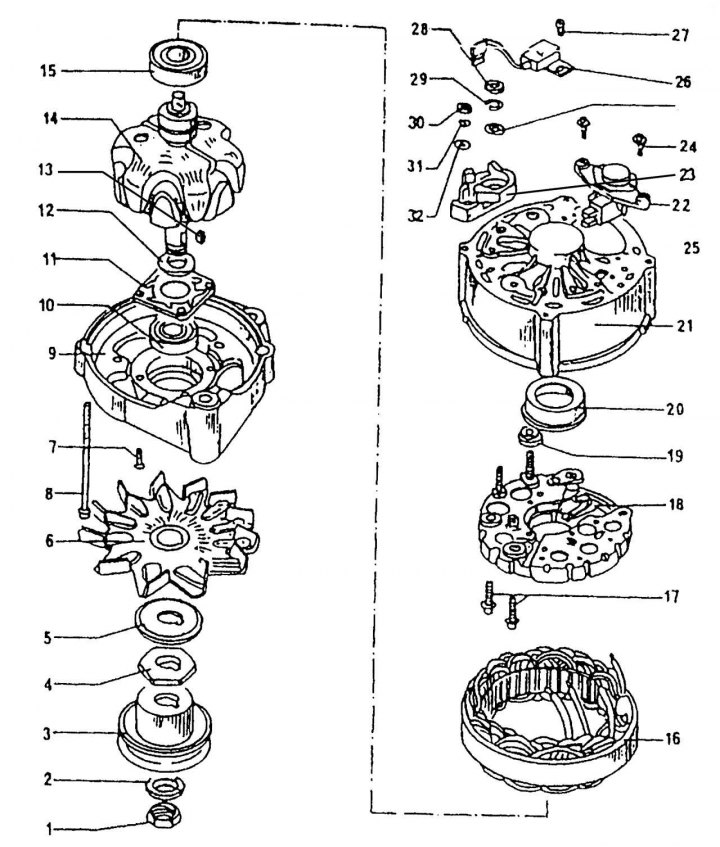
Figure 310. Bosch alternator design: 1 - nut, 50 Nm; 2 - washer; 3 - pulley; 4 - thrust washer; 5 - washer; 6 - cooling impeller; 7 — bolt; 8 - tightening bolt; 9 — generator front cover; 10 - drive side bearing; 11 - bearing retaining plate; 12 — thrust ring; 13 — key; 14 — rotor; 15 - rear bearing; 16 — stator; 17 — bolt; 18 - rectifier block; 19 - plastic insulating sleeve; 20 - plastic bearing sleeve; 21 — generator housing; 22 - voltage regulator; 23 - insulating washer; 24 — voltage regulator mounting bolt; 25 - washer; 26 — capacitor; 27 — bolt; 28 — nut, 16 Nm; 29 - spring ring; 30 — terminal nut "D+"; 31 - spring ring; 32 - washer
Work on disassembling the generator must be carried out in the following order (figure 310):
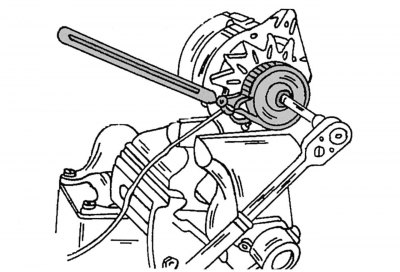
Figure 311. Unscrewing the pulley mounting nut
- unscrew the rotor shaft nut and remove the pulley, fan and spacer washer from the shaft. The shaft can be kept from turning by installing an old V-belt on the pulley and clamping the generator in a vice (figure 311), or you can install a hex key into the end of the shaft and unscrew the nut. To remove the pulley, use a two- or three-legged puller. Make sure that the installed pulley is suitable for the given engine type;
- remove the key from the shaft;
- unscrew the voltage regulator together with the brush holder and remove it (see description above);
- mark the relative positions of the front cover and the generator housing and unscrew the two tie bolts from the housing. Remove the cover, using a plastic hammer if necessary;
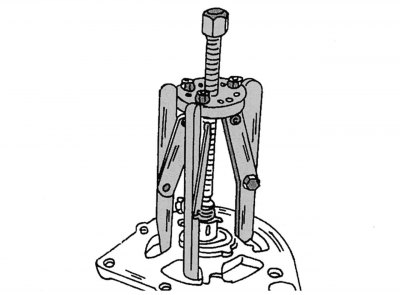
Figure 312. Removing the drive-side bearing from the rotor
- clamp the cover with the installed rotor in a vice and remove the rotor with a three-legged puller, as shown in the figure 312. When pressing out the rotor, the bearing retaining plate bolts may be torn out. Therefore, when installing the puller, carefully ensure that its paws are placed behind the plate, and not just behind the cover. If you need to remove the bearing, unscrew the bolts from the inside and press out the bearing;
- remove the bearing from the rotor shaft. If using a puller, insert it under the inner bearing race;
- unsolder the rectifier block from the stator. In order to remove heat, hold the wires at the soldering points with pliers. Overheating of diodes is unacceptable. It is recommended to remove diodes if you have the appropriate equipment and experience.
Checking the brushes and brush holder
Check the contact of the brushes with the slip rings. Check the mobility of the brush carbons in the guides; if necessary, clean the brush holder with a grease-removing liquid.
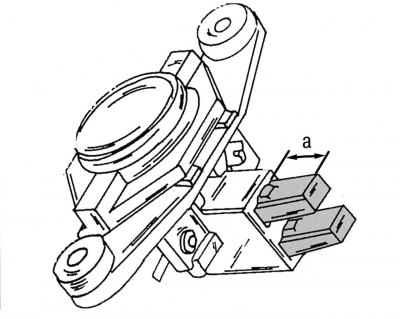
Figure 309. Measuring the length of the brushes (a - not less than 5.0 mm)
If the protruding part of the brushes is less than 5.0 mm (see figure 309), brushes need to be replaced. A ruler should be used for measuring.
Checking the rotor
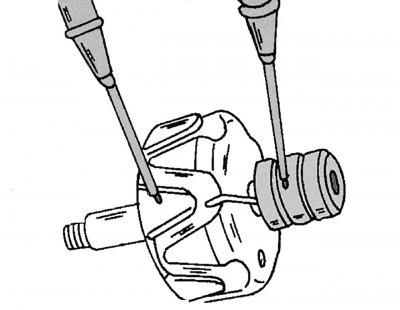
Figure 313. Method for connecting an ohmmeter to check if the rotor winding is closed to "ground"
If the contact rings are dirty or greasy, wipe them with a cloth dampened with a grease-dissolving liquid. Scratches can be polished out with the finest grit sandpaper. To check the insulation, apply the contact leads of the ohmmeter to the rotor core and slip rings. If the resistance value does not tend to infinity, the rotor must be replaced (figure 313).
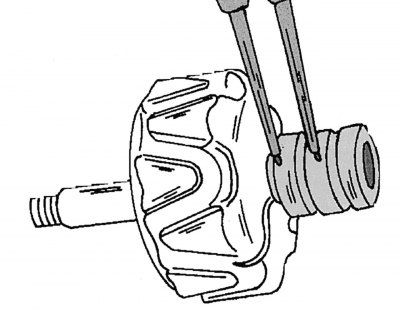
Figure 314. Checking the rotor for short circuit or open circuit
Check the rotor winding for electrical conductivity by applying both contact wires of the ohmmeter to the contact rings (figure 314). The resistance value should be between 2.8 and 3.0 ohms. If the value approaches infinity, the circuit is broken or shorted. In both cases, it is necessary to replace the rotor or install a serviceable used generator.
Stator check
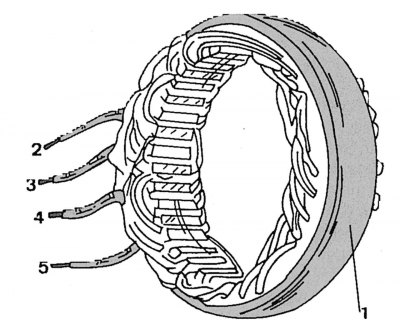
Figure 315. Checking the stator winding for short circuit
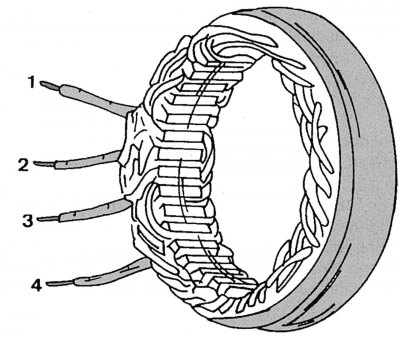
Figure 316. Checking the stator winding for open circuit
In the event of a short circuit, the location of the damage can be determined visually due to the resulting burnout. Otherwise, apply one contact of the ohmmeter to the outer ring 1 (figure 315) stator, and the other one - in turn to terminals 2, 3, 4, 5 of the stator winding. The device should show infinity. To check the winding for an open circuit, connect the ohmmeter contacts in turn between stator winding terminals 1 and 2; 1 and 3; 1 and 4; 2 and 3; 2 and 4; 3 and 4 (figure 316). If the value tends to infinity, the chain is broken. The normal resistance value should be 0.10-0.11 Ohm.
Checking rectifier diodes
Accurate testing of diodes for forward voltage transmission and determination of reverse current is only possible with the help of a special device, so it is better to entrust it to specialists.
Assembly
When assembling, please use the drawing 310, where the generator device is shown. Tighten the pulley mounting nut to a torque of 80 Nm. Also pay attention to the correct installation of the brushes.
Possible generator faults
Cause of malfunction Remedy A. The red indicator lamp does not light when the ignition is turned on 1. The battery is discharged Start the engine by jumping-on or towing 2. Broken wire from the battery Check the wires and battery terminals, replace if necessary 3. Burnt out bulb Replace the bulb 4. Broken wire between the ignition switch, indicator lamp and generator Check the circuit with a tester 5. Broken ground wire between the generator and the housing Check the wire 6. Worn brushes Replace the brushes 7. Faulty voltage regulator Replace the regulator 8. Faulty generator Repair the generator 9. The generator got wet during washing Blow with compressed air B. The red indicator lamp lights or flashes when the engine is running 1. Faulty belt drive Check the drive 2. Wire contacts Check 3. See A6, A7, A8