
Cars BMW Cars Volkswagen Cars Chevrolet Cars Land Rover Cars Lada Cars Honda Cars Peugeot
English Русский
Български
Беларускі
Український
Српски
Hrvatski
Română
Polski
Slovenský
Magyar
Bookmark News and articles Sitemap Feedback Site search
MercedesMan.ru


A-Class C-Class E-Class G-Class M-Class S-Class Others
190 (W201) (1982-1993) W202 (1993-2000) W203 (2000-2007)
  • Main
  • C-Class
  • W201 (1982-1993)
  • Chassis
  • Brake system
  • Front brake disc — inspection, removal and installation

Front brake disc — inspection, removal and installation (Mercedes-Benz C-Class W201)

0
Contents: Examination ↡ Replacement ↡ Installation ↡
Note: Please read the warning at the beginning before you begin paragraph 4 about the dangers of asbestos dust.


Examination


Note: If at least one of the discs requires replacement, BOTH discs must be replaced at the same time to ensure equal braking torque on both wheels. All four brake pads must be replaced along with the discs.


1. Apply the parking brake firmly, then jack up the front of the vehicle and support it on stands (see "Lifting the car and placing it on supports"). Remove the corresponding front wheel.

2. Slowly rotate the brake disc so that you can inspect the entire disc from both sides. To improve the viewing area of the inner surface of the disc, remove the brake pads. Minor scratches are allowed on the surface under the pads, but if the disc is significantly scratched or cracked, it must be replaced.

3. It is considered acceptable to have a rusty step around the perimeter of the disc, which can be removed if desired. However, if the step is due to wear caused by the pads, the thickness of the disc should be checked with a micrometer (see fig. 6.3). Measure at various points on the disc surface, on the inner and outer sides of the surface under the pads. If the wear in at least one place exceeds the maximum permissible technical data, the disc must be replaced.
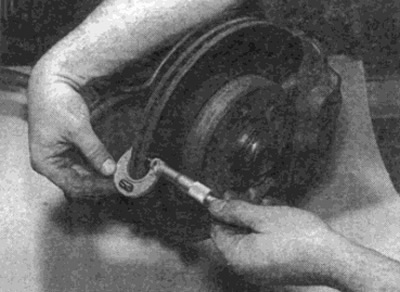
Fig. 6.3. Measuring the thickness of the disc using a micrometer

Fig. 6.3. Measuring the thickness of the disc using a micrometer


4. Check the axial runout of the brake disc (see fig. 6.4). However, first, rule out axial play in the hub bearing as a possible source of the problem (see Chapter 10).
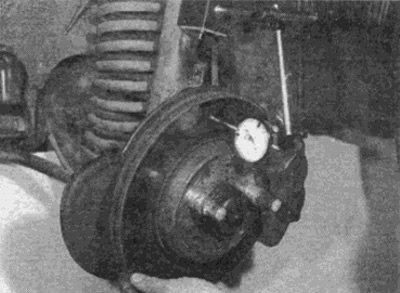


Fig. 6.4. Checking the disc runout using a micrometer with a circular scale (rear disc shown - the…

Fig. 6.4. Checking the disc runout using a micrometer with a circular scale (rear disc shown - the procedure is similar for the front disc)


5. To check the wheel runout, place large flat washers under the heads of the two wheel mounting bolts and screw them into the hub through the wheel. Position the bolts diagonally so that the wheel is installed evenly, then tighten the bolts. You can use a dial indicator attached to a fixed support or use flat feeler gauges to measure the clearance (at some points on the entire surface of the disk) between the disc and a fixed surface, such as a caliper mounting bracket. If the values obtained are outside the limits specified in the technical data, the disc should be replaced.

6. Check the disc for cracks, especially around the bolt holes. If cracks are found, as well as wear or other damage, the disc should be replaced.

Replacement


Note: Installation will require new caliper mounting bolts and disc mounting screws.


7. Remove the two bolts securing the brake caliper bracket to the steering knuckle, then slide the caliper off the rotor. Tie the caliper to the front suspension spring to avoid stretching the hydraulic hoses or wires from the caliper. Discard the bolts; new ones must be used for installation (see fig. 6.7).
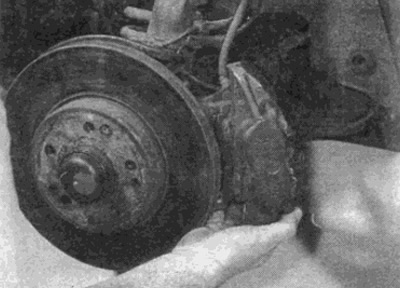


Fig. 6.7. Loosen the bolts and remove the caliper from the steering knuckle...

Fig. 6.7. Loosen the bolts and remove the caliper from the steering knuckle...


8. Loosen and remove the screws securing the brake disc to the hub (see fig. 6.8). Discard the screws as new ones must be used during installation.
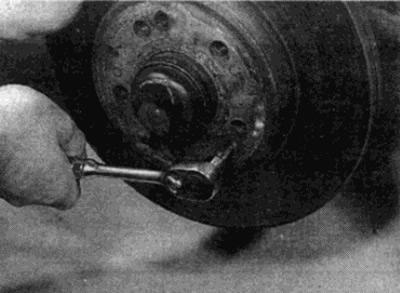
Fig. 6.8. ...then unscrew the mounting screws and remove the brake disc

Fig. 6.8. ...then unscrew the mounting screws and remove the brake disc


9. Remove the disc from the hub, remembering the correct position of its mounting pins. If it is tight, lightly tap it on the back side with a wooden hammer.

Installation


10. Before installation, remove all traces of the old locking compound from the threads of the hole for the caliper mounting bolts by going through the holes with a tap of the appropriate size. Similarly, clean the threads of the hub holes for the disc mounting screws.


Tip: If you don't have the required tap, go through the threads using an old bolt with a split groove on the thread.


11. Check that the mating surfaces of the disc and hub are clean and flat and that the dowel pins are in place. If a new disc is being fitted, use a suitable solvent to remove the protective film from the disc. Apply a thin coat of high temperature grease to the mating surfaces of the hub, but ensure that the disc surface is not contaminated.

12. Install the disc onto the hub, positioning it correctly on the mounting pins. Install a new mounting screw and tighten it to the required torque (see fig. 6.12).
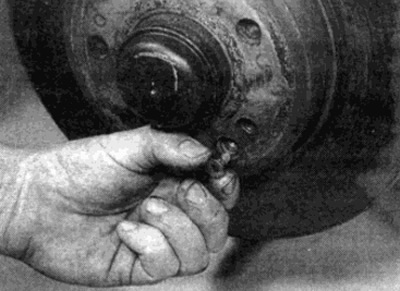
Fig. 6.12. When installing, secure the disk with a new mounting screw

Fig. 6.12. When installing, secure the disk with a new mounting screw


13. Slide the caliper over the top of the disc, making sure the pads pass on each side of the disc.

14. Install new caliper bracket mounting bolts and tighten them to the specified torque.

15. Install the wheels, then lower the car to the ground and tighten the wheel bolts to the required torque. Press the brake pedal several times to press the pads against the brake disc and restore normal pedal pressure. Check the brakes thoroughly before driving on the road.
This article is available at: russian, bulgarian, belarusian, ukrainian, serbian, croatian, romanian, polish, slovak, hungarian
The article has been verified: Lukyanov Nikita Ilyich
Share with friends:
◀ Previous
C-Class 190 (W201) / Brake system
Next ▶

Rear brake pads — replacement
Front brake pads — replacement
Hydraulic system tubes and hoses — replacement
Bleeding air from the hydraulic system
Basic provisions about the braking system
Rear brake disc — inspection, removal and installation
Front Brake Caliper — Removal, Repair and Installation
Rear Brake Caliper — Removal, Repair and Installation
Master Cylinder — Removal, Repair and Installation
Vacuum brake booster — checking, removal and installation
More similar articles for repairing other models

☛ Front Brake Disc — Removal and Installation Mercedes W168 (1997-2004)
☛ Front brake disc — removal, inspection and installation Mercedes W124 (1984-1995)
☛ Emergency Brake Booster (BAS) Mercedes W463 (1999-2019)
☛ Removal and installation the brake disc Mercedes W163 (1997-2005)
☛ Removal and installation the front brake disc Mercedes W116 (1972-1980, petrol)
☛ Removal and installation the front brake disc Mercedes Sprinter (1995-2000, diesel)
Link in different formats to this article
Comments and feedback from visitors
No comments yet


How much will 36 + 19 ?


W203 (2000-2007) 
  • General information
  • Introduction to guide
  • User manual
  • Maintenance
  • Power unit
  • Gasoline engines
  • Diesel engines
  • Cooling system
  • Ventilation and heating
  • Supply system
  • Injection system (gasoline)
  • Injection system (diesel)
  • Exhaust system
  • Ignition and control system
  • Charge and launch systems
  • Transmission
  • Mechanical gearbox
  • Automatic gearbox
  • Clutch and drive shafts
  • Differential
  • Chassis
  • Brake system
  • Car suspension
  • Steering
  • Body
  • Exterior (external elements)
  • Interior (internal elements)
  • Electrical equipment
  • Equipment and devices
  • Lighting system
  • Electrical diagrams (2000)
  • Electrical diagrams (since 2001)
W202 (1993-2000) 
  • General information
  • User manual
  • Driving a car
  • Car care
  • Maintenance
  • Power unit
  • Gasoline engines
  • Diesel engines
  • Lubrication system
  • Cooling system
  • Heating and ventilation
  • Ignition system
  • Fuel system
  • Injection system (gasoline)
  • Injection system (diesel)
  • Exhaust system
  • Transmission
  • Clutch
  • Car gearbox
  • Chassis
  • Suspension, wheels and tires
  • Steering
  • Brake system
  • Body
  • Exterior (external elements)
  • Interior (internal elements)
  • Doors and windows
  • Electrical equipment
  • Equipment and devices
  • Power devices
  • Lighting system
  • Electrical circuits
190 (W201) (1982-1993) 
  • General information
  • Introduction to the guide
  • Operation and care
  • Maintenance (gasoline)
  • Maintenance (diesel)
  • Troubleshooting
  • Power unit
  • Petrol engine I4
  • Petrol engine V6
  • Diesel engines
  • Engine overhaul
  • Cooling and heating
  • Power system (carburetor)
  • Injection system (gasoline)
  • Injection system (diesel)
  • Exhaust system
  • Charge and start system
  • Ignition system (I4)
  • Ignition system (V6)
  • Diesel heating system
  • Transmission
  • Clutch
  • Mechanical gearbox
  • Automatic gearbox
  • Cardan shaft and axle shafts
  • Chassis
  • Brake system
  • Car suspension
  • Steering
  • Body
  • Exterior (external elements)
  • Interior (internal elements)
  • Doors, locks and windows
  • Electrical equipment
  • Equipment and devices
  • Electrical circuits
 
MercedesMan.ru © 2017–2026 · Mobile version · Read about Mercedes · Sitemap: EN BG BY UA RS HR RO PL SK HU · Feedback · Site search · Bookmark A-Class (W168) · C-Class (W201) · C-Class (W202) · C-Class (W203) · E-Class (W123) · E-Class (W124) · E-Class (W210) · G-Class (W463) · M-Class (W163) · S-Class (W116, petrol) · S-Class (W126, petrol) · S-Class (W140) · S-Class (W220) · Sprinter · Vito 1 · Vito 2 · Vario 814D ·
 
We only use cookies without which some of the site's features may not be available.