



Running in
The more carefully you treat the engine at the beginning of its use, the more satisfied you will be with its operation later. Avoid heavy loads for the first 1500 km (movements at full throttle) and high engine speed (no more than 2/3 of the maximum speed in the selected gear).
Shift gears in time!
When pressing the accelerator pedal, it is advisable not to exceed the resistance point ("kick-down").
Do not downshift using the selector lever for braking purposes.
Select shift ranges 3, 2 or 1 only at low speeds (on mountain passes).
After the first 1500 km, the speed and number of revolutions can be gradually increased to the maximum values.
Help Call System - TeleAid
(Telematic Alarm Identification on Demand - used in Germany).
The emergency call system enables the transmission of an emergency call signal to one of the emergency call centres within the territory of the Federal Republic of Germany.
The transmission of the call for help signal is carried out automatically after an accident. If a dangerous situation arises, you can activate the call for help system manually. In this case, all the information necessary for assessing the emergency situation is transmitted, such as data on the location of the vehicle (determined by the GPS satellite orientation system, as well as the ABS system's path sensors) and concerning the severity of the accident.
Shortly after the call for help system is activated, voice communication is automatically established between the ambulance control center and the passengers of the damaged vehicle. If any of the passengers are able to speak, they can transmit more detailed information about the consequences of the accident to the ambulance control center staff. The phone is in speakerphone mode.
The emergency call system is available for:
- the existence of a valid contract with the services offering the relevant services (telephone service and service for receiving emergency calls).
- the existence of a valid contract with the services offering the relevant services (telephone service and service for receiving calls for help).
- having a valid telephone card,
- access to the appropriate radiotelephone network (access is only possible within Germany on the basis of the D1 and D2 networks), which provides the transmission of short messages via the SMS service (Short Message Service),
- the ability to receive signals from the GPS satellite orientation system,
- operational readiness of the emergency call system.
Attention! The first commissioning of the call for help system must be carried out exclusively at a service station "Mercedes-Benz".
When the electronic key in the ignition switch is turned to position 1 or 2, the assistance call system is in operational readiness.
The indicator LED on the emergency call button lights up for approximately 5 seconds.
When the electronic key in the ignition switch is turned to position 0 or when the key is removed, the assistance call system is no longer operational.
Personal Identification Number (PIN)
When measuring the phone's personal identification number (PIN) (please refer to your phone's user manual) a message is displayed on the phone display "Export PIN Speichern" (Enter the PIN code into memory).
Confirm the message by pressing the "OK" button - the message will briefly appear on the phone display "Gespeichert" (Entered into memory).
The personal identification code PIN is entered into the memory of the assistance call system control unit.
If this process is not confirmed by pressing the "OK" button, but is interrupted by the "C" command, the message briefly appears on the phone display "Nicht gesp." (Not recorded in memory). In this case, the help call system is not ready for operation; the control LED on the help call system button is constantly lit.
When using a D1 network telephone card and the PIN code request function is deactivated, it is still necessary to enter the PIN code into the memory of the assistance call control unit.
Note: If the indicator LED on the assistance call button does not go out or lights up while driving, there is a malfunction.
If the control LED goes out after a while, there has been a temporary system malfunction.
Caution: If the control LED does not go out, it is possible that the emergency call system is partially or completely inoperative.
Contact the service station as soon as possible "Mercedes-Benz" to test the emergency call system.
Transmitting a signal to call for help
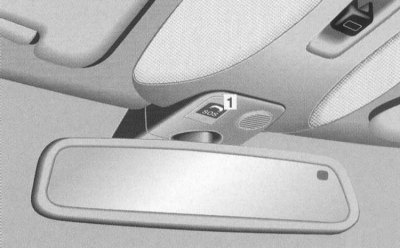
Manually: Press lightly on the cover "1" - the cover opens.
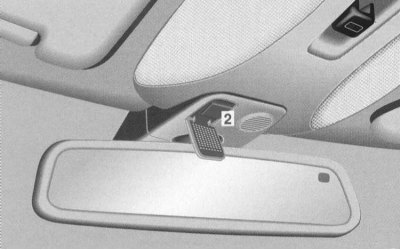
Press the emergency call system button "2" lightly.
The control LED on the emergency call button "2" flashes.
Receipt of a call for help signal for further transmission to the ambulance control center is confirmed by a message via a loudspeaker. Wait for voice communication with the ambulance control center.
After finishing the call for help, close the cover "1".
Automatically:
- when the airbag is deployed;
- in case of a strong impact on the car from behind;
- when the vehicle rolls over.
The control LED on the emergency call button "2" flashes.
Receipt of a call for help signal for further transmission to the ambulance control center is confirmed by a message via a loudspeaker. Wait for voice communication with the ambulance control center.
Note: The control LED flashes until the help call is completed.
After transmitting the signal for help, the phone switches to speakerphone mode within a few seconds until the end of the exchange of information between the ambulance control center and the vehicle passenger.
It is not possible to have other conversations on the phone during this time.
Attention! At low voltage (for example, when the battery is discharged) it is not possible to transmit a call for help signal through the call for help system.
After transmitting the help call signal: If the control LED on the help call button is constantly lit and voice communication has not been established before, the help call signal has failed (for example, there is no radiotelephone network).
In this case, rescue operations must be organized on your own.
Attention! The help call system is publicly accessible. Any abuse of the help call button is therefore punishable.
Electronic ignition switch
There is a risk of accident!
Remove the electronic key from the ignition switch even when leaving the vehicle for a short time.
The electric adjustment of the seat position is also possible with one door open. Therefore, do not leave children unattended in the car.
Models with KEYLESS-GO system: Please observe the notes on using the electronic key and smart card simultaneously.
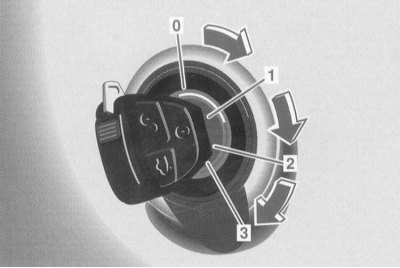
0 The electronic key can only be removed in position 0, if the AT selector lever is in position "P".
To mechanically lock the vehicle, the AT selector lever is locked in position "P" with the ignition switch in position 0 or 1 and after removing the electronic key.
1 Position of the radio receiver.
Most electrical consumers can be included. Information is provided in separate technical descriptions.
2 Movement position.
Driving position. All electrical consumers can be switched on.
The AT selector lever is released. If the AT selector lever is in the "P" position, the brake pedal must be additionally depressed to move it.
3 Start position.
Starting and stopping a gasoline engine (below in this Section).
Caution! When inserting the main electronic key into the ignition switch, the mechanical key must not be pulled forward. This may damage the ignition switch. (Mechanical key - refer to Section Locks, keys and bolts. Smart card. Single lock).
Note: Do not cover the infrared window at the end of the electronic key or allow it to become dirty, otherwise the performance of the electronic ignition switch cannot be guaranteed.
If the electronic key has been left in the ignition switch in position 0 for a long time, it will no longer be possible to turn it. To ensure turning, remove and reinsert it.
If the electronic key in the ignition switch does not turn, the AT selector lever remains locked in the "P" position. The reason may be that the vehicle's battery is significantly discharged. (Charging the battery - Chapter Routine maintenance, or Starting the engine from an auxiliary power source).
Then insert the electronic key back into the ignition switch and turn it. If the ignition switch is in position 2, the selector lever can be moved and remains free.
When parking the vehicle for a long time, remove the electronic key to avoid discharging the battery.
Function of the ignition switch KEYLESS-G0
There is a risk of accident!
Even if you leave your car for a short time, take your smart card with you.
The electric adjustment of the seat position is also possible with one door open. Therefore, do not leave children unattended in the car.
Please note the notes on using the electronic key and smart card simultaneously (Section Locks, keys and bolts. Smart card. Single lock).
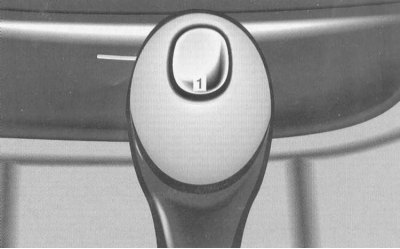
By pressing the start/stop button "1" on the selector lever without pressing the brake pedal, the radio receiver, operating position and zero position are activated in sequence.
The engine can be started from any position (radio position, operating position and zero position), if the AT selector lever is in the "P" or "N" position. (Starting a gasoline engine is discussed below).
Position of the radio receiver (corresponds to the position "Electronic key in the ignition switch in position 1"):
Most electrical systems can be included.
More detailed information is provided in the technical descriptions.
Operating position
(corresponds to the position "Electronic key in the ignition switch in position 2"):
- All electrical systems can be switched on.
- The AT selector lever is released.
Zero position
(corresponds to the position "Electronic key removed from the ignition switch"):
- Most electricity consumers cannot be turned on.
- The AT selector lever is locked in the "P" position and cannot be moved.
Note: The AT selector lever can only be moved when the battery is connected and charged and the ignition switch is in position 2. If the AT selector lever is in position "P", the service brake must also be pressed.
Attention! In order for the driver to always be able to perform all functions, we recommend that he/she always have a smart card with him/her:
- If the smart card is removed from the vehicle (for example, with luggage or clothes), the car can no longer be locked and the engine can be started.
- If the smart card is removed with the door open or the engine running, a warning message appears on the multi-information display every 3 seconds after starting off "CHIP CARD NOT RECOGNISED" (SMART CARD IS NOT IDENTIFIED).
- Please note that the vehicle engine can be started by leaving a smart card in the vehicle.
In order to be able to drive the car in the event of a malfunction of the KEYLESS-GO system, for example due to a strong source of radio interference or a discharged vehicle battery, we recommend that you always have a spare key with you.
Do not expose the smart card to increased electromagnetic radiation. There is a risk of malfunction!
Start interlock device
(Vehicle Authorization Verification System)
Controlling the car with an electronic key:
- Remove the electronic key from the ignition switch. The immobilizer is engaged. The engine cannot be started.
- Insert the electronic key into the ignition switch. The starter immobilizer is disabled.
Controlling your car with a smart card:
- Turn off the engine using the start/stop button (see below). The start interlock is engaged. The engine cannot be started.
- Start the engine using the start/stop button (see below). The starter interlock is disengaged.
Starting and stopping a petrol engine with an electronic key
There is a risk of accident!
Remove the electronic key from the ignition switch even when leaving the vehicle for a short time.
Do not leave children unattended in the car.
Models with KEYLESS-GO: Observe the notes on using the electronic key and smart card simultaneously (Section Locks, keys and bolts. Smart card. Single lock.
Before launch
Apply the parking brake.
Move the AT selector lever to the "P" / "N" position.
Launch
Turn the electronic key in the ignition switch to position 3 and release. The starting process is performed automatically until the engine starts, or for a certain period of time - the pulse start function.
Do not press the accelerator pedal.
Repeat launch
Before restarting, turn the electronic key in the ignition switch back to position 0 and repeat the starting process, keeping the electronic key in position 3 until the engine starts.
If the engine does not start after a long process, contact a service station "Mercedes-Benz".
Note: Too long attempts to start the engine will drain the battery. Emergency starting by towing is not possible.
Engine shutdown
When stopping the vehicle, move the AT selector lever to position "P" and turn the electronic key in the ignition switch to position 0.
Note: The electronic key can be removed from the ignition switch to position 0 only if the AT selector lever is in position "P".
Starting and stopping a petrol engine with the KEYLESS-GO system
There is a risk of accident!
Even if you leave your car for a short time, take your smart card with you.
Do not leave children unattended in the car.
Please note the notes on using the electronic key and smart card simultaneously (Section Locks, keys and bolts. Smart card. Single lock).
Before launch
Apply the parking brake.
Move the AT selector lever to the "P" / "N" position
Launch
Press the brake pedal.
Briefly press the start/stop button on the selector lever.
The starting process is carried out automatically until the engine starts, or for a certain period of time - pulse start function.
During the starting process, press the brake pedal.
Do not press the accelerator pedal.
Repeat launch
Press the brake pedal.
Press the start/stop button on the AT selector lever until the engine starts.
During the starting process, press the brake pedal.
Do not press the accelerator pedal.
If the engine does not start after a long starting process, contact a service station "Mercedes-Benz".
Note: Trying to start the engine for too long will drain the battery.
Emergency engine starting by towing is not possible.
Shutdown
When stopping the vehicle, move the AT selector lever to position "P" or "N".
Press the start/stop button on the selector lever until the engine turns off. With the driver's door closed, the vehicle's electrical equipment switches to the radio position (corresponds to position 1 of the electronic key in the ignition switch), and when open - to the zero position (corresponds to the position "Electronic key removed from the ignition switch").
Note: If the selector lever is not moved to the "P" position after the engine is switched off, a signal sounds and the indicator lights up on the multi-information display when the driver's door is opened "SELECT LEVER IN P" (MOVE THE SELECTOR LEVER TO POSITION "P").
Move the AT selector lever to position "P".
Automatic transmission
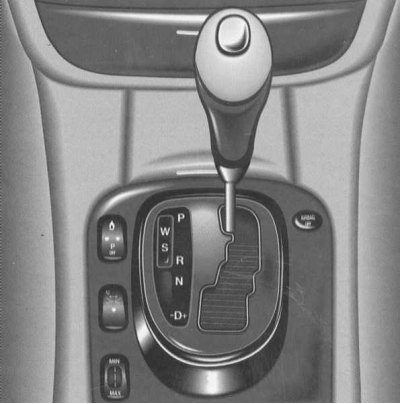
Individual gears are engaged automatically depending on:
- aT selector lever positions with shift ranges 4, 3, 2 and 1
- selected shift program (W/S)
- accelerator pedal position
- speed of movement.
The gearshift mechanism automatically adapts to the driver's individual driving style by shifting the gearshift points.
The shifting of the gearshift points is a continuous process that constantly takes into account the current operating and driving conditions, as well as the driver's wishes.
The automatic transmission responds to changed operating conditions with an adapted gear shift program.
The AT selector lever can be switched in position 2 of the ignition switch. To move the AT selector lever from position "P", the service brake must be additionally pressed.
Moving off
Press the service brake to release the AT selector lever. Release the parking brake.
Shift the AT selector lever to one of the drive positions with the engine idling. Wait until the gear is fully engaged, especially when the engine is cold. This is confirmed by a slight jerk.
Release the service brake and press the accelerator pedal.
Shifting to a higher gear after starting a cold engine
After starting a cold engine, gear shifting occurs at a higher engine speed than shifting at operating temperature.
This way the catalyst reaches its operating temperature earlier.
Accelerator pedal position
Light pressure on the accelerator pedal = earlier upshifts.
"Kick-down" - pressing the accelerator pedal to overcome the point of resistance, maximum acceleration, switching back to the lowest possible gear.
When you reach the desired speed, release the accelerator pedal - the transmission will shift to a higher gear again.
Stopping the car
Leave the selector lever in the "D" or "R" drive position and use the service or parking brake to prevent the vehicle from moving forward, or from rolling back on an incline.
Maneuvering
When maneuvering in a confined space, regulate the speed by gradually releasing the service brake. Press the accelerator pedal only slightly, do not play with it.
Parking
There is a risk of injury!
When working on the vehicle with the engine running, press the parking brake pedal and move the AT selector lever to the "P" position.
- Press the parking brake pedal.
- Move the AT selector lever to position "P".
- On steep climbs or descents, turn the front wheels toward the curbstone, being careful not to damage the tires.
AT selector lever positions
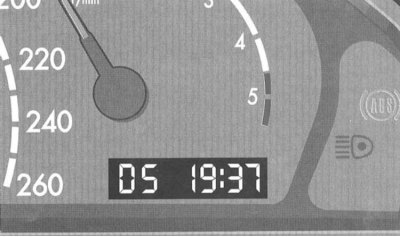
The current position of the automatic transmission selector lever is displayed on the instrument panel display.
P Locking when parked
Additional protection for the car when parking. Switch on only after the car has come to a complete stop.
Note: The electronic key can only be removed when the AT selector lever is in position "P".
When the electronic key is removed, the AT selector lever is locked in the "P" position.
R Reverse gear
Turn on only after the vehicle has come to a complete stop.
N Neutral position
There is no transmission of torque from the engine to the drive wheels. With the brakes released, the car can move freely (pushing, towing).
Do not shift into "N" position while driving, as this may damage the transmission.
When the EPS function is disabled or malfunctioning:
Only if there is a risk of skidding is it permitted to switch to the "N" position (for example, in winter on a slippery road).
"D" All 5 forward gears available This mode is designed for all normal forward driving conditions.
Switching ranges for special operating conditions
In the "D" position of the AT selector lever, shift ranges for special operating conditions are selected by lightly pressing or pressing the selector lever to the left or right.
The engaged switching range is indicated on the instrument panel.
Press the selector lever lightly in the — direction: Shifts one range at a time in the sequence D, 4, 3, 2, 1.
Press the selector lever in the direction - and hold it down: The shift range changes to the currently engaged AT gear. If the vehicle is already in the highest possible gear of the currently engaged shift range, the shift is only made to the next lower shift range.
Note: If the selector lever is moved in the - direction at too high a speed, downshifting will not occur. This prevents the engine from exceeding the permissible speed.
Press the selector lever lightly in the + direction: Shifts from the currently engaged shift range to the next higher shift range.
Press the selector lever in the + direction and hold it down: The shift range currently engaged is switched directly to the "D" position.
Note: If the transmission is in the "D" shift range, you can shift up one gear by lightly pressing the selector lever in the + direction.
There is a risk of skidding!
On slippery roads, do not downshift to a lower gear for braking purposes. The drive tires may lose traction.
Switching ranges:
- 4 Shifting only up to 4th gear.
- 3 Shifting only to 3rd gear.
In this position, the braking effect of the engine can be used.
- 2 Shifting only to 2nd gear.
The mode is intended for driving on steep passes, in the mountains, in difficult operating conditions, and also as a braking position on particularly steep descents.
- 1 1st gear.
Brake position for driving on particularly steep descents and long passes.
Program switch
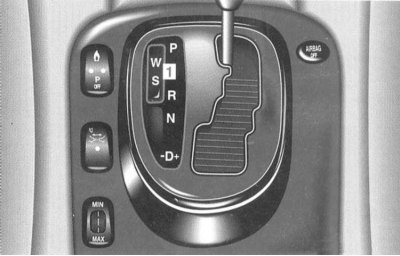
Pressing the "W/S" switch "1" switches between the "W" and "S" programs.
The selected program is displayed on the instrument panel.
"S" Standard mode
The mode is designed for all normal driving conditions.
"W" Winter mode
Moving forward and backward from a standstill occurs in 2nd gear.
Upshifts and downshifts are performed by pressing the accelerator pedal firmly at lower driving speeds and lower engine speeds than in the "S" program.
When the accelerator pedal is in the kick-down position, shifting to a higher or lower gear is performed as in the "S" program.
Emergency mode
If the transmission can no longer be shifted while driving and retains the engaged gear even under changed operating conditions, the transmission is in emergency mode.
To enable further movement, 2nd gear or 2nd reverse gear can be engaged. The sequence of actions is as follows:
Stop the car.
Move the AT selector lever to position "P".
Turn the electronic key in the ignition switch to position 0.
Wait at least 10 seconds.
Start the engine.
Move the AT selector lever to position "D": 2nd gear is engaged.
Move the AT selector lever to the "R" position: Immediately contact a service station "Mercedes-Benz" to check the transmission.
Parking brake
There is a risk of accident!
Do not leave children unattended in the vehicle. They may release the parking brake.
To set the parking brake: Press the parking brake pedal firmly. The parking brake is set.
When the parking brake is applied, the brake system indicator light comes on on the instrument panel.
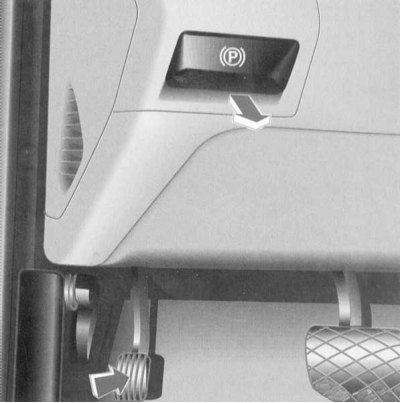
Release: Pull the handle towards you. The parking brake is released instantly - the car can move immediately.
The brake system indicator light on the instrument panel goes out when the engine is running.
Note: When moving away with the parking brake applied, a warning signal sounds - release the parking brake.
If the brake warning light remains on when the parking brake is released and the engine is running, refer to the "Brake Warning Light" section (Section Warning and indicator lamps, as well as multi-information display messages about registered faults).
Driving Tips
Control pedals
There is a risk of accident!
Never restrict the freedom of control of the pedals. There should be no objects in the driver's footwell. If using foot mats or carpets, ensure that there is sufficient free space and that they are securely fastened.
Driving and Parking
Fire hazard!
When driving or parking, ensure that exhaust system components do not come into contact with flammable material.
Warming up the engine to operating temperature
After starting off, quickly warm up the engine to operating temperature. Only then can you bring its load to full power.
Moving off
Starting off on slippery ground:
Be sure to avoid spinning one of the drive wheels for a long time. This can damage the transmission.
Steering
There is a risk of accident!
When the engine is not running, the power steering does not function. In this case, much more effort is required to steer.
Brakes
There is a risk of accident!
The hydraulic brake booster only works when the engine is running. It should be noted that when the engine is not running, braking requires significantly more force.
On long and steep descents, it is recommended to relieve the brakes by shifting the transmission to a lower gear - engage shift ranges 3, 2 or 1.
This prevents the brakes from overheating and reduces wear on the brake linings.
After an increased load on the brakes, it is recommended not to park the car immediately, but to first continue driving for a while in order to cool the brakes more quickly with the oncoming air flow.
If you have been driving for a long time without braking in heavy rain, there may be some delay when you first brake and you will have to press the brakes with greater force. Therefore, keep a greater distance than usual from the cars driving in front of you.
To prevent corrosion on the brake discs, before parking the car after driving on a wet road, especially if it has been sprayed with de-icing agent, press the brake hard to dry the brake discs by heating them.
Service brake
With relatively low operational loads on the brake system, its efficiency should be verified from time to time by short, strong braking at a higher speed. This improves the adhesion of the brake linings.
Make sure that braking does not endanger other road users!
If the brake system warning light comes on when the parking brake is released, refer to Section Warning and indicator lamps, as well as multi-information display messages about registered faults.
Install only brake linings approved by us!
Installing brake pads that we do not approve may adversely affect the vehicle's braking performance, significantly reducing safety.
Disabling fuel supply in forced idle mode
In forced idle mode, fuel supply is interrupted if the accelerator pedal is fully released.
Engine malfunctions
If the engine is running unstable (for example, in case of misfires) unburned fuel can enter the catalytic converter and cause thermal damage to it.
In case of misfires, only short-term operation of the engine under light load is permitted (at low speeds).
The fault must be immediately corrected at a service station "Mercedes-Benz".
Hydroplaning
Depending on the water level on the road, aquaplaning may occur despite sufficient tire tread depth and low driving speed. In rain, brake carefully and avoid driving in ruts.
Tire grip
While on a dry road a vehicle is completely controllable at a certain speed, when driving on a wet or icy road the speed must be reduced accordingly to achieve the same degree of driving safety.
Even at temperatures close to freezing, the condition of the road surface should be monitored especially carefully.
If ice forms on the road (for example, due to fog), when braking on ice, a thin water film quickly forms, significantly reducing the coefficient of adhesion of the tires to the road. In such weather, exercise special caution.
In winter, it is recommended to use M + S type tires (with a tread for driving on dirty and snowy roads). On icy roads and slippery snow, they can reduce the braking distance compared to tires with a summer tread pattern.
Tires
There is a risk of accident!
Be sure to maintain the prescribed air pressure in your tires.
This is especially important for tyres that are used under extreme conditions, such as high speed, full load and high outside temperatures.
Avoid excessive wear of the tires. When the tread depth is less than 3 mm, the wet grip coefficient of the tires decreases sharply.
The coefficient of adhesion of tires to the road varies significantly depending on the weather or road surface conditions.
Travelling abroad
Extensive network of maintenance stations "Mercedes-Benz" also available abroad. Corresponding lists of maintenance stations "Mercedes-Benz" can be requested at any maintenance station "Mercedes-Benz".
In some countries, only low-octane grades of fuel are sold.
In countries with traffic regulations that differ from the traffic regulations in the country where the vehicle is approved for use, it is necessary to switch the headlights to symmetrical low beam or partially cover them (Section Replacing incandescent lamps).
This reduces the glare from oncoming vehicles.
Operation in winter
Before the onset of winter, it is recommended to contact a maintenance station "Mercedes-Benz" in order to prepare the vehicle for use in winter.
Change the engine oil: if the oil is not approved for use in winter.
Check the concentration of antifreeze with anti-corrosion additives.
Windscreen washer and headlight cleaner: Add MB windscreen washer concentrate to the water (refer to Specifications Chapter Routine maintenance).
Battery check: When the temperature drops, the battery capacity drops. Only a well-charged battery ensures reliable engine starting even at low temperatures.
Tyres: In winter we recommend using M+S tyres on all wheels (with a tread for driving on dirty and snowy roads). In this case, the maximum driving speed for M + S tyres as well as the statutory maximum speed must be observed!
Note: When driving in winter, the maximum effect of the electronic traction control system (ESP) is achieved only when using M+S tyres and, if necessary, snow chains.
Recommendations for driving in icy conditions
The most important rule when driving on ice: Drive carefully, avoid sudden acceleration, braking and maneuvering when driving.
If there is a risk of skidding or if the vehicle cannot be stopped at low speed, move the automatic transmission selector lever to the "N" position.
Use the steering wheel to try to keep the car under control.
When driving in deep snow, we recommend increasing the vehicle's ground clearance (see "Adjusting ground clearance" subsection).
Anti-freeze agents used on roads may have a negative effect on braking performance. Therefore, greater force may be required to achieve the usual braking performance.
In this regard, we recommend that when driving for a long time on roads covered with defrosting agents, you press the brake pedal repeatedly. This can normalize the braking effect reduced by defrosting agents.
Be careful not to endanger other road users when braking!
If the vehicle has been parked after driving on roads sprinkled with defrosting agents, the braking action should be checked immediately, if possible, with due caution before continuing the journey. If braking efficiency has noticeably decreased, it can be restored by repeatedly pressing the brake pedal.
Anti-skid chains
Use only snow chains that have been tested and approved by us.
Any technical inspection station will provide information on this issue "Mercedes-Benz".
Note: Models with 245/45 R18 tires.
To facilitate the installation of anti-skid chains, it is recommended to increase the ground clearance of the vehicle (below in this Section).
Please note: The installation of snow chains is only permitted on certain wheel and tyre combinations. (More detailed instructions are given in the Specifications).
Apply snow chains to the rear wheels only (leading axle). Follow the manufacturer's installation instructions.
The maximum speed limit (50 km/h) is only permitted on snow.
On roads without snow, snow chains should be removed immediately if possible. (Recommendations for driving in icy conditions are given above).
When using snow chains, the ESP traction control function may be deactivated (see below).
Towing a trailer
There is a risk of injury and accident!
When coupling and uncoupling a trailer, exercise extreme caution and care.
When reversing the vehicle, there must be no people between the vehicle and the trailer!
Trailers with an inertia braking system must not be disconnected while rolling.
Due to incorrect connection of the trailer to the towing vehicle, there is a risk of the trailer being torn off.
Do not exceed the maximum support load, permissible towing capacity and permissible rear axle load of the vehicle.
It is necessary to strictly follow the installation instructions for the towing hitch with a removable ball head.
When operating with a trailer, it is necessary to take into account that the dynamic properties in this case differ significantly from the dynamic properties of a vehicle without a trailer.
A combination with a trailer is heavier, has limited acceleration and climbing ability, and a longer braking distance. It is more sensitive to crosswinds, etc., and requires more careful driving.
Fuel consumption when operating a vehicle with a trailer naturally increases.
When loading a trailer, make sure that the trailer's gross vehicle weight and the permissible towable weight of the vehicle together with the towing hitch are not exceeded (Specifications).
Permissible values are indicated in the vehicle registration documents and on the manufacturer's plates of the towing hitch and trailer.
The lowest value is valid.
In addition, the permissible load of the trailer drawbar on the ball head of the towing hitch must not be exceeded.
The maximum support load is stated in the Specifications or on the affixed plate. It must not exceed the value stated on the manufacturer's plates of the towing hitch and trailer.
We recommend using a maximum support load on the trailer drawbar of at least 50 kg.
In accordance with the support load, it is necessary to reduce the weight of the load in the vehicle to avoid exceeding the permissible load on the rear axle.
It is recommended not to exceed the maximum speed of 80 km/h, including in countries where higher speeds are permitted.
If possible, avoid abrupt braking and first apply the brakes lightly to allow the trailer to roll onto the tractor. Then gradually increase the braking force.
If the trailer starts to sway, it is necessary to reduce the speed of movement, do not turn the steering wheel against the skid, and, if necessary, brake. Under no circumstances try to "pull out" the composition by increasing the speed of movement.
The hill-climbing capability figures given in the Specifications are based on sea level. When driving in mountains, it should be remembered that as the altitude increases, engine power and therefore hill-climbing capability decrease.
Note: Trailers with overrun braking systems must not be disconnected while rolling. The reverse motion of the overrun braking system may damage the bumper.
Tempostat
The cruise control allows you to control the vehicle effortlessly, as it automatically maintains the set speed by actively pressing and releasing the accelerator pedal.
The cruise control lever on the steering column can be used to select and activate the cruise control or the variable speed limiter.
The selected system, cruise control or variable speed limiter, is indicated by the LIM indicator on the cruise control switch lever:
- Cruise control: LIM indicator on cruise control lever does not light.
- Variable speed limiter: LIM indicator on cruise control lever illuminates - refer to Variable speed limiter subsection.
There is a risk of accident!
The driver is always responsible for the speed of movement. The cruise control is only an auxiliary device for the driver.
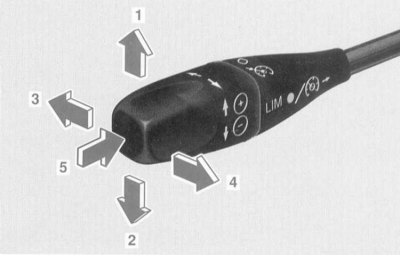
- 1 Saving the driving speed to memory - lightly press the cruise control lever.
Acceleration - keep the cruise control lever pressed.
Fine adjustment in 1 km/h steps – briefly press the cruise control lever.
- 2 Saving the driving speed to memory - lightly press the cruise control lever.
To reduce the speed of movement, hold the switch lever down.
Fine adjustment in 1 km/h steps – briefly press the switch lever.
- 3 Switching off - lightly press the switch lever.
The limited speed remains stored in memory.
- 4 To recall a stored speed, lightly press the cruise control lever.
- 5 Switching between variable speed limiter and cruise control – press the switch lever.
The cruise control is selected if the LIM indicator on the cruise control lever is off.
The variable speed limiter is selected if the LIM indicator on the cruise control lever is illuminated.
There is a risk of accident!
The cruise control function does not automatically adapt to road conditions, which means that the cruise control cannot be used, for example, on icy roads.
It is possible to record any speed above 40 km/h into memory:
Switching from variable speed limiter to cruise control. The LIM indicator on the cruise control lever must be off. If necessary, press the cruise control lever in the direction "5".
Accelerate to the desired speed by pressing the accelerator pedal.
Press the cruise control lever slightly in the direction "1" or "2". The speed is stored in the memory.
The speed entered into memory is displayed on the multi-information display, and the segments from the speed entered into memory to the maximum speed light up on the speedometer.
Release the accelerator pedal.
Note: When the vehicle speed is increased by pressing the cruise control lever in the "1" direction or decreased in the "2" direction after releasing the cruise control lever, the speed is recorded in the memory.
Precise setting in 1 km/h steps:
- To increase speed, press the cruise control lever slightly in direction "1".
- To reduce speed, press the cruise control lever slightly in direction "2".
Recalling the entered speed from memory:
- Starting from a driving speed of approximately 40 km/h, it is possible to recall the entered speed from memory.
- Press the shift lever lightly in direction "4".
The stored speed is displayed on the multi-information display, and the speedometer segments from the stored speed to the maximum speed light up.
Select the memorized speed only if the driver remembers it well and intends to recall it again from memory.
Note: When the electronic key in the ignition switch is turned to position 1 or 0, the stored speed is reset.
Switching off: Briefly press the cruise control lever in the direction of "3" or "5", the speed remains in memory.
When pressing in the direction "5", the LIM indicator on the cruise control lever lights up - the variable speed limiter is selected.
The cruise control is also switched off when the brake pedal is pressed.
If the segments on the speedometer start to flash, the cruise control is switched off, for example, if the AT selector lever is switched to the "N" position while driving or in the event of aquaplaning.
Note: On uphill or downhill gradients, the cruise control reduces the deviation from the driver's selected speed by downshifting the transmission. Despite this, it may not be possible to maintain the set speed.
After overcoming such a section, the stored speed is automatically set and the transmission returns to its previous position.
If the vehicle speed is reduced by pressing the cruise control lever in the "2" direction, then if the speed is not reduced sufficiently, the transmission shifts to 4th or 3rd gear.
To increase the speed of movement for a short time (eg for overtaking) - press the accelerator pedal. If the accelerator pedal is released again, the memorized speed is set again.
Use cruise control only when road conditions allow for a steady speed.
The indication on the multi-information display is switched on "CRUISE CONTROL - - -" (TEMPOSTAT - - -) when trying to enter a speed below 40 km/h into memory or when recalling an unrecorded speed from memory, the cruise control remains on.
If the thermostat is faulty, refer to Section Warning and indicator lamps, as well as multi-information display messages about registered faults.
Distance Control System "Distronic" (DTR)
If there is no vehicle in front, the Distronic (DTR) system functions as a conventional cruise control. It allows you to drive effortlessly, as it automatically maintains the set speed.
If the distance sensor detects a vehicle ahead moving at a slower speed, the speed of your vehicle is reduced and movement behind the vehicle ahead continues while maintaining the specified distance.
The Distronic system (DTR) or the variable speed limiter can be selected and activated with the tempostat switch lever on the steering column "Speedtronic").
The selected system, the Distronic system or the variable speed limiter, is indicated by the LIM indicator on the cruise control lever:
"Distronic" system:
The LIM indicator on the cruise control lever does not light.
Variable speed limiter: LIM indicator on cruise control lever illuminates (refer to the Variable Speed Limiter section).
There is a risk of accident!
The driver is always responsible for the speed of movement and for maintaining the required distance from the vehicle in front. The "Distronic" system is only an auxiliary means.
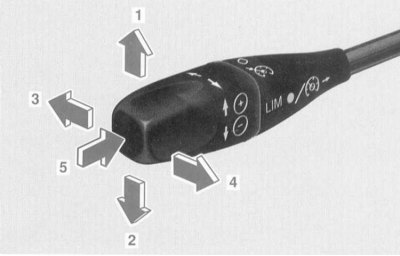
- 1 Saving the driving speed to memory - lightly press the cruise control lever.
To increase the selected speed by another ten km/h, briefly press the cruise control lever or hold it down.
- 2 Saving the driving speed to memory - lightly press the cruise control lever.
To reduce the selected speed to the next ten 10 km/h - briefly press the cruise control lever or hold it down.
- 3 Switching off - lightly press the switch lever.
The limited speed remains stored in memory.
- 4 To recall a stored speed, lightly press the cruise control lever.
Fine adjustment, increasing the selected speed in 1 km/h steps - briefly press the cruise control lever or hold it down.
- 5 Switching between the variable speed limiter and the Distronic system - press the selector lever.
The "Distronic" system is selected if the LIM indicator on the cruise control lever is off.
The variable speed limiter is selected if the LIM indicator on the cruise control lever is illuminated. (The variable speed limiter is described below).
Turning on
There is a risk of accident!
The Distronic system function does not automatically adapt to road conditions, which means that the Distronic system cannot be used, for example, on icy roads.
It is possible to record any driving speed from approximately 40 km/h to 160 km/h in the memory: Switching from the variable speed limiter to the "Distronic" system.
The LIM indicator on the cruise control lever must be off. If necessary, press the cruise control lever in the direction "5".
Accelerate to the desired speed by pressing the accelerator pedal.
Press the cruise control lever slightly in the direction "1" or "2". The speed is stored in the memory.
The speed stored in memory is displayed on the multi-information display, and one or two segments in the range of the stored speed light up on the speedometer.
Release the accelerator pedal.
Note. If the tempostat switch lever is held down in the direction of " 1 " or "2", the driving speed increases or decreases in steps of 10 km / h until the tempostat switch lever is released.
Fine adjustment in 1 km/h steps: Increase the selected speed - press the cruise control lever slightly in direction "4".
Note: If the cruise control lever is kept pressed in the "4" direction, the driving speed increases in 1 km/h steps until the cruise control lever is released.
Retrieving the entered speed from the memory: From a driving speed of approximately 40 km/h up to approximately 160 km/h, it is possible to retrieve the entered speed from the memory.
Press the shift lever lightly in direction "4".
The stored speed is displayed on the multi-information display, and one or two segments in the range of the stored speed light up on the speedometer.
Select the memorized speed only if the driver remembers it well and intends to recall it again from memory.
Note: When the electronic key in the ignition switch is turned to position 1 or 0, the stored speed is reset.
If the electronic traction control system (ESP) is switched off, the "Distronic" system (DTR) cannot be switched on.
When the ESP anti-slip function is activated, the Distronic system is switched off - a yellow warning light on the speedometer lights up. In addition, an audible signal sounds.
Invalid start attempts: If the start attempt is invalid, "- - -" appears on the multi-information display.
Invalid enable attempts include, for example:
- Switching on outside the speed range of approximately 40 to 160 km/h.
- Engaged when the automatic transmission selector lever is in the "P", "R" or "N" position.
- Switching on when the driver brakes the vehicle.
- Switching on by briefly pressing the cruise control lever in direction "4", although the driving speed has not been entered into memory.
In case of a malfunction or defect of the "Distronic" system, refer to the subsection "Distronic" System (DTR) of the Section Warning and indicator lamps, as well as multi-information display messages about registered faults.
Shutdown
Briefly press the cruise control lever in the direction "3" or "5", the speed remains in the memory.
When pressing in the direction "5", the LIM indicator on the cruise control lever lights up - the variable speed limiter is selected.
The "Distronic" system is also switched off:
- when pressing the brake pedal;
- when the vehicle's speed drops below 40 km/h due to a vehicle in front;
- when switching the AT selector lever to the "N" position;
- when the ESP electronic traction control function is activated;
- when accelerating the vehicle to a speed greater than 160 km.
Driving a car
When the electronic key in the ignition switch is turned to position 2, the warning light of the "Distronic" system lights up on the speedometer. It goes out when the engine is running.
Distronic system off: Measuring the distance to the vehicle in front continues even if the Distronic system is off.
There is a risk of accident!
If the "Distronic" warning light on the speedometer lights up while driving, the distance to the vehicle in front is too small. In addition, a double audible signal sounds if there is a risk of collision.
It is necessary to increase the distance from the vehicle in front.
Failure to keep a safe distance from the vehicle in front increases the risk of an accident.
The Distronic system is on: If the distance sensor detects a vehicle ahead that is moving at a lower speed, the speed of your vehicle is reduced and the vehicle continues to move while maintaining a set distance from the vehicle in front.
The speedometer lights up with segments from the speed of the vehicle in front to the speed selected by the driver.
There is a risk of injury!
The Distronic system automatically applies the brakes to achieve a set distance to the vehicle in front or to maintain the speed. The brake pedal is pulled down.
Your foot should not be on the brake pedal - there is a risk of pinching your foot.
In the event of a sudden, slower moving obstacle (for example, when the car in front changes lanes) the "Distronic" system produces deceleration of up to 2 m/s², which corresponds to approximately 20% of the maximum possible deceleration of the vehicle.
There is a risk of accident!
If the Distronic warning light on the speedometer lights up while driving and a double beep sounds, greater braking is required.
To reduce the speed of the vehicle, additionally use the service brake.
On uphill or downhill gradients, the Distronic system reduces the deviation from the driver's selected speed by braking and shifting the transmission to a lower gear. After overcoming such a section, the transmission returns to its previous position.
To increase the speed of movement for a short time (eg for overtaking) - press the accelerator pedal. If the accelerator pedal is released again, the memorized speed is set again.
If, as a result of the "Distronic" system regulating the distance to the vehicle in front, the speed drops below 40 km/h, or if the speed exceeds 160 km/h, the "Distronic" system is switched off. An audible signal is also emitted.
Recommendations for driving a car using the "Distronic" system
There is a risk of accident!
Without recognizing the obstacles in front of you (for example, a car moving in front) the Distronic system adjusts until the speed selected by the driver is reached. As a result:
When changing from the left lane to the right, your vehicle will continue to pass vehicles on the right in the left lane, and in the lane leading to the exit of the freeway, your vehicle will continue to accelerate to the speed selected by the driver.
Below is a description of some driving situations that affect the operation of the Distronic system.
The system is intended primarily for use on highways or equivalent federal highways. Use of the system inside cities is not recommended.
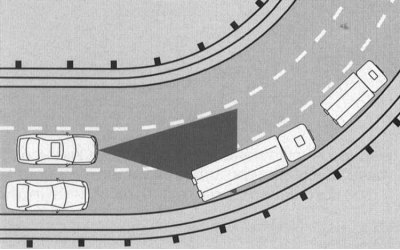
When cornering, entering or exiting a turn, it may be difficult to identify vehicles moving ahead.
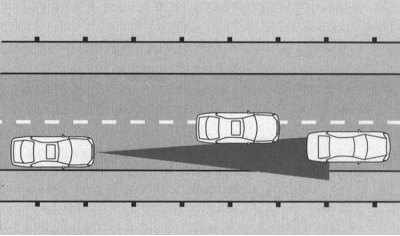
Off-center movement relative to the vehicle in front may make it difficult to identify.
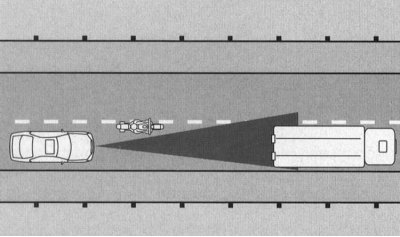
Vehicles that change lanes at a short distance into your lane can only be identified after the lane has completely changed.
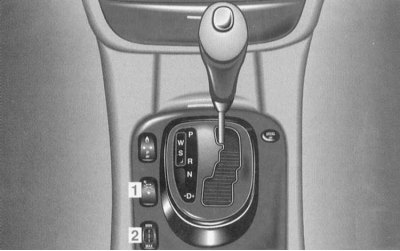
- 1 Switch - to turn off the warning sound signal of the distance to the vehicle in front
- 2 Set distance regulator
If the "Distronic" system is not switched on, the sound signal can be switched off using switch "1".
Switching off the sound signal: Press switch "1" at the top of the symbol. The control LED on the switch lights up.
Turning on the sound signal: Press the switch at the bottom "1". The control LED on the switch goes out.
Setting the specified distance to the vehicle moving ahead: Turn regulator "2" towards MIN or MAX.
The setting range of the time interval is from 1.0 to 2.0 seconds.
Note: Setting the time interval to, for example, 1.8 seconds corresponds to a distance of half the speed of movement in meters.
Indication on the multi-information display
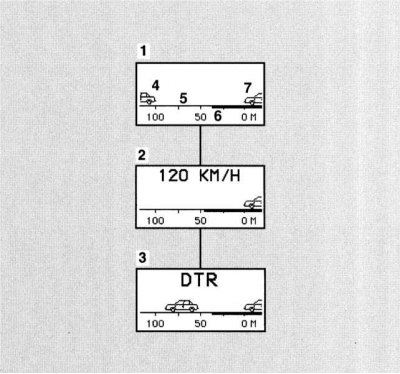
1 The "Distronic" system is switched off. The actual distance "5" and the set distance "6" to the vehicle moving in front are displayed "4"
2 The "Distronic" system switches on and the set speed indicator appears for approximately 3 seconds
3 Distronic is switched on.
4 Vehicle in Front Only appears if a vehicle in front has been detected.
5 Actual distance to the vehicle moving in front
6 Set distance to the vehicle moving ahead
7 Your car
Calling up the "Distronic" system indication: Button
 on the multifunction steering wheel, press repeatedly until the indicator (1 or 3) appears.
System "Speedtronic"
Consists of variable and constant speed limiters.
The variable speed limiter helps you to control the engine speed so that you do not exceed a set speed, for example when speed limits are in place.
With the permanent speed limiter you can limit the maximum speed when driving with winter tyres.
The cruise control lever on the steering column can be used to select and activate the cruise control, the Distronic (DTR) system or the variable speed limiter.
The selected system, cruise control, Distronic (DTR) system or variable speed limiter, is indicated by the LIM indicator on the cruise control lever:
Variable speed limiter: LIM indicator on the shift lever lights up.
Cruise control or Distronic system (DTR): The LIM indicator on the cruise control lever does not light. (Cruise control and Distronic system are discussed earlier in this Section.)
There is a risk of accident!
The driver is always responsible for the speed of movement. System "Speedtronic" is only an auxiliary means for the driver.
Variable speed limiter
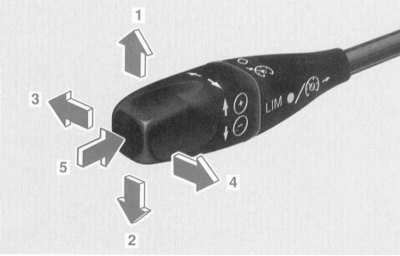
- 1 Activating the variable speed limiter - lightly press the cruise control lever.
Increasing the limited speed - keep the cruise control lever pressed.
- 2 Activating the variable speed limiter - lightly press the cruise control lever.
To reduce the limited speed, hold down the cruise control lever.
- 3 To switch off the variable speed limiter, press the cruise control lever slightly.
The set speed limit remains in memory.
- 4 Recalling a limited speed from memory - lightly press the cruise control lever.
Fine adjustment, increasing the limited speed in 1 km/h steps – briefly press the cruise control lever.
- 5 Switching between cruise control and variable speed limiter - press the cruise control switch lever.
The variable speed limiter is selected if the LIM indicator on the cruise control lever is illuminated.
The cruise control or Distronic (DTR) system is selected if the LIM indicator on the cruise control lever is not lit. (The cruise control and Distronic system are discussed earlier in this Section.)
There is a risk of accident!
When the variable speed limiter is activated, the speedometer segments light up from the start of the scale to the set speed limit:
The set speed can in this case only be exceeded when the accelerator pedal is in the kick-down position.
Turning off the speed limiter:
Briefly press the switch lever in direction "3" or "5".
All segments on the speedometer light up.
When pressing in direction "5", the LIM indicator on the cruise control lever also goes out.
The speed limiter is also deactivated if, in the kick-down position of the accelerator pedal, the driving speed differs from the preset speed by no more than 20 km/h.
Use the speed limiter only if you do not foresee the need to suddenly accelerate to a speed higher than the preset speed.
When changing drivers, for safety reasons, be sure to inform them of the set speed.
Unlike the cruise control or Distronic system, the variable speed limiter cannot be switched off by pressing the brake pedal.
There is a risk of injury!
Models with the "Distronic" system: To prevent the speed limit being exceeded, the "Distronic" system automatically applies the brakes. The brake pedal is pulled down.
Your foot should not be under the brake pedal - there is a risk of your foot getting pinched.
Switching/activating
Start the engine.
When the engine is running, any speed above 30 km/h can be limited in vehicles with the Distronic system.
Switching from cruise control or Distronic to variable speed limiter.
The LIM indicator on the cruise control lever should be lit. If necessary, press the cruise control lever in the direction "5".
Press the switch lever lightly in the direction (1, 2 or 4).
The variable speed limiter is activated.
The set speed limit is displayed on the multi-information display and the speedometer segments light up from the start of the scale to the set speed limit.
Direction "1": The current speed is stored as the new speed limit; this rounds off to the next higher ten. Further light pressing or holding of the lever increases the set limited speed.
Direction "2": The current speed is stored as the new speed limit; this rounds off to the next lower ten. Further light pressing or holding of the lever reduces the set limited speed.
Direction "4": The last speed limit learned is activated if the driving speed exceeds the learned speed limit by no more than 30 km/h.
By further lightly pressing or holding the lever, the set speed limit is increased in 1 km/h steps.
Deactivation
Lightly press the shift lever in direction "3" or press in direction "5".
All segments on the speedometer light up.
When you press in the direction "5", the LIM indicator on the cruise control lever goes out.
The speed limiter is also deactivated if, in the kick-down position of the accelerator pedal, the driving speed differs from the preset speed by no more than 20 km/h.
Note: Depending on the design, slight deviations in speedometer readings from the speed limiter setting are possible.
If the variable speed limiter is faulty, refer to the subsection "Speedtronic", Section Warning and indicator lamps, as well as multi-information display messages about registered faults).
Models without "Distronic" system (DTR)
If the speed limiter cannot maintain the set speed (for example, on descents), a sound signal sounds and the indicator flashes on the multi-information display for approximately 5 seconds "LIMIT EXCEEDED" (LIMIT EXCEEDED).
The segments on the speedometer flash until the set speed limit is reached again.
Permanent speed limiter
When operating the vehicle with winter tyres, a permanent speed limiter can be set in the system menu "Individual setting" (Section Multifunctional steering wheel, multi-information display) at a speed of 210 km/h.
When the permanent speed limiter is activated, the speedometer segments light up from zero to 210 km/h.
Shortly before reaching the set speed limit, its value is displayed on the multi-information display.
Note: If the constant speed limiter is faulty, refer to the subsection "Speedtronic" Section Warning and indicator lamps, as well as multi-information display messages about registered faults).
Brake Assist (BAS) (Brake Assist)
There is a risk of accident!
Driving at excessive speed, especially on bends, aquaplaning and not keeping a safe distance from vehicles in front increase the risk of an accident. This risk cannot be reduced by BAS.
BAS helps you reduce the braking distance when braking in dangerous road situations and allows you to fully utilize the benefits of the anti-lock braking system (ABS).
When you press the brake pedal very quickly, BAS provides maximum brake assist. To achieve the shortest possible braking distance, do not reduce your foot pressure, but continue to press the brake pedal.
When the brake pedal is released, BAS switches off; as usual, the normal function of the service brake remains available.
Anti-lock braking system (ABS)
There is a risk of accident!
Driving at excessive speed, especially on bends, aquaplaning and not keeping a safe distance from vehicles in front increase the risk of an accident. This risk cannot be reduced by the ABS system.
If the electronic key in the ignition switch is in position 2, the ABS system indicator lamp lights up. It goes out when the engine is running.
If the ABS warning light on the instrument panel is constantly on while the engine is running, refer to Section Warning and indicator lamps, as well as multi-information display messages about registered faults.
The ABS system prevents the wheels from locking regardless of road conditions, starting at a speed of approximately 8 km/h.
If one of the wheels reaches the locking limit during braking, then due to the control of the brake pressure by ABS, a vibration of the car and a slight pulsation of the brake pedal is felt. This way the driver is notified of the transition to regulation by ABS.
If further braking is required, do not reduce the force of your foot on the pedal. This takes advantage of the ABS system - braking while maintaining control of the car.
If full braking is required, press the brake pedal with full force, thereby ensuring the ABS control mode.
In the case of slippery roads, such as icy roads and snowfall, the system can be activated even at low braking force. The resulting pulsation of the brake pedal indicates that the driving style should be adapted to the difficult road conditions.
Electronic traction control (ESP)
Electronic traction control (ESP) improves vehicle stability and traction control in all operating modes.
By braking the wheels, the vehicle is counteracted from skidding or losing control. At the same time, the warning light on the speedometer flashes.
There is a risk of accident!
If the speedometer warning light flashes, adjust your driving style to the road conditions.
Driving at too high a speed increases the risk of an accident. This risk cannot be reduced by the ESP system.
When the electronic key in the ignition switch is in position 2, a warning light on the speedometer lights up. It goes out when the engine is running.
Switching off the ESP traction control function
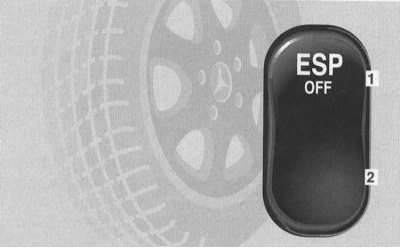
The switch is located on the center console.
Press the switch:
- 1 Turn off
- 2 Turning on
When driving with anti-skid chains, on deep snow, sand or gravel, turning off the traction control system can play a positive role. In this case, the engine torque is not limited and the drive wheels can spin, creating a milling action.
To turn off, press the ESP system switch at the top "1".
The warning light on the speedometer comes on.
The traction control function is also activated when one wheel reaches the limit of the tyre's adhesion to the road, for example on one-sided icy roads.
The wheel is braked to increase traction. This function is activated up to a speed of about 40 km/h. It is switched off at a speed of about 80 km/h at the latest.
The warning light on the speedometer will flash at any speed when the tires have reached the limit of adhesion to the road.
To return to normal driving mode, press the ESP switch at the bottom "2". The traction control system is ready for operation again.
There is a risk of accident!
If the speedometer warning light comes on: Adjust your driving style to the road conditions.
If the warning light on the speedometer starts to flash: When starting off, press the accelerator pedal only as far as necessary.
While driving, release the accelerator pedal.
Adjust your driving mode to road conditions.
Do not turn off the traction control system.
Failure to follow these warnings increases the risk of an accident. There is a risk of skidding.
When towing with the front axle raised or checking the parking brake on a brake test stand, the engine must be switched off. Otherwise, the active braking effect via the ESP system may cause damage to the rear axle braking system.
Note: If the anti-lock braking system (ABS) fails, the ESP system is also switched off.
When operating the vehicle in winter, the maximum effect of the electronic traction control system (ESP) is achieved only when using "M + S" tires and, if necessary, anti-skid chains.
When using wheels with tires of different sizes, the proper functioning of the ESP system is not ensured.
If the electronic traction control system (ESP) is switched off, the "Distronic" system (DTR) cannot be switched on.
When the ESP traction control system is switched on, the Distronic system is switched off - a yellow warning light on the speedometer lights up.
Adjusting the vehicle's ground clearance
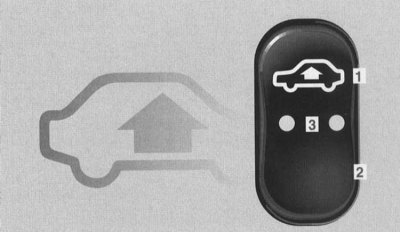
The switch is located on the center console.
Pressing the switch while the engine is running:
- 1 Increased ground clearance
- 2 Normal ground clearance
- 3 Control LEDs
The vehicle's ground clearance is automatically adjusted depending on the set ground clearance ("increased" or "normal") and the driving speed. This increases driving safety and reduces fuel consumption.
At speeds above approximately 140 km/h, the vehicle's ground clearance is lowered to approximately 15 mm below normal. This is done regardless of the selected ground clearance level. At speeds below approximately 70 km/h, normal ground clearance is restored.
Pressing the switch at the top "1": Increased ground clearance, set, for example, on a bad road. This increases the vehicle's ground clearance by approximately 25 mm. The control LEDs "3" light up. The indication on the multi-information display switches on "AIR SPRING, VEHICLE RISING" (AIR SUSPENSION, THE CAR RISES!).
Once the vehicle has been lifted, the indicator turns off.
Note: At driving speeds above approximately 120 km/h, or if the speed remains between 80 km/h and 120 km/h for approximately 5 minutes, the "high ground clearance" setting is reset. The indicator lights up on the multi-information display "AIR SPRING, LEVEL CANCELLED!" (AIR SUSPENSION, GROUND CLEARANCE SELECTION RESET!).
If the vehicle speed does not reach these limits, the increased ground clearance remains in memory even when the electronic key is removed from the ignition switch.
Pressing the switch at the bottom "2": Lowering the raised ground clearance to normal. The control LEDs "3" go out.
Note: Warning and fault signaling system - refer to the "Air suspension" subsection of Section Warning and indicator lamps, as well as multi-information display messages about registered faults).
Adaptive Damping System (ADS)
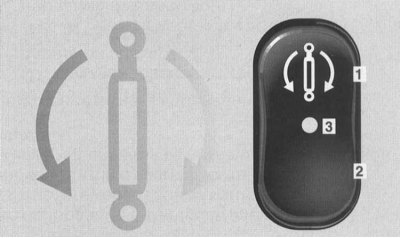
The switch is located on the center console.
Press the switch with the engine running:
- 1 Sports Damping Program
- 2 Comfortable damping program
- 3 Control LED
Optimum damping is automatically set depending on the selected damping program ("sport" or "comfort"), road conditions and driving style.
Pressing the switch at the top "1": Sport damping program. Setting for a sporty driving style. The control LED "3" on the switch lights up and goes out.
Note: The selected damping program (1, 2) remains in memory even when the electronic key is removed from the ignition switch.
System "Parktronic" (PTS)
System "Parktronic" indicates to you optically and acoustically the distance between your car and the obstacle.
If the electronic key in the ignition switch is turned to position 2, the system "Parktronic" automatically switches on and remains activated up to a speed of approximately 15 km/h.
At higher speeds the system "Parktronic" automatically turns off. At low speed it automatically turns on again.
The activation of the alarms with the corresponding control zone is carried out depending on the position of the automatic transmission selector lever.
Position of the AT selector lever:
- "D" - front zone alarms activated.
- "R", "N" - alarms for the front and rear zones are activated.
- "P" - alarms are deactivated.
There is a risk of accident!
The driver is always responsible for parking and maneuvering in critical situations.
System "Parktronic" is an auxiliary system. It is not intended to replace the driver and cannot relieve him of the responsibility to remain attentive.
System "Parktronic" can be switched off by a switch on the center console.
Sensors
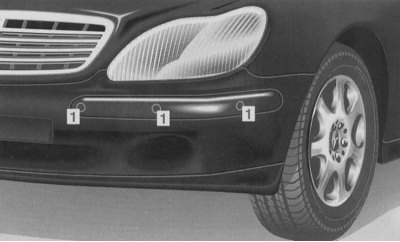
The nearest zone is monitored by 6 sensors "1" on the front bumper and 4 sensors on the rear bumper.
Attention! To ensure full functionality of the system "Parktronic" keep the sensors free from dirt, ice and snow at all times.
To this end, clean the sensors regularly, avoiding scratching or damaging the sensors. (Cleaning the sensors of the system "Parktronic" on bumpers - refer to Chapter Body).
Signaling devices
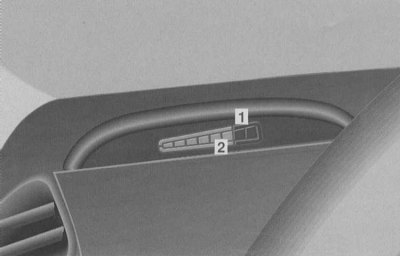
1 Frame
2 Segments
The distance between the sensor and the obstacle is indicated to you by segments "2" of the alarms.
The front warning lights are located on the instrument panel above the driver's side air vent and above the center air vent.
The rear area indicators are located on the roof headliner in the rear of the passenger compartment.
If the system "Parktronic" turned on, the frames "1" are lit on the indicators.
The alarms are divided into 6 yellow and 2 red segments.
If the vehicle approaches an obstacle registered by the sensors, one or more segments light up depending on the distance. Starting from the seventh segment, an intermittent warning signal is additionally emitted, and from the eighth segment, a continuous warning signal is emitted for a maximum of 3 seconds.
Sensor range
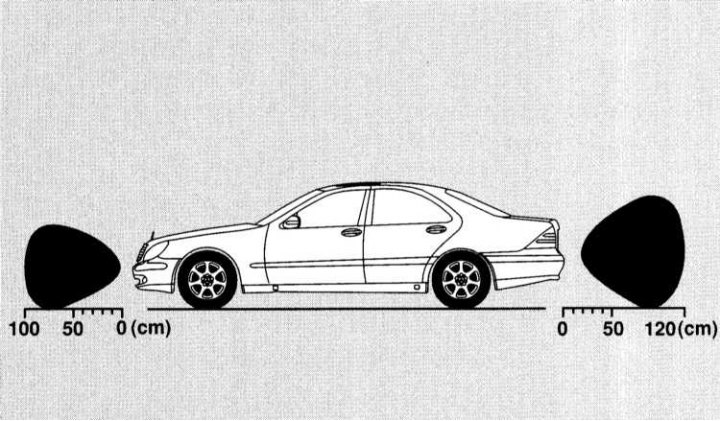
Front bumper:
- in the middle about 100 cm
- corners about 60 cm
Rear bumper:
- in the middle about 120 cm
- corners about 80 cm
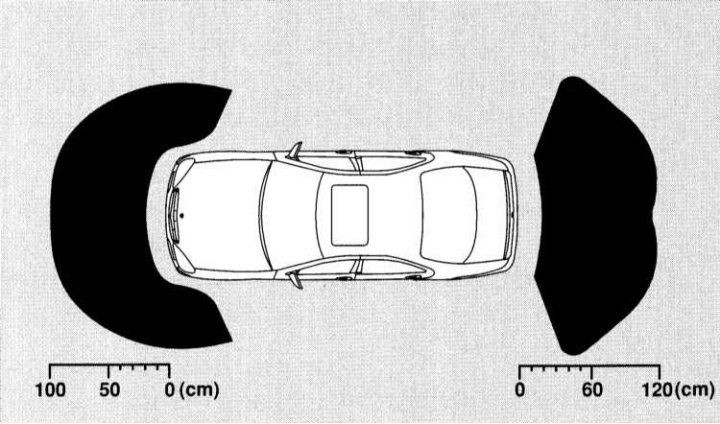
At these distances the first yellow segment lights up. As the distance decreases, other segments light up.
Minimum distance between sensor and obstacle:
- front corners about 15 cm
- in the middle about 20 cm
All yellow segments and one or both red segments light up. In addition, a warning signal sounds for approximately 3 seconds.
Further approach may result in the obstacle no longer being indicated (segments do not light up).
There is a risk of accident!
The driver is always responsible for parking and maneuvering in critical situations.
Make sure that there are no people or animals in the maneuvering area.
System "Parktronic" is an auxiliary system. It is not intended to replace the driver and cannot relieve him of the responsibility to remain attentive. Therefore, the driver must continue to pay attention to the immediate surroundings of the vehicle when driving at low speeds.
Caution: When parking, pay particular attention to objects located below or above the sensors, such as flower boxes or the trailer drawbar.
Similar objects in close proximity (about 30 cm), may not always be recognized by the system and may thus be damaged or cause damage to the vehicle.
Function of the system "Parktronic" may be impaired if the sensors are damaged or covered with dirt, snow, ice and especially slush.
Interference from other sources of ultrasound, such as air brakes on trucks or air hammers, also cannot be completely excluded.
It is possible that certain objects that may come into contact with the front or rear of the vehicle may not be detected by the system's sensors.
Shutting down the system "Parktronic"
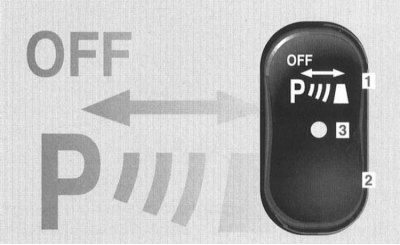
The switch is located on the center console.
Press the switch:
- 1 Turn off
- 2 Turning on
- 3 Control LED - lights up when the system is off "Parktronic"
Switching on occurs automatically when the electronic key in the ignition switch is turned to position 2.
Towing a trailer
If the power cable is plugged into the socket when towing a trailer, the rear protection function is not activated.
If the power cable is disconnected, the rear protection function is reactivated.
Note: The trailer adapter with 7-pin plug must be removed from the socket after the trailer has been disconnected, otherwise the rear protection function remains inactive.
System failure "Parktronic"
In case of a malfunction, only the red segments of all alarms light up.
The cause may be an extraneous ultrasound source or a dirty sensor. (Cleaning the system sensors "Parktronic" on bumpers - refer to Chapter Body).
After cleaning the sensors, turn the electronic key in the ignition switch back to position 2.
In the event of a malfunction, a warning signal sounds for approximately 3 seconds and the control LED on the system switch lights up "Parktronic" on the center console lights up. The system turns off!
Contact a service station as soon as possible "Mercedes-Benz" to check the system "Parktronic".
Remote garage door opener
There is a risk of accident!
Pressing one of the buttons on the transmitter of the integrated remote control in the interior rearview mirror is only permitted if there are no people or objects in the operating range of the garage door opener; otherwise, there is a risk of injury to people from the opening door.
The remote control integrated into the interior rear-view mirror can be used to open or close up to three different door systems.
Note: Some garage door openers cannot be controlled by the built-in remote control. For more information, please contact your service station "Mercedes-Benz".
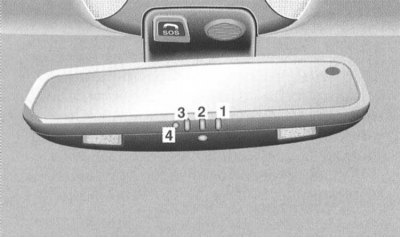
1 Transmitter button
2 Transmitter button
3 Transmitter button
4 Control LED
Programming the built-in remote control
There is a risk of accident!
During programming and when pressing the built-in remote control transmitter button in the interior rearview mirror, there must be no people or objects in the door or garage door movement area.
The garage door may begin to open or close, causing injury to people.
Transmitter buttons "1", "2" and "3" can be programmed.
Programming using the transmitter button "1" as an example: Turn the electronic key in the ignition switch to position 1 or 2.
Press and hold transmitter button "1" until control LED "4" starts flashing at a frequency of approximately once per second.
Continue to hold down the transmitter button "1".
Note.
The control LED "4" starts flashing immediately if one of the transmitter buttons is being programmed for the first time, or if the contents of the built-in remote control device memory have been previously reset.
When reprogramming a programmed transmitter button, the control LED "4" will begin to flash after approximately 20 seconds. Keep the handheld remote control for the garage door opener pointed (transmitter output) on the left side of the interior rearview mirror. Press the transmitter button of the portable remote control until the control LED "4" starts to flash quickly.
Programming was successful. Release transmitter button "1".
Opening/closing the garage door
The built-in remote control, once programmed, takes on the properties of a portable remote control for the garage door opener (refer to the appropriate "Operating Manual").
- Turn the electronic key in the ignition switch to position 1 or 2.
- Press the desired transmitter button (1, 2 or 3) in accordance with programming.
The garage door opens or closes.
Note: The transmitter operates as long as the transmitter button is pressed. After no more than 20 seconds, the transmission process is interrupted and the control LED "4" starts to flash. If necessary, press the transmitter button again.
Resetting the built-in remote control device
- Turn the electronic key in the ignition switch to position 1 or 2.
- Press and hold buttons "1" and "3" for approximately 20 seconds until control LED "4" starts flashing rapidly.
The contents of the memory have been reset.
Note: Before selling your vehicle, we recommend that you reset the contents of the built-in remote control device memory.
Gas stations: what you need to know when filling up
Refueling
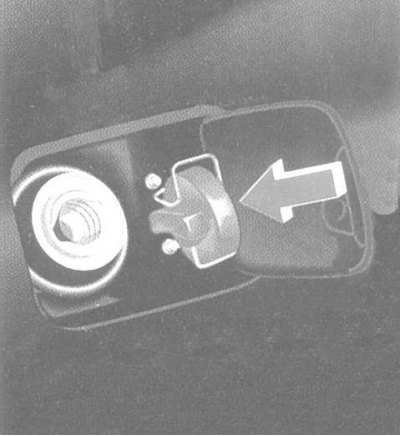
Opening the fuel tank cap: turn to the left.
Insert the fuel filler cap into the holder on the inside of the fuel filler flap. (Emergency release of the fuel filler flap - refer to Section Locks, keys and bolts. Smart card. Single lock).
Fuel grades
Petrol engine: unleaded petrol EN 228.
Filling volume:
- Models without ski bag about 88 l, including fuel reserve about 11 l.
- Models with ski bag about 78 l, including fuel reserve of about 10 l.
Fill the fuel tank only to the level at which the dispenser nozzle shuts off - do not overfill it.
Fire hazard!
The fuel is highly flammable.
The use of open flames and smoking when handling fuel is prohibited.
Avoid contact with skin or clothing.
Harmful to health!
Direct skin contact with fuel and inhalation of fuel vapors are harmful to health.
Engine oil
(Oil level control is discussed in Chapter Routine maintenance).
The difference between the lower and upper marks on the oil dipstick: about 2 l.
(refer to Chapter Specifications Routine maintenance).
Tire pressure
Prescribed tire pressure - refer to the tire pressure chart on the inside of the fuel filler flap. Check the tire pressure at least once every two weeks. (For more detailed recommendations, see Chapter Routine maintenance).