



Locks with remote radio control device
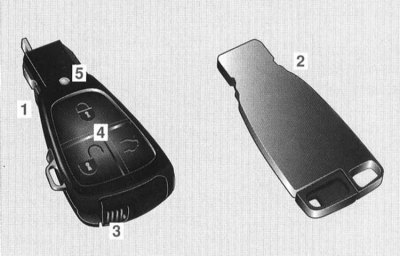
The car can also be unlocked from a long distance, even out of sight, using the radio remote control. To prevent unauthorized persons from entering the car, use the radio remote control only in the immediate vicinity of the car.
Opening/closing the side windows and the sliding and lifting sunroof and switching on the seat ventilation system (summer opening function/comfort closing) for safety reasons, they can only be carried out in the immediate vicinity of the vehicle using the infrared function of the remote control device (below in this Section).
The car comes complete with:
1 Two electronic main keys with a retractable mechanical key. To better distinguish the two main electronic keys, the unlocking keys "3" have different colors.
2 Spare electronic key without remote control functions with removable mechanical key. The spare key cannot be used to unlock the vehicle via the radio control system and the summer opening/comfort closing function cannot be activated.
Note: Do not expose the remote control to excessive electromagnetic radiation. Risk of malfunction!
Models with KEYLESS-GO system:
Please follow the instructions for using the electronic key and smart card simultaneously (below in this Section).
Main electronic key
4 Button functions.
Unlocking the driver's door
 Click once.
The driver's door and fuel filler flap are unlocked.
Unlocking a single lock
 Press twice.
The doors, fuel filler flap and boot lid are unlocked.
Unlocking the vehicle and disarming the anti-theft alarm system (EDW) is confirmed by a single flash of the direction indicator lights.
If, after unlocking the vehicle, none of the doors or the trunk lid are opened, the vehicle will automatically lock after approximately 40 seconds.
Models with memory function:
After unlocking the vehicle, the driver's seat, mirrors and steering wheel are set to the position memorized for the corresponding key. (Memory function - refer to Section Seat position memory).
Turning the "Driver's Door Unlock" function on and off:
Press the buttons simultaneously
 and
and  and hold them down for about 6 seconds.
Control lamp "4" lights up twice.
If the "Driver Door Unlock" function is turned off, the single lock is unlocked by pressing the unlock button once.
Single lock
 Click once.
The doors, fuel filler flap and boot lid are lockable.
With the doors and boot lid closed, activation of the vehicle authorisation check system or the operational readiness of the anti-theft warning system (EDW) after locking is confirmed by three flashes of the direction indicators.
Remote trunk lid opening
 Press and hold the button until the trunk lid opens, unless the trunk lid has been locked separately (below in this Section).
Note: After closing the trunk lid, it is locked again if the car was previously locked with a single lock.
Attention! The trunk lid automatically opens upwards. Therefore, make sure there is sufficient free space!
5 Checking the charge level of the batteries
Each time the electronic key is used, the battery charge indicator light will briefly light up.
If the control LED does not light, the batteries must be replaced immediately.
Replacing the power supply elements of the main electronic key
There is a risk of poisoning!
Keep batteries away from children. If a battery is swallowed, seek medical attention immediately.
Environmental protection notice!
Dispose of discharged batteries in accordance with environmental protection requirements.
Remove the mechanical key.
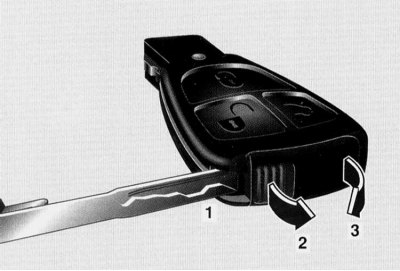
Press the key lightly into hole "1" (without jerking).
Lift the battery compartment slightly in the direction of arrow "3".
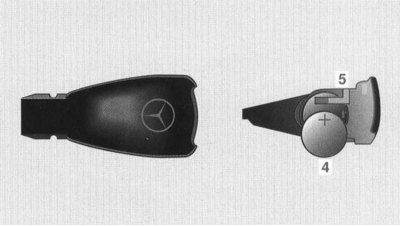
Insert the batteries "4" under the contact spring "5" using a lint-free cloth. With the plus sign facing up!
Push the battery compartment into the key housing until it locks into place.
Note: The spare key cannot be opened and there are no batteries.
KEYLESS-GO system
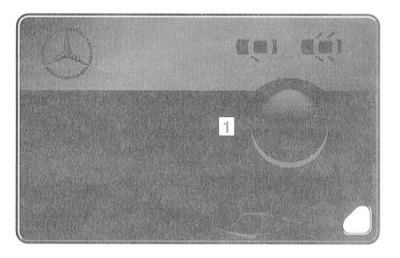
The smart card of the KEYLESS-GO "1" system corresponds in function to an electronic key; the presence of a smart card provides the ability to use the car.
The smart card is checked for validity when the door handle is grasped or the boot lid button is pressed. If the smart card is recognised from the outside, the selected doors, boot lid and fuel filler flap are unlocked accordingly.
You will find additional information on the KEYLESS-GO system in the section "Driving a car":
"Starter activation function using the KEYLESS-GO system smart card" (Section Vehicle control and auxiliary systems).
"Starting a petrol engine using a smart card" (Section Vehicle control and auxiliary systems).
Important!
In order for the driver to be able to use all the functions of the KEYLESS-GO system at any time, the following must be observed:
- We recommend that the driver always carry the smart card with him. To unlock or lock the car, it must be outside the car. It must be in the immediate vicinity (no more than 1.0 m) from the door or boot lid to be locked or unlocked. The smart card must be in close proximity to control the ignition switch functions (no more than 1.0 m) from the door or boot lid to be locked or unlocked. The smart card must be in the vehicle to operate the ignition switch functions.
- If the smart card is removed from the vehicle (for example, with luggage or in a clothing pocket), the car can no longer be locked and the engine cannot be started.
- If the smart card is removed with the door open and the engine running, a warning message appears on the multi-information display every 3 seconds after starting off "CHIP CARD NOT RECOGNISED" (SMART CARD IS NOT IDENTIFIED).
- Please note that the vehicle engine can be started by leaving the smart card in the vehicle. If the smart card is left in the vehicle, the message appears on the multi-information display when locking the vehicle "CHIP CARD STILL IN VEHICLE" (SMART CARD IN THE CAR).
In order to be able to drive the car in the event of a malfunction of the KEYLESS-GO system, for example due to a strong source of radio interference or a discharged vehicle battery, we recommend that you always have a spare electronic key with you.
Do not expose the smart card to increased electromagnetic radiation. There is a risk of malfunction!
Note: The KEYLESS-GO function can also be used to raise the side windows and close the sliding and tilting sunroof (comfortable closing) (below in this Section).
To avoid the risk of being accidentally left outside, the boot lid cannot be closed when the vehicle is locked if the smart card is on the rear shelf or in the boot.
Unlocking the car
Grasp the door handle. The car unlocks. Two settings can be selected:
Unlocking a single lock
When the door handle is pulled, all doors, the trunk lid and the fuel filler flap are unlocked.
Unlocking the driver's door
Grasping the driver's door handle unlocks only the driver's door and fuel filler flap. Grasping the other door handle unlocks the entire vehicle lock.
The door through which the unlocking was made can be opened immediately after an audible click. Other doors can be opened after lifting the locking button. (Switching the selected setting is discussed later in this Section).
Unlocking the vehicle and disarming the anti-theft alarm system (EDW) is confirmed by a single flash of the direction indicator lights.
If after unlocking the vehicle none of the doors or the trunk lid are opened, automatic locking occurs after approximately 40 seconds.
Individual trunk unlocking/opening
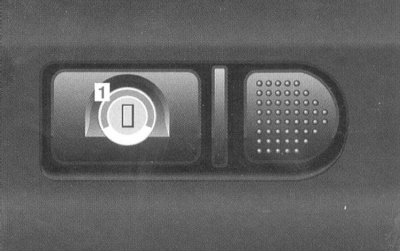
To open the trunk, press button "1".
The button is located in the rear recess of the license plate.
Note: After closing the trunk lid, it will lock again if the vehicle was previously locked with a single lock.
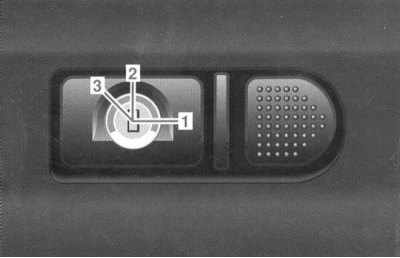
Switching between the functions "Unlocking the driver's door" and "Unlocking the single lock"
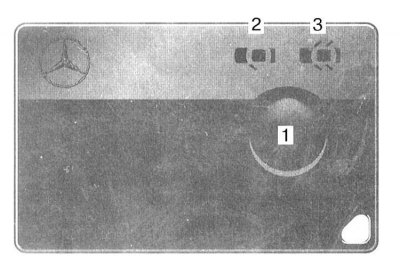
Press and hold button "1" until the indicator lamp lights up at the required symbol "Unlocking the driver's door" "2" or "Unlocking the single lock" "3".
Locking the car locks
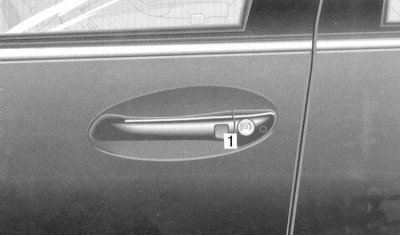
1 Door lock button
Press the lock button on the door or trunk lid. If the doors are closed, the vehicle's main lock is locked.
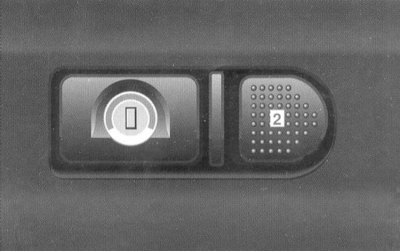
2 Lock button on the trunk lid
The button is located in the rear recess of the license plate.
With the doors and boot lid closed, activation of the vehicle authorisation check system or the operational readiness of the anti-theft warning system (EDW) after locking is confirmed by three flashes of the direction indicators.
Note: To avoid the risk of being left outside, the boot lid cannot be closed if the smart card is on the rear shelf or in the boot.
Recalling the last locking state performed by the smart card
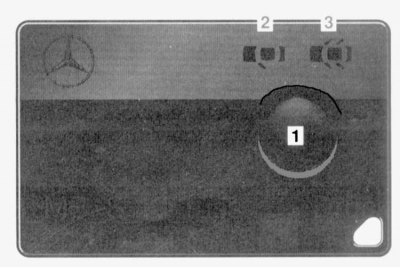
Lightly press button "1". The indicator LED "Unlock driver's door" "2" or "Unlock single lock" "3" lights up red or green.
- Green light: car unlocked
- Red light: car locked
Battery charge control
Lightly press button "1". The "Unlock driver's door" "2" or "Unlock single lock" "3" control LED should light red or green.
If the control LEDs do not light up, the power supply elements must be replaced immediately.
Replacing smart card batteries
There is a risk of poisoning!
Keep batteries away from children. If a battery is swallowed, seek medical attention immediately.
Environmental protection notice!
Dispose of discharged batteries in accordance with environmental protection requirements.
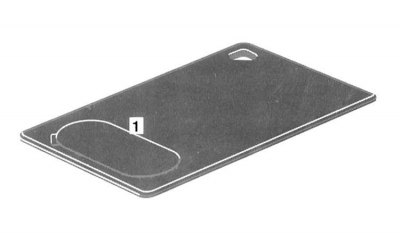
Lift cover "1" and remove the batteries.
Insert new batteries according to the + and - pole markings molded into the smart card body.
Press the cover "1".
Simultaneous use of electronic key and smart card
When using both the electronic key and the smart card at the same time, control of the vehicle using the electronic key has priority over control using the smart card.
If the engine has been started with the smart card and the electronic key is then inserted into the ignition switch while the engine is running, the engine continues to run in the AT selector lever positions R, N, D or shift ranges 4, 3, 2, 1 until it is switched off via the KEYLESS-GO function.
If the electronic key is inserted into the ignition switch and the selector lever is in position P, the electronic key takes over control. The vehicle's electrical equipment is switched on in accordance with the position of the electronic key in the ignition switch; if necessary, the running engine is switched off.
Automatic locking while driving
Starting from a speed of approximately 15 km/h, the vehicle's single lock is locked.
If one of the front doors is opened from the inside, the vehicle's single lock is unlocked if the last single lock was unlocked using the remote control or the KEYLESS-GO smart card.
Automatic locking can be switched on or off (refer to the "Individual installation" subsection of Section Multifunctional steering wheel, multi-information display).
There is a risk of accident!
You can remain outside when pushing or towing the vehicle: The vehicle is locked if the electronic key is in the ignition switch in position 2 (models with KEYLESS-GO system: in driving position), and the car moves.
(To turn off the "Automatic locking while driving" function, refer to the "Individual installation" subsection of Section Multifunctional steering wheel, multi-information display).
Automatic unlocking in case of accident
The doors will only unlock when the impact is above a certain value.
Single lock switch
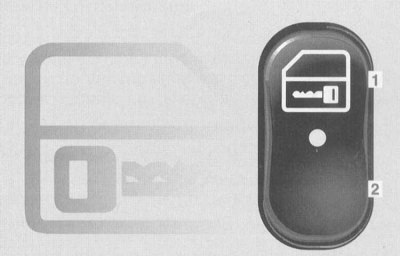
The single lock switch is located on the center console.
Press the switch:
- 1 Locking
- 2 Unlocking
The vehicle can be unlocked or locked from the inside using the single lock switch.
Locking with the single lock switch can only be performed when the front doors are closed.
If locking was done with an electronic key or via the KEYLESS-GO system function, unlocking with the switch is not possible.
There is a risk of accident!
Do not leave children unattended in the car. They may open it even if it is locked, thereby endangering themselves and others.
Opening/closing side windows and sliding and lifting sunroof (summer opening function/comfort closing)
Summer opening function: opens the sliding and lifting sunroof and lowers the side windows, and simultaneously switches on the driver's seat ventilation system.
("Seat ventilation system" - Section Seats).
Comfortable closing: closes the sliding and lifting top hatch and raises the side windows.
Control by electronic key
Point the tip of the main electronic key at the driver's or front passenger's door handle.
Summer opening function:
Unlock the car, press the button
 keep pressing until the windows and sliding/lifting sunroof reach the desired position.
Opening interruption:
Button
 let go.
Comfortable closing:
Lock the car, button
 keep pressing until all windows are raised and the tilt and slide sunroof is closed.
There is a risk of injury!
Control the lifting/closing process to avoid passengers getting trapped.
If there is a risk of pinching, release the button
 - the lifting/closing process is immediately interrupted.
Button
 press and hold - the side windows will lower again and the sliding and lifting sunroof will open.
When leaving the vehicle, check that all side windows are raised and that the sliding and tilting sunroof is closed.
Control using the KEYLESS-GO system
Comfortable closing:
Press the lock button in the door handle and hold it down until all windows are raised and the tilt/slide sunroof is closed.
There is a risk of injury!
Control the lifting/closing process to avoid passengers getting trapped.
In case of danger and pinching, release the lock button in the door handle - the closing process is immediately interrupted.
Pull the door handle and hold it - the side windows will lower again and the sliding and lifting sunroof will open.
When leaving the vehicle, check that all side windows are raised and that the sliding and tilting sunroof is closed.
Opening the door
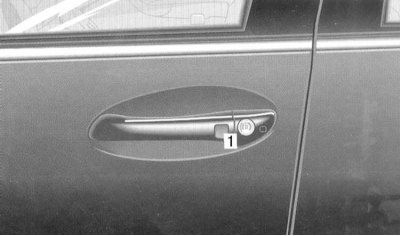
1 Opening the door from the outside
The door can only be opened from the outside if the vehicle has been unlocked beforehand.
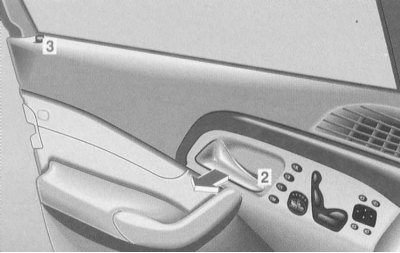
2 Opening the door from the inside
A separate door can be opened from the inside even if the car is locked. In this case, only the corresponding door is unlocked.
Unlocking of the doors is confirmed by pulling out the locking button "3".
Door closing mechanism amplifier
The doors and boot lid close automatically if: the doors are pressed against the lock beyond the pre-lock position, the boot lid is pressed against the lock.
There is a risk of crushing!
Do not attempt to activate the door closing mechanism booster by manipulating the locking mechanism. Control the process of closing the doors and trunk lid.
If necessary:
- Pull the door handle from the inside or outside.
- Press the trunk lid lock.
- If the car is locked, unlock it first.
Rear door lock locking
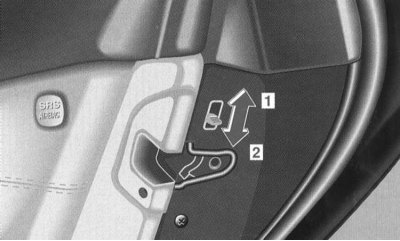
1 Lock - move the lever up.
2 Release - move the lever down.
A locked door cannot be opened from the inside by pulling the handle.
The door can be opened from the outside if the car is unlocked. The rear door locking button is in the up position.
There is a risk of accident!
Do not leave children unattended in the car. They may open the door even if it is locked, thereby endangering themselves and others.
Temporary disabling of rear door locks
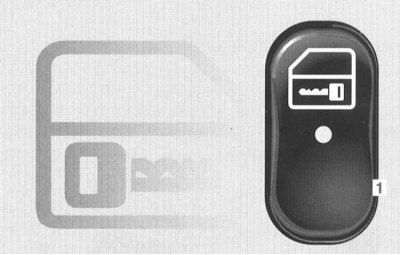
1 Disabling rear door locks
The single lock switch is located on the center console.
Pressing the single lock switch for 5 seconds on both rear doors disengages the locks.
Locked doors can be opened during this time from the inside using the door handle.
There is a risk of accident!
If the rear door locks are released by pressing the single lock switch, both rear doors are unlocked. Be careful that a child does not accidentally open a door. Do not leave children unattended in the vehicle. They may press the single lock switch and temporarily release the rear door locks, or open one of the front doors even if it is locked, putting themselves and others at risk.
Mechanical key
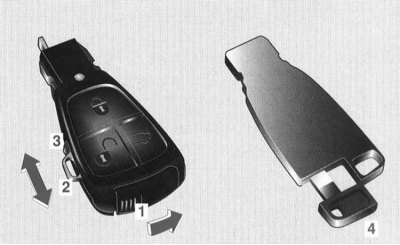
The driver's door can be unlocked and locked using mechanical key "2" on the main electronic key and mechanical key "4" on the spare electronic key (emergency door opening) or the trunk lid is locked or opened separately.
(Emergency door opening is discussed below).
(Separate locking/opening of the trunk lid - discussed later in this Section).
Important!
When inserting the main electronic key into the ignition switch, the mechanical key must not be pulled forward. Otherwise, the ignition switch may be damaged.
Removing the mechanical key from the main electronic key: Move button "1" in the direction of the arrow, and pull mechanical key "2" forward until it locks.
Sliding the mechanical key into the main electronic key: Press button "3" and slide the mechanical key in until it locks into place.
Removing the mechanical key: On the main electronic key, slide button "1" in the direction of the arrow and pull out the mechanical key "2" backwards.
Remove mechanical key "4" from the spare electronic key.
Emergency door opening
If the vehicle cannot be unlocked using the electronic key remote control or smart card, unlock the driver's door using the mechanical key.
Note: Models with anti-theft alarm: The anti-theft alarm is triggered when the door is opened with the mechanical key. The alarm can only be turned off by inserting the electronic key into the ignition switch, pressing the buttonsor
on the electronic key or, if a valid smart card is present, by grasping the door handle or pressing the start/stop button on the selector lever.
Separate locking/opening of the trunk lid
The lock is located in the rear recess of the license plate.
Separate locking of the trunk lid
Lock the trunk lid with the mechanical key "1" and remove the key in this position.
The trunk remains locked even after the vehicle's main lock is unlocked.
Unlocking and locking the trunk lid with a single lock
Lock the trunk lid with the mechanical key "2" and remove the key in this position.
Opening the trunk lid with a mechanical key: Turn the key to position "3" and press the lock cylinder.
Additional trunk lid lock
When you lock and unlock the vehicle, the additional trunk lid lock is also locked and unlocked.
If the trunk is locked separately, the additional trunk lid lock is also locked separately.
Remote trunk lid opening
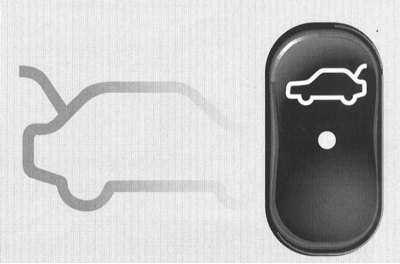
The remote trunk lid release handle is located on the driver's door.
The trunk can only be opened using the remote release handle when the vehicle is stationary.
To open the trunk lid, pull the remote release handle upwards.
The indicator LED on the remote release handle lights up as long as the trunk lid is open.
Important!
The trunk lid opens upwards, so make sure there is enough free space!
Note: If the trunk lid does not open, it must first be unlocked separately (see above).
Closing the trunk
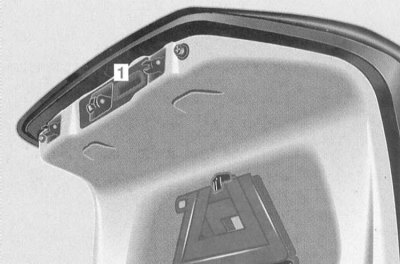
Lower the trunk lid by pulling it down using the recess "1" and slam it shut.
Note: To avoid the risk of being left outside, the boot lid cannot be closed when the vehicle is locked if the smart card is on the rear shelf or in the boot.
Emergency release of the fuel filler flap
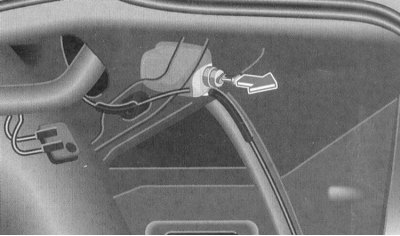
Carefully pull back the right side inner trim in the trunk. Pull the handle (arrow) and open the fuel filler flap.
Loss of smart card, electronic or mechanical key
Attention! Block the electronic key or smart card at one of the maintenance stations "Mercedes-Benz", and immediately notify your insurance company of the loss.
If you lose a mechanical key, we recommend replacing the mechanical elements of the locks.
A new smart card, electronic key or mechanical key can only be purchased through one of the service stations "Mercedes-Benz".
We recommend that you always have a spare key with you.
General notes on the lock system
If the electronic key is in the ignition switch, locking or unlocking with a second electronic key or smart card is not possible.
If the vehicle cannot be unlocked or locked: Point the tip of the master electronic key at the driver's or front passenger's door handle.
Check the charge level of the batteries in the main electronic key or smart card (materials at the beginning of the Section).
Open the car with the mechanical key. Insert the main electronic key into the ignition switch and wait until the electronic key in the ignition switch can be turned.