



Contents: Unlocking door locks ↡ Locking the locks ↡ Keys with remote control ↡ Folding key with remote control ↡ Signal light on the remote control ↡ Automatic door locking while driving ↡ Central lock switch ↡ Emergency door opening ↡ Replacing batteries in the remote…↡ Central lock switch ↡ Locking the rear side doors when…↡
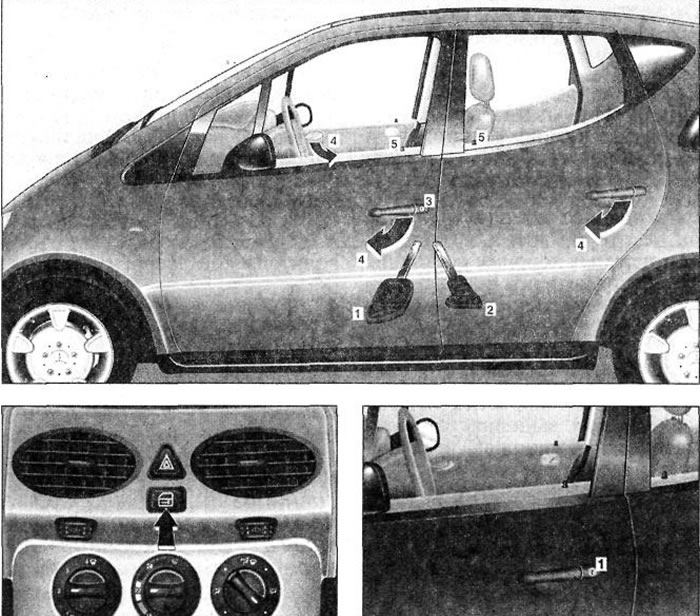
1 - main key
2 - spare key
3 - lock
4 - opening the door
5 - door lock switch. Designed for individual door locking. The switch on the driver's door can only be pressed after the door is closed
The key set includes two main keys and one spare.
The key can be used to lock or unlock all locks centrally by inserting it into the driver's door, passenger door or tailgate lock.
Unlocking door locks
1. Insert the key into the lock and turn it to the left. This will unlock all doors, the tailgate and the fuel filler flap.
Locking the locks
2. Turn the key in the lock to the right.
If you lose your key, it is recommended to replace the door locks.
A new key can only be ordered and received at a Mercedes-Benz service station (dealer).
Making new keys takes time. It is recommended to have a spare key with you.
Keys with remote control
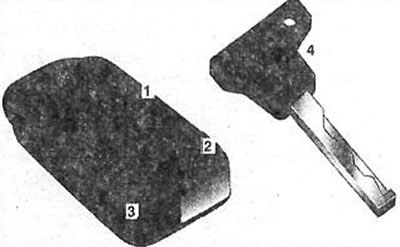
1 - control buttons
2 - button for retracting the key from the handle
3 - power supply status light
4 - spare key
Using the remote control, you can lock and unlock the car doors from a sufficient distance.
Caution: Do not expose the remote control to strong electromagnetic radiation.
The package includes two folding keys with remote controls and one spare key.
Folding key with remote control
It is recommended to keep a spare key in a safe place so that it can be used when needed.
The remote control can be used to lock and unlock all doors, the tailgate and the fuel filler flap.
The keys can be used to lock and open the driver's door and tailgate separately.
Warning! On vehicles with an alarm system, unlocking the doors with the key without using the remote control may trigger the alarm. You can turn off the alarm by pressing the button or inserting the key into the ignition and turning it to position 2.
Pressing the button once opens the driver's door lock and the fuel filler flap.
Pressing the button twice will open all doors, the rear door and the fuel filler flap using the central locking system.
Opening of the doors is confirmed by a single illumination of the direction indicators. If after unlocking the locks none of the doors is opened, then after approximately 40 seconds all locks are automatically locked.
The function of unlocking the driver's door only can be disabled and re-enabled if necessary.
To do this, press both buttons simultaneously and hold them down for about 5 seconds.
The signal lamp on the remote control confirms the execution by flashing twice. If this function is disabled, then pressing the button on the remote control once will simultaneously unlock all doors.
To lock the doors, tailgate and fuel filler flap using the central locking system, press the button once.
Locking of the doors is confirmed by three flashes of the direction indicators.
If all doors have been locked using the remote control and one of them is later opened from the inside, all the others, including the tailgate and fuel filler flap, remain locked.
Attention! If the doors do not lock or unlock with the remote control, check the condition of the batteries or synchronize the remote control.
Signal light on the remote control
Check the battery status regularly by pressing and holding the button for more than one second.
The indicator light should light up for a while, indicating that the batteries are in good condition. If the light does not light up, the batteries should be replaced.
Automatic door locking while driving
When the car reaches a certain speed, the central lock automatically locks all doors, including the rear one.
If one of the front doors is opened from the inside, the central lock unlocks all doors if they were also previously unlocked by the central lock.
If the doors are unlocked while driving using the central locking switch, the doors will not be locked again.
Central lock switch
1. Insert the key into the ignition switch and turn it to position 2.
2. Press the central locking switch and hold it down for about five seconds. A single acoustic signal confirms that the automatic door locking is on. Disabling the central locking is confirmed by a double acoustic signal.
Attention! The doors are unlocked automatically in the event of a frontal collision when the impact force reaches a certain level.
Emergency door opening
If the car doors cannot be opened or closed using the remote control, the driver's door lock can be locked or unlocked mechanically using the key.
3. Remove cover 1 of the lock on the driver's door.
4. Insert the key and turn it to the right in the lock to open the door.
Attention! If the car is equipped with a security alarm that can be turned on and off with a remote control, then in this case it will go off when the door is opened. You can turn off the security alarm by pressing the button or by inserting the key into the ignition and turning it to position 2.
If the doors do not close or do not open with the remote control, check the condition of the power supply.
If they are normal, which is confirmed by the signal light on the remote control, then the remote control must be synchronized.
1. Point the remote control at the car and press the button twice.
2. Insert the key into the ignition switch no later than 30 seconds after the first action and turn it to position 2.
Replacing batteries in the remote control
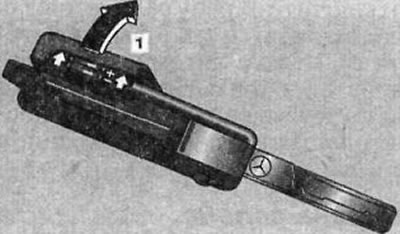
1. Slide the key out of the remote control and remove cover 1 from the compartment containing the batteries.
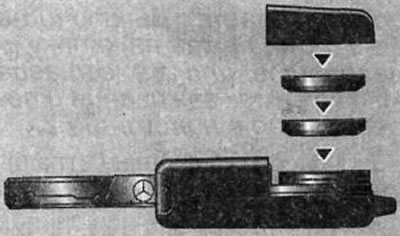
3. Close the compartment with the lid and secure it.
Central lock switch
In order for the door locks to be locked centrally, it is necessary to turn on the central lock by pressing the switch.
The doors will be locked by the central lock if only one of the doors was unlocked, and all doors will be unlocked if they were locked.
The central lock switch can only lock the doors after the front doors have been closed. If the door locks have been locked using the switch, then after opening one of the front doors, all the others are unlocked.
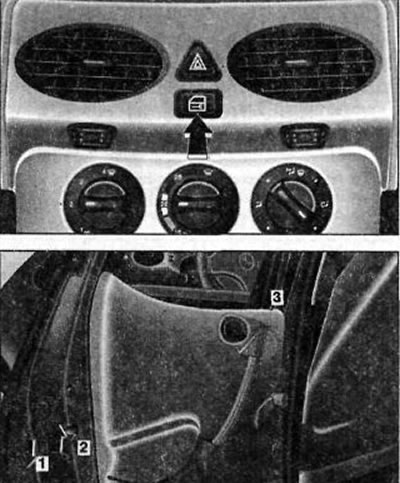
If the door locks have been locked using the remote control, they cannot be unlocked using the switch.
Locking the rear side doors when transporting children
1. Lock the door by moving lever 1 down.
Unlocking is done by moving the lever upwards. A door locked in this way cannot be opened from the inside.
The door can only be opened from the outside if the 3rd lock switch is not recessed.