



Contents: Tow-away protection device, interior…↡ Disabling the tow protection device ↡ Salon security ↡ Disabling the interior protection…↡
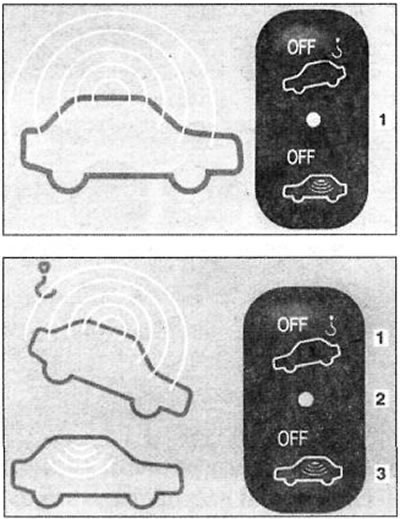
1 - towing protection device off
2 - signal light on the switch
3 - disabling interior security
The security alarm is activated approximately 15 seconds after the vehicle is locked with the master key.
The activation of the alarm is confirmed by the flashing of LED 1. If the vehicle is also unlocked with the main key, the alarm is deactivated.
The alarm system can be turned off by inserting the key into the ignition switch and turning it to position 2 or by pressing the buttons on the remote control.
In vehicles with remote control, the alarm system can only be armed and disarmed by using the remote control.
Warning! If a car with remote control is unlocked with a key, the alarm system is triggered. It can be turned off by pressing the button on the remote control or by inserting the key into the ignition and turning it to position 2.
The activated security alarm is triggered:
- when opening the door,
- when opening the trunk,
- when opening the hood.
An acoustic alarm signal lasting approximately 30 seconds is given in interval mode.
A light signal lasting approximately 5 minutes is given by flashing the hazard warning lights at double the frequency.
Security alarm signals are also given if, for example, an open door is immediately closed.
Tow-away protection device, interior protection
The protection switch is located on the center console (see illustration).
Disabling the tow protection device
To avoid false alarms, the towing protection device must be switched off during intended transportation or loading of the vehicle onto a transport vehicle.
To do this, remove the key from the ignition switch.
Press the top of switch 1. LED 2 on the switch lights up briefly.
If you also need to turn off the interior security, wait until the LED on the tow protection switch goes out and only then turn off the interior security by pressing the bottom part 3 of the switch. Lock the car. The tow protection device remains off until the security alarm is turned on again.
Salon security
The interior security system is activated approximately 30 seconds after the car is locked if the alarm system is activated. The alarm system is activated if the side windows are broken and the interior is entered.
Warning! Raise the side windows and close the sunroof.
Do not leave any objects (for example, toys on a keychain), suspended from the interior rearview mirror or from handles on the ceiling of the passenger compartment. They can cause a false alarm.
Disabling the interior protection device
If people or animals are to remain in a locked vehicle, turn off the interior security to avoid a false alarm.
To do this, remove the key from the ignition switch and press the lower part 3 of the security alarm switch.
When switched off, the indicator light 2 on the switch will flash for a while.
If you also want to turn off the tow-away protection device, wait until the LED goes out and then turn off the tow-away protection device by pressing the top of the switch 1.
Lock the car with the key. The interior security remains off until the doors are locked again with the key.