



Contents: Switches located on the steering…↡ Switches and controls located on the…↡ Individual switches for controlling…↡ Protecting rear view mirrors from…↡ Interior lighting ↡ Control of the operation of the…↡ Sun visors ↡ Rear vanity mirror ↡ Storage boxes ↡ First aid kit ↡ Fire extinguisher ↡ Removal and installation front seat…↡ Removal and installation the rear…↡ Transportation of skis ↡
Switches located on the steering column
Combination switch
Switching headlight operating modes (low/high beam) and activation of direction indicators
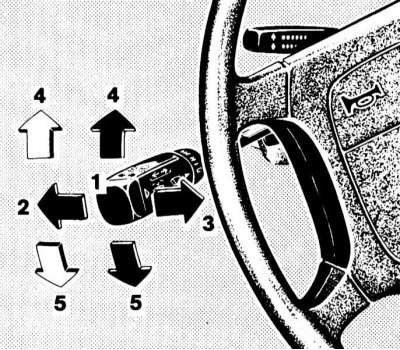
Switching headlight operating modes and activating turn signals
1 — Position "Low beam"
2 — "High Beam" Position
3 - High beam signaling
4 - Activation of right turn signals
5 - Activation of left turn signals
The headlights are switched from low beam to high beam by pushing the steering column switch lever away from you - the corresponding blue indicator lamp on the instrument panel should light up automatically. To turn off the high beam, return the lever to its original position.
There is also the option of signalling with high beams: signalling is carried out by pulling the lever of the steering column switch towards you and regardless of the selected position of the handle for selecting the operating mode of the external lighting devices.
Material based on data from the portal (MercedesMan.ru)
Note: High beam signalling remains possible even when the ignition is switched off.
The direction indicators are activated by pressing the left steering column stalk lever in the appropriate direction (black arrows). The lever is moved up or down, depending on the selected direction of course change.
When the lever is moved to the extreme upper/lower position (until it clicks), the corresponding turn signals will continue to function until the steering wheel is returned to the straight-ahead position (the limit switch will trip), or until the lever is returned to the neutral position.
Brief activation of the indicators, for example, when intending to change lanes, is done by lightly pulling the lever up or down (white arrows).
Control of windshield wipers/washers and headlight lenses
Note: The washer fluid reservoir, as well as the lines and nozzles, are equipped with heating elements.
Windscreen and headlight lens wipers and washers can only be activated when the ignition is on (key in ON or ACC position).
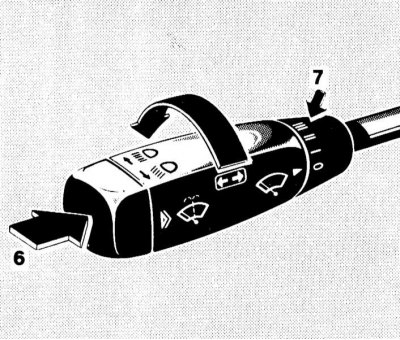
Control of windshield wipers/washers and headlight lenses
6 — Push-button switch for supplying washer fluid
7 — Windscreen wiper mode selection ring switch
A short press on the end switch causes the windshield wiper to operate once without dispensing washer fluid.
Note: This mode should only be used when the windshield is wet.
Pressing the pushbutton switch against resistance allows the windshield washer fluid to be supplied, which activates the windshield wiper. When the running lights/low beam headlights are on, the headlight wipers will be activated at the same time.
The standard windshield wiper modes are activated using the ring control installed at the rear of the combination switch handle. In position 0, the windshield wipers are off. Moving the control to position I activates the windshield wipers in interval mode.
Note: On models equipped with a rain sensor, the windshield wipers perform one stroke, then the period of the brushes' operation cycles is adjusted automatically. In the II position of the regulator, the windshield wipers operate in the normal speed mode. Position III is used to switch the windshield wipers to the accelerated operation mode.
Note: On models equipped with a rain sensor, when the vehicle is stopped, the wiper operation period automatically switches back one step.
Steering column switch for controlling the cruise control
The cruise control switch is located on the steering column above the combined steering column switch.
A detailed description of the principles of managing the functioning of the tempostat is given in Section Speed control systems (tempostat) and Speedtronic.
Horn activation button
The horn button is built into the steering wheel hub.
Switches and controls located on the instrument panel and front section of the center console
 Switch for selecting the operating mode of external lighting/signaling devices
Selecting the operating mode of external lighting devices (dimensions, low beam) is carried out using the rotary handle located on the left side of the instrument panel.
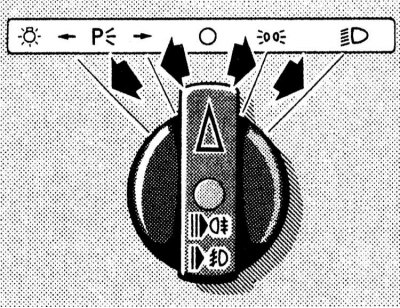
It is possible to select one of the following outdoor lighting modes.
ABOUT Off.
 Side lights - front and rear side lights and license plate lights are turned on.
 Low beam - in addition to the lights activated in the previous position of the handle, the low beam of the headlights is turned on.
 Right parking lights - the right front and rear parking lights are activated.
 Left parking lights - the left front and rear parking lights are activated.
 Fog light - pulling the switch handle to the first stop activates the fog light.
 Fog light - pulling the switch handle to the second stop results in additional activation of the rear fog light.
The standard equipment of all models includes a function of sound notification of the driver about the need to turn off the lighting before leaving the car. The signal buzzer is triggered when an attempt is made to open the driver's door with the ignition off (key in position 0 or 1) if the external lighting mode selection handle is not moved to position 0 or one of the parking positions
 or
or 
Note: Remember that leaving the exterior lighting on for too long with the engine off can drain the battery!
Headlight Axis Tilt Regulator
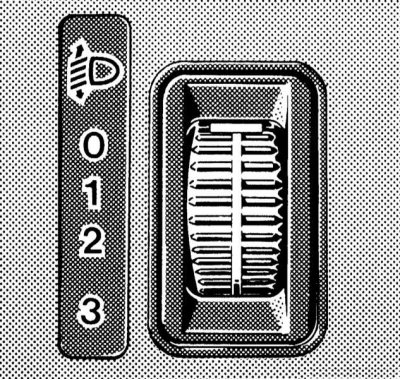
The wheel switch for adjusting the tilt of the optical axes of the headlights is located on the left side of the instrument panel and has four fixed positions (0, 1, 2 and 3)
The switch is used to adjust the lighting distance (when the low beam is turned on), in order to prevent blinding of drivers of oncoming and preceding vehicles.
The regulator must be set to the position (according to the tables below), corresponding to the number of passengers and the degree of loading of the vehicle.
Models with adjustable ground clearance
| Switch position | Number of people in the front seats | Number of people in the rear seats | Cargo in the luggage compartment |
| 0 | 1 or 2 | 0 | Absent |
| 1 | 1 | 3 | Full load |
| 2 | 2 | 3 | Full load |
| 3 | Not used | ||
Models without adjustable ground clearance
| Switch position | Number of people in the front seats | Number of people in the rear seats | Cargo in the luggage compartment |
0 | 1 or 2 | 0-3 | Doesn't matter |
| 1 | 1 | 0 | Full load |
| 2 | Not used | ||
| 3 | Not used | ||
Parking brake release handle
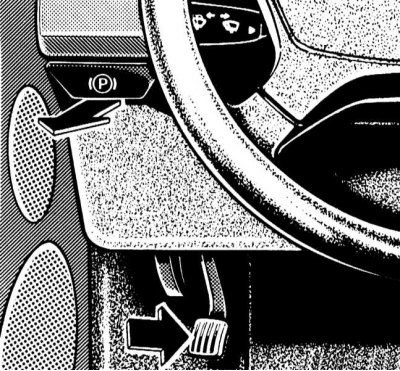
The models considered in this Manual use a foot-operated parking brake. The parking brake is set by pressing the pedal located on the left under the instrument panel. The parking brake release handle is on the left side of the vehicle's instrument panel and is marked with a pictogram with the corresponding content. Pulling the handle releases the parking brake immediately - the corresponding indicator lamp (see section Instrument cluster, gauges and control lamps and indicator lights) on the instrument panel should go out.
Adjusting the position of the steering wheel
Models with manual regulator drive
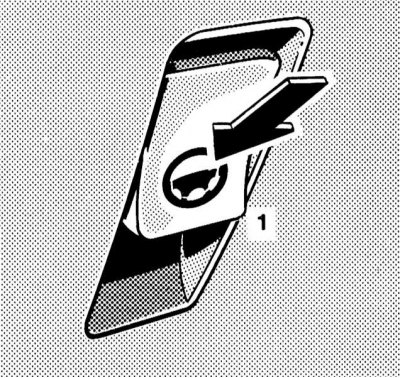
The release lever of the locking mechanism is located on the left side of the instrument panel. To release the lock, press the lever down until it stops, then pull the steering wheel towards you or press it away from you. Having achieved a comfortable position of the steering wheel, press the lever down and release it - the return of the lever to the normal (locked) position should occur automatically.
Models with electric regulator drive
The switch for controlling the operation of the electric drive for adjusting the position of the steering column is located on the left side of the instrument panel. The electric drive of the steering column only functions when the ignition is on.
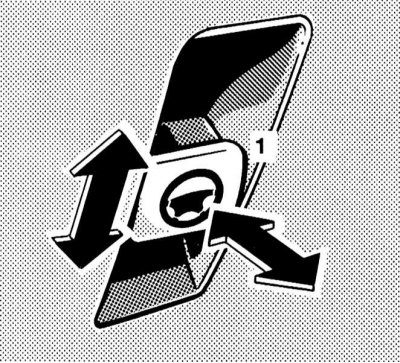
To adjust the steering wheel position in the longitudinal direction, pull the switch (1) towards you or press it into the instrument panel. The column position in the vertical plane is adjusted by moving the switch lever in the corresponding direction.
The selected steering column/wheel position can be stored in the on-board processor memory together with the data on the positions of the seats and outside rear-view mirrors (see section Seat adjustment).
Ignition Switch/Steering Column Lock
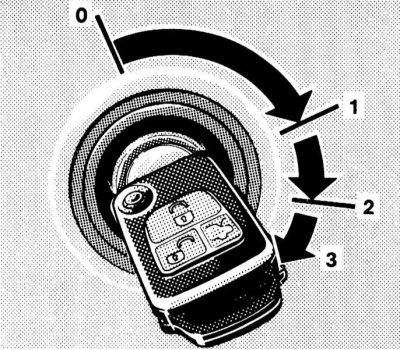
The ignition switch is located on the instrument panel to the right of the steering column. The key can occupy one of four fixed positions in the lock:
- 0 — Steering column lock
- 1 - Auxiliary consumers of electricity (parking position)
- 2 - Ignition on
- 3 - Starting the engine
Position 0 - steering column lock
The key can only be inserted or removed from the lock in this position. When the ignition key is turned from position 0 to position 1, the steering column is unlocked. In addition, on models equipped with an automatic transmission, an additional condition for allowing the start is the mandatory transfer of the selector lever to position "P".
The key can only be removed from the ignition switch after it has been turned to position 0.
Note: On models with automatic transmission, removing the key from the ignition switch is only possible after moving the selector lever to the "P" position.
The steering column lock is activated automatically when you try to turn the steering wheel after removing the key from the ignition switch.
Steering column lock sometimes makes it impossible to turn the key in the ignition. In this situation, you should turn the steering wheel slightly in one direction or another (in order to relieve the load), while simultaneously turning the key in the lock.
Note: Never remove the key from the ignition while driving! This will inevitably lead to the steering column locking and loss of control. Remove the key from the ignition only after the car has come to a complete stop!
Note: When the front door is open, it is still possible to operate the electric seat adjustments, steering column, windows and sunroof with the key removed from the ignition switch.
Position 1 - parking
In this position of the ignition key, the operation of auxiliary power consumers is ensured (audio system, cigarette lighter, heater fan, windshield wipers, etc.).
Position 2 - ignition on
The ignition key is kept in this position at all times while the vehicle is moving, as well as when the engine is idling. On diesel models, turning the key to position 2 before starting the engine activates the pre-heating system. At the same time, electrical power is supplied to all systems and additional equipment installed on the vehicle. When the key is turned from position 1 to position 2, some of the indicator lamps located on the instrument panel of the vehicle briefly turn on, confirming that the corresponding control systems are functioning properly (see section Instrument cluster, gauges and control lamps and indicator lights).
Position 3 - launch
When the key is turned to this position, the starter is engaged. After the engine has started, the key should be released and it will automatically return to the "ON" position.
Glove box and glasses compartment latch release buttons and lock
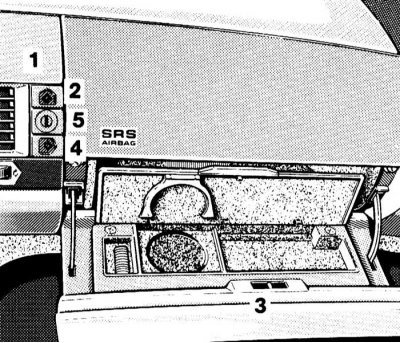
Opening buttons and lock for the lids of the glove compartment and glasses compartment
1 - Compartment for glasses
2 — Glasses compartment lock latch release button
3 - Glove box
4 — Glove box lock latch release button
5 — Lock of the glove compartment and glasses compartment lids
The release buttons for the glove compartment and glasses compartment latches are located in the central part of the instrument panel, to the right of the air vent panel.
The upper of the two buttons releases the latch of the glasses compartment, the lower one releases the glove compartment, and the cylinder of the lock of both lids is placed between the buttons. Both lids are locked simultaneously by turning the key in the cylinder of the lock to the right and then removing it.
Note: On models equipped with a trip computer, in place of the glasses compartment, a display assembly is installed, the hinged cover of which is raised using the top button.
Trunk lid latch release button
The remote release button for the luggage compartment lid lock is located on the left in the upper row of switches in the center console.
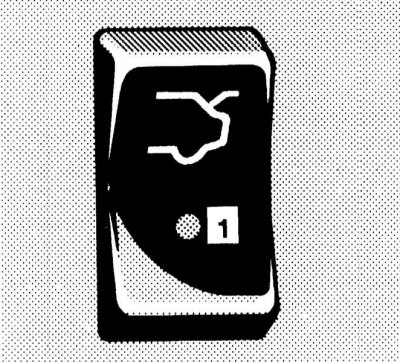
To release the latch, press the button - the built-in control LED should be activated.
Note: After releasing the latch, the luggage compartment lid will swing upwards, so make sure there is adequate free space!
Switch for disabling towing protection devices/interior entry/anti-theft alarm control LED
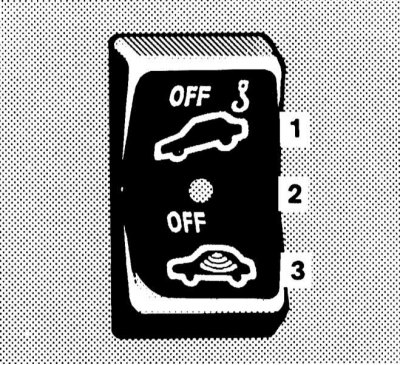
Switch for disabling the anti-intrusion/anti-towing devices
1 - Disabling the tow protection device
2 — Control LED
3 - Disabling the device to protect against unauthorized entry into the passenger compartment
If the vehicle is equipped accordingly, the activation of the devices in question occurs automatically when the doors are locked/the anti-theft alarm is activated.
Note: There is a delay of approximately 60 seconds before the interior intrusion protection device volume sensors activate.
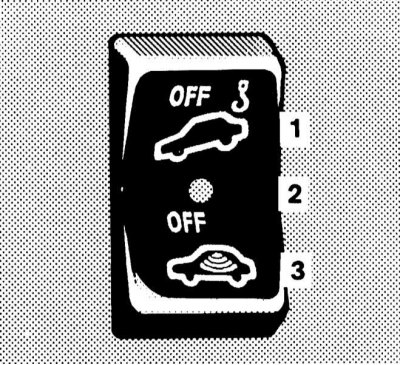
The switch for activating the relevant devices is located second from the left in the top row of switches on the central console and is equipped with a built-in control LED for the anti-theft alarm system, which is activated approximately 15 seconds after the doors are locked - the LED starts to flash evenly.
The corresponding protection system is switched off by pressing the corresponding section of the switch after removing the key from the ignition switch - the built-in control LED should light up briefly and then go out, confirming the fact of switching off. Then the car can be locked and the anti-theft alarm can be activated from the remote control (see Single lock). The corresponding device remains disabled until the next time the car is locked using the remote control.
Switch for releasing the latches/controlling the function of the electric rear seat headrest adjustment drive
Models with manual adjustment of rear headrests
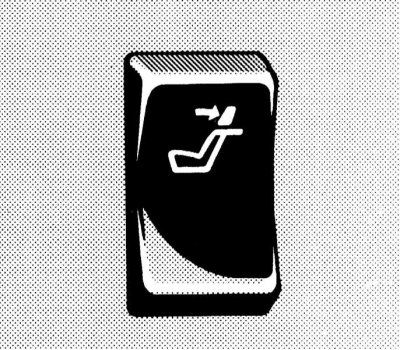
With this configuration, the release of the rear seat head restraints is carried out remotely using the middle key switch in the upper row of console switches. The drive can only be activated when the ignition is on. To release the clamps, press the upper part of the key, then adjust the position of the head restraints manually (see Seat adjustment).
Models with electric adjustment of rear head restraints
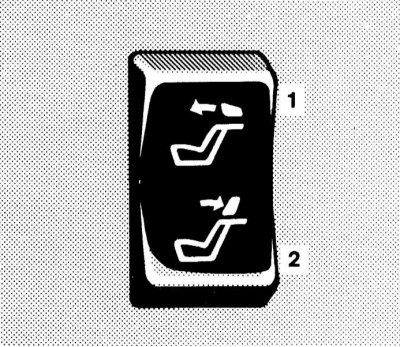
Switch for controlling the operation of the electric drive for adjusting the rear head restraints
1 - Raise the headrests
2 - Lower the headrests
The switch for controlling the operation of the electric drive of the rear head restraints is located in the middle of the upper row of console switches. Activation of the drive is possible only with the ignition on.
Note: Additional switches for adjusting the height of the head restraints are individually mounted in the armrests of the rear doors of the vehicle - the tilt of the head restraints is then set manually.
The position of the headrests is adjusted by pressing the corresponding part of the switch button.
Single Lock Actuator Switch/Anti-Theft Alarm Control LED
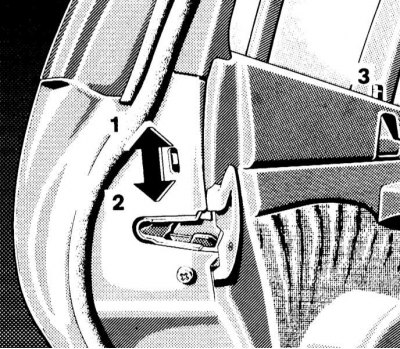
Single Lock Drive Switch
1 - Locking the locks
2 - Unlocking locks
The single lock actuator switch is located second from the right in the top row of console switches.
Pressing the upper section of the switch locks the doors, and pressing the lower section unlocks them.
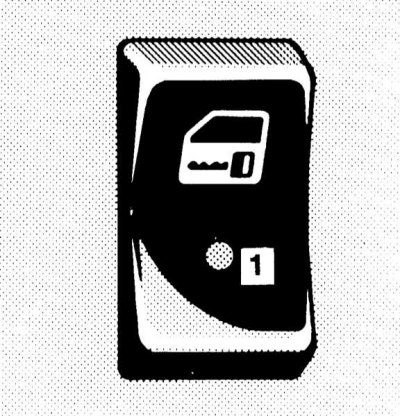
On models not equipped with the anti-theft/towing protection system, the switch also has a built-in anti-theft alarm indicator lamp, which is activated approximately 15 seconds after the doors are locked - the LED starts to flash steadily.
Note: The anti-theft alarm is automatically deactivated when the car doors are unlocked using any of the standard methods (see Doors).
Hazard warning switch
The hazard warning lights are activated using the rightmost button in the top row of console switches. The switch key is equipped with a standard signal lamp with a pictogram depicting two triangles inscribed in each other.
Turning on the hazard warning lights causes all four direction indicators to come on simultaneously (and their indicator lights on the car's dashboard). The alarm is designed to warn other road users about a forced stop of the vehicle and is also used in other dangerous situations provided for by traffic regulations.
Anti-slip regulation (ASR) and anti-skid program (ESP) system deactivation keys
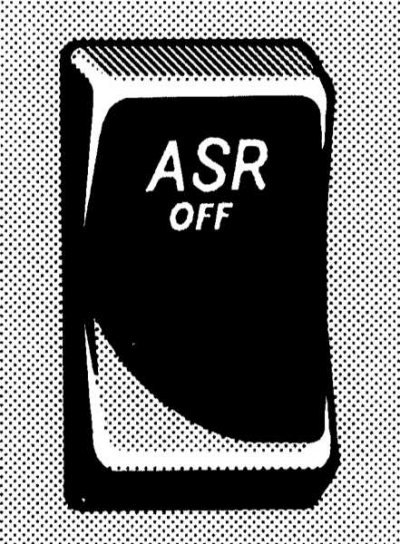 |
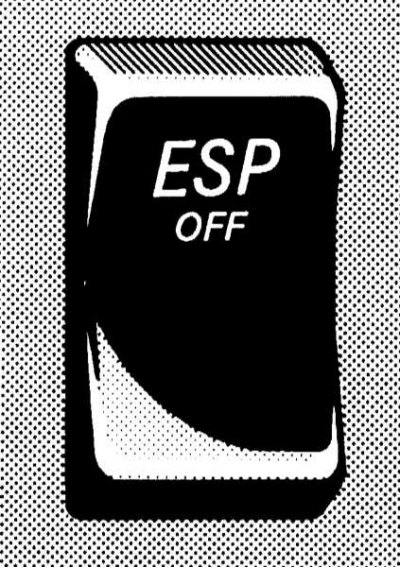 |
Keys for disabling the ASR and ESP functions (see sections Anti-Slip Regulation (ASR) and Electronic skid control system (ESP)) are located at the top left in the second section from the top of the center console, to the left of the ashtray.
Disabling the systems is accompanied by activation of the warning indicator lamp built into the speedometer dial (see section Instrument cluster, gauges and control lamps and indicator lights).
Switching off is done by pressing the upper part of the corresponding switch key.
Automatic Damping System (ADS) Mode Switch
The switch is located in the upper right corner of the second section from the top of the central console, to the right of the ashtray, and allows you to switch between the operating modes of the ADS system, which controls the stiffness of the suspension.
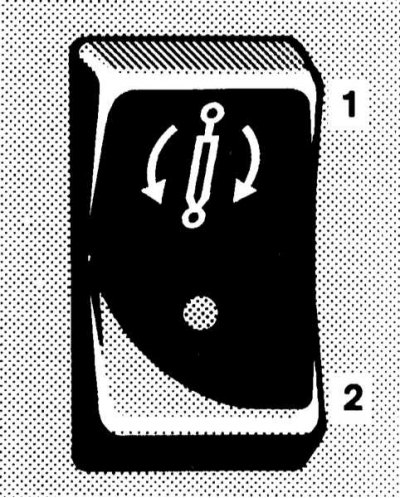
Automatic Damping System (ADS) Operating Mode Switch
1 - Sport driving mode
2 - Comfort mode
When the sport driving mode is activated, the control LED integrated into the switch button lights up.
Seat heating mode switches
Two heated seat mode rocker switches are located on either side of the front ashtray, in the lower corners of the second-from-top section of the center console, and allow you to activate two seat heating modes (normal and accelerated), and also turn off the heaters.
The front seat heating is activated in positions 1 and 2 of the ignition key, and the rear seat heating is activated only in position 2.
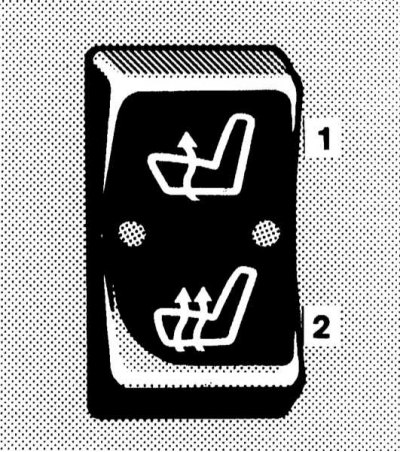
Seat heating mode switch
1 - Normal heating
2 - Accelerated heating
Activation of the normal mode is accompanied by the activation of one of the two control LEDs built into the switch. During accelerated heating, both LEDs light up.
The heating is switched off as follows: if one built-in control LED is lit, you should press the upper part of the corresponding switch key, two - the lower part. Automatic switching off of the heating elements occurs according to the timer signal after approximately 30 minutes of continuous operation of the heating elements.
Note: The seat heating is also switched off if the charging system is overloaded or the battery charge level is insufficient - in this situation, one or both control diodes (depending on the selected heating mode) switch to flashing mode. After the overload is removed (disconnection of unnecessary electricity consumers) the seat heating will be activated automatically.
Switch for controlling the operation of the electric drive of the outside rear-view mirrors
The switch is located in the upper left corner of the third section from the top of the center console, to the left of the selector lever (AT)/gear shift knob (RCPP).
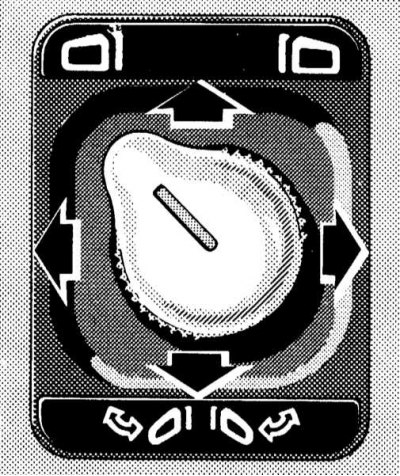
Driver's door exterior rearview mirror position adjustment mode
 Adjusting the driver's mirror
 Adjusting the passenger mirror
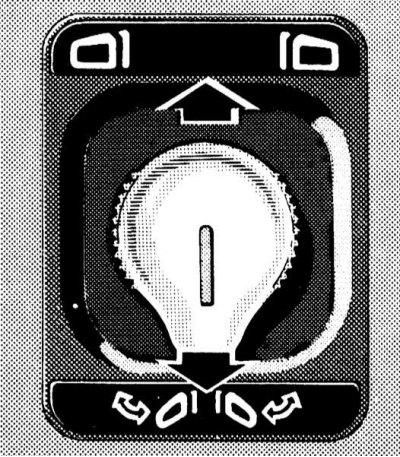
Mirror folding/unfolding mode
The switch has a joystick design and is equipped with a rotary handle, which is used to select the mirror to be adjusted, as well as the operating modes of the electric drive (adjustment/folding).
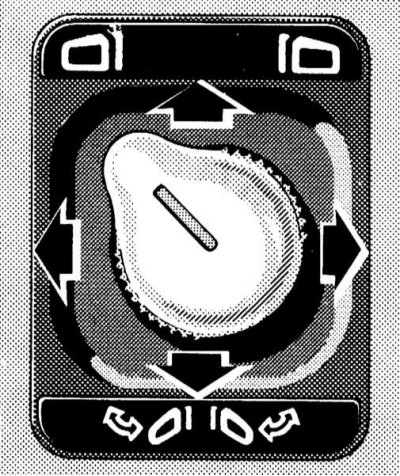
To switch to the mirror adjustment mode, turn the rotary handle with the nose in the direction of the corresponding pictogram, then perform the actual adjustment by moving the joystick in the corresponding direction
To fold the mirrors while parking or before washing the car, turn the rotary handle with the tip down and press the joystick down - both mirrors will be pressed against the windows of their doors. To unfold the mirrors, press the joystick up.
Note: To avoid vibration of the mirrors, unfold them fully while driving. The selected position of the outside rearview mirrors can be stored in the memory of the on-board processor together with the data on the positions of the steering column/wheel and seats (see section Seat adjustment).
Main switches for controlling the operation of the electric window lifters
Four individual switches for controlling the operation of the electric door window lifters are located on the center console to the right and left of the selector lever (AT)/gear shift knob (MT) assembly.
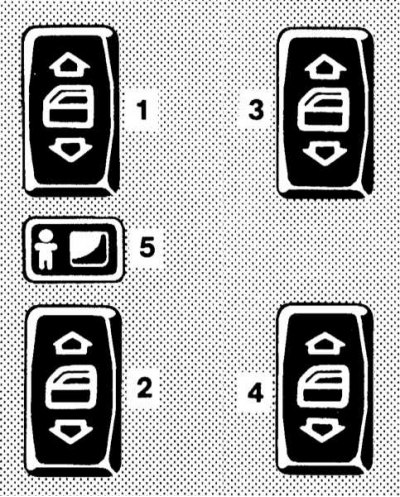
Main switches for controlling the operation of the electric window lifters
1 — Driver's door window regulator activation switch
2 — Right front door window regulator activation switch
3 — Left rear door window regulator activation switch
4 — Right rear door window regulator activation switch
5 — Button for blocking activation of rear door window regulators from individual door switches
Each switch allows you to activate the drive of the window regulator of the corresponding door. The slider located between the switches of the left doors allows, if necessary, to block the ability to activate the rear door window regulators from individual door switches by moving it to the right - a pictogram with an image of a man should open.
The operation of the window lifters is only possible in positions 1 or 2 of the ignition switch, as well as in position 0 with any of the front doors of the car open.
To lower the glass, press the lower part of the corresponding switch key. To raise the glass, press the upper part of the key.
The design of the drive of the front door window regulators also allows for automatic transfer of the windows to the extreme upper or lower position. To activate the automatic window lifting/lowering function, press the corresponding side of the switch, overcoming the resistance point, then release the button - the window will move to the extreme upper/lower position. The automatic window lift drive can be stopped by pressing the corresponding side of the button again.
Note: If an obstruction occurs when lifting the glass at the top of its stroke, the regulator movement process is suspended, after which the glass moves down slightly.
When the on-board power supply is disconnected, the automatic window up/down function is deactivated. To restore it, raise the window to the stop and continue to hold the upper part of the corresponding switch button pressed for about 1 more second.
Note: The door windows can also be closed using the remote control of the single lock (see Single lock).
Parktronic System (PTS) Switch
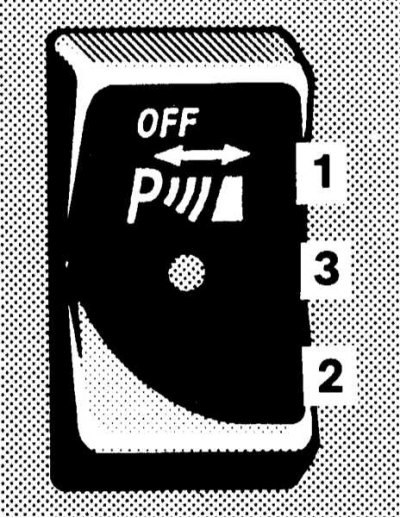
Parktronic system switch
1 - PTS off
2 - PTS is on
3 — Control LED
The PTS deactivation key switch is located directly below the selector lever (AT)/gear shift knob (MT) and is equipped with a built-in indicator LED that is activated when the system is deactivated.
PTS is reactivated automatically when the ignition key is turned to position 2.
Note: Connecting the trailer wiring to the towbar will automatically disable the PTS.
Rear window horizontal/vertical blind operation control switch
The switch for controlling the operation of the electric rear window blind is located on the center console, on the right under the selector lever (AT)/gear shift knob (RCP).
The drive only functions in positions 1 or 2 of the ignition key.
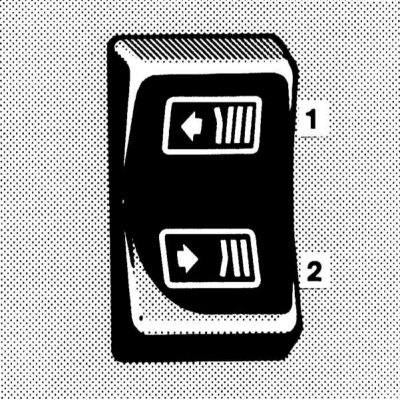
Rear window horizontal blind electric drive control switch
1 - Close
2 - Open
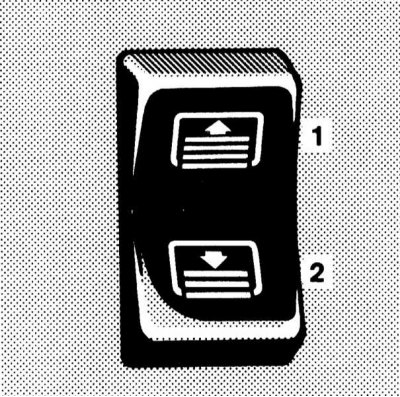
Switch for controlling the operation of the electric drive of the vertical (lifting) rear window curtain
1 - Raise
2 - Lower
To close the curtain, press the upper part of the switch key; to open it, press the lower part.
Trip computer
Control Panel
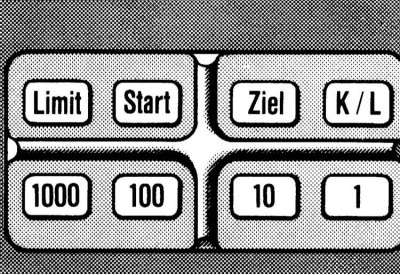
The trip computer control panel is located on the central console of the vehicle, directly under the selector lever (AT)/gear shift knob (RCPP).
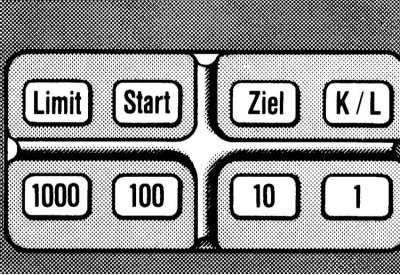
Trip computer control panel
The panel consists of three functional buttons:
 (Limit),
  (Start) and
  (Target), one K/L data access switch button (K = short distance memory, L = long distance memory) and four digital value entry buttons: 1000, 100, 10 and 1.
Display
Note: On models without a trip computer, the display assembly is replaced by a compartment for glasses.
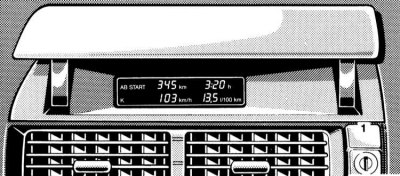
Trip computer data output display
1 - Lid opening button
The data output display is located in the central part of the instrument panel, directly above the assembly of the ventilation/heating systems of the passenger compartment and is equipped with a lifting cover, where on models without a computer there is a compartment for glasses.
To open the display screen, press the button
Note: Lowering the display lid does not stop the computer from operating - the maximum permissible speed of movement (Limit) continues to be monitored.
The computer is activated when the ignition key is turned to position 2 - the message "AB START" will be displayed on the display screen (Since the start) and the letter "K" for short distance memory.
Speed Limit Control Function (Limit)
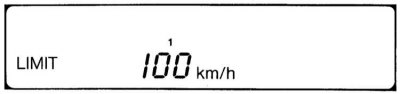
Click on the button
 press and hold it down until the beep sounds (the corresponding text will appear in the left corner of the display, then use the numeric buttons to enter the value of the vehicle's speed limit, which will be controlled by the computer.
To confirm your entry, briefly press the button again
 From now on, the computer will monitor compliance with the maximum permissible speed of the vehicle, notifying the driver of its excess by issuing a visual signal (indication on the display screen) and sound (gong, lasting about 4 seconds) signals. To turn off the gong, simply press any of the buttons on the trip computer control panel - the gong is activated automatically when the key is inserted into the ignition switch.
Note: When entering a speed limit below 10 km/h, the alarm gong is blocked.
Unlock: Press the button briefly
 .
.
Function of monitoring route parameters from the moment of start (
 )
)
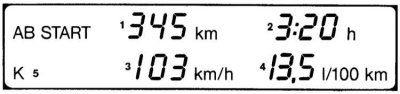
This function allows you to track route parameters such as the distance traveled since the start, travel time, average speed and average fuel consumption.
The mode is activated using the button
. Calculation of parameters can be performed in two independent modes: short distance mode (K) and long distance mode (L). Switching between modes is performed using the K/L button - the corresponding letter is displayed in the left corner of the display screen.
To reset the data, press the button "
 " until the sound signal is heard.
Note: If after stopping the vehicle the key is inserted into the steering wheel lock again and turned to position 2, the short distance memory is reset - the message "AB START" and the letter "K" will flash on the display. The monitoring data of the last trip is saved as long as the message "AB START" and the letter "K" continue to flash (over a distance of no more than 2 km). To do this, briefly press the button
Function for calculating the parameters of a route of a given length (Ziel)
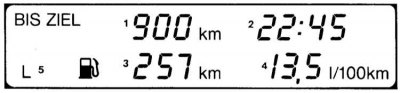
This function allows you to track route parameters such as the distance to the selected destination (entered by the user), estimated time of arrival, cruising range and average fuel consumption.
Calculation of parameters can be performed in two independent modes: short distance mode (K) and long distance mode (L). Switching between modes is performed using the K/L button - the corresponding letter is displayed in the left corner of the display screen.
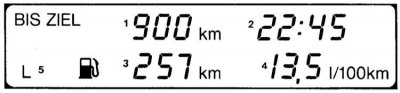
To enter the distance to the intended target, press the button
 and hold it down until you hear a beep (the message "BIS ZIEL" will appear on the display screen, and the letter L will appear in the lower left corner.
Next, using the digital buttons, enter the length of the route, the parameters of which will be tracked by the computer. To confirm the entry, briefly press the button again
 .
.
Note: Resetting average fuel consumption data is possible in the "Start" mode.
When setting the time of the clock built into the instrument cluster (see section Instrument cluster, gauges and control lamps and indicator lights) the current time is automatically displayed on the screen. The clock is used to calculate the arrival time. To turn off the clock display, press any of the function buttons (
,  or
or  ).
).
Individual switches for controlling the operation of the rear door electric windows
The key switches are built into the rear door armrests. Their operating principle is similar to that described above for the corresponding main switches (see Instrument cluster, gauges and control lamps and indicator lights).
Protecting rear view mirrors from blinding the driver with reflected light
Driver's door exterior rearview mirror with automatic anti-glare protection
The protection is activated automatically when the ignition key is turned to position 2 - the mirror switches to the appropriate mode depending on the angle of incidence of light rays on its reflective surface.
Note: The safety switch will only activate if there is unobstructed light reaching the sensors mounted in the mirror. This may not be the case when towing a trailer or closing the rear window blind.
Note: When reverse gear is engaged or the interior lighting is activated, the mirror anti-glare protection is blocked.
Switching modes of the interior rearview mirror
Mirror with manual switching
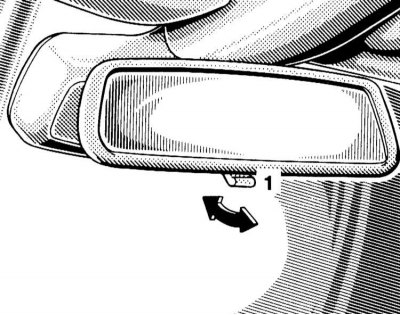
The interior rearview mirror with manual switching has two fixed positions: day and night. Switching is performed using a lever mounted in the lower part of the spherical support of the mirror.
Mirror with automatic protection
The operating principle of the automatic protection of the interior mirror is similar to that described above for the outside mirror of the driver's door.
Ashtrays and cigarette lighters
The ashtray assemblies with cigarette lighters are mounted in the front section of the central console and in the trim panels of the rear doors of the car and have an almost identical design.
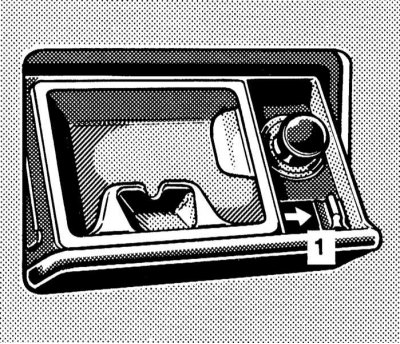
To slide the ashtray/cigarette lighter out of the console panel/door trim panel, press the top edge of its cover - when you release the cover, the assembly will automatically slide out of the panel.
 |
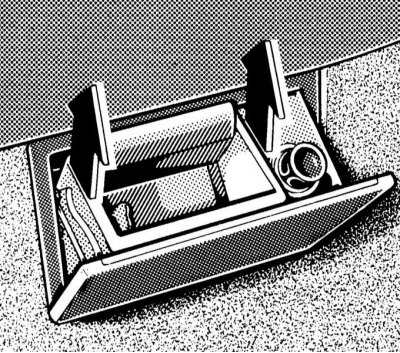 |
To remove the ashtray receiving element for cleaning, press the locking tab - having thus released the lock, remove the element by pulling it upwards.
Note: On models with the appropriate equipment, move the AT selector lever to the "N" position before removing the console ashtray receptacle.
The use of cigarette lighters is only possible in positions 1 or 2 of the ignition key.
To activate the cigarette lighter, simply press its button into the socket until it stops - after the heating element has warmed up, the button will automatically pop out to its original position.
Note: Never press the cigarette lighter button by force! If the cigarette lighter button does not pop out after being pressed for more than 30 seconds, the car should be taken to a service station to have the fault eliminated. After use, do not forget to return the button to the socket (to avoid clogging the latter).
The cigarette lighter socket can be used to connect external power consumers (pump, radiotelephone charger, vacuum cleaner), designed for 12 V power supply and with a power consumption of no more than 120 W.
Interior lighting
Main cabin lights and front navigation lights
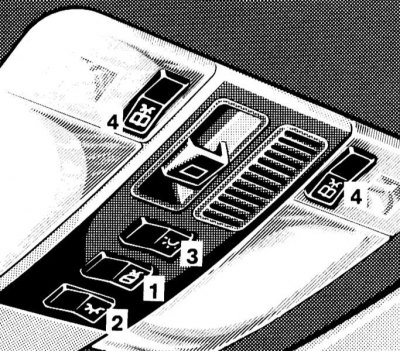
Main control panel for interior lights/electric sunroof operation
1 — Switch for activating interior lighting when opening doors
2 — Main interior light switch
3 — Rear interior lights switch
4 - Front directional light switches (navigation lamps)
The main control panel for the interior lights/electric sunroof is mounted in the overhead console assembly of the vehicle.
Using the middle of the three key switches

the activation mode of the interior lighting is switched on/off when the doors are opened. In position B of the switch, the interior lights are activated automatically when any of the doors is opened; in position A, such activation does not occur. In the automatic activation mode, the lights are switched off automatically by a timer signal when the doors are closed or when the ignition is turned on.
Note: If none of the doors are opened when the vehicle is unlocked from the outside, there will be a time delay before the lights are activated.
Front switch
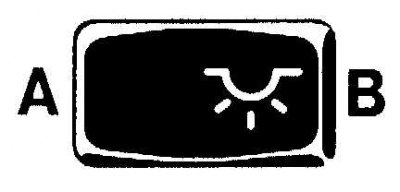
allows for forced switching on (B)/switching off (A) of the main interior light.
Rear switch
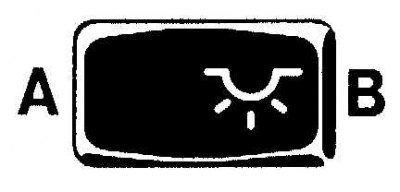
serves to switch on (B)/off (A) the rear interior lights.
Note: It is not possible to switch off the rear interior lights if any of the rear doors are open.
Using two side switches
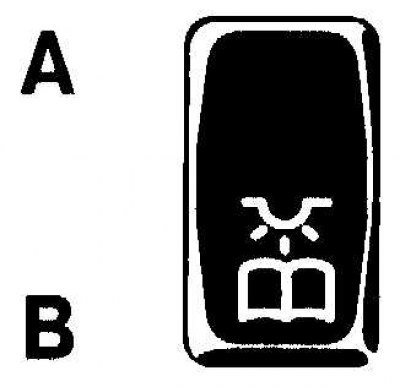
the front directional lights are switched on (navigation lamps). In position B of the switch the lamp is on, in position A it is off.
Rear directional lights (reading lamps)
Activation of rear directional lights (reading lamps) is carried out using built-in push-button switches. To turn off the lamp, press the button again.
Door sill lights when opening doors
The lights are activated automatically by contact switches.
Control of the operation of the electric drive of the upper hatch cover
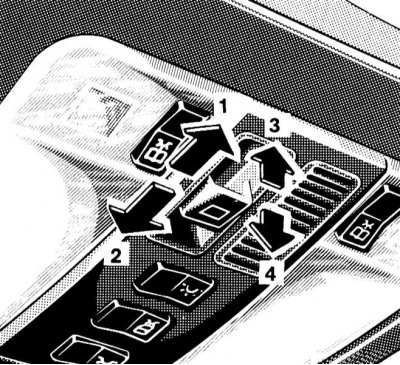
Operating principle of the switch controlling the operation of the electric drive of the upper hatch
1 - Move
2 - Push in
3 - Raise
4 - Lower
The control switch for the operation of the electric lift-and-slide sunroof is located on the overhead console.
The electric sunroof drive operates only in positions 1 or 2 of the ignition key, as well as in position 0 with any of the front doors of the vehicle open.
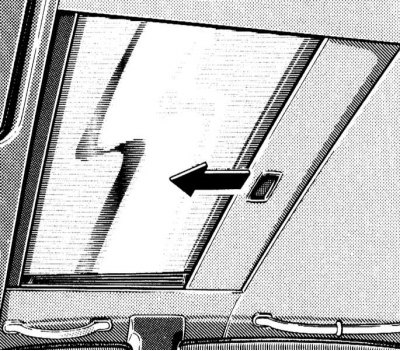
The glass hatch cover is equipped with a sunshade that can be opened and closed manually.
Note: When the sunroof is moved to the open position, the shade also moves.
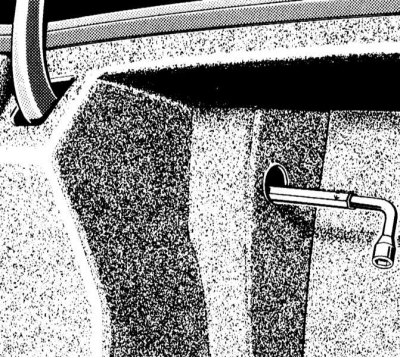
In case of failure of the electric drive, it is possible to close the hatch cover manually. Access to the mechanical drive is provided from the left side of the luggage compartment. Insert the Allen key equipped with a handle into the hole in the side trim, turning the key clockwise allows you to close the shifted hatch cover, counterclockwise - lowers the raised one.
Sun visors
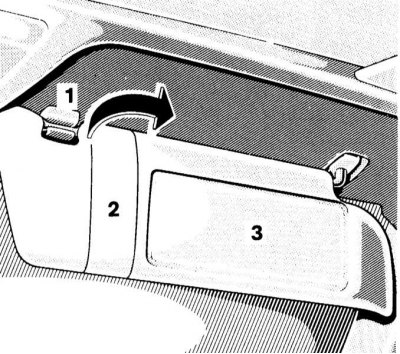
Sun visors provide protection for the driver/front passenger's eyes from glare from direct sunlight both from the front and from the sides.
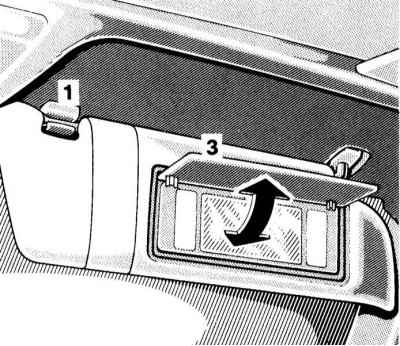
The passenger sun visor additionally has a vanity mirror with a hinged cover. Opening the mirror cover when the ignition is on (key in position 1 or 2) causes the mirror backlight to be activated.
Rear vanity mirror
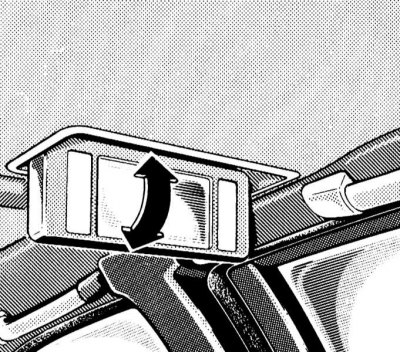
The rear vanity mirror is built into the roof trim. To lower the mirror, press lightly on its cover.
Storage boxes
The main storage compartment is located on the right side of the instrument panel and is equipped with a lock. The lock latch can be released using a special button located directly under the lock cylinder, to the right of the central air vents of the instrument panel.
On models not equipped with a trip computer, a compartment for storing glasses is located directly above the central instrument panel deflectors.
Note: On models with a trip computer, the data display is located here. The compartment lid is locked with the same lock as the glove box, the latch of the lock can be released using the button located directly above the lock cylinder.
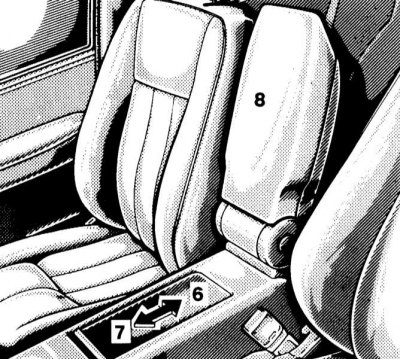
Console storage box
6 - Open
7 - Close
Another storage compartment can be equipped in the center console assembly, under the armrest between the front seats of the car - lift the armrest, then open the sliding cover of the compartment.
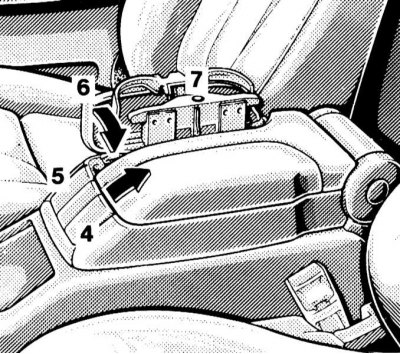
Console armrest with mobile phone storage compartment and fold-down cup holder panel
4 — Mobile phone storage compartment cover release button
5 — Cup holder panel latch release button
6 — Cup holder panel
7 — Release button for the cup holder panel in the expanded position
Some models have a lidded compartment for storing a mobile phone and a folding panel with cup holders instead of a console box - when folded, the assembly forms an armrest.
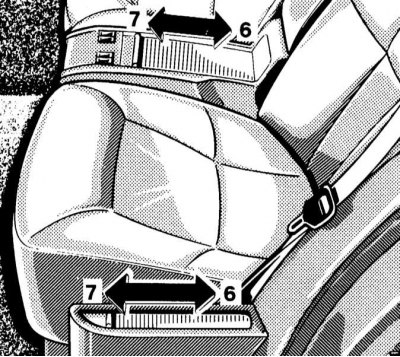
Rear storage compartments
6 - Open
7 - Close
Boxes of similar design (with sliding lid) are also provided in the rear of the cabin.
First aid kit
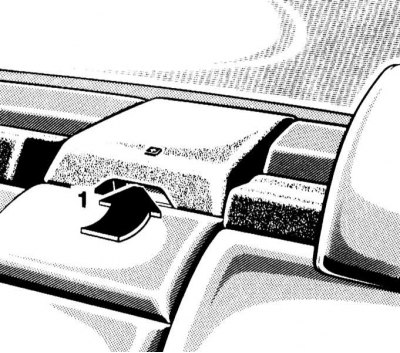
Rear storage compartments
1 - Recess for prying off the lid
The standard first aid kit is located in the rear shelf of the passenger compartment and has a hinged lid. To open the lid, pry it up by the specially provided recess. Periodically check the completeness of the contents of the first aid kit.
Fire extinguisher
A standard place for attaching a fire extinguisher is equipped on the front side of the driver's seat cushion. After each use, the fire extinguisher must be refilled. The fire extinguisher must be checked every 1-2 years.
Removal and installation front seat headrests
To remove the headrest raised to its highest position, press the lock release button (1).
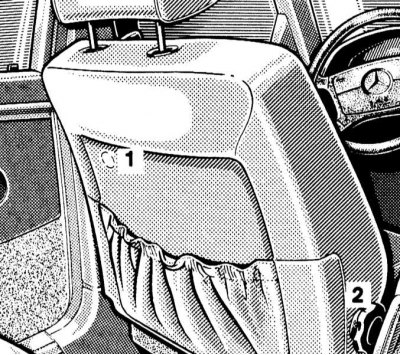
1 — Lock release button
2 — Handle of mechanical headrest drive (pull out)
The differential for removing the head restraints with manual adjustment should be rotated by the extended handle of the mechanical drive (see section Seat adjustment) until the headrest is in the extreme upper position, then remove it manually, after pressing the lock release button.
On models with an electric drive, the procedure is similar, the only difference being that the head restraint is moved to the upper position using the corresponding door switch (see section Seat adjustment).
Installation is carried out in reverse order.
Removal and installation the rear bench seat cushion
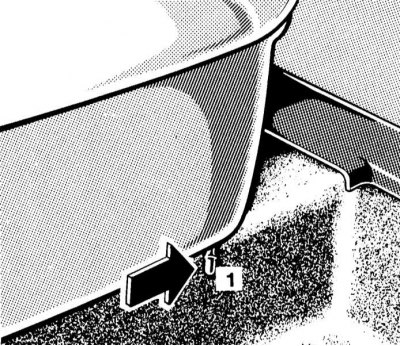
Press the locking levers located at the bottom edge of the cushion outward, then lift the front edge of the cushion.
When installing the cushion, make sure that its rear edge is pushed under the backrest until it stops. Press the front edge and snap the fasteners into place.
Transportation of skis
Transporting skis in the car
Note: The protective cover is designed for one pair of skis.
Some models have a cover-equipped window in the back of the multi-seat rear seat for direct access to the luggage compartment, which allows you to easily transport long sports equipment such as skis, etc. in the car.
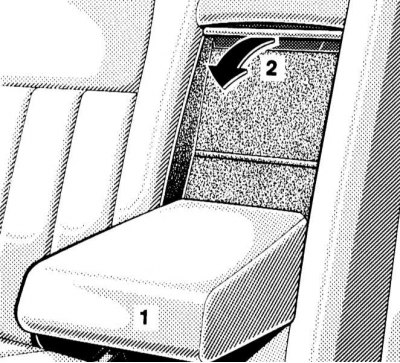
Lower the rear armrest and the folding cover.
Pull the ski bag folded under the lid into the car interior.
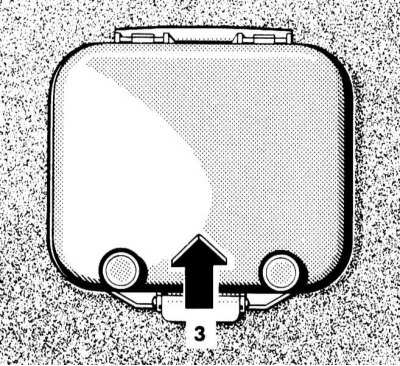
From the luggage compartment side, lift the access hatch cover; the cover is held in the raised position by two magnets.
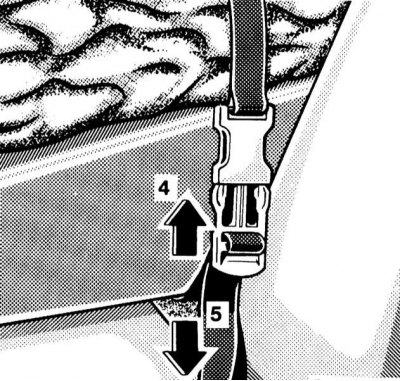
Tuck the skis into the bag and use straps to secure the bag to the rear seat armrest.
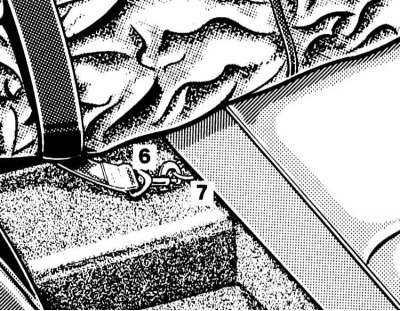
After tightening the belt, snap the safety carabiner into the special loop.
The cover is folded in reverse order - do not forget to close the access hatch in the luggage compartment.
Attention! Removing and installing the ski bag assembly
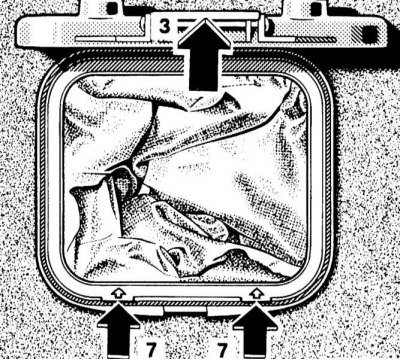
If necessary, the ski bag can be removed from the back of the rear seat (for example, for cleaning or drying), and the freed up space is used as an additional storage compartment. Lift the access hatch cover and secure it with magnets, press the locking tabs marked with arrows in the hatch trim, then remove the cover frame by pulling it back from the seat back. Installing the cover back is done in the reverse order - the upper edge of the frame is fixed in a special hole in the upper side of the opening. Make sure that the lower fasteners are securely snapped into place.
Transporting skis on the roof of a car
To transport skis on the roof of the car, you can use the standard roof rack or a special ski holder of the proprietary Mercedes-Benz design.
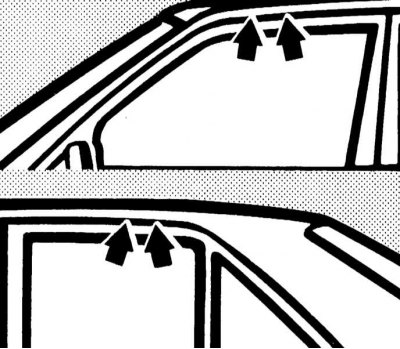
Attach the rack/holder only to the standard mounting points, strictly following the manufacturer's instructions.