



Contents: Combined steering column switch ↡ Switches and controls located on the…↡ Instrument cluster console section…↡ Switches and controls located on the…↡ Switches located on the door panels ↡ Switches and controls located on the…↡
Combined steering column switch
Switching headlight operating modes, high beam signaling
Note: Activation of high beam in permanent mode is only possible when the low beam headlights are on (see below).
Using the steering column switch, you can switch the headlights from low beam to high beam mode - push the lever away from you - the corresponding indicator lamp with a characteristic blue glow should automatically light up on the instrument panel (see Section Instrument cluster, gauges, control lamps and indicator lights). To turn off the high beam, return the lever to its original position.
Switching headlight operating modes
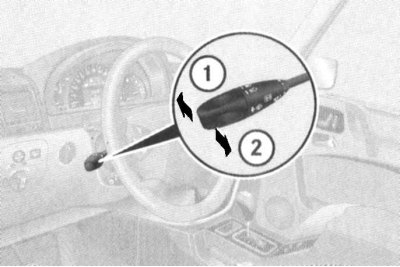
1 - "High beam" position
2 - High beam signaling
It is also possible to signal with high beams: signaling is carried out by pulling the steering column switch lever towards you and regardless of the selected position of the handle for selecting the operating mode of the external lighting devices (see below).
Note: High beam signaling can be performed even when the ignition is off.
Activating the direction indicators
The direction indicators are activated by pressing the stalk switch in the appropriate direction. The stalk is moved up or down, depending on the selected direction of course change.
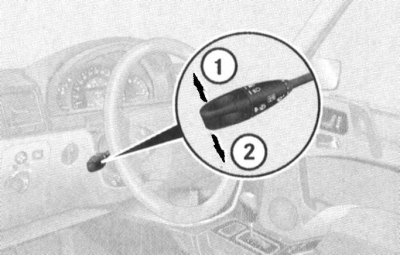
1 - Activation of right turn signals
2— Activation of left turn signals
When the lever is moved to the extreme (until it clicks) upper/lower position, the corresponding turn signals will continue to function until the steering wheel is returned to the straight-ahead position (the limit switch will trip), or until the lever is forcibly returned to the neutral position.
Note: To briefly turn on the indicators, for example when you intend to change lanes, simply pull the lever up or down slightly.
Controlling the operation of the windshield wipers/washers
Note: Windscreen and headlight lens wipers and washers can only be activated when the ignition is on (key in position 1 or 2).
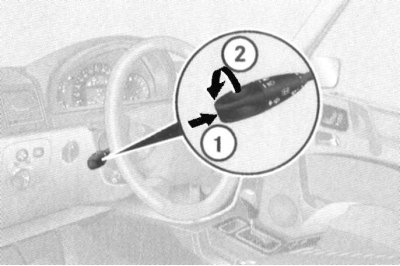
1 - Single activation of windscreen wipers/supply of washer fluid
2 — Activation/selection of windshield wiper operating mode
The windshield wiper operating mode is selected by rotating the rotary handle of the switch lever:
0: Off
I: Interval mode (the duration of the pause is determined by the readings of the rain sensor; when the car stops and the front door is opened, the windshield wipers stop moving in order to prevent the wiped moisture from getting on the clothes of the driver/passenger leaving the car)
II: Normal high-speed continuous windshield wiper mode
III: High speed continuous wiper mode (when the car stops, it automatically switches to normal mode)
A single operation of the windscreen wipers can be achieved by briefly pressing the switch handle.
The washer fluid supply is activated by pressing the switch handle (1) until the resistance point is overcome - the washer fluid supply is accompanied by several strokes of the windscreen wipers.
Note: When the vehicle comes to a complete stop and one of the front doors is open, the intermittent operation of the windshield wipers is suspended, which prevents moisture from being wiped off by the brushes from getting on the clothes of the driver/passenger entering or leaving the vehicle.
Steering column switch for controlling cruise control/Speedtronic variable speed limiter
The lever switch for controlling the cruise control is located on the steering column above the combined steering column switch (see illustration Layout of control components on the instrument panel and steering column).
A detailed description of the principles of managing the functioning of the tempostat is given in Section Speed control systems (Tempostat/Speedtronic).
Steering wheel position adjustment/heating switch
Adjusting the position of the steering wheel
Caution! To avoid losing control over the steering wheel, the steering wheel position must never be adjusted while driving!
The steering wheel adjustment lever switch is located on the left side of the steering column below the combination stalk switch (see illustration Layout of control components on the instrument panel and steering column). Adjustment can be made for another 30 minutes after removing the key from the ignition switch, provided that the driver's door is open.
Turn on the ignition or open the driver's door.
The column length is adjusted by pushing/pulling the lever forward/backward. To adjust the height of the steering wheel, the lever should be moved up or down in the vertical plane.
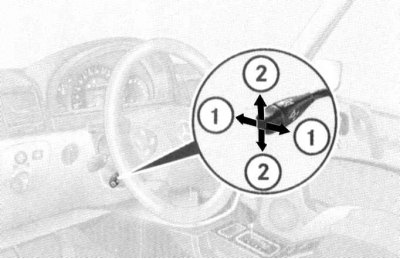
1 - Adjusting the length of the steering column projection
2 - Adjusting the height of the steering wheel
The selected steering wheel position is entered into the processor memory at the same time as the driver's seat position is memorized.
Heating
Note: The steering wheel heating only functions in positions 1 and 2 of the ignition switch.
At the end of the lever is a rotary handle for activating the steering wheel heating, equipped with an integrated control lamp. Turning the handle in the direction of the arrow (1) activates the heating elements built into the leather-covered segments of the steering wheel rim - at the same time, the control LED (3) is activated. To switch off the heating, turn the handle in the opposite direction.
Note: Automatic switching off of the steering wheel heating is not included in its electrical circuit.
Activating/deactivating the steering wheel heating
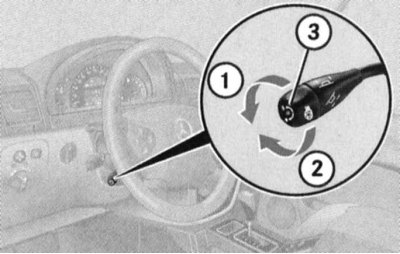
1 - Turn on
2 - Turn off
3 — Control lamp
Steering column switch for controlling the Linguatronic system
Lever switch for controlling the operation of the Linguatronic system (voice control of certain comfort functions) is placed on the right side of the steering column (see illustration Layout of control components on the instrument panel and steering column).
Voice control is provided in German, and a description of the operating principle of the system is provided in a separate manual.
Horn activation button
The horn button is built into the steering wheel hub (see illustration) Layout of control components on the instrument panel and steering column).
On-board computer control panels/audio system volume control
The control panels are mounted on the sides of the steering wheel hub and are equipped with push-button switches for selecting modes and switching functions of the on-board computer/audio system control (see illustration Layout of control components on the multifunction steering wheel). See below for details.
Switches and controls located on the instrument panel
Left Switch Panel
Door rear view mirror adjustment switch group
The exterior rear-view mirrors have a spherical design, which allows for a wider field of view.
The mirror heating is activated automatically depending on the outside temperature.
The rear view mirrors also feature automatic dimming (both external and internal) when the headlights of other road users hit the sensors built into the mirror assemblies (the ignition must be on).
Note: Mirror dimming is not activated when the interior lighting is on, or when reverse gear AT ("R") is selected.
A group of three switches for adjusting the outside rearview mirrors is located in the upper left corner of the panel. Adjustment is made using a rotary control switch, directly below which are two push-button switches for selecting the mirror to be adjusted.
Adjusting the door rear view mirrors
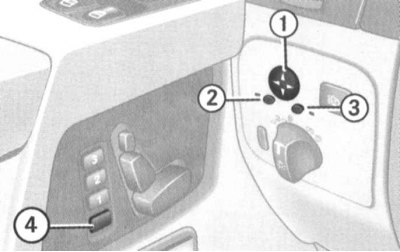
1 - Rotary control switch
2 — Left mirror adjustment selector switch
3 — Right mirror adjustment selector switch
4 — Processor memory access button (for recording)
The recording of the selected position of the rear-view mirrors into the processor memory is carried out simultaneously with the recording of the adjustment parameters of the front seats.
The system design allows recording the parking position of the right door rearview mirror. Park the car stationary at the edge of the road and leave the ignition on. Make sure that the corresponding function is activated ("ON") in the trip computer settings (function "MIRROR SETTING WHEN PARKING" in the submenu "CONVENIENCE") (see below), adjust the right door mirror so that it reflects the curbstone and the rear wheel of the car, then press the processor memory access button and press the rotary switch for approximately 3 seconds to control the electric drive of the mirrors down - the mirror should not measure its position, otherwise the procedure should be repeated. Now, before starting to park the car, it will be enough to engage reverse gear ("R") and press the corresponding button of the selector switch for adjusting the right door mirror. The mirror returns to its original position automatically approximately 10 seconds after disengaging reverse gear, when the driving speed reaches 10 km / h, and also when pressing the selector switch for activating the electric drive of the right door mirror.
Headlight washer switch
Note: The headlight washers can only operate when the ignition is on.
The headlight washer activation switch is located in the upper right corner of the left switch panel. When the button is pressed briefly, a jet of windshield washer fluid is sprayed onto the headlight lenses under high pressure.
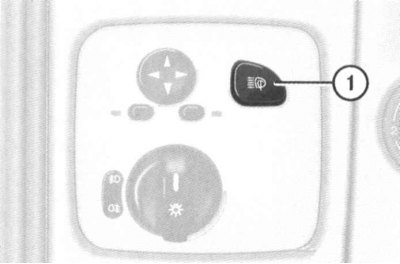
Headlight washer activation switch (1)
Switch for selecting the operating mode of external lighting devices
The rotary switch handle is located at the bottom of the left switch panel. Using the switch, one of the following operating modes of the external lighting devices can be selected:
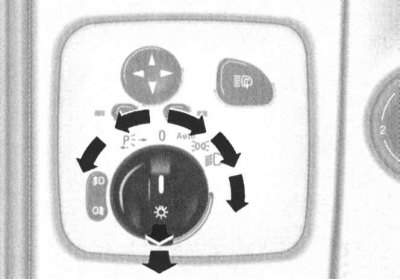
Switch for selecting the operating mode of external lighting devices
 — Lights are off. If the trip computer is set to activate the daytime running lights (DRL) mode, starting the engine will automatically activate the running lights (dimensions, low beam, license plate light).
Attention! In countries where DRL activation is legally accepted, disabling this function should not be done!
 — Automatic selection of the operating mode of lighting devices depending on the lighting conditions: the side lights will be activated in position 1 of the ignition key, low beam headlights and license plate lighting – when the engine is running.
Attention! Blinding of the car by the headlights of oncoming traffic participants may lead to a short-term shutdown of the lighting, therefore, when driving in the dark, the automatic mode should not be used! Also remember that the fog lights are not activated in automatic mode!
 — Activation of parking lights, license plate lights and instrument lighting.
 — Activation of low/high beam, - depending on the selected position of the steering column combination switch (see above), - headlights.
 — Activation of the parking lights on the right side of the vehicle.
 — Activation of the parking lights on the left side of the vehicle.
To activate the fog lights, turn the knob to the low beam position (
 ) and pull it towards you to the first fixed position - the upper green indicator light to the left of the switch should light up
  . Pulling the handle to the second detent position also activates the rear fog light - the upper yellow indicator light to the left of the switch should light up
  .
.
Delayed switching off of external lighting
Note: Switching on/off and selecting the operating settings of the light delay function is done via the on-board computer menu system (see below).
After the engine is turned off, the following external lighting devices remain on during the dark hours of the day:
- Side lights;
- License plate light;
- Fog lights.
When the door is opened and then closed, the on-board computer starts a countdown of the selected delay. After this time, the lighting turns off.
Within the next ten minutes, this function can be reactivated by opening any of the doors. If after turning off the engine none of the doors are opened or closed, the final shutdown of the external lighting will occur after 15-60 seconds (depending on the settings entered through the on-board computer menu).
To temporarily deactivate the function, after turning off the engine, turn the ignition key to position 0, then to position 2, then back to position 0. The next time the engine is started, the function is automatically reactivated.
On-board lighting
When the on-board lighting function is enabled, unlocking the vehicle using the remote control of the single lock in the dark activates the following lighting devices:
- Side lights;
- License plate light;
- Fog lights;
- Repeaters built into the door mirrors.
The backlight turns off automatically when the driver's door is opened (except for the repeaters built into the mirrors), when the ignition is turned on, and also by timer after a maximum of 40 seconds. Opening any of the front doors leads to deactivation of only the repeater of the mirror of the same name.
Headlight Axis Tilt Regulator
The rotary knob for adjusting the tilt of the headlight optical axes is located on the left side of the instrument panel in close proximity to the steering column (see illustration Layout of control components on the instrument panel and steering column) and has six fixed positions (0, 1, 2, 3, 4 and 5).
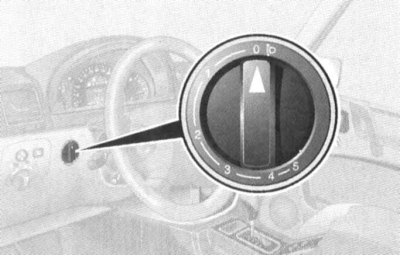
Headlight Axis Tilt Regulator
The switch is used to adjust the length of the low beam illumination zone to prevent blinding drivers of oncoming vehicles and vehicles in front.
The regulator must be set to a position corresponding to the number of passengers and the degree of loading of the vehicle (see Specifications).
Ignition Switch/Steering Column Lock
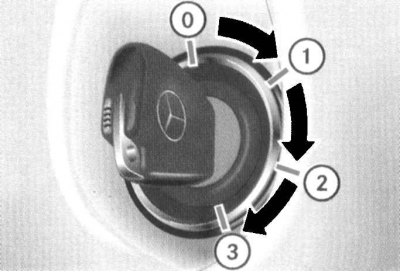
The ignition switch has four fixed positions
The ignition switch is located on the instrument panel, to the right of the steering column (see illustration Layout of control components on the instrument panel and steering column). The key can occupy one of four fixed positions in the lock:
0: Key removal/steering column lock
1: Auxiliary consumers of electricity (parking position)
2: Ignition on/Movement
3: Starting the engine
Position 0 - steering column lock
The key can be inserted into or removed from the lock only in this position. When the ignition key is turned from position 0 to position 1, the steering column is unlocked. In addition, additional conditions for allowing the key to be removed include the mandatory transfer of the AT selector lever to position "P" and the release of the foot brake pedal.
The steering column lock is activated automatically when you try to turn the steering wheel after removing the key from the ignition switch.
Steering column lock sometimes makes it impossible to turn the key in the ignition. In this situation, you should turn the steering wheel slightly in one direction or another (in order to relieve the load), while simultaneously turning the key in the lock.
Attention! Never remove the key from the ignition while driving - this will inevitably lead to the steering column locking and loss of control! Remove the key from the ignition only after the car has come to a complete stop!
Note: The ability to adjust the seats and steering column with the front door open remains for approximately half an hour after the key is removed from the ignition switch.
Position 1 - parking
In this position of the key, the operation of auxiliary power consumers is ensured (audio system, cigarette lighter, heater fan, windshield wipers, etc.).
Position 2 - ignition on/movement
The ignition key is kept in this position at all times while the vehicle is moving, as well as when the engine is idling. On diesel models, turning the key to position 2 before starting the engine activates the pre-heating system. At the same time, electrical power is supplied to all systems and additional equipment installed on the vehicle. When the key is turned from position 1 to position 2, some of the indicator lamps located on the vehicle's instrument panel are briefly switched on, confirming that the relevant systems are functioning properly (see Section Instrument cluster, gauges, control lamps and indicator lights).
Position 3 - launch
When the key is turned to this position, the starter is engaged. After the engine has started, the key should be released and it will automatically return to position 2.
Bonnet Lock Latch Release Lever
The bonnet release lever is located under the instrument panel to the left of the steering column and is painted red.
Differential lock switches
The group of differential lock switches is located in the central part of the instrument panel above its console section between the deflectors of the central air ducts of the interior heating/ventilation systems. Below the switches are yellow control LEDs for the locks being on, and above them are red indicator lights for the locks functioning (see illustration Layout of control components on the instrument panel and steering column).
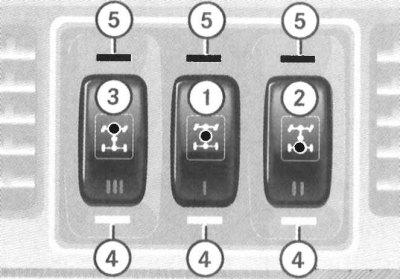
1 - Center differential lock switch; 2 - Front axle interwheel differential lock switch; 3 - Rear axle interwheel differential lock switch; 4 - Differential lock control indicators (yellow); 5 - Signal indicators of lock operation (red)
The design of the transmission line allows for a total of three differentials to be locked: the center differential in the transfer case and two interwheel differentials (in the assemblies of both bridges).
Attention! Blocking can only be done in the sequence 1→2→3!
Differential locking allows you to optimize the transmission of traction in off-road conditions when overcoming water obstacles, as well as when driving on snowy and icy roads. Differential locking also allows you to disable the ABS and ESP systems in off-road conditions. When starting off with the differentials locked, try not to press the gas pedal sharply.
Attention! Locking the front axle cross-axle differential significantly reduces vehicle controllability when taking sharp turns!
The locks should be used only at minimum speeds and in the event of. The locks should only be engaged when the vehicle is stationary.
Interaxle differential lock
The lock is activated by pressing the lower part of the push-button switch (1) - the yellow control LED at the bottom should light up, and the 4-ETS/ESP control lamp in the instrument cluster should be activated (see Section Instrument cluster, gauges, control lamps and indicator lights). At the same time, a warning about ABS disabling is displayed on the multifunction display screen ("ABS NOT AVAILABLE LOCK SELECTED"). The red control LED above the switch button only lights up after the differential locking process has been completed - the control lamps on the instrument cluster will be activated
 and
and  , - a message will appear on the display screen "DIFFERENTIAL LOCK" (The differential is locked).
Attention! Activation of the differential lock leads to automatic disabling of the ABS, ESP and BAS systems!
After the process of locking the interaxle differential is completed, the interwheel differentials can be sequentially locked, first on the rear axle, then on the front axle (see below).
Interwheel differential lock
The interwheel differentials are locked using individual switches (2) and (3) - first the yellow control LED lights up under the corresponding switch, then (after the blocking process is completed) red on top.
Disabling differential locks
To disable the lock, simply press the corresponding switch button again.
Disabling the differential lock must be done in the reverse order of their engagement, i.e.: 3→2→1!
Simultaneous disabling of all differential locks can be done by pressing the switch button (1).
The control LEDs should go out. After approximately three seconds of driving in normal mode, the ESP, BAS and ABS systems are automatically activated (control lamps
 and
and  will go out), message "DIFFERENTIAL LOCK" should also disappear from the multifunction display screen.
If after the procedure for disabling the locks the red control LEDs above the switches do not go out, you should slightly change the direction of the car by turning the steering wheel slightly - try not to create emergency situations on the road.
Instrument cluster console section switches
Hazard warning switch
The hazard warning lights are turned on using the button located in the center of the upper part of the console section of the instrument panel (see illustration Layout of control components on the console section of the instrument panel). The switch button is equipped as standard with a built-in signal lamp with a pictogram depicting two triangles inscribed within each other.
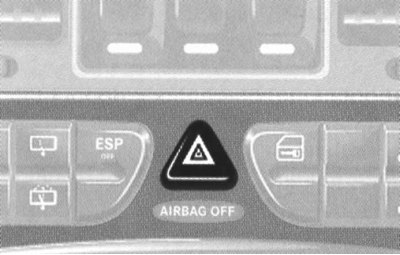
Hazard warning switch
Turning on the hazard warning lights causes all four direction indicators to come on simultaneously (and their indicator lights on the vehicle's instrument cluster). The alarm is designed to warn other road users about a forced stop of the vehicle and is also used in other dangerous situations provided for by traffic regulations. To turn off the hazard warning, press the switch button again.
Note: The hazard warning lights are activated automatically when any of the airbags are deployed.
Upper left group of switches
The upper left group of switches on the instrument panel console section includes switches for activating the driver's seat heater, activating the rear window wiper/washer, and disabling the electronic skid control (ESP) system (see illustration Layout of control components on the console section of the instrument panel).
Driver's seat heating activation switches
The buttons for selecting the operating modes of the driver's seat heating elements are mounted in the left part of the upper left group of switches of the console section of the instrument panel (see illustration Layout of control components on the console section of the instrument panel). The principle of activation/deactivation of heating is similar to that described below for the front passenger seat.
Rear window wiper/washer activation switches
Note: The rear window wiper is activated automatically if the reverse gear ("R") is engaged (see above) while the windscreen wipers are on.
Two buttons located one above the other for activating the wiper and supplying the washer fluid are located in the central part of the upper left group of switches (see illustration Layout of control components on the console section of the instrument panel). Make sure that the ignition is on. To start the windshield wiper in interval mode, press the upper push-button switch (1) - the control LED (2) mounted in the panel between the switch buttons should light up. To turn off the windshield wiper, press the same button again - the LED should go out.
Rear window wiper/washer activation switches
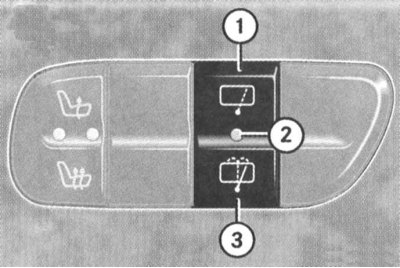
1 — Button for activating the rear window wiper in interval mode
2 — Control LED
3 — Washer fluid supply activation button
Pressing the lower pushbutton switch (3) activates the pump that supplies washer fluid to the rear window (with simultaneous activation of the windshield wiper), - after the button is released, the supply of fluid will stop, and the windshield wiper will continue to operate for about five more seconds.
Electronic Stability Program (ESP) Switch
The ESP switch is located in the center of the lower row of switches on the instrument panel console (see illustration Layout of control components on the multifunction steering wheel). The need to switch off the ESP system may arise when driving with anti-skid chains, on deep snow, sand or gravel. In this case, the engine torque is no longer controlled and the slippage of the drive wheels can have a milling effect on the ground.
To switch off the ESP, press the upper part of the switch button - the corresponding indicator lamp on the instrument cluster should light up (see Section Instrument cluster, gauges, control lamps and indicator lights).
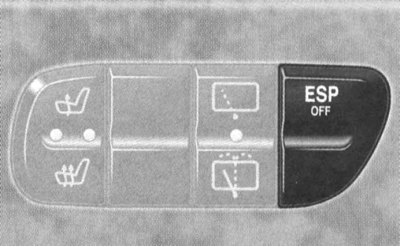
Electronic Stability Program (ESP) Disable Switch
To return to normal driving mode, simply press the bottom of the key.
Right upper group of switches
The upper left group of switches on the instrument panel console section includes switches for activating the single lock, towing protection systems, ultrasonic scanning of the interior volume, and heating of the right front seat (see illustration Layout of control components on the console section of the instrument panel).
Single lock activation switch
It is possible to control the operation of the lock actuators using a key switch mounted in the upper right corner of the console section of the instrument panel (see illustration Layout of control components on the console section of the instrument panel).
The fixed switch of the single lock is placed on the panel of the central console of the car
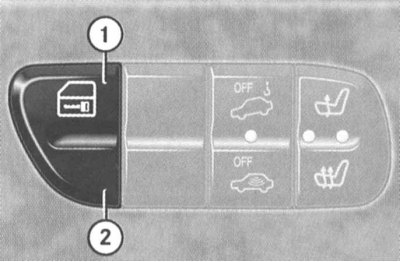
1 - Lock button
2 - Lock release button
Note: If the locks were locked using the remote control, unlocking them using the console switch is not possible. Locking the locks using the console switch can only be done when all the vehicle doors are tightly closed.
Switches for activating special modes of anti-theft alarm (towing protection and ultrasonic scanning of the interior)
Location of the control LED for activation of the anti-theft system and switches for special modes of the anti-theft system (see also illustration Hazard warning switch).
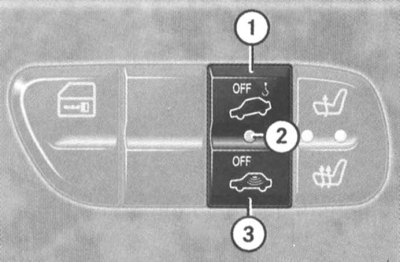
1 — Tow-away protection switch
2 — Control LED
3 — Switch for ultrasonic control of internal volume
Right front seat heating activation switches
Note: The driver's seat heating control principle is similar to that described below; the heating element activation buttons are located symmetrically in the upper left group of switches on the console section of the instrument panel (see above).
The buttons for selecting the operating modes of the heating elements of the right front seat are mounted in the right part of the right upper group of switches of the console section of the instrument panel (see illustration Layout of control components on the console section of the instrument panel).
Make sure the ignition is on.
The upper button activates the normal heating mode - one red control LED lights up. The lower button activates the accelerated seat heating - both red control LEDs light up.
Seat heating mode switches
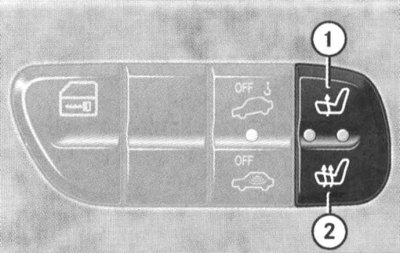
1 - Normal heating
2 - Accelerated heating
To turn off the heating, press the top button until both control LEDs go out.
Note: The seat heating is also switched off if the charging system is overloaded or the battery charge level is insufficient - in this situation, one or both control diodes (depending on the selected heating mode) switch to flashing mode. After the overload is removed (disconnection of unnecessary electricity consumers) the seat heating will be activated automatically.
Air conditioning system control panel
See Section Comfort devices.
Control panel for the operation of the audio system/combined audio-telephone-navigation system COMAND
Please refer to your vehicle owner's manual.
Switches and controls located on the center console
The central console of the car contains controls such as the AT selector lever and the parking brake lever, as well as switches for controlling the independent heating/ventilation system and the additional heater (diesel models) and switching transfer case modes (see illustration Layout of AT control components on the center console).
Selector lever AT
See Section Starting the movement and switching the automatic transmission.
Independent control switch for the operation of the interior heating/ventilation system
See Part Comfort devices.
Switch for controlling the operation of the additional heater.
Location of auxiliary heater key switch on vehicle center console assembly (diesel models only)
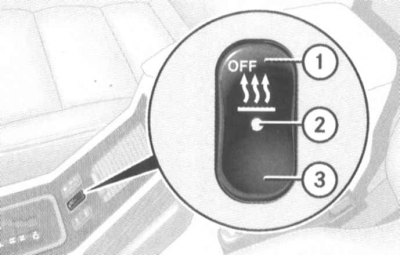
1 - Press to deactivate the independent heater
2 — Control LED (the system is activated)
3 - Press to put the heater into standby mode for automatic activation
Transfer case mode switch
Warning! When parking, never leave the transfer case in "N" mode - this habit is associated with the risk of the car rolling downhill on its own if the parking brake fails!
The transfer case is equipped with a two-stage gearbox, providing conditions for movement both in normal conditions (mode "H") and in off-road conditions (mode "L"). It is also possible to completely disable the transmission of traction force to the wheels of both axles of the car (mode "N"). In both operating modes of the gearbox ("H" and "L"), the drive is carried out to the wheels of both driving axles. At the same time, in the "L" mode, the transfer case gearbox provides transmission of increased torque to the driving wheels of the car, practically doubling the gear ratio.
Attention! Do not forget that increasing the traction force by increasing the gear ratio is always associated with an inversely proportional reduction in the vehicle speed!
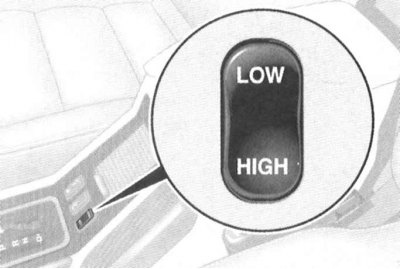
Transfer case mode switch
The transfer case mode key switch is located on the left side of the car's slanted rear center console panel. Activation of the downshift mode must be performed with the engine running, the AT selector lever set to the "N" position, and at a driving speed no more than 40 km/h. Press the upper ("LOW") part of the key - the transfer case gearbox should switch to a lower gear, which is accompanied by the letter "L" appearing in the corresponding field of the basic page of the multifunctional display of the on-board computer (see Section Instrument cluster, gauges, control lamps and indicator lights).
To return to normal driving mode (overdrive mode) you should click on the bottom ("HIGH") keys (the engine must be running, the transmission must be in neutral position, and the vehicle speed must be not less than 70 km/h), - in the corresponding field of the basic page of the multifunctional display of the on-board computer (see Section Instrument cluster, gauges, control lamps and indicator lights) the letter "H" should appear.
If switching to the multifunction display screen of the trip computer fails, one of the following messages is displayed:
- "TC SHIFT CONDITIONS NOT FULFILLED" (Transfer case switching conditions not met), - one or more switching conditions are not met;
- "TC IN NEUTRAL" (The transfer case is in neutral position), - the switching process was interrupted and the transfer case gearbox was switched to neutral position;
- "TC SHIFT ABORTED" (The gear shift process has been interrupted), - switching failed.
Please try again.
To move the transfer case gearbox to the neutral position "N", stop the vehicle, turn the ignition key to position 0 and firmly set the parking brake. Next, depress the foot brake pedal, move the AT selector lever to the "N" position, then turn the key in the ignition switch to the position 1, press any part ("LOW" or "HIGH") of the mode switch key. If switching is successful, the corresponding field of the basic page of the multifunction display (see Section Instrument cluster, gauges, control lamps and indicator lights) the letter "N" will be displayed, in addition, a message will be displayed on the screen "TC IN NEUTRAL" (The transfer case is in neutral position).
Note: Opening the driver's door of the car with the key left in the ignition and the transfer case in the "N" position will cause the alarm buzzer to sound!
Switches located on the door panels
The side panels of the front doors contain switches for adjusting the position of the front seats, and the armrests contain assemblies of switches for controlling the operation of the electric window lifters.
Front Door Assembly Switches (using the driver's license as an example)
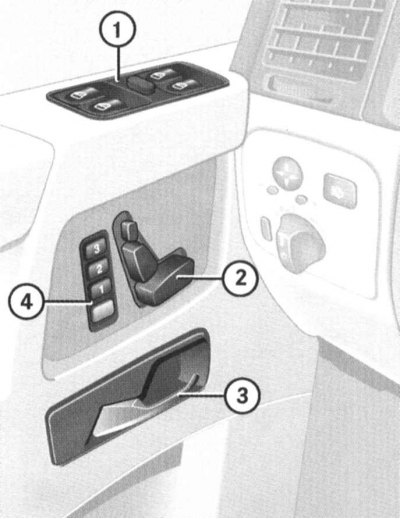
1 - Main panel of switches for controlling the operation of the electric window lifters; 2 - Driver's seat adjustment switch group; 4 - Buttons for entering into memory and recalling from memory the driver's seat/steering column/door rear-view mirror adjustment parameters; 3 - Inner door handle
Seat position adjustment/processor memory access switch group
The electric drive design allows flexible adjustments of up to five seat parameters - use the appropriate section of the switch
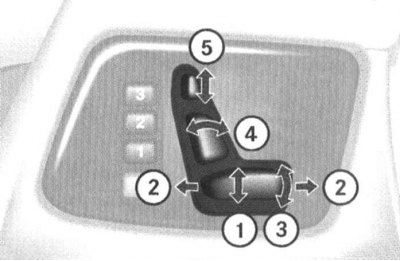
1 - Adjusting the height of the seat position; 2 - Adjusting the seat position in the longitudinal direction; 3 - Adjusting the tilt of the seat cushion; 4 - Adjusting the backrest angle; 5 - Adjusting the height of the headrest
Seat adjustment settings memorization/recall buttons
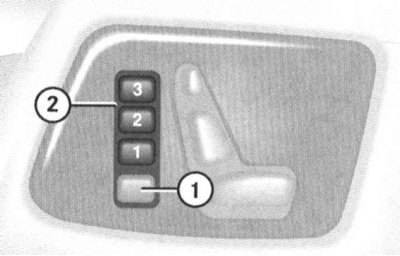
5 - Memory access button for recording
6 — Buttons for recording/calling selected parameters
The front seat adjustment switches are located on the side panels of the front doors. The electric drive can only operate in positions 1 and 2 ignition switch (on some models also in position 0 with any of the front doors open).
Switches for controlling the operation of the electric drive of the door windows
Note: The electric windows only operate when the ignition is on.
Individual switches for controlling the operation of the window lifts are located on each of the side doors of the vehicle.
The main centralized control panel for the electric window lifts of all doors is mounted in the armrest of the driver's door.
Main panel of switches for centralized control of door window lifters
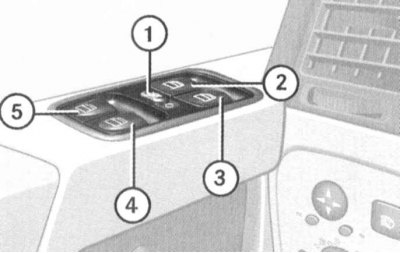
1 - Switch for blocking individual switches of rear door windows; 2 - Left front door window lifter; 3 - Right front door window lifter; 4 - Right rear door window regulator; 5 - Left rear door window regulator
Each of the switches on the main panel allows you to activate the window regulator drive for the corresponding door. The slide switch located in the center of the panel is moved to the right until the symbol appears
 allows, if necessary, to block the possibility of activating the rear door window regulators from individual door switches - a pictogram with a picture of a man should open.
To lower/raise the glass, press the button of the corresponding switch slightly in the desired direction - releasing the button will stop the glass. Pressing the switch with overcoming the resistance point leads to automatic lowering/raising of the glass of the corresponding door.
Note: If the glass encounters resistance when moving to the upper position, the electric drive of the regulator is immediately blocked, and the glass moves down slightly, and further holding down the upper part of the key will only lower the glass to the lower position.
It is also possible to lower and raise the door windows using the remote control of the single lock.
Switches and controls located on the overhead console and interior rearview mirror
Overhead console switch layout and interior rearview mirror assembly
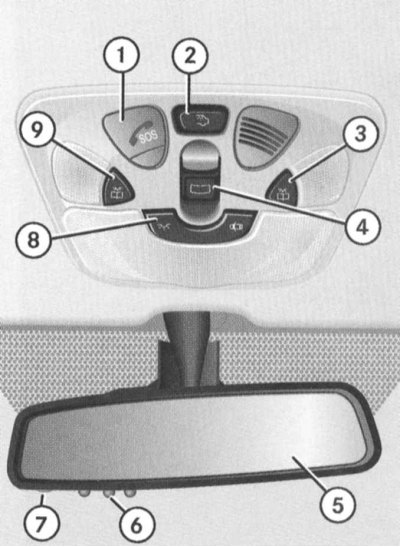
1 - Emergency call button of the TELE AID system; 2 - Luggage compartment lighting switch; 3 - Right directional individual light switch button; 4 - Switch for controlling the operation of the electric lift-and-slide sunroof (models Universal)/convertible top (convertible models); 5 - Interior rear view mirror; 6 - Buttons for controlling the operation of the transmitter of the remote drive device for garage doors; 7 - Control LED of the garage door remote drive device; 8 - Switch for selecting the operating mode of the main interior lighting; 9 - Left directional individual lamp switch button
Emergency call button of the TELE AID system
The button is intended for emergency communication with the regional rescue service dispatcher.
Information on activating and deactivating the service mode of the TELE AID system is provided in Part Comfort devices.
Luggage compartment light switch
The luggage compartment lighting is provided by a push-button switch (2) mounted in the rear part of the overhead console. The layout of the rear lights is shown below (see illustration Rear interior lights are equipped with three-position slide switches). On the Station Wagon models, the luggage compartment lighting is activated automatically when the tailgate is opened, but it is not possible to switch it off using the console switch. To avoid draining the battery when the tailgate is left open for a long time, you should switch off the lights: press the button on the lock cylinder of the outer handle of the open tailgate, then lower the latch flag. The lock is released by pressing the button on the lock cylinder again.
Caution! To avoid damaging the lock, do not attempt to close the tailgate with the latch flag down!
Procedure for switching off the luggage compartment lighting when the tailgate is open on Station Wagon models
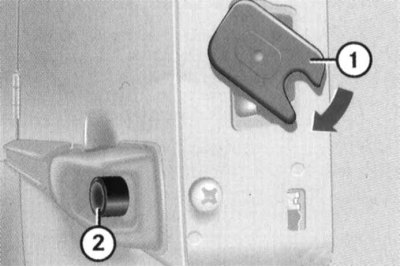
1 — Lock cylinder button
2— Latch flag
Switches for individual directional lights in front seats
Two push-button switches (3 and 9) (see illustration Switch layout diagram on overhead console and interior rearview mirror assembly) are located on the sides of the ceiling console and serve to activate the side directional lights, providing individual illumination of the driver and front passenger seats.
Switch for selecting the operating mode of the main interior lighting
Key switch (8) mounted in the front part of the overhead console (see illustration Switch layout diagram on overhead console and interior rearview mirror assembly), has three fixed positions, allowing you to select one of three modes of operation of the main interior lighting.
Automatic activation mode for interior lighting
When the switch is set to the middle position, the interior lighting (without luggage compartment) is activated automatically at night in the following cases:
- When unlocking the door locks;
- When removing the key from the ignition switch;
- When opening the doors, opening the front doors activates only the front interior lights, opening the rear doors activates only the rear interior lights, and additionally the door lighting is switched on.
Note: If the doors are left open with the key removed from the ignition, the lights will turn off according to a timer signal after approximately 30 minutes.
Closing the doors with the key removed from the ignition causes the lights to switch off slowly. To switch the lights off immediately, simply insert the key into the ignition.
Note: The slow-down function for switching off the interior lighting can be switched off by the vehicle owner via the menu system of the multi-function display of the on-board computer.
Manual control
If necessary, automatically activated lights can be forcibly switched off by pressing the right side of the switch key marked with the symbol
 .
.
By pressing the left part of the key marked with the symbol
 , you can forcibly activate the interior lighting even with the doors closed - to return to automatic mode, move the button to the middle position.
Note: Please note that the automatic switch-off function does not apply to individual directional lighting fixtures - please remember to switch them off manually after use (see above - front lights - and below - rear lights).
Upper sliding and tilting sunroof control switch (models Universal)/convertible top (convertible models)
Note: The power sunroof/soft top only operates when the ignition is on.
The control key-slide switch (4) is located in the central part of the overhead console (see illustration Switch layout diagram on overhead console and interior rearview mirror assembly).
Station wagon models with lift-and-slide sunroof
Staff management (from console switch)
To move the hatch cover, press the switch in the direction of the arrows (1 or 2).
Note: Pressing the switch beyond the point of resistance allows the hatch cover to be automatically moved to the corresponding extreme position.
Operating principle of the switch for controlling the operation of the electric lift-and-slide sunroof drive on suitably equipped Estate models
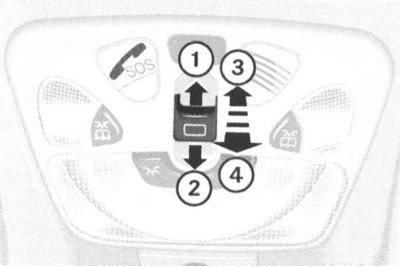
1 - Open
2 - Close
3 - Raise
4 - Lower
The lid is raised and lowered by pressing the switch in the direction of the arrows (3 and 4). The operating principle is the same as when sliding, i.e. when pressing the switch slightly, the lid will move as long as the key is held down, but to automatically move the lid to the extreme positions, you should press the switch in the appropriate direction, overcoming the resistance point.
If the electric drive fails, the top hatch cover must be closed manually (see below).
Emergency closing of the upper hatch cover
The manual sunroof mechanism is located under the left rear pillar trim panel in the vehicle's luggage compartment.
The mechanical emergency closing mechanism for the sunroof is located under the left rear trim panel of the luggage compartment.
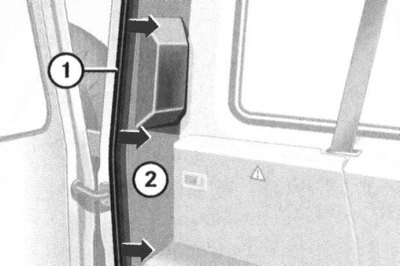
1 - Doorway seal
2 - Trim panel
Open the tailgate, remove the seal from the corresponding side of the door opening and the left rear pillar trim panel.
Note: On models equipped with additional storage compartments, it is necessary to first remove the screws securing the rear trim panel of the additional compartment.
Remove the socket wrench from the on-board tool kit, place it on the drive shaft of the mechanism and begin to rotate it in the appropriate direction using a screwdriver.
The manual drive mechanism of the upper hatch is activated using the socket wrench from the on-board kit.
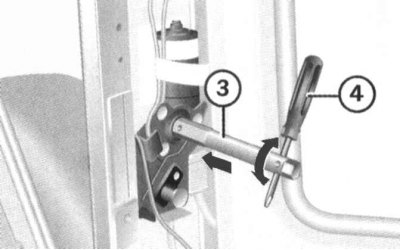
Rotate left: Open
Rotate right: Close
Convertible Convertible Models
Attention! Lowering and raising the convertible top should only be done after the car has come to a complete stop! When driving, the convertible top should occupy one of the outer (lowered or raised) positions, - make sure that the convertible top is securely locked while driving!
Caution! To avoid draining the battery, try to avoid activating the electric convertible top drive multiple times!
Note: The procedures for attaching the convertible top cover and installing the wind deflector are described below in the "Convertible Top Cover and Wind Deflector" subsection.
When raising/lowering the convertible top, pay attention to the following points:
- When lowered, the protective cover must be fully fastened;
- When lowering/raising the convertible top, there must be sufficient free space for the roof to move;
- Make sure that the height of the cargo placed in the luggage compartment does not exceed the standard position of the protective cover - the luggage should not rest against the cover;
- No objects should be placed on top of the protective luggage compartment cover;
- The vehicle must not have a roof rack mounted on it;
- Do not lower the convertible top when it is dirty or wet;
- To avoid damage to the roof material, do not lower the convertible top when the outside temperature is below -15°C;
- Before lowering/raising the roof, the car should be parked in a position as close to horizontal as possible.
Staff management (from console switch)
Lowering
Make sure the tailgate zippers and corner fasteners are securely fastened.
Move the AT selector lever to position "P".
Set the parking brake.
Make sure the ignition is on.
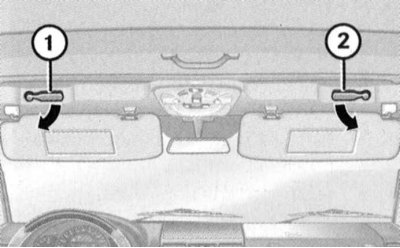
To release the convertible top lock, turn the two locking levers (1 and 2) located under the sun visors downwards
Lower the sun visors and turn the two locking levers located underneath them in the directions indicated by the arrows - a signal buzzer should be activated, confirming that the roof locks have been released.
Operating principle of the electric convertible top control switch
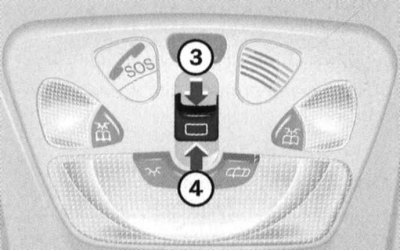
3 - Lower
4 - Raise
Press the slide switch on the roof panel in the direction of the arrow (3) and hold it in this position until the signal buzzer goes off, confirming the end of the roof lowering process.
Return the locking levers located under the sun visors to their original position.
Lifting
Move the AT selector lever to position "P".
Set the parking brake.
Make sure the ignition is on.
Lower the sun visors and turn the two locking levers located underneath them in the directions indicated by the arrows - a signal buzzer should be activated, confirming that the roof locks have been released.
Press the slide switch on the roof panel in the direction of the arrow (4) and hold it in this position until the edge of the convertible top stops above the edge of the windshield.
Procedure for completing the convertible top lifting procedure
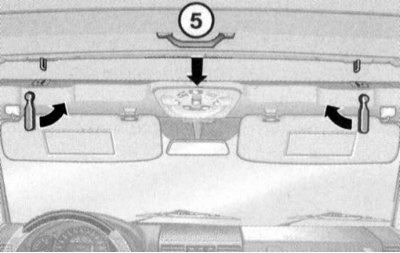
5 - Handle
Pull the roof by the handle (5) so that at least one of the locks clicks into place, then return the corresponding locking lever to its original position. Then turn the second lever up - the signal buzzer should go off, thus confirming the successful completion of the roof locking process.
If the electric drive fails, the convertible top can be raised manually (see below).
Emergency closing of the convertible top
Note: This procedure will require the assistance of an assistant.
Move the AT selector lever to position "P".
Set the parking brake and remove the key from the ignition.
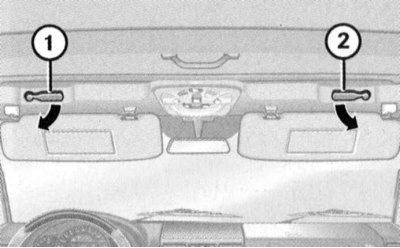
Release the soft top lock. To release the soft top lock, turn the two locking levers (1 and 2) located under the sun visors downwards
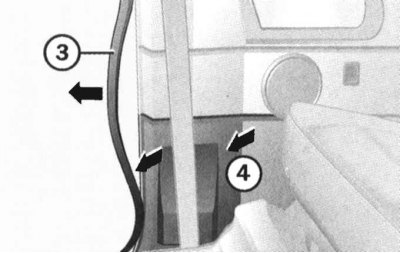
Open the right front door, release the front portion of the door opening seal from the B-pillar and remove the lower B-pillar trim panel.
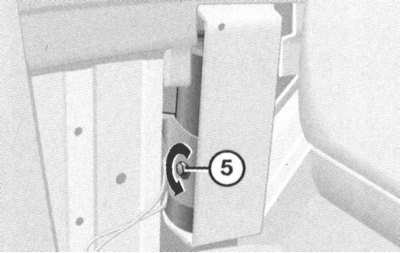
Using a socket wrench, turn the emergency valve head counterclockwise.
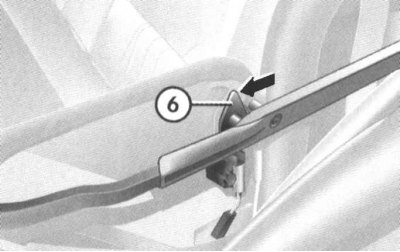
Press the locking latches on both sides of the vehicle in the direction indicated by the arrow and simultaneously pull up and straighten the convertible roof. After the edge of the roof has been pulled up to the edge of the windshield, proceed in the same way as with a standard roof installation.
Buttons of the remote control device for the electric drive of the garage door
The push-button switches and control LED for the electric drive operation control system are built into the interior rearview mirror assembly (see illustration Switch layout diagram on overhead console and interior rearview mirror assembly).
Rear Individual Interior Light Switches
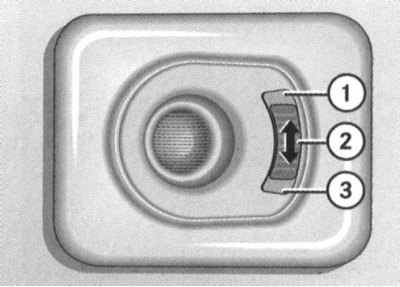
The rear interior lights are equipped with three-position slide switches:
1 - The lamp is on
2 - The light is off
3 - Automatic control
The slide switches are mounted in the assemblies of the rear individual interior lamps, located on the left and right above the multi-seat rear seat of the car and have three standard positions. The principle of operation of the switches is similar to the principle of operation of the switch for selecting the operating modes of the main interior lighting (see above).
On-board computer (with appropriate equipment)
Detailed information on the rules for using the on-board computer is provided in the vehicle operating instructions.