



Contents: Instrument cluster ↡ Control and measuring instruments ↡ Control lamps and indicator lights ↡
Instrument cluster
Instrument cluster design
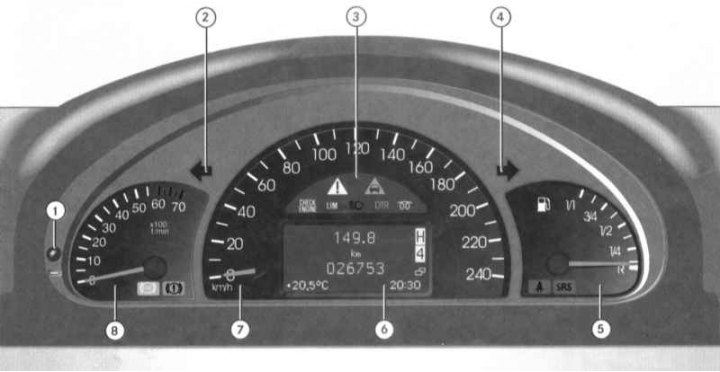
1 - Rotary push handle for resetting the current mileage counter/adjusting the instrument lighting intensity; 2 - Left turn signal activation indicator lamp; 3 - Control lamps and indicator lights; 4 - Right turn signal activation indicator lamp; 5 - Fuel gauge with built-in SRS and "Fasten seat belt" warning lights; 6 - Multifunctional display of the on-board computer (basic page: odometer/tripmeter/chronometer/transfer case and AT indicators/outside air temperature sensor indicator); 7 - Speedometer; 8 - Tachometer with built-in brake system and ABS indicator lights
Control and measuring instruments
Activating the instrument cluster
The instrument cluster is activated by opening the driver's door, turning the key in the ignition switch to position 1 or 2, pressing the rotary push-button handle for resetting the current mileage counter (1) and turning on the interior lighting (see Section Interior controls and equipment).
Adjusting the intensity of instrument lighting
Adjusting the intensity of the instrument lighting (with the running lights on - see Section Interior controls and equipment) is carried out using the rotary push-button handle (1) mounted on the left side of the instrument cluster; using the same handle, the instrument cluster can be activated (see above) and the current mileage counter can be reset (see below).
Fuel gauge
The gauge (5) is located in the right corner of the instrument cluster and serves for visual monitoring of the remaining fuel supply in the tank.
The error of the fuel gauge readings is minimal when the car is in a strictly horizontal position. When the car is moving on winding or hilly roads, the error of the device increases. The operation of the gauge does not depend on the position of the ignition key. The 1/1 mark corresponds to a full tank, R - an empty tank (with reserve stock). A control lamp with an image of a filling station built into the dial of the meter notifies the driver of the need to refuel the car at the first opportunity.
The SRS and "Fasten Seat Belt" warning lights are mounted in the lower left corner of the gauge dial (see below).
Speedometer
The speedometer is located in the central part of the instrument cluster and shows the vehicle speed in km/h.
The speedometer dial houses a panel of control lamps/indicator lights and a multifunctional display for the on-board computer.
Tachometer
The tachometer is located to the left of the speedometer and shows the engine crankshaft speed in thousands of revolutions per minute (the reading should be multiplied by 100)To avoid engine failure, do not exceed the maximum permissible crankshaft speed (the tachometer needle should never enter the red zone of the scale).
Note: In order to protect the engine, when the crankshaft speed reaches the red marking range, the fuel supply is cut off.
The lower right corner of the tachometer indicator houses warning lights for the parking brake engaged/low brake fluid level and ABS (see below).
Display fields of the main page of the multifunctional display of the trip computer
Note: Instructions for using the on-board computer are provided in the vehicle's operating manual - ask in automotive literature stores.
Odometer and current mileage counter
Layout of the display fields of the base page of the multifunctional display of the on-board computer
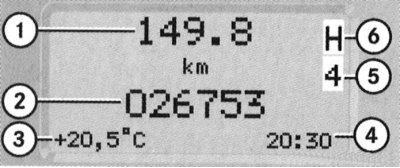
1 - Current mileage counter; 2 - Odometer reading; 3 - Outside air temperature; 4 - Chronometer; 5 - Selector lever position/AT shift range; 6 - Indicator of the selected transfer case mode
The odometer (2) and trip meter (1) display fields are located one above the other in the central part of the main page of the multifunction display. The odometer records the total mileage of the vehicle since its introduction into service, the resettable trip meter allows you to track the mileage of a specific trip of the car (since the last reset).
To reset the meter, activate the instrument cluster, then press the rotary push-button knob mounted in the left corner of the instrument cluster and hold it down for about 1 second.
Note: The display must have the base page cut out.
Publication taken from an online resource: mercedesman.ru
Outside air temperature indicator
The display field for the outside air temperature sensor (3) is located in the lower left corner of the basic page of the multifunction display. The temperature is determined in degrees Celsius (°C).
The change in readings after leaving the garage occurs with a certain delay, due to the inertia of the sensor adaptation.
In addition, a forced delay in the increase in readings is provided in accordance with the increase in ambient temperature when the engine coolant temperature exceeds 60°C, which helps prevent interference from a hot engine during stops and when the car is moving at low speeds.
Chronometer
The lower right corner of the main page of the multifunctional display is reserved for the indication of the on-board chronometer readings. The regulator for setting the chronometer readings is located on the left under the tachometer dial (see ibid). Rotating the regulator pulled out from the panel clockwise leads to an increase in readings, counterclockwise to a decrease.
AT selector lever position/shift range indicator
The current AT range indication field (5) is located in the upper left corner of the basic page of the multifunction display. The field displays a symbol corresponding to the selected position of the AT selector lever ("P", "R", "N" or "D").
Transfer case mode selection indicator
The current transfer case mode indication field (6) is located in the upper left corner of the basic page of the multifunction display, directly above the current AT range indication field (4). The field displays a symbol corresponding to the selected transfer case mode ("H", "L" or "N").
Control lamps and indicator lights
The vehicle's instrument cluster assembly has a whole set of control lamps and indicators, which provide the driver with important information about the serviceability/malfunction of the vehicle's main units and systems. The layout of the control lamps on the instrument panel is shown in the illustration Instrument cluster design. Another control lamp (fuel system filter sump) is placed on the central console in front of the AT selector lever.
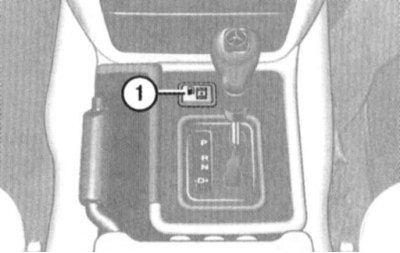
Fuel System Filter Sump Indicator Light Location
Below you will find information about the operating principle of each of the provided light indicators separately.
List of control lamps and indicator lights included in the instrument cluster
Control lamps and indicator lights are built into the instrument cluster dials (Instrument cluster design).
 — (Green) Direction indicator/hazard warning lights
 — (Yellow) Anti-lock Brake System (ABS) Malfunction Indicator Lamp
 — (Red) Brake fluid level/brake system failure/parking brake applied indicator light
 — (Yellow) Anti-slip warning Light (4-ETS)/Anti-aircraft Protection (ESP)system/anti-lock braking (ABS) systems ("Adapt your driving style to road conditions!")
 — (Yellow) Failure warning light MIL/ "Check engine"
 — (Yellow) Speedtronic system activation indicator light
 — (Blue) High beam headlight activation indicator light
 — (Yellow) Diesel Engine Pre-Glow Warning Light
 — (Red) "Fasten your seat belt" indicator light
 — (Red) Supplemental Restraint System (SRS) Warning Light
Direction indicator/hazard warning lights

The arrow-shaped indicator lights glow green and serve to monitor the proper functioning of the corresponding turn signals. The direction of the indicator arrows coincides with the selected direction of the vehicle's course change. The indicators operate in a flashing mode with a frequency corresponding to the blinking frequency of the turn signals. Rapid blinking of one of the indicators usually indicates that the lamp of one of the indicators of the corresponding turn has burned out - replace the burned-out lamp at the first opportunity in order to avoid emergency situations on the roads.
The simultaneous flashing of both direction indicator lights usually accompanies the activation of the hazard warning lights.
ABS Anti-lock Brake System Warning Light

This control lamp serves to monitor the proper functioning of the ABS, briefly lights up when the ignition is turned on and should go out a few seconds after the engine has started. If the lamp fails to turn off, or if it is activated while driving, this indicates a malfunction of the anti-lock brake system - the car should be taken to a Mercedes-Benz service station without delay for diagnostics and the necessary repairs.
Note: At the same time as ABS, the 4-ETS and ESP systems are also switched off, which must be confirmed by the activation of the corresponding indicator lamp (see below).
Brake fluid level/brake failure warning light/parking brake applied indicator

The indicator light stays on continuously when the parking brake is applied, reminding the driver to release it before driving. Driving with the parking brake applied will cause the rear brakes to overheat quickly and fail, and will cause premature wear of the rear tire treads, and may also cause the anti-lock braking system (ABS) to malfunction.
If the warning light remains on after the parking brake is released, or comes on while driving, this usually indicates that the brake fluid level has dropped excessively - one possible cause of a gradual decrease in the brake fluid level is normal wear of the brake shoe friction linings.
Note: The indicator lamp also lights briefly when the ignition is turned on (even with the parking brake released).
Anti-slip warning Light (4-ETS)/Anti-aircraft Protection (ESP)system/anti-lock braking (ABS) systems

Note: The 4-ETS system is activated at speeds between 40 and 80 km/h when any of the wheels reaches the limit of tire grip on the road (for example, in case of one-sided ice). The corresponding wheel is braked in order to ensure reliable traction.
This indicator lamp is briefly activated when the ignition is switched on and should go out immediately after the engine has started. The activation of this indicator lamp is accompanied by the forced disabling of the anti-skid (ESP) system (see Sections Traction Control System (4-ETS), Electronic skid control system (ESP)). Failure of the lamp to switch off, as well as its activation during movement, indicates a malfunction of the 4-ETS/ESP/ABS systems - the car should be immediately driven to a Mercedes-Benz service station for diagnostics and necessary repairs. Activation of the lamp in flashing mode while the car is moving warns the driver that the car's wheels are at the limit of adhesion to the road surface and it is necessary to reduce the speed to a safe level.
Note: When the brakes are under high load, the 4-ETS system is automatically switched off briefly to prevent the brakes from overheating. This switching off is accompanied by the activation of the indicator lamp.
Attention! When towing a vehicle with the rear wheels off the ground, as well as when checking the proper functioning of the brake mechanisms on the stand, the engine must be turned off, because otherwise the active braking effect of the ESP system may lead to failure of the rear wheel brake mechanisms!
Malfunction Indicator Lamp MIL (Check Engine)

This warning lamp briefly lights up when the ignition is switched on and should go out a few seconds after the engine has started. If the lamp fails to turn off, or if it becomes active while driving, this indicates a malfunction in the engine management/emission control systems - the vehicle should be taken to a Mercedes-Benz service station without delay for diagnostics and necessary repairs.
Note: To turn off the warning light that is activated after refilling a completely empty fuel tank, repeat the engine starting procedure three or four times.
Speedtronic system activation indicator light

This indicator serves to confirm the activation of the variable cruise control speed limiter mode (Speedtronic) (See Section Speed control systems (Tempostat/Speedtronic)).
High beam activation indicator light

This indicator serves to confirm that the high beam headlights are activated.
Diesel Engine Pre-Glow Warning Light

The pre-glow indicator lamp lights up when the ignition is switched on and indicates that the pre-glow system is activated. The engine should not be started until the indicator lamp goes out.
"Fasten your seat belt" indicator light

This indicator has an amber glow and briefly (for about 6 seconds) it is activated when the ignition is turned on, reminding the driver and passengers to fasten their seat belts.
Supplemental Restraint System (SRS) Warning Light

This indicator lamp lights up for approximately 4 seconds when the ignition is switched on and should go out immediately after the engine is started. If the lamp remains lit when the engine is running (in constant or flashing mode), this indicates a malfunction of the SRS system components. If equipped, the activation of this indicator lamp may indicate a malfunction in the side and head airbag circuits or in the automatic emergency seat belt tensioners.
Fuel system moisture separator indicator light
The indicator lamp is located in the front part of the upper cover of the central console of the car (see illustration Location of fuel system filter sump indicator lamp), briefly operate when the ignition is turned on and serves to warn the driver of the need to perform a procedure to remove moisture from the fuel. If the lamp refuses to turn off after starting the engine or it operates while driving, you should contact a Mercedes-Benz service station as soon as possible.
Attention! Long-term operation of the vehicle with the moisture separator indicator light on may result in serious internal engine damage, the associated repairs being not covered by the manufacturers' warranty obligations!