



Contents: Switches located on the steering…↡ Switches and controls located on the…↡ Models with adjustable ground…↡ Parking brake release handle ↡ Adjusting the position of the…↡ Headlight washer activation switch…↡ Ignition Switch/Steering Column Lock ↡ Hazard warning switch ↡ LOW RANGE mode switch (for off-road…↡ Fog light activation switch ↡ Front seat heating mode switches ↡ Rear power tilt side window switches ↡ Rear window wiper/washer control…↡ Electronic Stability Program (ESP)…↡ Air conditioning system control panel ↡ Control panel for audio system…↡ Switches located on the center…↡ Single lock switch ↡ Parktronic System (PTS) Switch ↡ Control panel for operation of…↡ Other switches ↡ Switch for controlling the operation…↡ Trip computer (with appropriate…↡ Date ↡ Compass ↡ Stopwatch ↡ Instantaneous fuel consumption ↡ Average fuel consumption ↡ Cruising range based on remaining…↡ Interface language ↡ Off ↡ Switching modes of the interior…↡ Ashtrays cigarette lighters ↡ Power outlets ↡ Interior lighting ↡ Rear individual lights (reading…↡ Luggage compartment light ↡ Garage door drive remote control…↡ General information ↡ Programming the Universal Transceiver ↡ Rules for using a universal…↡ Diagnosing errors in entering…↡ Universal Transceiver Memory Reset ↡ Procedure in case of car theft ↡ Sun visors ↡ Storage boxes ↡ Cup holders ↡ Fire extinguisher ↡ Removal and installation headrests ↡ Rear bench seat head restraints ↡ Headrests for folding seats of the…↡ Top rack, ski holder ↡
Switching headlight operating modes and activating turn signals
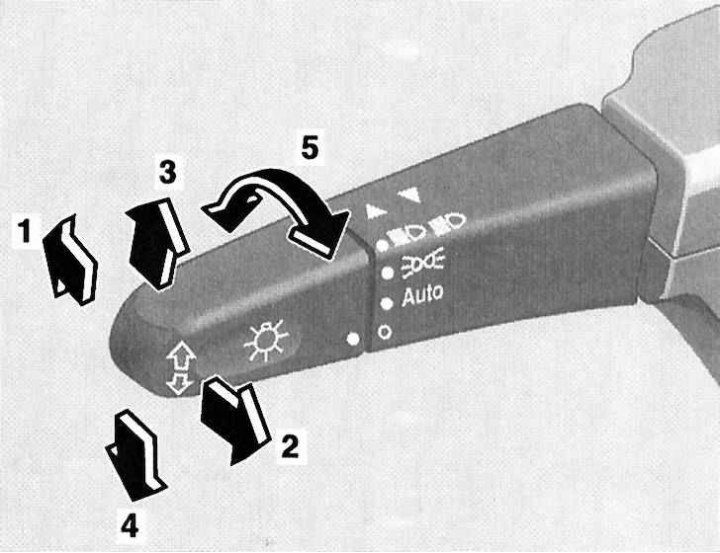
1 - Position "High beam"; 2 - High beam signaling; 3 - Activation of right turn signals; 4 - Activation of left turn signals; 5 - Selecting the operating mode of external lighting devices (Off/Automatic selection/Driving lights/Low and high beam/Parking lights)
Switches located on the steering column
Combination switch
Left combination steering column switch (selection of operating modes of external lighting devices, activation of direction indicators).
Using the rotary knob at the end of the steering column switch lever, one of the following operating modes of the exterior lighting devices can be selected:
ABOUT The lights are off
AUTO Automatic selection of the operating mode of lighting devices depending on the lighting conditions.
 Activation of parking lights, license plate lights and instrument lighting
 Activating low/high beam headlights
 Parking lights (the ignition key is turned to position 0 or removed from the ignition switch). The switch lever is lowered to position (4), - the left parking light is activated, (3) - the right.
 The headlights are switched from low beam to high beam by pushing the steering column switch lever away from you - the corresponding blue indicator lamp should light up automatically on the instrument panel (see above). To turn off the high beam, return the lever to its original position.
It is also possible to signal with high beams: signaling is carried out by pulling the steering column switch lever towards you and regardless of the selected position of the handle for selecting the operating mode of the external lighting devices (see above).
Note: High beam signalling remains possible even when the ignition is switched off.
The direction indicators are activated by pressing the left steering column stalk lever in the appropriate direction. The lever is moved up or down, depending on the selected direction of course change.
When the lever is moved to the extreme upper/lower position (until it clicks), the corresponding turn signals will continue to function until the steering wheel is returned to the straight-ahead position (the limit switch will trip), or until the lever is returned to the neutral position.
Note: To briefly turn on the indicators, for example when you intend to change lanes, simply pull the lever up or down slightly.
Controlling the operation of the windshield wipers/washers
Windscreen and headlight lens wipers and washers can only be activated when the ignition is on (key in position 1 or 2). The windshield wiper operating mode is selected by moving the switch lever in the vertical plane:
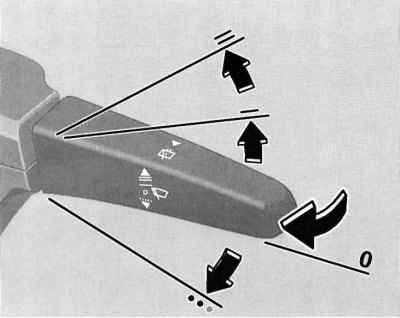
Controlling the operation of the windshield wipers/washers
O Off
---- Interval mode
—— Normal high-speed continuous windshield wiper mode
=== High speed continuous wiper mode
Note: When the vehicle speed exceeds 170 km/h, the intermittent windshield wiper mode automatically switches to continuous mode.
On models equipped with a rain sensor, activation of the interval mode of the windshield wipers results in a single operation of the wipers, followed by automatic selection of the pause duration depending on the intensity of wetting of the glass surface.
The washers are activated by pulling the switch lever towards you; the supply of washer fluid is accompanied by several strokes of the windshield wipers.
Note: When the vehicle comes to a complete stop and one of the front doors is open, the intermittent operation of the windshield wipers is suspended, which prevents moisture from being wiped off by the brushes from getting on the clothes of the driver/passenger entering or leaving the vehicle.
Steering column switch for controlling cruise control/Speedtronic variable speed limiter
The cruise control switch is located on the steering column above the combined steering column switch.
A detailed description of the principles of managing the functioning of the tempostat is given in Section Speed control systems (Tempostat/Speedtronic).
Horn activation button
The horn button is built into the steering wheel hub.
Switches and controls located on the instrument panel
Headlight Axis Tilt Regulator
The roller switch for adjusting the tilt of the optical axes of the headlights is located on the left side of the instrument panel and has four fixed positions (0, 1, 2 and 3).
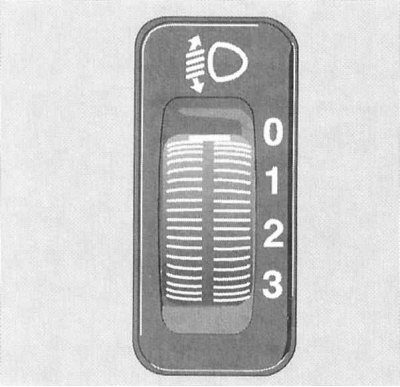
Headlight Axis Tilt Regulator
The switch is used to adjust the lighting distance (when the low beam is turned on), in order to prevent blinding of drivers of oncoming and preceding vehicles.
Regulator (see accompanying illustration) must be set to position (according to the tables below), corresponding to the number of passengers and the degree of loading of the vehicle.
Models with adjustable ground clearance
See table.
| Switch position | Number of people in the front seats | Number of people in the back seats | Cargo in the luggage compartment |
| 0 | 1 or 2 | 0 | Absent |
| 1 | 2 | 3 | Absent |
| 2 | 2 | 3+2 on folding third row seats | Full load |
| 3 | 1 | 0 | Full load |
Parking brake release handle
The models discussed in this Manual use a foot-operated parking brake. The parking brake is set by pressing the pedal located on the left under the instrument panel. The parking brake release handle is on the left side of the vehicle's instrument panel and is marked with a pictogram with the corresponding content.
Pulling the handle results in the immediate release of the parking brake, - the corresponding indicator lamp (see Section Instrument cluster, gauges and control lamps and indicator lights) on the instrument panel should go out.
Adjusting the position of the steering wheel
The release lever of the locking mechanism is located on the left side of the steering column. To release the lock, press the lever down until it stops, then adjust the height of the steering wheel according to your body type. Once you have achieved a comfortable position of the steering wheel, press the lever up.
Note: The driver is warned that the locking mechanism of the adjustment mechanism is disabled by the corresponding indicator lamp on the vehicle's instrument cluster (see Section Instrument cluster, gauges and control lamps and indicator lights).
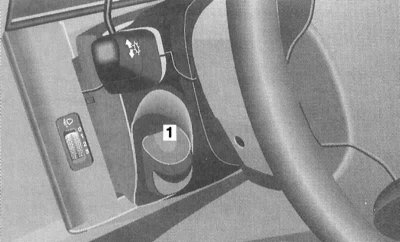
Location of the lever (1) for releasing the steering column locking mechanism
Headlight washer activation switch (models equipped with bi-xenon headlights)
The headlight wiper activation switch is located on the vehicle's instrument panel, to the right of the steering column. Activation of the headlight wipers is only possible in position 2 of the ignition key.
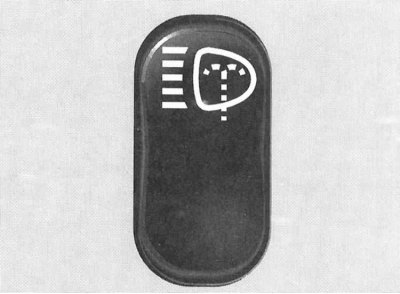
Headlight washer activation switch (models equipped with bi-xenon headlights)
Ignition Switch/Steering Column Lock
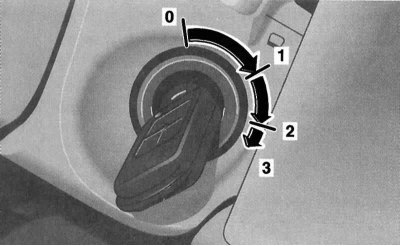
The ignition switch has four fixed positions
The ignition switch is located on the right side of the steering column. The key can occupy one of four fixed positions in the lock:
- 0: Steering column lock
- 1: Auxiliary consumers of electricity (parking position)
- 2: Ignition on/Movement
- 3: Starting the engine
Position 0 - steering column lock
The key can be inserted into or removed from the lock only in this position. When the ignition key is turned from position 0 to position 1, the steering column is unlocked. In addition, on models equipped with an automatic transmission, an additional condition for allowing the start is the mandatory transfer of the selector lever to position "P".
The key can only be removed from the ignition switch after it has been turned to position 0.
Note: On models with automatic transmission, removing the key from the ignition switch is only possible after moving the selector lever to the "P" position.
The steering column lock is activated automatically when you try to turn the steering wheel after removing the key from the ignition switch.
Steering column lock sometimes makes it impossible to turn the key in the ignition. In this situation, you should turn the steering wheel slightly in one direction or another (in order to relieve the load), while simultaneously turning the key in the lock.
Attention! Never remove the key from the ignition switch while driving! This will inevitably lead to the steering column locking and loss of control. Remove the key from the switch only after the car has come to a complete stop!
Note: When the front door is open, it is still possible to operate the electric seat adjustments, steering column, windows and sunroof with the key removed from the ignition switch.
Position 1 - parking
In this position of the ignition key, the operation of auxiliary power consumers is ensured (audio system, cigarette lighter, heater fan, windshield wipers, etc.).
Position 2 - ignition on/movement
The ignition key is kept in this position at all times while the vehicle is moving, as well as when the engine is idling. On diesel models, turning the key to position 2 before starting the engine activates the pre-heating system. At the same time, electrical power is supplied to all systems and additional equipment installed on the vehicle. When the key is turned from position 1 to position 2, some of the indicator lamps located on the instrument panel of the vehicle briefly turn on, confirming that the corresponding control systems are functioning properly (see Section Instrument cluster, gauges and control lamps and indicator lights).
Position 3 - launch
When the key is turned to this position, the starter is engaged. After the engine has started, the key should be released and it will automatically return to position 2.
Hazard warning switch
The hazard warning lights are switched on using a button located on top of the steering column. The switch button is equipped with a standard signal lamp with a pictogram depicting two triangles inscribed in each other.
Turning on the hazard warning lights causes all four direction indicators to come on simultaneously (and their indicator lights on the vehicle's instrument cluster). The alarm is designed to warn other road users about a forced stop of the vehicle and is also used in other dangerous situations provided for by traffic regulations. To turn off the hazard warning, press the switch button again.
Note: The hazard warning lights are activated automatically when any of the airbags are deployed.
LOW RANGE mode switch (for off-road driving)
Note: LOW RANGE mode is designed for off-road driving, crossing water obstacles, and towing a trailer in hilly terrain.
The LOW RANGE off-road mode activation switch is located in the upper left corner of the instrument panel console. To activate the low range mode, move the selector lever to the "N" position (models with AT)/press the clutch and foot brake pedals (models with manual transmission), then press the upper part of the push-button switch once, - the "LOW RANGE" indicator lamp (see Section Instrument cluster, gauges and control lamps and indicator lights) on the instrument cluster should blink three times, then switch to a constant glow mode. If the step-down mode is not working properly, the control lamp will blink at double the frequency.
LOW RANGE mode activation switch for off-road driving
Returning to normal driving mode is done in a similar manner - the control lamp should flash three times and then go out, confirming that the step-down mode has been switched off.
Attention! The mode should be activated only after the car has come to a complete stop! When driving in LOW RANGE mode, try not to allow the engine speed to increase above 1500 rpm!
Fog light activation switch
The fog light activation switch is located on the left in the central part of the console section of the instrument panel, next to the storage compartment. The fog light can only be activated when the exterior lighting devices are working and the low beam headlights are on (see above). To turn on the fog lights, turn on the low beam headlights (see above), then press the upper part of the key switch - the corresponding light indicator on the instrument cluster should light up (see Section Instrument cluster, gauges and control lamps and indicator lights).
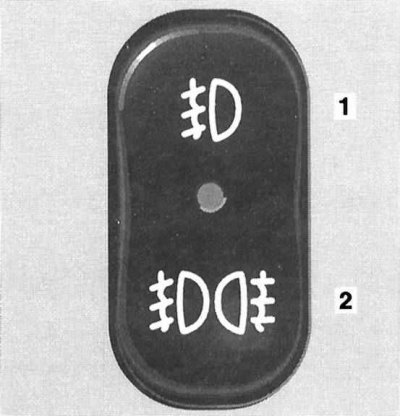
Switch for activation of front fog lights (1)/rear fog lights (2)
To turn on the rear fog lights in addition to the fog lights, press the lower part of the key switch - the control LED built into the switch assembly should light up.
When activating the automatic mode of operation of external lighting devices, when starting the engine in addition to the standard running lights (dimensions, number plate light) the rear fog light is also activated.
This switch is also used to set the delay time for turning off the headlights when the doors are closed - the upper part of the button should be held down until the desired delay time is displayed on the instrument cluster display (the rotary knob of the left steering column switch must be turned to the O position).
If none of the vehicle doors are opened after the engine is turned off, or if all the doors are not closed securely after opening, the headlight delay function will be turned off automatically after approximately 1 minute.
Note: Within 10 minutes after the doors are closed, the function can be reactivated by opening any of the doors.
Front seat heating mode switches
Two heated seat mode rocker switches are located at the ends of the lower row of switches on the instrument panel console section and allow activation of two seat heating modes (normal and accelerated), and also turn off the heaters.
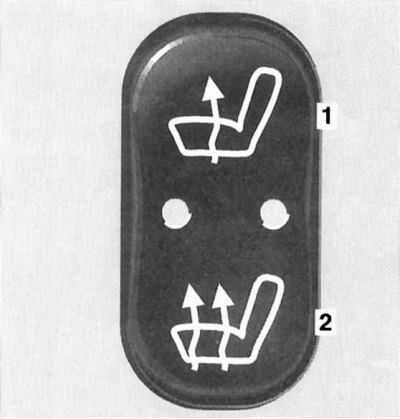
Seat heating mode switch
1 - Normal heating
2 - Accelerated heating
The seat heating can only be activated when the engine is running.
Activation of the normal mode is accompanied by the activation of one of the two control LEDs built into the switch. During accelerated heating, both LEDs light up.
The heating is switched off as follows: if one built-in control LED is lit, you should press the upper part of the corresponding switch key, two - the lower part. Automatic switching off of the heating elements occurs according to the timer signal after approximately 20 minutes of continuous operation of the heating elements.
Note: The seat heating is also switched off if the charging system is overloaded or the battery charge level is insufficient - in this situation, one or both control diodes (depending on the selected heating mode) switch to flashing mode. After the overload is removed (disconnection of unnecessary electricity consumers) the seat heating will be activated automatically.
Rear power tilt side window switches
The key switches for the electric rear side windows are located second from the edges of the bottom row of switches on the console section of the instrument panel. Pressing the upper part of the switch opens the corresponding window, and pressing the lower part closes it.
Note: The rear power tilt side windows continue to operate for 30 minutes after any of the front doors are opened (even if the ignition key is turned to position 0), - "Comfort" function.
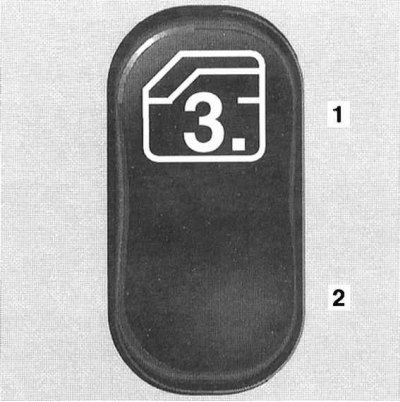
Electric switch for the rear rotary side window
1 - Open
2 - Close
Rear window wiper/washer control switch
The rear window wiper/washer control switch, equipped with a control LED, is located in the center of the lower row of switches on the instrument panel console. Pressing the top of the switch activates the rear window wiper in interval mode - to turn off the wiper, press the same button again.
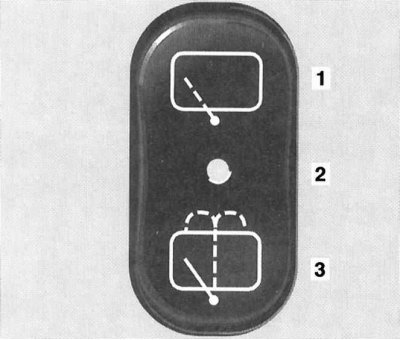
Rear window wiper/washer control switch
1 - Activation of the intermittent wiper mode
2 — Control LED
3 - Windscreen washer activation
The supply of washer fluid to the rear window is activated by holding down the lower part of the switch button - at the same time the windscreen wiper is also activated, which will continue to operate for about 5 seconds after the button is released.
Note: If the intermittent windshield wiper mode was turned on, stopping the washer fluid supply does not turn the wiper off.
On models equipped with a rain sensor, the interval mode of the rear wiper is adjusted automatically (provided that the front windscreen wipers are also switched on in the interval mode).
Electronic Stability Program (ESP) Switch
The anti-aircraft system (ESP) switch is placed in the central part of the lower row of switches in the console section of the instrument panel. You may need to turn off the ESP system when driving with snow chains, on deep snow, sand or gravel. At the same time, the engine torque is no longer controlled and slipping of the driving wheels can have a milling effect on the ground.
To turn off the ESP, press the top of the switch button - the indicator lamp built into the speedometer dial should light up on the instrument cluster (see Section Instrument cluster, gauges and control lamps and indicator lights).
To return to normal driving mode, simply press the bottom of the switch button.
Air conditioning system control panel
See Section Comfort.
Control panel for audio system operation
See Section Comfort.
Switches located on the center console
Switches for controlling the operation of the electric window lifters
Four individual switches for controlling the operation of the electric drive for the door windows are located on the center console to the right and left of the AT selector lever assembly/gear shift knob (manual transmission). Two more individual switches for controlling the electric drive for the rear windows are located on the rear end of the center console.
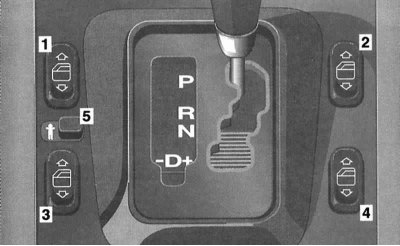
Electric door window switches
1 - Left front door window lifter; 2 - Right front door window lifter; 3 - Left rear door window regulator; 4 - Right rear door window regulator; 5 - Switch for blocking individual rear door window lift switches
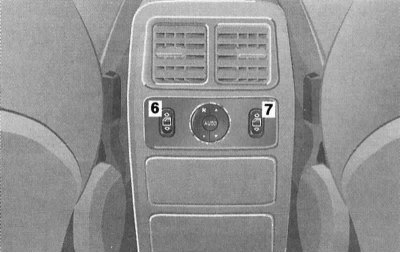
Individual rear door window lifter switches
6 - Right rear door window lifter; 7 - Switch for blocking individual rear door window lift switches
Each switch allows you to activate the drive of the window regulator of the corresponding door. The slider located between the switches of the left doors allows, if necessary, to block the ability to activate the rear door window regulators from individual door switches by moving it to the right - a pictogram with an image of a man should open.
The power windows can only be activated when the ignition is on.
Note: The power windows remain active for an additional 30 minutes after any front door is opened (even with the ignition key turned to position 0), - "Comfort" function.
To lower the glass, press the lower part of the corresponding key switch. Pressing the upper part of the switch allows you to move the glass to the raised position. Pressing the switch key with overcoming the resistance point leads to automatic lowering/raising of the glass of the corresponding door.
Note: If the glass encounters resistance when moving to the upper position, the electric drive of the regulator is immediately blocked, and the glass moves down slightly, and further holding down the upper part of the key will only lower the glass to the lower position.
The door window lifters must be adjusted each time after the vehicle power supply has been disconnected/the battery has been discharged, and also after pressing the switch several times without moving the window to the extreme position. To perform the adjustment, turn the key in the ignition switch to position 2, press the upper part of the corresponding key switch and hold it in this position until the window rises, plus approximately 1 more second.
Single lock switch
The single lock switch is located on the center console to the left behind the gearshift/AT selector lever and allows the single lock to be activated from inside the vehicle, with all doors closed.
Note: If the doors were locked using the remote control, unlocking the locks using the switch is not possible.
Parktronic System (PTS) Switch
Note: The operating principle of PTS is described in detail in Section Parktronic system (PTS).
The PTS switch is located on the centre console to the right behind the gearshift/AT selector lever and is equipped with a built-in control LED that is activated when the system is switched off and allows the Parktronic system to be switched on/off.
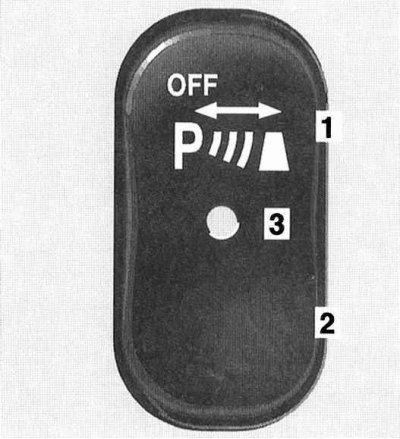
Parktronic System (PTS) Switch
1 - Off
2 — On
3 — Control LED
PTS is reactivated automatically when the ignition key is turned to position 2.
Note: Connecting the trailer wiring to the towbar will automatically disable the PTS.
Control panel for operation of electric drive for adjusting door rear view mirrors
Adjustment
The panel is located on the center console behind the gearshift lever/AT selector.
At the corners of the panel there are buttons for selecting the mirror to be adjusted and push-button switches for folding the mirrors; in the center of the panel there is a rotary control switch for adjusting the position of the mirrors.
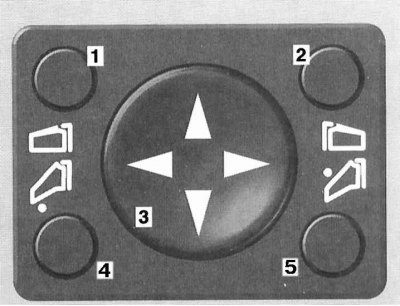
Control panel for operation of electric door mirrors
1 - Left door mirror electric drive activation switch; 2 - Right door mirror electric drive activation switch; 3 - Rotary control switch; 4 - Left mirror folding switch; 5 - Right mirror folding switch
The exterior rearview mirrors have a spherical design, allowing for a wider field of view. Mirror heating is automatic.
Writing control parameters to processor memory (with appropriate equipment)
Note: The selected position of the outside rearview mirrors can be stored in the on-board processor memory together with the seat position data (see Section Seat adjustment).
The recording of the selected position of the rear-view mirrors into the processor memory is performed simultaneously with the recording of the parameters for adjusting the front seats (see Section Seat adjustment).
The system design allows recording the parking position of the right door rearview mirror. Park the car stationary at the edge of the road and leave the ignition on, adjust the right door mirror so that it reflects the curbstone, then press the processor memory access button and press the rotary switch for controlling the electric drive of the mirrors down for approximately 3 seconds - the mirror should not measure its position, otherwise the procedure should be repeated. Now, before parking the car, it will be enough to press the corresponding button to recall the parking position of the right mirror from memory. The mirror returns to its original position automatically when the speed reaches 10 km / h, approximately 10 seconds after disengaging the reverse gear, and also when pressing the button to activate the electric drive of the left door mirror.
Note: When any of the front doors is opened, the electric rear-view mirrors remain active for another 30 minutes even with the key turned to position 0 or removed from the ignition switch - "Comfort" function.
Other switches
Switch for disabling towing protection devices/unauthorized entry into the vehicle interior
If the vehicle is equipped accordingly, the activation of the devices in question occurs automatically when the doors are locked/the anti-theft alarm is activated.
Before starting planned towing/transportation of the vehicle, the protective device must be disabled.
The tow-away protection/volume sensor activation/deactivation switch is located on the vehicle's overhead console - turn the ignition key to position 1, press the OFF button on the switch, then turn the key to position 0 and remove it from the ignition.
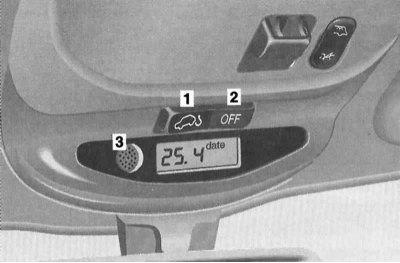
Switch for disabling the vehicle's tow-away protection devices
1 - Turn on the device
2 - Turn off the device
3 — Volume sensor
On models equipped with an on-board computer, press and hold the RESET or MODE button on the overhead console control panel within 30 seconds - the display should show the message "OFF".
Once the device is disabled, the vehicle can be locked and the anti-theft alarm can be activated via the remote control. The tow-away protection device/volume sensor remains disabled until the ignition key is turned to position 1.
Switch for controlling the operation of the electric drive of the upper hatch cover
The control switch for the operation of the electric lift-and-slide sunroof is located on the overhead console in front of the interior light.
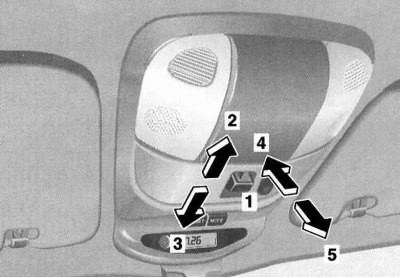
The principle of control of the functioning of the electric drive of the upper hatch
1 - Control switch
2 - Move
3 - Push in
4 - Raise
5 - Lower
The electric sunroof drive operates only in positions 1 or 2 of the ignition key, and also for 30 minutes in position 0 with any of the front doors of the car open (the "Comfort" function).
The principle of control of the cover drive is shown in the illustration - a short press of the switch brings the automatic mode of operation of the electric drive (stopping can be done by pressing the switch again).
Note: In automatic mode, the hatch does not open completely (if necessary, press the switch again). To move the cover to the required position, hold the switch down.
The glass hatch cover is equipped with a sunshade that can be opened and closed manually.
Note: When the sunroof is moved to the open position, the shade also moves.
In case of failure of the electric drive, it is possible to close the hatch cover manually. Fold back the protective cover and insert the Allen key equipped with a handle into the receiving hole of the drive electric motor shaft; turning the key clockwise allows you to close the shifted hatch cover, and counterclockwise - to lower the raised one.
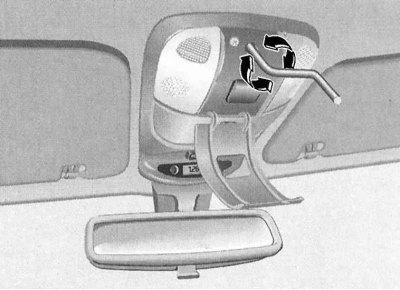
Mechanical method of emergency closing of the upper hatch cover in case of electric drive failure
Trip computer (with appropriate equipment)
The trip computer control panel is located on the overhead console of the vehicle's central console and is equipped with a liquid crystal display and a key switch for setting/selecting operating modes.
The computer is activated automatically when the ignition key is turned to position 2. If the computer is forcibly turned off and the display does not activate, press the MODE button on the key switch on the control panel.
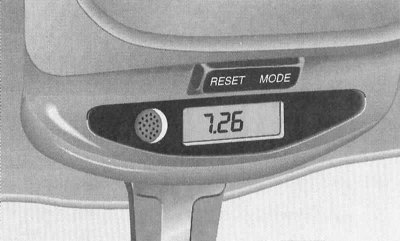
Trip computer control panel
The computer design provides for eight operating modes:
- 1. Date
- 2. Compass
- 3. Stopwatch
- 4. Instantaneous fuel consumption
- 5. Average fuel consumption
- 6. Cruising range based on remaining fuel supply
- 7. Interface language
- 8. Off
Switching between modes is done using the MODE button on the key switch on the control panel.
Date
To enter the setup mode, press the RESET button of the key switch - the current month will start flashing on the display screen - the adjustment is made using the MODE button. Pressing the RESET button a second time switches to the day of the week setup mode, then the year. Pressing the RESET button a fourth time exits the setup mode.
Compass
In the "Compass" mode, the direction of travel is displayed on the screen:
- N — North
- NO — Northeast
- O — East
- SO — Southeast
- S — South
- SW — Southwest
- W — West
- NW — Northwest
Note: The accuracy of the compass readings may be affected by the proximity of large buildings, bridges, power lines and powerful sources of radio waves, as well as the presence of metal and magnetic objects on board the vehicle.

Map of magnetic declination zones
When traveling long distances, it may be necessary to adapt the compass to the conditions of changing magnetic declination zones:
- a) Using a special magnetic declination map, determine the zone of your location - write down the result;
- b) Turn the ignition key to position 2;
- c) While holding down the MODE button on the computer control panel, wait until the compass readings are displayed on the display screen;
- d) By pressing the RESET button of the key switch, go to the zone selection mode - the number of the previously selected magnetic declination zone should appear on the display screen;
- e) By successive pressings of the RESET button, adjust the zone in accordance with the actual location of the vehicle, - see point (a);
- f) To exit the setup mode and enter a new value into the processor memory, press the MODE button twice - the compass readings should appear on the display screen.
If the automatic compass corrector fails to cope with the task, the necessary calibration can be performed manually:
- a) Drive the car to an open area;
- b) Switch off all on-board electrical consumers and close all doors, including the tailgate (otherwise the display screen in compass mode will show "- - -";
- c) While holding down the MODE button on the key switch, wait until the compass readings are displayed on the display screen;
- d) Press the reset button (RESET), then the MODE button again - the display screen should show the message "CAL" (Calibration);
- e) Press and hold the RESET button for approximately 2 seconds to enter the calibration mode (the display shows "CAL");
- f) Moving at a speed of approximately 5÷10 km/h, make a couple of circles - the inscription "CAL" on the screen should go out, confirming the completion of the compass calibration.
Note: If the "CAL" message does not disappear, then to exit the calibration mode you must remove the key from the ignition switch - after turning the ignition on again, the procedure can be repeated.
Stopwatch
The stopwatch is started and stopped using the RESET button on the key switch on the computer control panel. To reset the stopwatch readings, hold the RESET button down for several seconds.
Instantaneous fuel consumption
In this mode, the display screen shows the instantaneous fuel consumption value based on the current driving parameters.
Average fuel consumption
The average fuel consumption readings are reset by pressing the RESET button on the key switch.
Cruising range based on remaining fuel supply
When you turn the ignition key to position 2, the display screen shows the distance that can be covered with the amount of fuel left in the tank.
Note: When the minimum fuel level in the tank is reached, the display screen starts flashing.
Interface language
The interface language is also selected using the RESET button.
Off
Pressing the MODE button again will turn off the computer.
Switching modes of the interior rearview mirror
Mirror with manual switching
The interior rearview mirror with manual switching has two fixed positions: day and night. Switching is performed using a lever mounted in the lower part of the spherical support of the mirror.
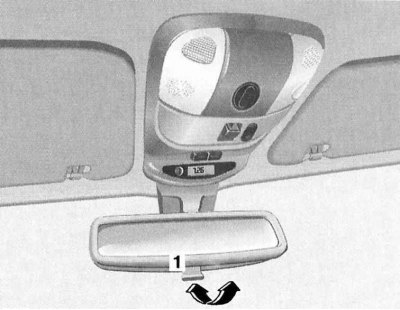
Interior rear view mirror mode switch
Mirror with automatic protection
The protection is activated automatically when the ignition key is turned to position 2 - the control LED built into the mirror assembly should light up and can be forcibly switched off using the button located next to the LED. When active, the mirror switches to the appropriate mode depending on the angle of incidence of light rays on its reflective surface.
Important! The safety switch will only be activated if the light is unobstructed and can reach the sensors built into the mirror. This may not be the case when towing a trailer or closing the rear window blind.
Note: When reverse gear is engaged or the interior lighting is activated, the mirror anti-glare protection is blocked.
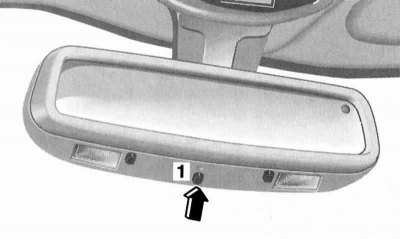
Rearview mirror with automatic anti-glare protection
1 - Anti-glare function switch
Ashtrays cigarette lighters
The ashtray assemblies with cigarette lighters are mounted in the middle and rear sections of the car's central console and have a virtually identical design.
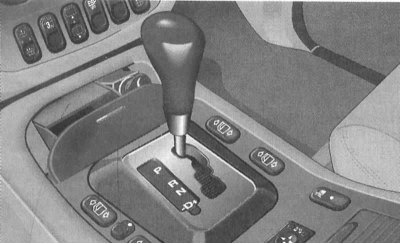
Assembling the front ashtray (1) with the cigarette lighter (2)
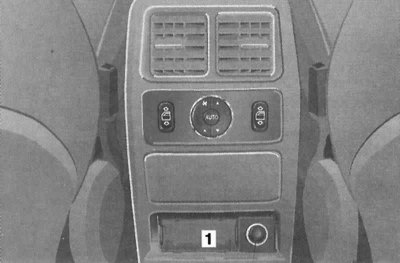
Assembling the rear ashtray (1) with the cigarette lighter (2)
The front ashtray is opened by briefly pressing the top of the lid. To remove the insert, grasp it by the side walls and pull it up.
The rear ashtray is removed by pushing it inwards and then releasing it and can be completely released from the receptacle if necessary.
Caution! Before folding the rear bench seat, the ashtray must be closed!
The use of cigarette lighters is only possible in positions 1 or 2 of the ignition key.
To activate the cigarette lighter, simply press its button into the socket until it stops - after the heating element has warmed up, the button will automatically pop out to its original position.
Attention! Never hold the cigarette lighter button down by force!
If the cigarette lighter button does not pop out after being pressed for more than 30 seconds, the car should be taken to a service station to have the malfunction eliminated. After use, do not forget to return the button to the socket (to avoid clogging the latter).
The cigarette lighter socket can be used to connect external power consumers (pump, radiotelephone charger, vacuum cleaner), designed for 12 V power supply and with a power consumption of no more than 50 W.
Power outlets
One power outlet is located in the front passenger footwell, and another one is located in the vehicle's luggage compartment.
The sockets are equipped with protective covers and are intended for connecting consumers designed for 12 V power supply and with a power consumption of no more than 180 W.
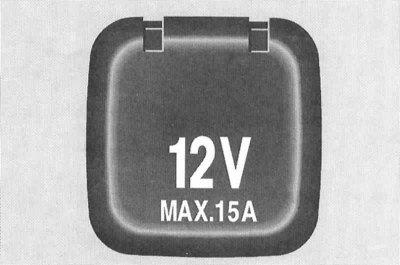
The power sockets are equipped with protective covers and are designed for connecting additional equipment with a power consumption of no more than 180 W (12B x 15A)
Note: The sockets can be used even with the key removed from the ignition switch.
Interior lighting
Main cabin lights and front navigation lights
The operating mode switch for interior lamps is placed on the ceiling console next to the control switch for the operation of the electric drive of the upper hatch, behind the control panel is the assembly of the two-piece main interior lamp/the holder of the remote control device for the garage door drive.
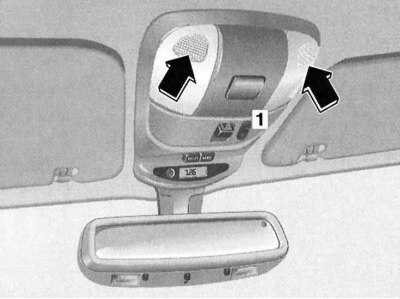
Location of the switch for operating modes of interior lights (1) and design of the assembly of the two-section main interior light (arrows).
Activation/deactivation of each section of the main interior light is performed by pressing the corresponding lens. In addition, the lighting is automatically switched on when the doors are unlocked using the remote control of the single lock, as well as when they are opened - closing the doors leads to switching off the light with a certain time delay. Automatic switching off of the interior lighting is performed when the ignition is turned on.
A three-position key switch for the operating modes of the lights allows you to turn on/off the rear interior lights, activate the interior lighting mode when opening the doors, and also completely turn off the interior lighting (neutral position of the switch).
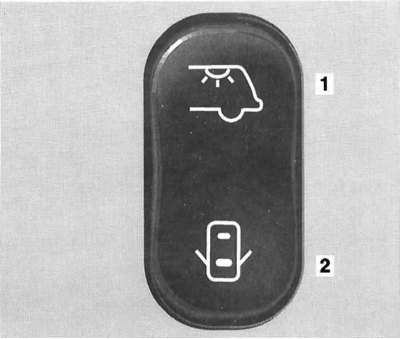
Operating principle of interior light switch (in neutral position the interior lighting remains off under all conditions)
1 — Turning on/off the rear interior lights
2 — Activation/deactivation of interior lighting mode when doors are opened
Rear individual lights (reading lamps)
Activation/deactivation of rear individual lamps (reading lamps) is produced by pressing on the lenses of their lampshades. In addition, the lighting is automatically switched on when the doors are opened - closing the doors results in the lamp being switched off with a certain time delay. Automatic switching off of the interior lighting is performed when the ignition is switched on.
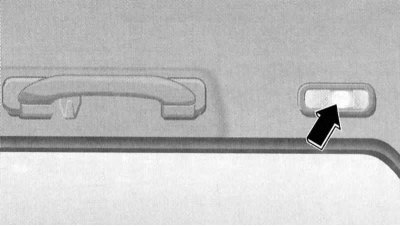
The rear individual lamps are mounted in the side sections of the headlining directly behind the central pillars.
Luggage compartment light
The lamp is mounted in the central part of the rear section of the ceiling trim and is equipped with an individual three-position switch, allowing you to select the operating mode of the lamp.
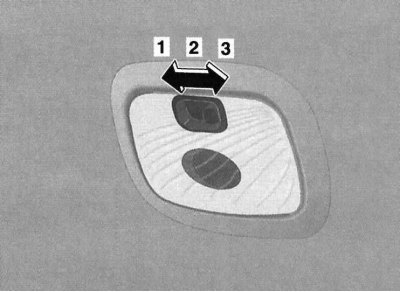
Assembly of the luggage compartment light, switch for selecting the operating mode of the light
1 - Off (the light remains off even when the tailgate is opened)
2 — On (the light stays on all the time)
3 - Door (the light is activated when the tailgate is opened)
Garage door drive remote control device
The holder for fixing the device is placed under the protective cover in the central part of the two-section main interior light assembly.
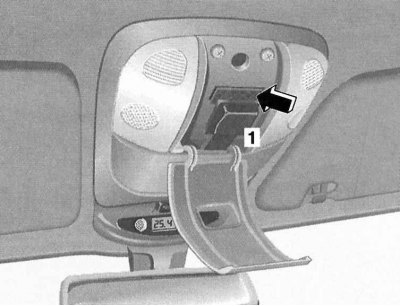
Location of the holder for installing the remote control device for the garage door drive
General information
The universal transceiver built into the assembly allows you to conveniently combine the functions of up to three individual hand-held remote controls and allows you to control the operation of most actuators operating in the radio frequency range, such as a garage door drive, door lock actuators, security systems, etc. The transceiver is powered by an on-board battery, which eliminates the need for periodic replacement of the battery. The transceiver memory is organized according to the ROM principle, which means that there is no need to re-enter data after disconnecting the battery.
Warning! The built-in universal transceiver is not intended for use with garage door opener actuators that do not have an emergency stop reverser function. These requirements were standardized for actuators manufactured on or after April 1, 1982!
Programming the Universal Transceiver
Note: Once the program code has been entered into the transceiver, the original transmitter should be kept in case reprogramming is required (for example, in the case of purchasing a new car). When selling the vehicle, the transceiver software code must be deleted from the device memory for security reasons. See below for details.
Warning! When entering the program code, the garage door may begin to open or close spontaneously - make sure that there are no people or pets in the doorway! Programming the transceiver must be done with the engine off!
With the ignition off (key in position 1 or 2) press the left button of the transmitter on the roof console of the car and, holding it down, wait until the control LED mounted in the console just above the buttons starts to flash at a frequency of about 1 time per second.
Note: When programming any of the buttons for the first time, as well as when reprogramming after a reset, the LED starts to flash almost immediately; when reprogramming a button that is already in use, the LED only activates after approximately 20 seconds.
Without releasing the left button of the control panel, point the portable remote control from the standard kit towards the actuator, which will be controlled from this button, with the end equipped with the emitter towards the left side of the interior rearview mirror, into which the antenna part of the transceiver is integrated, and, without losing sight of the control LED, press the control button of the portable remote control. Hold the button pressed until the blinking frequency of the control LED doubles, confirming the correctness of the input information.
Note: If the gate actuator is equipped with a code change function (Rolling-Code), then you should synchronize the transceiver with the standard transmitter of the driven device - see the operating instructions for the device.
The remaining two control panel buttons are programmed in a similar manner.
Rules for using a universal transceiver
After entering the appropriate program code, the transceiver can be used to control the corresponding actuator (for example, controlling the operation of a garage door drive)To activate the device, simply press the corresponding button on the transceiver control panel (the key in the car ignition must be turned to position 1 or 2), - during the transmission of the control signal, the light indicator must be triggered.
Note: The emitter operates continuously for 20 seconds when the button is pressed, after which the command transmission process is interrupted and the control LED switches to flashing mode - if necessary, press the control button again.
Diagnosing errors in entering program code
If you are unable to enter information from the hand-held transmitter into the transceiver memory quickly enough, proceed as follows:
- a) Replace the battery of the portable remote control;
- b) Ensure that the portable remote control is correctly oriented when brought to the transceiver (the side with the battery compartment should be on the outside);
- c) Try to hold down the buttons on both devices at the same time firmly enough;
- d) Make sure that the transmitter is no more than 125 mm away from the transceiver when entering information. If the frequency of the indicator light flashes does not increase within 15 seconds, confirming successful entry of the program code, try repeating the procedure, slightly changing the position of the transmitter relative to the transceiver - keep the indicator in sight at all times.
If you are unable to enter the code under any circumstances, please contact your authorized Mercedes-Benz service station for advice.
Universal Transceiver Memory Reset
The device design does not provide for the ability to clear data entered for a separate transceiver button. To delete all entered information, hold down both side buttons on the transceiver control panel simultaneously for about 20 seconds. The buttons can be released as soon as the control LED starts flashing.
Note: It is recommended to clear the universal transmitter memory before selling the vehicle.
Procedure in case of car theft
If the vehicle is stolen, the actuators of all transceiver-driven devices that are not equipped with a code alternation function must be reprogrammed - if necessary, consult with representatives of the relevant manufacturers.
When returning a stolen vehicle, all buttons of the built-in transceiver must be reprogrammed.
Sun visors
Sun visors provide protection for the driver/front passenger's eyes from glare from direct sunlight both from the front and from the sides.
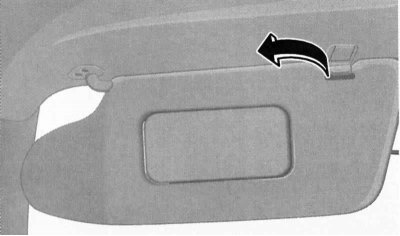
The sun visors have two operating positions - to protect from side rays, release the visor from the lock (arrow) and turn it towards the door glass (driver's visor shown).
On some models, a vanity mirror with a hinged cover may be additionally fitted on the rear side of the sun visor. Opening the vanity mirror cover with the ignition on (key in position 1 or 2) causes the mirror backlight to be activated.
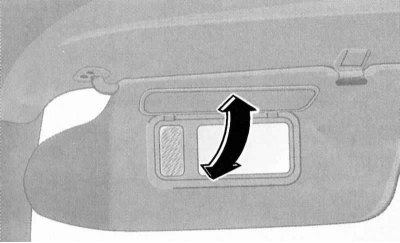
Some models may be equipped with a lighted vanity mirror fitted on the rear of the sun visor, which can be folded down and illuminated.
Storage boxes
The main storage compartment is located on the right side of the instrument panel and has a hinged lid with a rotary handle - opening the lid with the ignition on activates the lighting of the interior of the compartment.
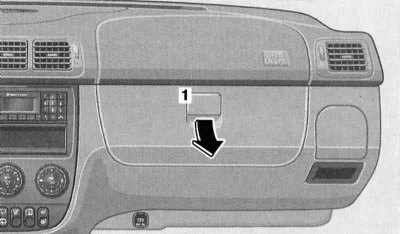
The main storage compartment flap is equipped with a rotating handle (1)
An additional two-section storage box is equipped in the central console assembly, under the armrest between the front seats of the car. A coin box is provided in the lid of the console box.
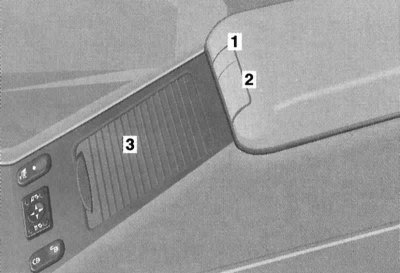
The console armrest has a built-in two-section additional storage compartment
1 - Button for releasing the latch of the upper section of the console box cover
2 - Button for releasing the latch of the lower section of the console box cover
3 - Sliding access cover to the cup holder
Another lockable storage compartment is located under the front passenger seat assembly (see Section Access to the right front seat storage compartment).
Cup holders
Two folding cup holders are equipped on both sides of the instrument panel. To move the cup holder into the working position, simply press the assembly cover briefly and then release it.
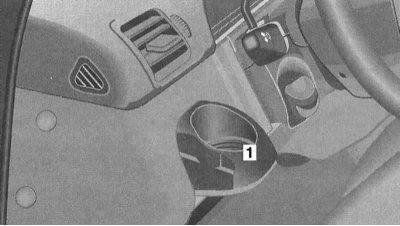
To move the folding cup holder of the instrument panel (1) into the working position, briefly press its cover and then release it (driver's cup holder shown).
Another front cup holder is located under a sliding cover in the front wall of the console armrest - slide the cover up and, pulling the frame of the cup holder, move the latter into the working position.
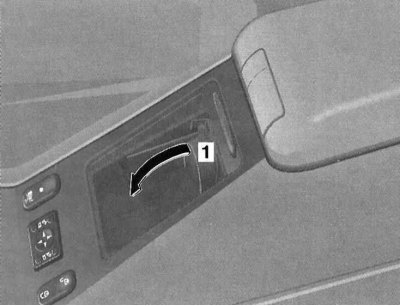
To move the front console cup holder into the working position, open the sliding cover, then pull the holder frame (1) in the direction of the arrow.
Another retractable two-section cup holder is installed in the rear end wall of the central console. To move the cup holder into the working position, it is enough to briefly press the assembly cover, then release it.
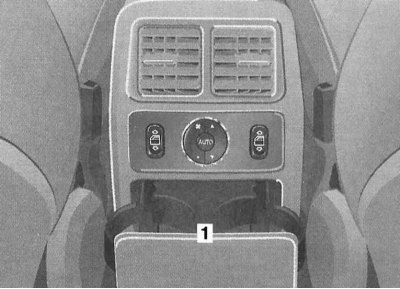
To move the retractable two-section rear cup holder (1) into the working position, briefly press its cover and then release it.
Fire extinguisher
The fire extinguisher mounting location is located in the front of the passenger compartment, next to the driver's seat. The fire extinguisher must be refilled after each use. The fire extinguisher must be checked every 1 - 2 years.
Attention! Carefully read the instructions included in the delivery set for using the fire extinguisher installed in the vehicle!
Removal and installation headrests
Front seat headrests
To remove the head restraints, pull it out of the seat back guide channels until it stops, then press the lock release button and completely release the assembly guide rods from the seat back.
To install, insert the headrest guide rods into the backrest receiving slots (make sure the assembly orientation is correct) and lower the assembly down until the latch snaps into place.
A description of the head restraint adjustment procedure is provided in Section Seat adjustment.
Rear bench seat head restraints
The procedure is the same as described above for the front head restraints.
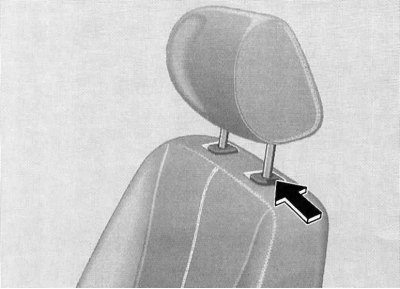
To remove the headrest raised to its highest position, press the lock release button.
Headrests for folding seats of the third additional row
In the stowed position, the headrests of the folding seats are tucked into the side wall of the seat cushion.
The procedure for removing and installing headrests on the backrests is similar to that described above for the front seats.
Top rack, ski holder
The roof rack must be secured exclusively to the standard roof profile guides.
For transporting skis, only special holders approved for use by Mercedes-Benz service centre specialists should be used.