



Contents: General notes on the operation of…↡ Governing bodies ↡ Front control panel for the…↡ Automatic operation mode ↡ Manual adjustment of intensity and…↡ Glass condensation removal mode ↡ Closed air circulation mode ↡ Economy mode ↡ Engine residual heat utilization mode ↡ Shutting off the air supply to the…↡ Rear window heating ↡ Rear switch for controlling the…↡ Automatic operation mode ↡
The automatic air conditioning system, which is standard on some models, only operates when the engine is running. When the economy mode (ACoff) is selected, the cooling system does not operate.
The transition to the selected temperature mode is always carried out at the maximum possible speed.
Note: Minor temperature fluctuations around the set point are due to solar radiation and changes in outside air temperature.
A plug-in filter built into the system's air intake duct protects the interior from dust and pollen.
General notes on the operation of the K/V system
The operation of the air conditioning system may result in condensation forming under the bottom of the vehicle; a small puddle forming under a parked vehicle in hot weather should not cause concern.
In hot sunny weather, before starting to drive, you should ventilate the sun-heated interior of the car.
Make sure that the air vents in the space between the rear shelf and the rear window of the vehicle remain open.
In winter, clear snow from the air intake grille in front of the car's windshield before driving.
In case of refrigerant leaks, the operation of the air conditioning system is automatically suspended and the system switches to economy mode.
Governing bodies
Air is supplied to the vehicle's interior through a network of ventilation ducts ending in nozzles equipped with deflectors.
Publication taken from an online resource www.mercedesman.ru
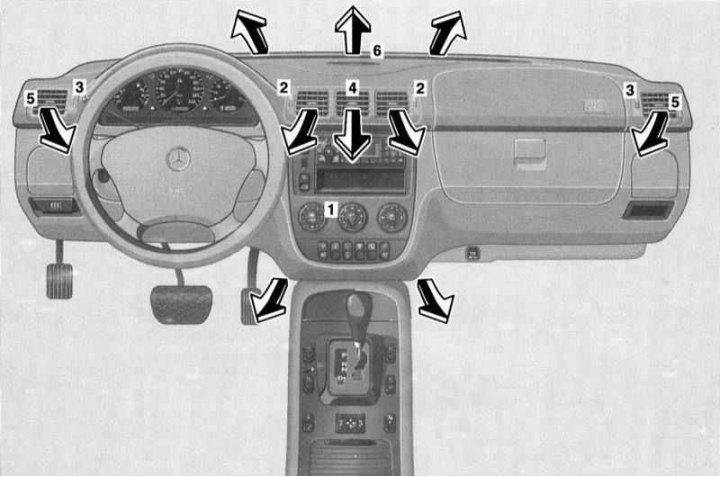
Air flow distribution diagram and front air duct output control elements
1 - System operation control panel; 2 - Regulators of flow sections of central nozzles of the instrument panel; 3 - Regulators of flow sections of side nozzles of the instrument panel; 4 - Rotating deflectors of the central nozzles of the instrument panel; 5 - Rotating deflectors of the side nozzles of the instrument panel; 6 - Windshield air supply nozzle deflector
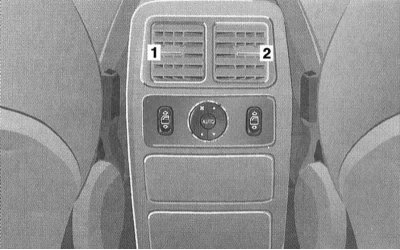
Nozzle deflectors (1 and 2) for air supply to the rear of the passenger compartment
Air is supplied to the front of the cabin in four main directions: to the front level of the driver and front passenger (central and side instrument panel deflectors), for windshield blowing (front instrument panel deflectors), for blowing side windows (side deflectors) and into the foot wells (lower air ducts).
The front air duct outlets are located on the instrument panel and in the passenger compartment footwells.
The design of the louvered deflectors of the outlet nozzles of the front level air ducts allows you to control the intensity (complete closing of the nozzle is achieved by turning the regulator all the way up) and the direction of the outgoing flows (the rotating element is the nozzle assembly).
The front A/C control assembly is located at the top of the instrument panel console section.
The louvered deflectors of the air supply nozzles to the rear of the passenger compartment have a rotating design; the air pressure and flow distribution in the vertical direction are adjusted using a control switch located directly under the deflectors assembly.
Front control panel for the operation of the automated K/V system
The design of the control panel of the air conditioning system is shown in the illustration.
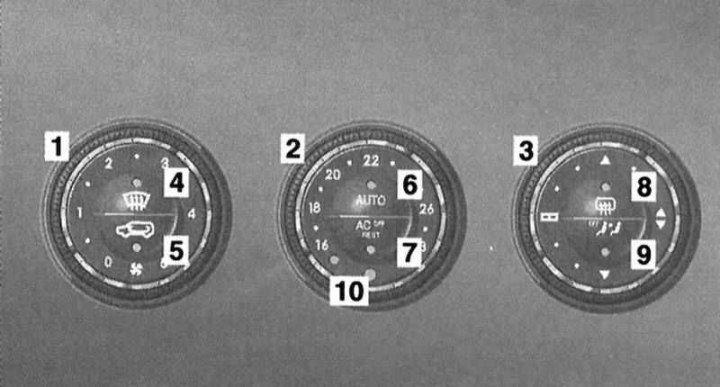
Front control panel for the operation of the automated K/V system
1 - Rotary control for setting the fan speed mode; 2 - Rotary control for selecting the temperature mode; 3 - Rotary control for selecting the direction of air distribution; 4 - Button for activating the condensation removal mode from the glass; 5 - Air circulation mode switching button; 6 - AUTO mode activation buttons; 7 - Economy mode button; 8 - Rear window heating activation button; 9 - Rear air supply shut-off button; 10 - Cabin air temperature sensor
Automatic operation mode
The automatic mode of the system is basic. To activate the mode, press the AUTO button on the central switch of the control panel - the LED built into the button should light up. The required temperature mode is selected by rotating the rotary control of the central switch (the luminous segment built into the control ring serves to indicate the selected value).
Note: When the regulator is turned to the extreme positions marked with blue and red dots on the switch assembly, the temperature control function is disabled.
Having set a comfortable temperature mode, press the AUTO button and hold it down for at least 3 seconds - the system will switch to the automatic mode of maintaining the selected setting.
Note: The rear window heating can be activated manually if necessary.
The control system design allows programming of the basic temperature mode. Turn the rotary control of the central switch to the position of your choice (for example, 21°C), then press the AUTO button and hold it down for about 10 seconds.
Note: Adjustments to the set temperature regime should be made in small steps.
Manual adjustment of intensity and direction of air distribution
The intensity and direction of air distribution can be set manually using the rotary controls on the side switches (the AUTO mode control LED will go out), - the selected temperature mode does not change.
The air supply intensity can be changed within 5 stages of fan speed modes.
Attention! When setting the air supply intensity to zero, the system is switched off! This setting should only be selected for a short time.
The choice of air distribution direction provides the following possible options:
 Air supply for windshield defroster
 Air supply for glass blowing, to the front level and to the footwells
 Air supply to the footwells and to the front level through the side nozzles of the instrument panel
 Air supply to the facial level
Return to automatic mode can be done by pressing the AUTO button (the illuminated segments built into the control rings should go out), - make sure that the automatic mode control LED is activated properly.
Glass condensation removal mode
To quickly remove condensation from the glass, press the button
 , - the control LED built into the button should light up. The system automatically provides maximum heating and fan performance, air supply for blowing the windshield and side windows (through the side nozzles of the instrument panel - do not forget to fully open their passage nozzles and turn the rotary deflectors as required) and shutting off the air supply to the rear of the cabin.
Adjustment of all other settings, with the exception of the rear window heating function, is blocked while the mode is activated.
To turn off the mode, simply press the same button again, or the AUTO button.
Note: To remove condensation from the outer surface of the windshield, select the air supply mode for blowing the glass () and activate the windshield wipers.
Closed air circulation mode
The closed air circulation mode is activated using the lower button of the left switch of the front control panel of the air conditioner - the control LED built into the button should light up. In this mode, the supply of fresh air to the passenger compartment is turned off. This function allows you to prevent polluted or unpleasantly smelling air from entering the car.
Note. Long-term use of closed circulation leads to fogging of the windows and increased air tightness, so it is recommended to turn on this mode only if necessary and for a relatively short time, for example, when driving in an area with a smoky or polluted atmosphere. As soon as the need for interior insulation disappears, the supply of fresh air should be resumed.
Pressing the switch button again restores the air supply.
There is also an automatic shutdown of the closed circulation mode according to the timer signal: approximately after 30 minutes with the air conditioner on, or after 5 minutes with the air conditioner off.
Note: At high outside temperatures, the closed circulation mode is activated automatically and is not accompanied by the control LED of the switch button turning on.
Economy mode
When selecting the economy mode, the air conditioning compressor is switched off.
To activate the economy mode, press the ACoff button on the central switch - the control LED built into the button should light up.
In economy mode, system functions such as cooling and dehumidification are disabled.
The mode is disabled by pressing the same button again.
Engine residual heat utilization mode
Heating of the passenger compartment can be carried out for some time after the engine has stopped by using the residual heat accumulated by the mass of the power unit. The mode is activated using the ACoff/REST button of the central switch of the front control panel - the control LED built into the button should light up.
Before engaging the residual engine heat (REST) mode, turn the ignition key to position 1.
When the mode is activated, the intensity and direction of air flow are adjusted automatically.
Note: A prerequisite for using REST mode is that the battery level is sufficient.
The mode is switched off automatically by a timer signal after approximately 30 minutes, when the ignition key is turned to position 2, and also when the battery charge level noticeably decreases.
Shutting off the air supply to the rear of the cabin
The air supply to the rear of the passenger compartment can be switched off using the lower button of the right switch on the front control panel - the control LED built into the button should light up, and the control from the rear panel will be blocked.
To restore the air supply back, press the same button again - the control LED should go out, and the rear control panel will switch to automatic operation mode (the nozzle cross-sections open).
Rear window heating
The rear window heating only functions in position 2 of the ignition key. The rear window heating element is activated using the upper button of the right switch on the front control panel of the A/C system - the control LED built into the button should light up.
Note: In winter, remove ice and snow from the glass before turning on the heating.
Caution: The rear window heating element consumes a lot of electricity, so do not activate it for a long time.
The heating is automatically switched off by a timer signal after approximately 6-17 minutes, depending on the outside air temperature and the vehicle speed.
Note. The rear window heating may also be switched off if a large number of power consumers are activated simultaneously, or if the battery charge level drops significantly - the control LED built into the button will start flashing. When the voltage level is restored, the heating element is automatically activated.
Rear switch for controlling the operation of the automated K/V system
The rear switch is mounted in the central part of the control panel, located on the rear end wall of the center console directly under the rear air vents. On both sides of the K/V switch are individual switches for the rear door window regulators.
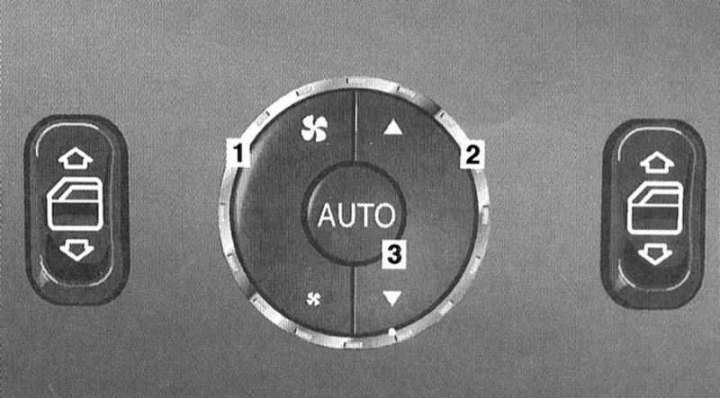
Rear air conditioning control switch
1 — Air flow intensity adjustment key
2 — Key for selecting the direction of air flow in the vertical plane
4 — Automatic mode activation button
Automatic operation mode
Automatic mode is activated using the AUTO button on the rear derailleur, which is equipped with a built-in control LED.
When the automatic mode is on, the air conditioning system automatically maintains the temperature in the rear of the passenger compartment in accordance with the setting selected using the regulator on the front A/C control panel.
Manual adjustment of intensity and direction of air distribution
The intensity and direction of air distribution can be set manually using the side rocker controls on the rear derailleur (the AUTO mode control LED will go out). The temperature mode selected from the front panel remains unchanged.
The fan speed is controlled by the left key controller, and the direction of distribution in the vertical plane is controlled by the right key controller.
Return to automatic mode can be done by pressing the AUTO button - make sure that the automatic mode control LED is activated properly.