



Contents: Replacing the front lamps ↡ Front lamps ↡ Rear lights ↡ Location of lamps inside the right…↡ Direction indicator ↡ Additional direction indicator ↡ Replacing rear lamps ↡ Rear lights ↡ Removal the lamp holder ↡ Arrangement of lamps ↡ Replacing lamps ↡ Installation of the rear light unit ↡ License plate light ↡
Lamps and lights are essential components of vehicle safety. Therefore, make sure that all lamps are always functioning
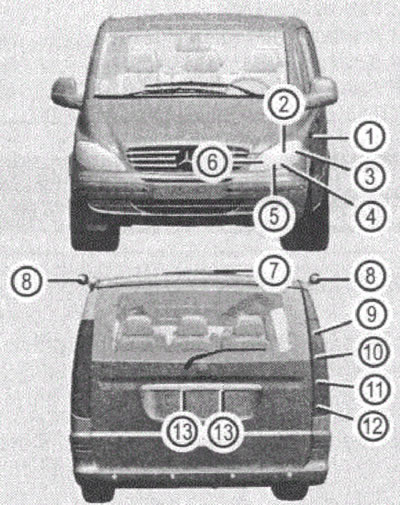
Figure 75
Before replacing lamps, turn off the lights to avoid short circuits.
Handle lamps only with a clean, lint-free cloth. Hands must be dry and clean.
Use only lamps rated for 12 V, of the same type and the appropriate power.
Check headlight adjustment regularly.
To replace the LEDs, contact one of the Mercedes-Benz service stations.
Replacing the front lamps
Turn off the lights. Open the hood.
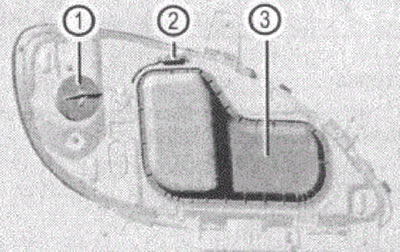
Figure 76
1. Housing cover with snap-on latch
2. Stopper
3. Housing cover
Press the stopper 2 down. The housing cover 3 is unlocked.
Pull the housing cover back. Open it up.
Remove the connector from the lamp holder. Release the spring clip and remove the lamp.
Front lamps
| Pos. | Pampa | Type |
| 1 | Additional direction indicator (in mirror) | LEDs |
| 2 | Low beam | H7 55 W |
| 3 | Direction indicator | P¥21 W |
| 4 | High beam | H7 55W |
| 5 | Parking light | W5W |
| 6 | Fog light | H7 55W |
Rear lights
| Pos. | Lamp | Type |
| 7 | Third brake light | LEDs |
| 8 | Additional direction indicator on the roof | Р21 W |
| 9 | Brake light, tail light | P21/5W |
| 10 | Direction indicator | PY21 W |
| 11 | Reversing light | Р21 W |
| 12 | Rear fog light (on the driver's side) parking light | R 21 W |
| 13 | Number plate light | C5W |
Install the new bulb so that the protrusion on the bulb base aligns with the recess in the bulb holder socket.
Fasten the spring clip.
Insert the plug into the lamp holder.
Place the housing cover 3 on top of the holder. Press the housing cover until the lock snaps into place. A distinctive click should be heard
Location of lamps inside the right headlight
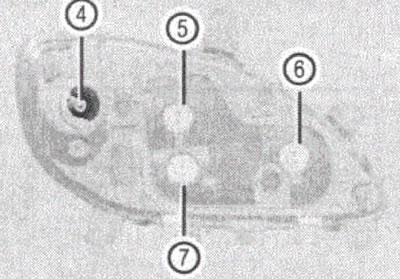
Figure 77
4. Direction indicator
5. Low beam
6. Fog light
7. High beam
Direction indicator
Turn the housing cover with the snap-on latch 1 to the left. Remove it.
Move the lamp back. Remove the lamp (with a left turn) from the holder.
Install the new bulb into the holder. Pull the lamp back and install it by turning it to the right.
Install the lamp holder into the lantern.
Turn it to the right until it clicks into place.
Additional direction indicator
The light is located on the sides of the car in front of the doors.
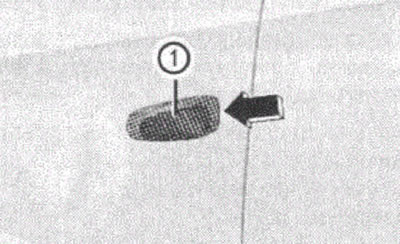
Figure 78
1. Direction indicator light
Slide the turn signal lamp housing 1 forward. Turn it outward.
Move the lamp back. Remove the lamp (with a left turn).
Install the new bulb into the holder. Pull the lamp back and install it with a right turn.
Install the front part of the turn signal lamp housing 1. Push the rear part of the lamp housing inward until it clicks into place.
Replacing rear lamps
To avoid damaging the paintwork, dismantling the rear light assembly should be carried out with extreme caution and foresight.
Rear lights
To replace the bulbs, you must remove the rear light assembly.
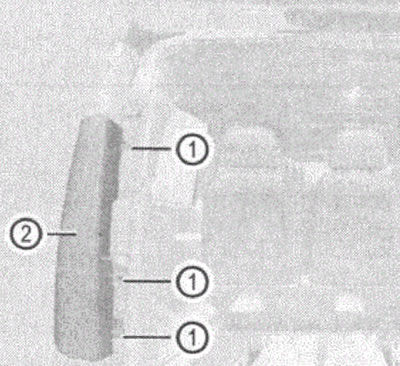
Figure 79
1. Mounting screws
2. Rear light unit
The screwdriver is located in the on-board tool kit in the right-hand storage compartment in the luggage compartment.
(Article was borrowed from the website www.mercedesman.ru)
- Turn off the lights.
- Open the trunk lid or doors.
- Unscrew the three side mounting screws 1.
- Turn the rear light unit 2 outward.
- Remove the rear light assembly 2 from the mounting holes.
- Disconnect the electrical connector.
Removal the lamp holder
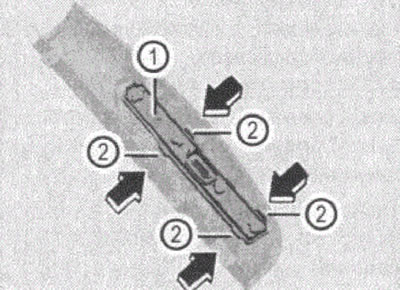
Figure 80
1. Lamp holder
2. Fixators
Press the latches 2 in the direction of the arrow. Remove lamp holder 1.
Arrangement of lamps
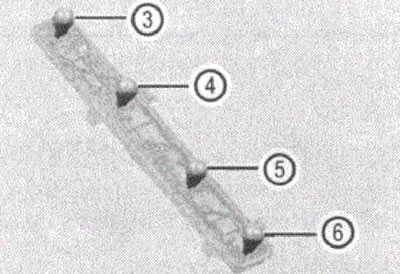
Figure 81
3. Brake light/side light
4. Direction indicator
5. Reverse
6. Fog light (only on the driver's side)
Replacing lamps
Press on the lamp and remove it (with a left turn).
Install a new lamp (with a right turn) into the holder.
Installation of the rear light unit
Install the bulb holder into the tail light assembly until it snaps into place.
Install the connector into the lamp holder.
Install the rear light assembly from the side into the mounting holes.
Turn the rear light assembly inward.
Install the three side mounting screws 1.
License plate light
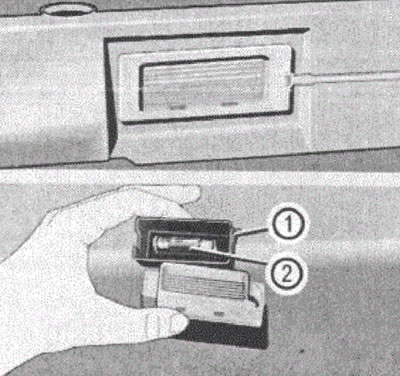
Figure 82
1. Flashlight casing
2. Light bulb
Press the lantern against the spring force. Take it out.
Remove the casing.
Remove the lamp from the holder.
Install a new lamp.
Place the cover on the flashlight.
Place the lantern back in place.
Press the light down until it clicks into place.
Additional direction indicator on the roof
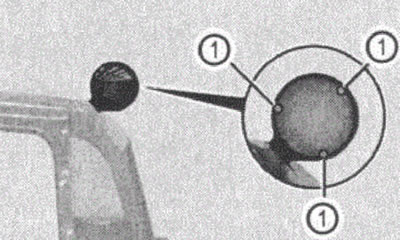
Figure 83
1. Mounting screws
Turn off the lights.
Remove the three mounting screws 1.
Remove the turn signal lamp glass.
Remove the lamp from the lamp holder.
Install a new lamp.
Install the turn signal lamp glass and screw in the three side mounting screws 1.
All the tools required for installation are included in the on-board tool kit in the right additional storage compartment in the luggage compartment.