



Backlight and indicator lamps
2. Turn the bulb holders counterclockwise and remove them from the rear of the instrument cluster (see fig. 9.2).
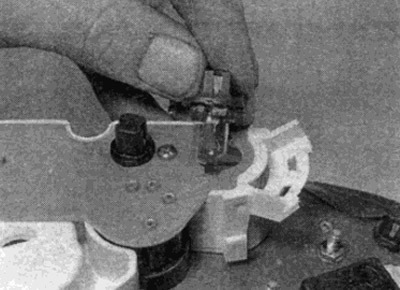
Fig. 9.2. Replacing the instrument cluster backlight lamp
3. Remove the backlight lamp by pulling it out of the holder. Control lamps (except for the generator indicator light) are replaced together with the holders.
Original article is on the portal: www.mercedesman.ru
4. Install the lamp holders by pressing them down and turning them clockwise.
Speedometer
5. Remove the resistance block on the back of the speedometer by pulling it upwards (see fig. 9.5). The block is secured with two screws, unscrew them first.
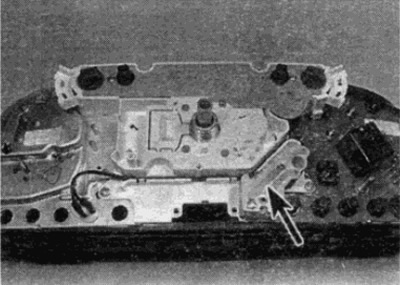
Fig. 9.5. Location of the resistor block on the instrument panel (shown by arrow)
6. Remove the four screws securing the speedometer to the rear of the instrument cluster.
7. Remove the two screws or loosen the latches and pull out the bulb holder above the speedometer.
8. Where provided, remove the coolant level indicator pump and release the wiring near the speedometer.
9. Remove the speedometer from the instrument cluster.
10. Installation is carried out in reverse order.
Tachometer
11. Remove the speedometer as described above.
12. Remove the two additional screws (see fig. 9.12) and remove the block.
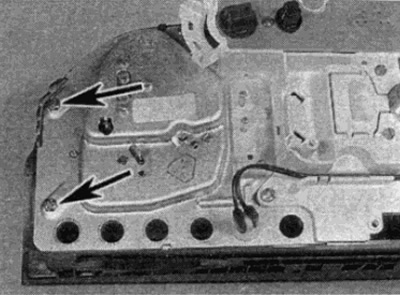
Fig. 9.12. Tachometer mounting screws (shown by arrows)
13. Installation is carried out in reverse order.
Block of pointer instruments
14. Remove the speedometer as described earlier.
15. Remove the two additional screws (see fig. 9.15) and remove the instrument cluster.
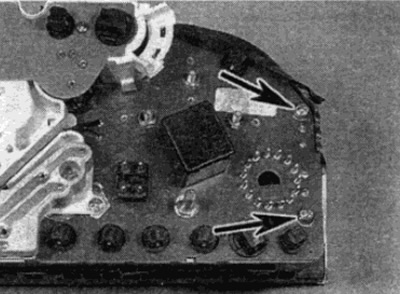
Fig. 9.15. Instrument cluster mounting screws (shown by arrows)
16. Installation is carried out in reverse order.