



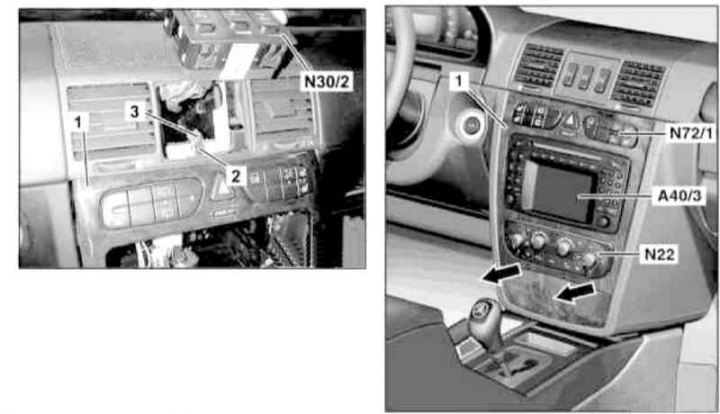
Instrument cluster center/console section trim installation details
1 - Facing panel; 2 - Mounting plate; 3 - Bolt; A40/3 - Multifunctional display/control module for the COMAND system; N₂2 - Automatic K/V activation button; N30/2 - Assembly of differential lock switches; N72/1 - Left upper group of switches of the console section of the instrument panel
1. On models with the corresponding configuration (code ET2), activate the service mode of the TELE AID emergency call system (see Section Activation/deactivation of the service mode of the TELE AID emergency call system).
2. Move the AT selector lever to position "D".
3. Disconnect the negative cable from the battery.
4. Remove the differential lock switch assembly (N30/2) (see Chapter On-board electrical equipment) and, without disconnecting the electrical wiring, put it aside.
5. Unscrew the bolt (3) and remove the mounting plate (2).
6. Open the front ashtray and remove the trim panel (1) by first sliding it down and then pulling it out.
7. Disconnect the connector (N₂2) of the A/C activation button wiring and completely remove the panel (1).
8. Installation is carried out in the reverse order - if the corresponding configuration (code ET2) is installed, deactivate the service mode of the TELE AID system (see Section Activation/deactivation of the service mode of the TELE AID emergency call system).
9. Finally, read the DTC codes and clear the on-board diagnostic system memory using the STAR DIAGNOSIS scanner (6511 1801 00) (See Chapter Engine electrical systems) and enter the required basic settings of the on-board equipment.