



Instrument panel switches
2. To remove switches on either side of the instrument panel, carefully pry up one end of the switch with a knife blade or thin screwdriver, protecting the surface of the instrument panel.
3. Remove the switch assembly and disconnect the plug at the rear (see fig. 6.3).
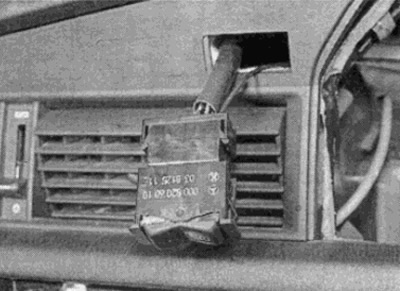
Fig. 6.3. Pry the switch out of the panel and disconnect the wire plug
4. To install, connect the wire plug and press the switch into place.
Headlight switch
5. Remove the cover under the instrument panel on the driver's side.
6. Using pliers and a protective cloth, carefully remove the switch button (see Fig. 6.6, a, b).
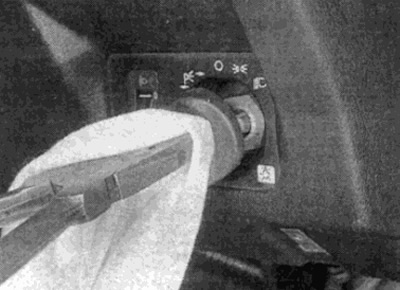
Fig. 6.6. a. Use pliers and a cloth to release the switch button...
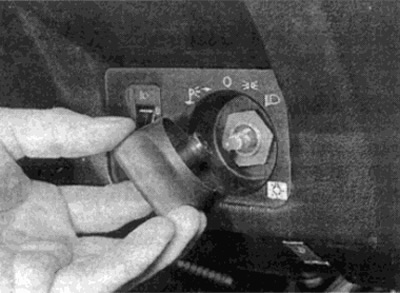
Fig. 6.6, b....then remove the button
7. Using a small screwdriver, pry up the rotary light control switch (see fig. 6.7). Disconnect the vacuum hoses, pull out the backlight lamp holder and remove the switch.
Original source of information [MercedesMan.ru]
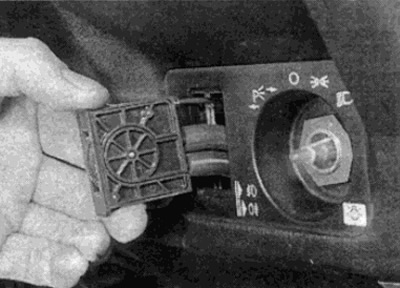
Fig. 6.7. Removing the headlight control switch
8. Loosen the headlight switch mounting nut (see fig. 6.8) and pull the switch out from the back of the instrument panel. Disconnect the wire plug and remove the switch.
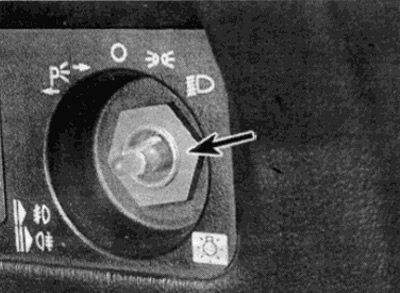
Fig. 6.8. Headlight switch mounting nut
9. Installation is carried out in reverse order.
Central control panel switches
10. Using a small screwdriver, carefully pry the corresponding switch out of the socket (see fig. 6.10).
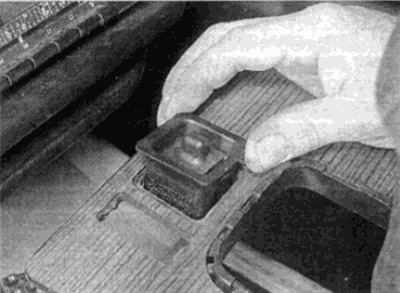
Fig. 6.10. Removing the central control panel switch
11. Disconnect the plug and remove the switch.
12. Installation is carried out in reverse order.