



Contents: Models 463.250/323/333 ↡ Models 463.246/249 ↡
Models 463.250/323/333
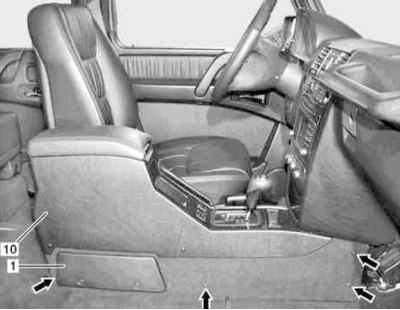
Center Console Installation Details for Models 463.250/323/333 (1 of 5)
1 - Cover of the fuse box; 10 - Center console
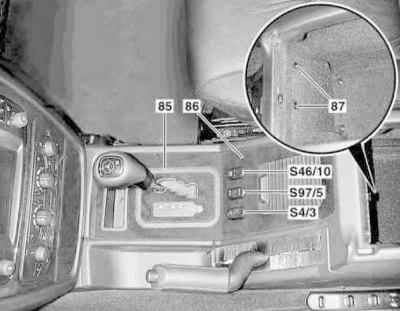
Center Console Installation Details for Models 463.250/323/333 (2 of 5)
85 - Facing frame; 86 - Wooden panel; 87 - Bolts; S4/3 - Additional heating system switch (diesel models only); S46/10 - Independent switch for interior heating/ventilation system (with appropriate equipment); S97/5 - Transfer case switch
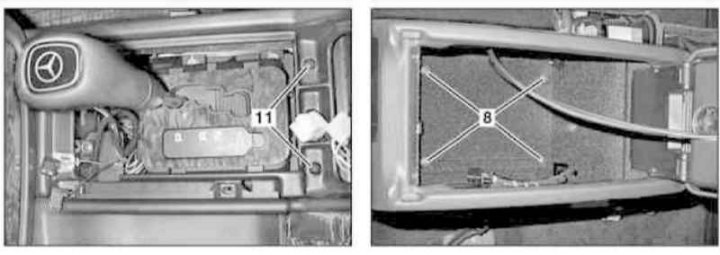
Center Console Installation Details for Models 463.250/323/333 (3 of 5)
8, 11 — Bolts
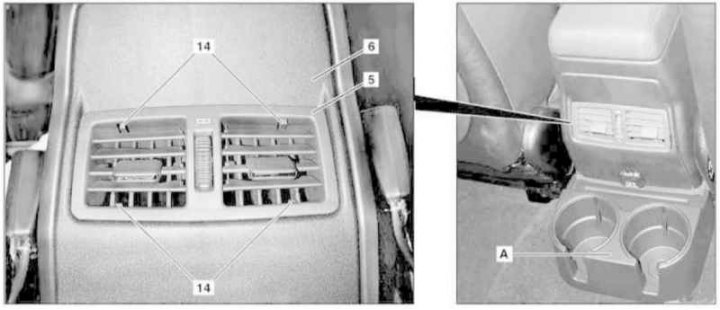
Center console installation details (all models) (4 out of 5)
5 - Console deflectors; 6 - Lid; 14 - Fixators; A - Cup holder
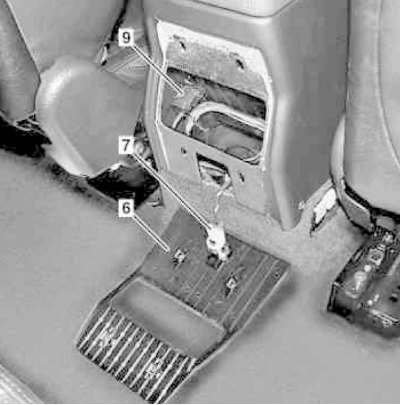
Center console installation details (all models) (5 out of 5)
6 - Lid; 7 - Power socket; 9 - Telephone jack
1. Loosen the bolt located at the bottom and remove the fuse box cover (1).
2. Unscrew the side bolts (arrows) securing the central console (10) - to provide access to the bolts, move the front seats to a comfortable position.
3. On models with the corresponding configuration (code ET2), activate the service mode of the TELE AID emergency call system (see Section Activation/deactivation of the service mode of the TELE AID emergency call system).
4. Remove the key from the ignition switch.
5. Turn on the auxiliary battery and connect it to the standard battery, then disconnect the negative cable from the latter.
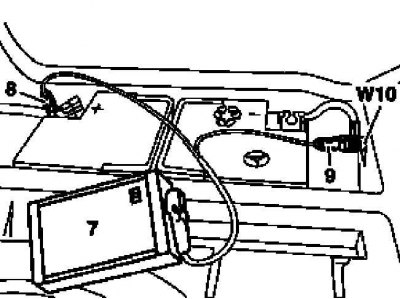
7 - Auxiliary battery
8 — Positive wire terminal of the module
9 — Terminal of the negative wire of the module
W10 - Battery ground
6. Remove the trim frame (85) of the AT selector lever base cover.
7. Remove the mounting bolts (87) located inside the console storage compartment.
8. Carefully release the front wooden panel (86) from the console assembly (10).
9. Disconnect the wiring from the console switches (S4/3, S46/10 and S97/5).
10. Unscrew the mounting bolts (8).
11. Remove the parking brake release lever cover.
12. Carefully release the fasteners (14) and remove the assembly (5) of the rear console deflectors of the interior heating/ventilation systems.
13. Remove the cup holder (A).
14. Release the four clamps (two up and two down) and remove the cover (6).
15. Disconnect the electrical wiring from the power socket (7).
16. Disconnect the telephone connector (9).
17. Remove the bolts (11).
18. Set the parking brake.
19. Remove the center console assembly (10) by pushing it backwards and upwards.
20. Installation is carried out in the reverse order - if the corresponding configuration (code ET2) is installed, deactivate the service mode of the TELE AID system (see Section Activation/deactivation of the service mode of the TELE AID emergency call system).
21. Finally, read the DTC codes and clear the on-board diagnostic system memory using the STAR DIAGNOSIS scanner (6511 1801 00) (See Chapter Engine electrical systems).
Models 463.246/249
The corresponding illustrative material is presented in the accompanying illustration and the illustrations Center Console Installation Details for Models 463.250/323/333 (2 of 5) and Center Console Installation Details for Models 463.250/323/333 (3 of 5), to which all references in the text refer.
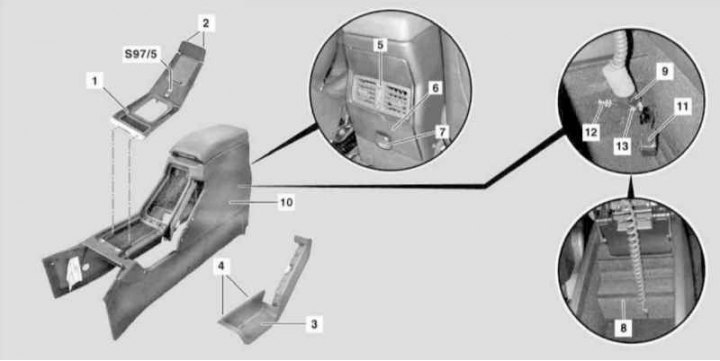
Installation details for the center console on models 463.246/249 (see also illustrations Installation details for the center console (all models) (4 of 5) and Center Console Installation Details (all models) (5 out of 5))
1 - Overlay; 2 - Fixators; 3 - Parking brake lever cover; 5 - Console deflectors; 6, 8 - Lids; 7 - Power socket; 9 - Connector; 10 - Console assembly; 11 - Telephone jack; 12 - Antenna cable; 13 - Retainer; S97/5 - Transfer case switch
1. Remove the key from the ignition switch.
2. Turn on the auxiliary battery and connect it to the standard battery, then disconnect the negative cable from the latter.
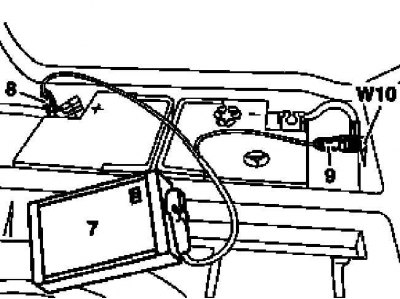
7 - Auxiliary battery
8 — Positive wire terminal of the module
9 — Terminal of the negative wire of the module
W10 - Battery ground
3. Remove the cover (3) of the parking brake release lever.
4. Remove the cup holder (A).
5. Carefully release the fasteners (14) and remove the assembly (5) of the rear console deflectors of the interior heating/ventilation systems.
6. Release the four clamps (two up and two down) and remove the cover (6).
7. Disconnect the electrical wiring from the power outlet (7).
8. Inside the console storage compartment, remove the cover (8) and disconnect the connector (9).
9. Release the connectors (9 and 11) and the antenna cable (12) from the console assembly, after first releasing the lock (13).
10. Remove the fourteen mounting screws and remove the center console assembly (10).
11. Installation is carried out in reverse order.
12. Finally, read the DTC codes and clear the on-board diagnostic system memory using the STAR DIAGNOSIS scanner (6511 1801 00) (See Chapter Engine electrical systems).