



For models 463.246/249 with corresponding configuration
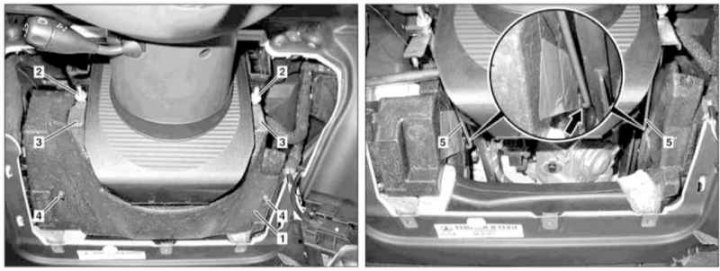
Knee support installation details for models 463.246/249 with corresponding configuration
1 - Knee support; 2 - Fastening nuts; 3 - Pressure plates; 4 - Mounting bolts; 5 - Mounting bracket
1. Remove the lower trim section from the driver's side of the instrument panel (see Section Removal and installation the left lower section of the instrument panel trim), - there is no need to dismantle the electronic ignition switch module (EIS/EZS).
2. Loosen the fastening nuts (2) and remove the pressure plates (3).
3. Unscrew the bolts (4) and remove the knee support (1).
4. Installation is carried out in the reverse order - make sure that the mounting bracket (5) does not jump out of the mounting hole (arrow), and that the material of the stop (1) is not deformed when screwing in the mounting bolts (4).
[Material borrowed from an online resource: MercedesMAN.ru]