



Contents: General information ↡ COMAND system control module with…↡ Door assembly control modules ↡ Signal Activation and Sensing System…↡ Electronic Ignition Switch (EIS/EZS)…↡ Telecommunications Management Module…↡ Control module of the emergency call…↡ Tow Protection Sensor Control Module ↡ Control module for ultrasonic…↡ Seat heating control module (code…↡ Control module for the Linguatronic…↡ Audio amplifier control module (code…↡ SRS control module ↡
General information
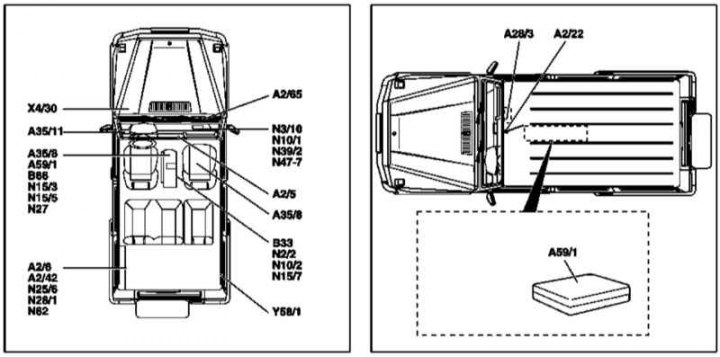
Layout of control modules on board the vehicle
A2/5 - Antenna splitter; A2/6 - CD changer; A2/22 - Antenna; A2/42 - TV tuner; A2/65 - Antenna amplifier; A35/8 - Control module of the emergency call system (E-call) TELE AID; A35/11 - Linguatronic system control module; B33 - Anti-theft alarm system (ATA) tilt sensor; B66 - Cone tilt sensor; N₂/2 - SRS control module; N3/10 - ME-SFI injection control module; N10/1 - Right SAM control module/mounting block; N10/2 - Rear SAM Control Module/Mounting Block; N15/3 - AT Control Module (TCM/ETC); N15/5 - Selector module (ESM) AT; N15/7 - Transfer case control module VGS; N₂5/6 - Rear seat heating control module; N₂7 - Tow-away protection sensor control module; N₂8/1 - Trailer connection detection system control module; N39/2 - CDI injection control module; N47-7 - ABS Control Module; N62 - Reversing Assist (BA) Control Module; X4/30 - Terminal block (circuit 30, engine); Y58/1 - Carbon adsorber purge valve
Description of procedures for removing and installing injection control modules (ME-SFI/CDI), AT (TCM/ETC), transfer case, brake and auxiliary stabilization systems (ABS/BAS/EBV/ESP) are given in the relevant Chapters of the Manual (see Chapters Fuel and exhaust systems, Automatic transmission, Transmission line and Suspension and steering).
COMAND system control module with multifunctional display (code ET4)
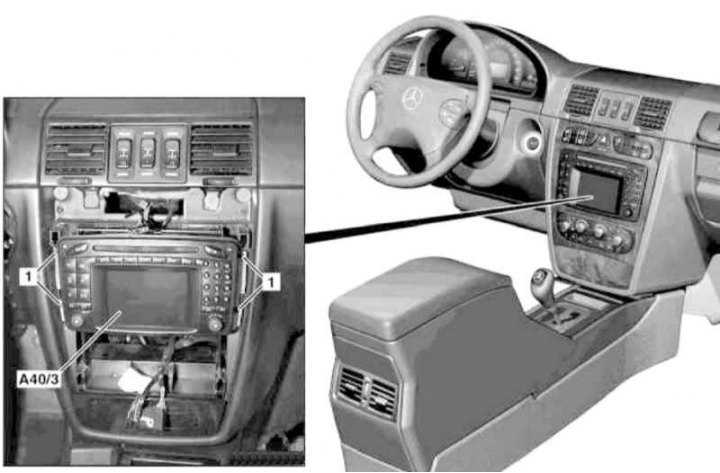
Installation details of the COMAND control module with multifunction display (1 of 2)
1 - Bolt
A40/3 - Command control module with multifunctional display
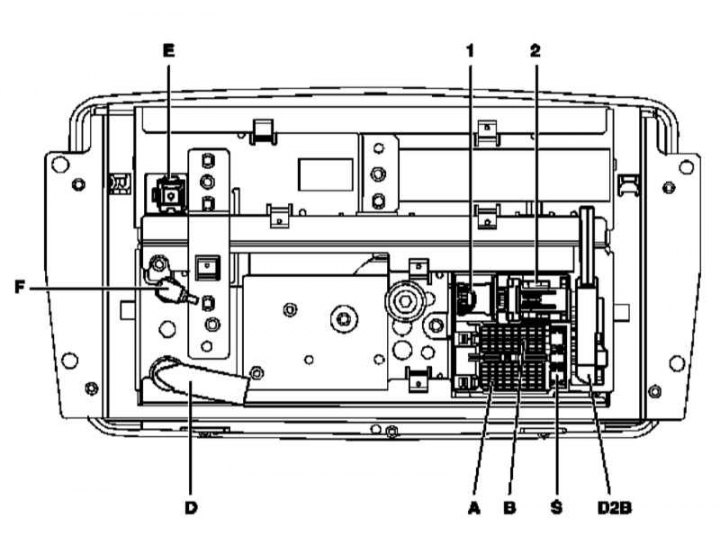
Installation details of the COMAND control module with multifunction display (2 of 2)
1 - RGB TV tuner signal connector; 2 - CAN bus connector (to the instrument cluster); A - Power supply connector; B - Speaker connector; D2B - Fiber Optic Bus Connector; D - FM/AM antenna input connector; E - GPS input connector; F - IF output signal connector*; S - Fuse
1. On models with the corresponding configuration (code ET2), activate the service mode of the TELE AID emergency call system (see Section Activation/deactivation of the service mode of the TELE AID emergency call system).
2. Disconnect the negative cable from the battery.
3. Remove the instrument panel center section trim (see Removal and installation the trim panel of the console section of the instrument panel).
4. Remove the mounting bolts (1) and release the control module/multifunction display assembly (A40/3) from the instrument panel.
5. Disconnect the electrical connectors (1, 2, A, B, D, E, F).
6. Carefully, being careful not to pull or bend the cable, disconnect the D2B connector of the fiber optic bus.
7. Installation is carried out in the reverse order - if the corresponding configuration (code ET2) is installed, deactivate the service mode of the TELE AID system (see Section Activation/deactivation of the service mode of the TELE AID emergency call system).
8. Finally, read the DTC codes and clear the on-board diagnostic system memory using the STAR DIAGNOSIS scanner (6511 1801 00) (See Chapter Engine electrical systems).
Door assembly control modules
Front door
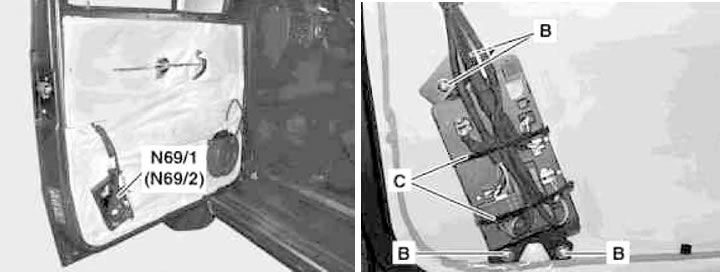
Front Door Control Module Installation Details
B - Mounting screws; C - Strappings; N69/1 - Left door control module; N69/2 - Right door control module
1. Turn on the auxiliary battery and connect it to the standard battery, then disconnect the negative cable from the latter.
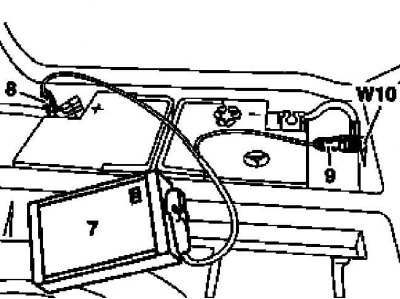
7 - Auxiliary battery
8 — Positive wire terminal of the module
9 — Terminal of the negative wire of the module
W10 - Battery ground
2. Remove the door interior trim panel (see Chapter Body).
3. Disconnect the electrical wiring from the door control module (N69/1 or N69/2) (See Section Disconnecting and connecting electrical wiring of mounting blocks and control modules).
4. Remove the mounting screws (B) and remove the control module (N69/1 or N69/2).
5. Installation is carried out in the reverse order - the electrical wiring of the modules, making sure that the wires do not cross, secure with new bandages (C).
6. Finally, read the DTC codes and clear the on-board diagnostic system memory using the STAR DIAGNOSIS scanner (6511 1801 00) (See Chapter Engine electrical systems).
Back door
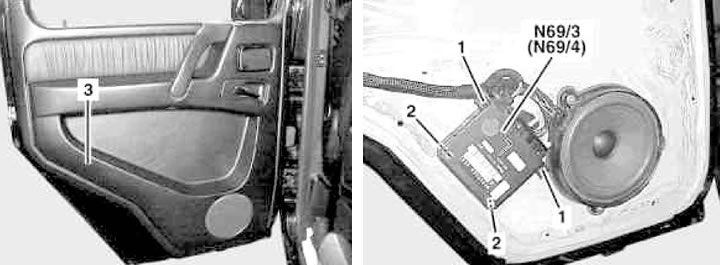
Rear Door Control Module Installation Details (1 of 2)
1 - Fixators; 2 - Latches; 3 - Trim panel; N69/3 - Left door control module; N69/4 - Right door control module
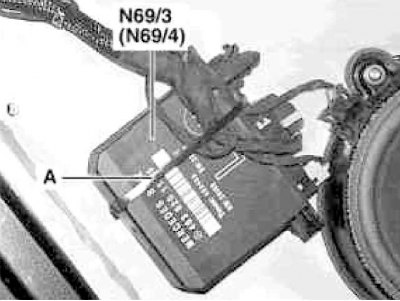
Rear Door Control Module Installation Details (2 of 2)
A - Harness
1. Turn on the auxiliary battery and connect it to the standard battery, then disconnect the negative cable from the latter.
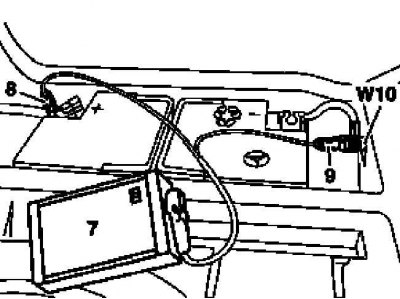
7 - Auxiliary battery
8 — Positive wire terminal of the module
9 — Terminal of the negative wire of the module
W10 - Battery ground
2. Remove the door interior trim panel (3) (see Chapter Body).
3. Disconnect the electrical wiring from the door control module (N69/3 or N69/4) (See Section Disconnecting and connecting electrical wiring of mounting blocks and control modules).
4. Squeeze the clips (1) and remove the control module (N69/3 or N69/4).
5. Installation is carried out in the reverse order - wiring of the modules, making sure that the wires do not cross, secure with a new harness (A).
6. Finally, read the DTC codes and clear the on-board diagnostic system memory using the STAR DIAGNOSIS scanner (6511 1801 00) (See Chapter Engine electrical systems).
Signal Activation and Sensing System (SAM) Control Modules/Fuse and Relay Mounting Blocks
Front module
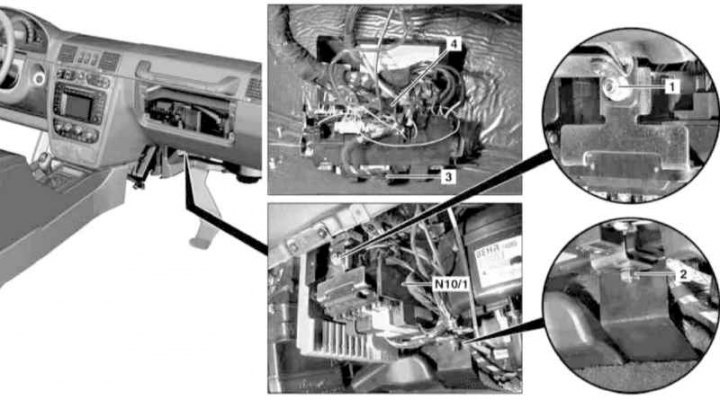
Front SAM/Fuse and Relay Box Installation Details
1, 2 - Nuts; 3, 4 - SAM wiring connector; N10/1 - Front Control Module SAM
1. On models with the corresponding configuration (code ET2), activate the service mode of the TELE AID emergency call system (see Section Activation/deactivation of the service mode of the TELE AID emergency call system).
2. Disconnect the negative cable from the battery.
3. Remove the main storage compartment (see Chapter Body).
4. Remove the right lower instrument panel cover (see Chapter Body).
5. Loosen the mounting nuts (1 and 2) and remove the front SAM module/mounting block (N10/1).
6. After marking, disconnect the connectors (3 and 4) of the control module (N10/1) (see Section Disconnecting and connecting electrical wiring of mounting blocks and control modules).
7. Installation is carried out in the reverse order - make sure that the electrical wiring is laid correctly and that its connectors are securely fastened (see Section Disconnecting and connecting electrical wiring of mounting blocks and control modules).
8. On models with the corresponding configuration (code ET2), deactivate the service mode of the TELE AID system (see Section Activation/deactivation of the service mode of the TELE AID emergency call system).
9. Finally, read the DTC codes and clear the on-board diagnostic system memory using the STAR DIAGNOSIS scanner (6511 1801 00) (See Chapter Engine electrical systems) and enter the required basic settings of the on-board equipment.
Rear module
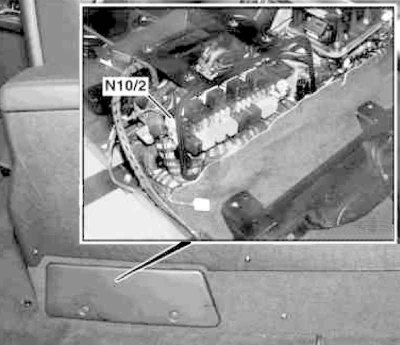
Rear SAM/Fuse and Relay Box Installation Details (N10/2)
1. On models with the corresponding configuration (code ET2), activate the service mode of the TELE AID emergency call system (see Section Activation/deactivation of the service mode of the TELE AID emergency call system).
2. Disconnect the negative cable from the battery.
3. Remove the center console (see Chapter Body) and the air duct laid underneath it.
4. Loosen the mounting screws and remove the SAM module/mounting block (N10/2).
5. Installation is carried out in the reverse order - make sure that the electrical wiring is laid correctly and that its connectors are securely fastened (see Section Disconnecting and connecting electrical wiring of mounting blocks and control modules).
6. On models with the corresponding configuration (code ET2), deactivate the service mode of the TELE AID system (see Section Activation/deactivation of the service mode of the TELE AID emergency call system).
7. Finally, read the DTC codes and clear the on-board diagnostic system memory using the STAR DIAGNOSIS scanner (6511 1801 00) (See Chapter Engine electrical systems) and enter the required basic settings of the on-board equipment.
Electronic Ignition Switch (EIS/EZS) Control Module
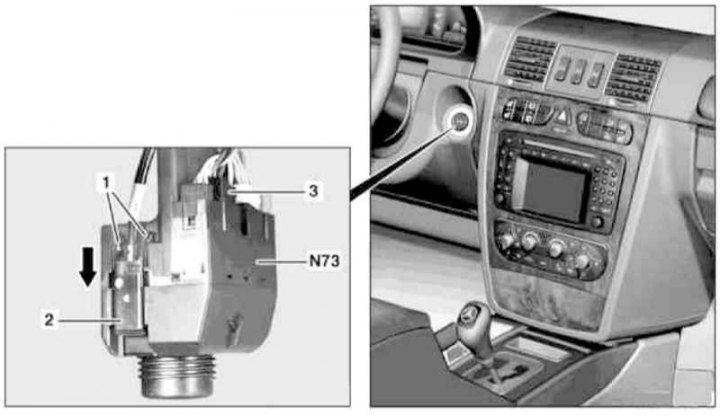
EIS/EZS Control Module Installation Details
1 - Fixators; 2 - Ignition switch drive cable; 3 - Electrical wiring connector; N73 - EIS/EZS Control Module
1. On models with the corresponding configuration (code ET2), activate the service mode of the TELE AID emergency call system (see Section Activation/deactivation of the service mode of the TELE AID emergency call system).
2. Turn on the auxiliary battery and connect it to the standard battery, then disconnect the negative cable from the latter.
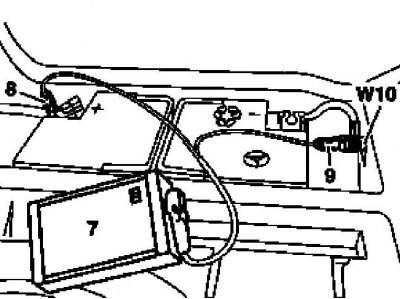
7 - Auxiliary battery
8 — Positive wire terminal of the module
9 — Terminal of the negative wire of the module
W10 - Battery ground
3. Remove the ignition key.
4. Remove the left lower section of the instrument panel trim (see Chapter Body).
5. Squeeze the clips (1) and disconnect the drive cable (2) from the EIS module (N73) by pulling it in the direction shown by the arrow.
6. Disconnect the EIS module (N73) wiring connector (3).
7. Installation is carried out in reverse order - the replacement EIS module must be programmed in accordance with the instructions included in the kit.
8. Finally, read the DTC codes and clear the on-board diagnostic system memory using the STAR DIAGNOSIS scanner (6511 1801 00) (See Chapter Engine electrical systems).
Telecommunications Management Module (eT7/EV7 codes)
Telecommunications Control Module Installation Details (eT7/EV7 codes)
1 - Module console; A - Fiber optic cable connection connector; B - Connector; N112 - Control module
1. Remove the center console (see Chapter Body).
2. Disconnect the connector (A) for connecting the fiber optic cable on the control module (N112), - immediately close the waveguide connectors with protective plugs.
3. Squeeze the locking tabs and gently pull to disconnect the connector (B).
4. Remove the 2 mounting screws and, after loosening one nut, remove the control module (N112) console (1) from the transmission line tunnel.
5. Remove the two bottom mounting screws and remove the control module (N112) from the console panel (1).
6. Installation is carried out in reverse order.
7. Finally, read the DTC codes and clear the on-board diagnostic system memory using the STAR DIAGNOSIS scanner (6511 1801 00) (See Chapter Engine electrical systems).
Control module of the emergency call system TELE AID (code ET2)
Models 463.250/323/333
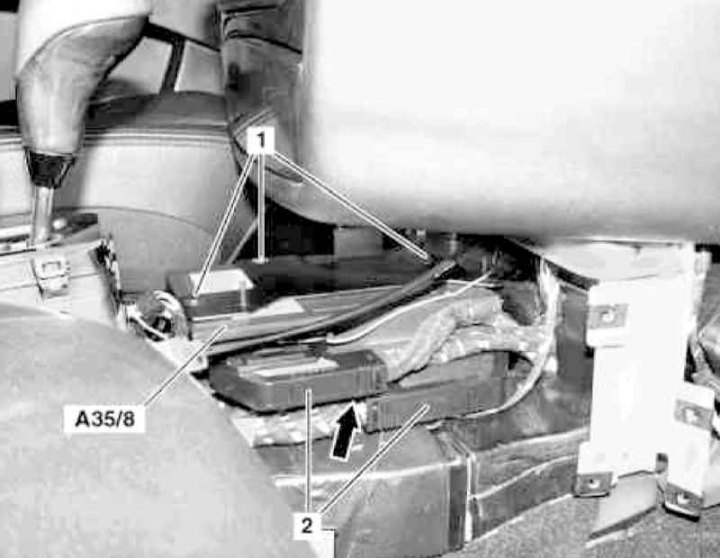
Installation details of the control module of the TELE AID emergency call system on models 463.250/323/333
1 - Screws; 2 - Electrical wiring connectors; A35/8 - Control module; Arrow - Electrical wiring connector
1. On models with the corresponding configuration (code ET2), activate the service mode of the TELE AID emergency call system (see Section Activation/deactivation of the service mode of the TELE AID emergency call system).
2. Disconnect the negative cable from the battery.
3. Remove the center console (see Chapter Body).
4. Remove the ECM/ETC module (see Chapter Automatic transmission).
5. Remove the three mounting screws (1), disconnect the two connectors (2), then disconnect the connector shown by the arrow and remove the control module (A35/8).
6. Replace the emergency call system battery.
7. Installation is carried out in reverse order.
8. On models with the corresponding configuration (code ET2), deactivate the service mode of the TELE AID system (see Section Activation/deactivation of the service mode of the TELE AID emergency call system).
9. Finally, read the DTC codes and clear the on-board diagnostic system memory using the STAR DIAGNOSIS scanner (6511 1801 00) (See Chapter Engine electrical systems) and enter the required basic settings of the on-board equipment.
Models 463.246/249
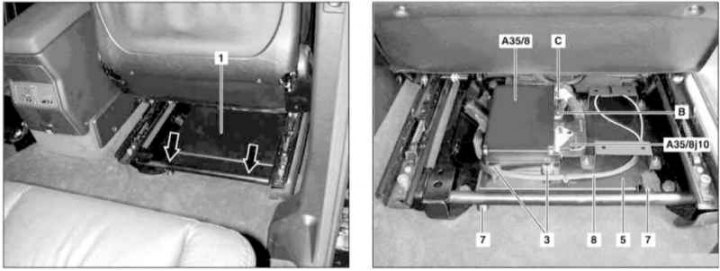
Installation details of the control module of the TELE AID emergency call system on models 463.246/249 (1 of 3)
1 - Control module cover; 3 - Fastening nut; A35/8 - Control module; A35/8j10 - Electrical wiring connector; B - CAN data bus wiring connector; C - Antenna cable connector; Arrow - Clamps
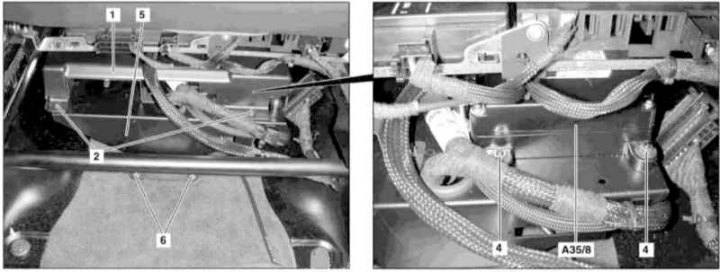
Installation details of the control module of the TELE AID emergency call system on models 463.246/249 (2 of 3)
4 - Fastening nut; 5 - Module console; 6 - Fastening nuts
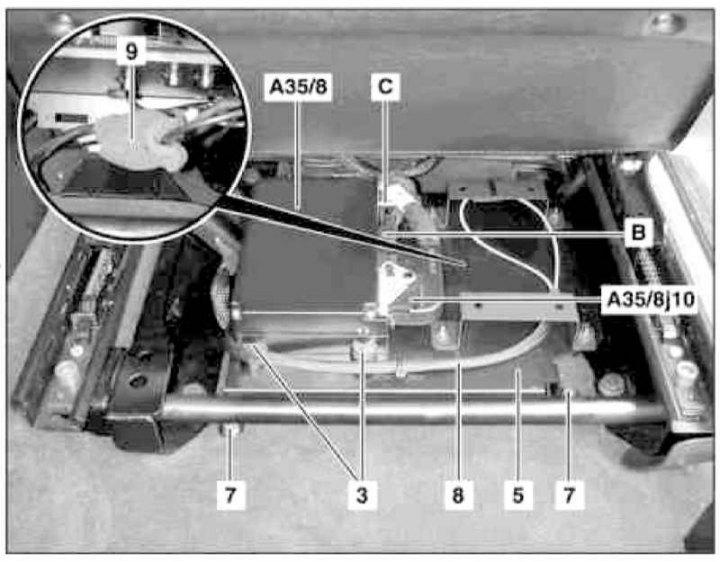
Installation details of the control module console of the TELE AID emergency call system on models 463.246/249 (3 of 3)
5 - Module console; 7 - Fastening nuts; 8 - CAN data bus wire; 9 - Porous insulating material
1. Lift the right front seat and slide it back as far as it will go.
2. Release the two fasteners (2) securing the front side of the control module cover (1).
3. Move the raised seat forward as far as it will go, release the two rear fasteners (arrows) and remove the cover (1).
4. Loosen the two nuts (3) securing the rear part of the control module (A35/8).
5. Move the raised seat back to its extreme rear position, loosen the two front nuts (4) and remove the module (A35/8).
6. Turn off the ignition, activate the auxiliary battery and connect it to the standard battery, then disconnect the negative cable from the latter.
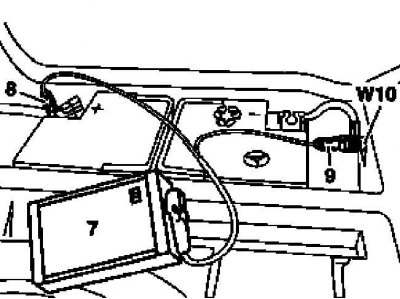
7 - Auxiliary battery
8 — Positive wire terminal of the module
9 — Terminal of the negative wire of the module
W10 - Battery ground
7. Remove the control module (A35/8) from the support bracket.
8. Unlock and disconnect the connector (A35/8j10).
9. Disconnect the CAN data bus fibre optic cable and immediately seal both halves of its connector (B) with special protective caps that prevent exposure to light.
10. Disconnect the antenna cable connector (C).
11. Remove the TELE AID emergency call system control module (A35/8).
12. If necessary, loosen the front (6) and rear (7) nuts, separate the CAN bus wire (8) from the console (5), remove the foam insulation material (9) and disconnect the contact connectors, - take care to protect the fiber optic waveguide with special caps and remove the console (5) of the module, threading the electrical wiring through the through windows.
13. Installation is carried out in reverse order.
14. Finally, read the DTC codes and clear the on-board diagnostic system memory using the STAR DIAGNOSIS scanner (6511 1801 00) (See Chapter Engine electrical systems) and enter the required basic settings of the on-board equipment.
Tow Protection Sensor Control Module
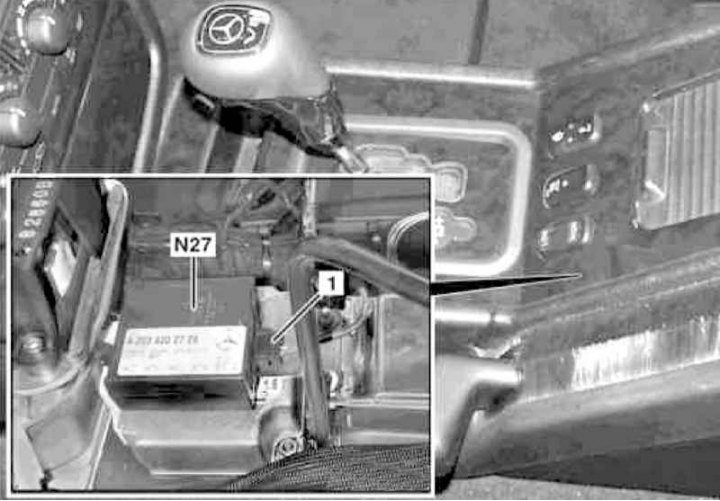
Installation details of the control module (N₂7) tow protection sensor
1. On models with the corresponding configuration (code ET2), activate the service mode of the TELE AID emergency call system (see Section Activation/deactivation of the service mode of the TELE AID emergency call system).
2. Disconnect the negative cable from the battery.
3. Remove the center console (see Chapter Body).
4. Remove the rear SAM module (N10/2), - see above.
5. Disconnect the electrical wiring from the tow-away protection sensor control module (N₂7).
6. Loosen the fastener and remove the module (N₂7).
7. Installation is carried out in the reverse order - on models with the corresponding configuration (code ET2) deactivate the service mode of the TELE AID system (see Section Activation/deactivation of the service mode of the TELE AID emergency call system).
8. Finally, read the DTC codes and clear the on-board diagnostic system memory using the STAR DIAGNOSIS scanner (6511 1801 00) (See Chapter Engine electrical systems) and enter the required basic settings of the on-board equipment.
Control module for ultrasonic reversing assist (BA) (code J44)
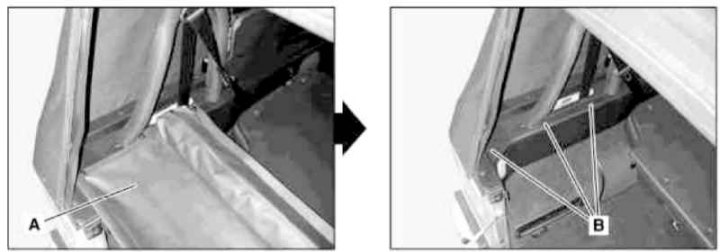
BA Control Module Installation Details (1 of 2)
A - Luggage compartment lid with wind deflector; B - Wind deflector support bracket
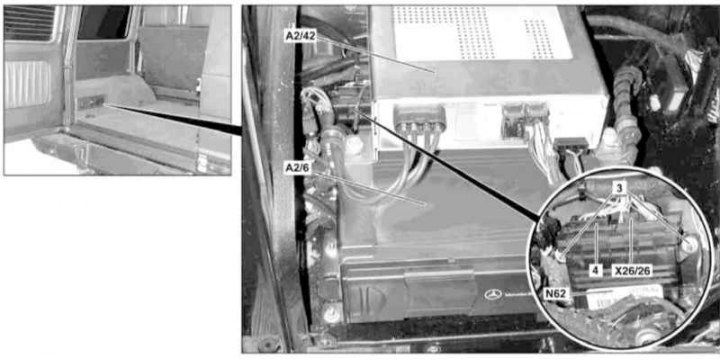
BA Control Module Installation Details (2 of 2)
3 - Nuts; 4 - BA wiring connector; A2/6 - CD changer; A2/42 - TV tuner; N62 - BA Control Module; X26/26 - BA wiring connector
1. Turn off the ignition, activate the auxiliary battery and connect it to the standard battery, then disconnect the negative cable from the latter.
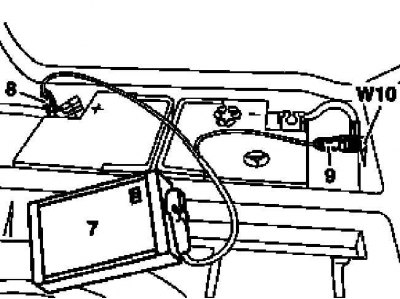
7 - Auxiliary battery
8 — Positive wire terminal of the module
9 — Terminal of the negative wire of the module
W10 - Battery ground
2. Releasing the six clamps (three on each side), remove the luggage compartment cover (A) equipped with a wind deflector.
3. Remove the wind deflector support bracket (B) from the left wall of the luggage compartment.
4. On models with the corresponding equipment (code V53), remove the left-hand glove compartment.
5. On models with the corresponding configuration, remove the TV tuner (A2/42), - code EM9 and the CD changer (A2/6), - code EP5 (see Section Removal and installation CD changer/TV tuner).
6. Loosen the fastening nuts (3), disconnect the connectors (X26/26 and 4) and remove the BA control module (N62).
7. Installation is carried out in reverse order.
8. Finally, read the DTC codes and clear the on-board diagnostic system memory using the STAR DIAGNOSIS scanner (6511 1801 00) (See Chapter Engine electrical systems).
Seat heating control module (code H11)
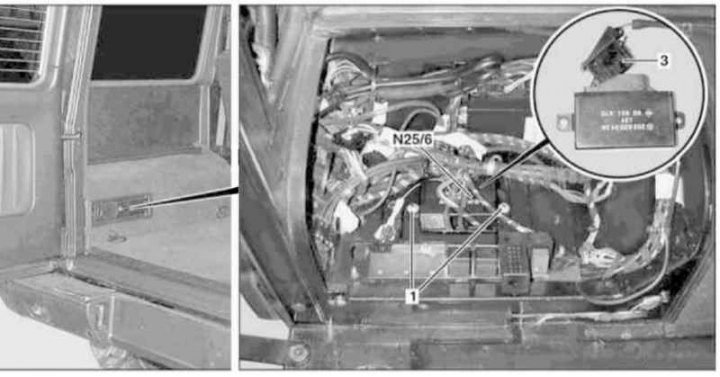
Seat Heating Control Module Installation Details (Code H11)
1 - Fastening nuts; 3 - Connector; N₂5/6 - Control module
1. On models with the corresponding configuration (code ET2), activate the service mode of the TELE AID emergency call system (see Section Activation/deactivation of the service mode of the TELE AID emergency call system).
2. Disconnect the negative cable from the battery.
3. Releasing the six clamps (three on each side), remove the luggage compartment cover (A) equipped with a wind deflector.
4. Remove the wind deflector support bracket (B) from the left wall of the luggage compartment.
5. On models with the corresponding equipment (code V53), remove the left-hand glove compartment.
6. On models with the corresponding configuration, remove the TV tuner (A2/42), - code EM9 and the CD changer (A2/6), - code EP5 (see Section Removal and installation CD changer/TV tuner).
7. Loosen the fastening nuts (1), disconnect the connector (3) and remove the control module (N₂5/6).
8. Installation is carried out in the reverse order - on models with the corresponding configuration (code ET2) deactivate the service mode of the TELE AID system (see Section Activation/deactivation of the service mode of the TELE AID emergency call system).
9. Finally, read the DTC codes and clear the on-board diagnostic system memory using the STAR DIAGNOSIS scanner (6511 1801 00) (See Chapter Engine electrical systems) and enter the required basic settings of the on-board equipment.
Control module for the Linguatronic voice command system (codes EL1÷EL6)
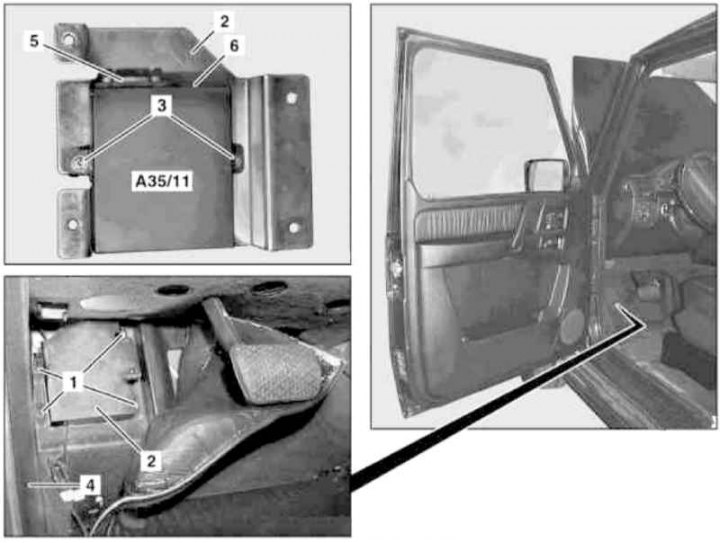
Linguatronic Control Module Installation Details
1, 3 - Nuts; 2 - Support bracket; 4 - Footwell trim panel; 5 - Connector; 6 - D2B fiber optic cable connection connector; A35/11 - Linguatronic control module
1. Turn off the ignition, activate the auxiliary battery and connect it to the standard battery, then disconnect the negative cable from the latter.
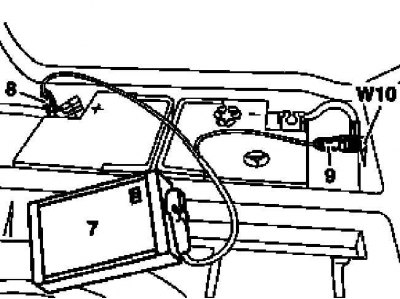
7 - Auxiliary battery
8 — Positive wire terminal of the module
9 — Terminal of the negative wire of the module
W10 - Battery ground
2. Fold back the carpet panel in the driver's footwell.
3. If necessary, lift the trim panel (4) and loosen the nuts (1).
4. Remove the Linguatronic control module (A35/11) complete with support bracket (2).
5. Release and disconnect the connectors (5 and 6), - immediately plug the inputs of the waveguides of the D2B fiber optic cable with special plugs.
6. Loosen the fastening nuts (3) and remove the control module (A35/11).
7. Installation is carried out in reverse order.
8. Finally, read the DTC codes and clear the on-board diagnostic system memory using the STAR DIAGNOSIS scanner (6511 1801 00) (See Chapter Engine electrical systems).
Audio amplifier control module (code E66)
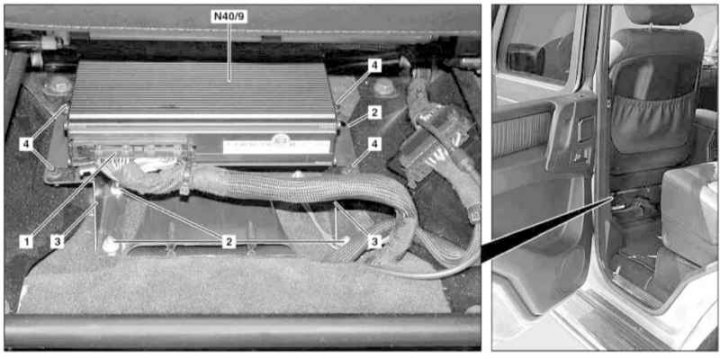
Audio Amplifier Control Module Installation Details
1 - Electrical wiring connector; 2 - Nuts; 3 - Console; 4 - Screws; N40/9 - Amplifier
1. Move the raised driver's seat forward until it stops.
2. Turn off the ignition, activate the auxiliary battery and connect it to the standard battery, then disconnect the negative cable from the latter.
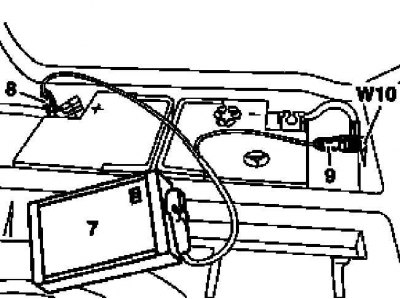
7 - Auxiliary battery
8 — Positive wire terminal of the module
9 — Terminal of the negative wire of the module
W10 - Battery ground
3. Disconnect the connector (1).
4. Loosen the nuts (2) and remove the console (3) with the amplifier (N40/9) installed on it.
5. Remove the mounting screws (4) and remove the amplifier (N40/9) from the console (3).
6. Installation is carried out in reverse order.
7. Finally, read the DTC codes and clear the on-board diagnostic system memory using the STAR DIAGNOSIS scanner (6511 1801 00) (See Chapter Engine electrical systems).
SRS control module
Models produced up to 11/30/01
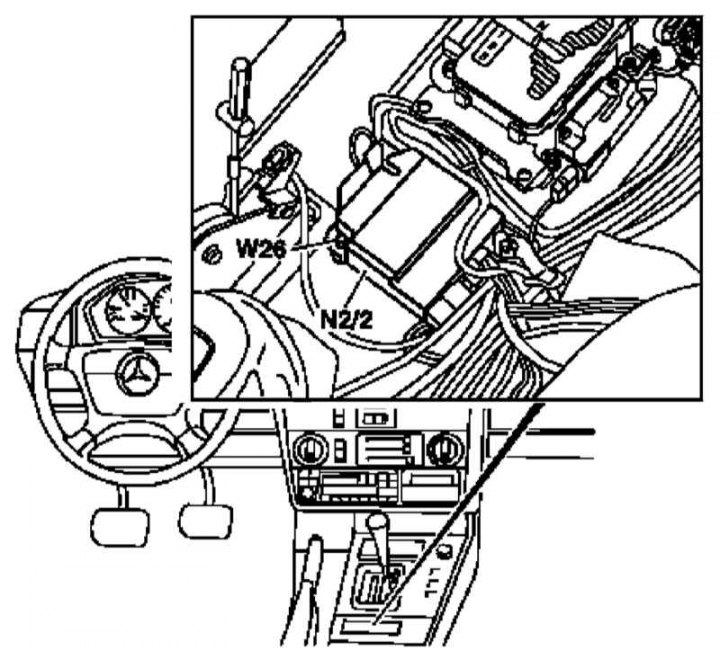
SRS Control Module Installation Details for Models Produced Up to 11/30/01
N₂/2 — Control module
W26 - Module grounding
1. Disconnect the negative cable from the battery.
2. Remove the center console (see Chapter Body).
3. Disconnect the electrical wiring from the control module (N₂/2), - try to remember the ground connection diagram (W26)
4. Loosen the mounting screws and remove the module (N₂/2).
5. Installation is carried out in the reverse order - the arrow marking on the casing of the installed module should point forward in the direction of travel.
6. Finally, enter the SRS program data.
Models released from 01.12.01
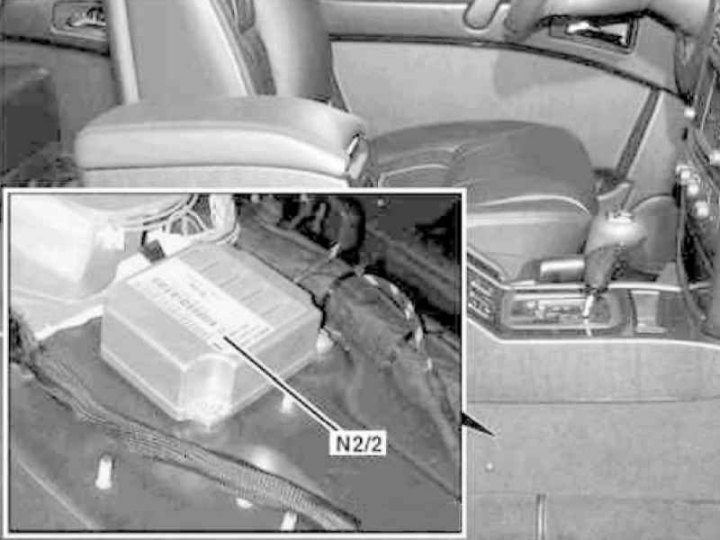
Installation details of the SRS control module (N₂/2) on models produced from 01.12.01.
1. Remove the tow-away protection device control module (see above).
2. Disconnect the wiring, release the fasteners and remove the SRS control module (N₂/2), - try to remember the ground connection diagram (W26).
3. Installation is carried out in reverse order.
4. Finally, read the DTC codes and clear the on-board diagnostic system memory using the STAR DIAGNOSIS scanner (6511 1801 00) (See Chapter Engine electrical systems).