



Contents: Fuel injection control module…↡ Traction Control Module (ETS/ESP) ↡ General Activity Module (AAM) ↡ Extended Activity Module (EAM) ↡ Driver Browsing Module (FBM) ↡ Supplemental Restraint System (SRS)…↡ Emergency call system control module…↡ Front seat adjustment control modules ↡ Headlight Optical Axis Direction…↡ Xenon headlight control module ↡ Loudspeaker Amplifier Control Module ↡
The details of the installation of the control modules in the main mounting block are shown in the illustration to which all references in the text refer.
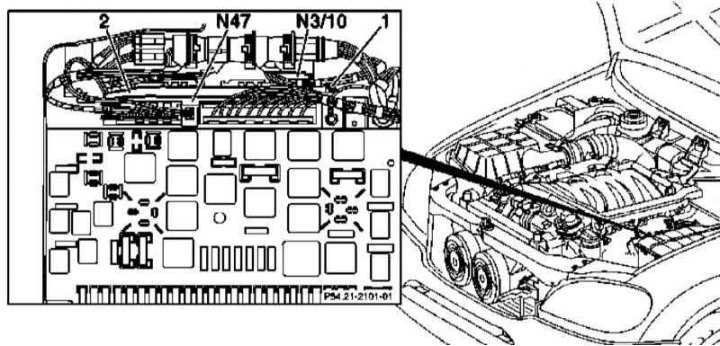
Details of installation of control modules in the main assembly block
Fuel injection control module (ECM/ME-SFI)
1. If the ECM needs to be replaced, read its coding using a special diagnostic scanner (see Chapter Engine electrical systems).
2. Loosen the five mounting screws and remove the rear cover of the main assembly unit.
3. Disconnect the electrical wiring from the ME-SFI (N3/10) and ETS/ESP (N47) control modules.
4. Loosen the mounting screws (1) and remove the control module assembly with the mounting frame (2).
5. Remove the mounting screws/fasteners and remove the ECM (N3/10) from the frame (2).
6. Installation is carried out in reverse order.
7. When installing a new module, code it using a diagnostic scanner.
8. To enter the idle throttle position data into the module memory, turn the ignition key to position 2 and wait 60 seconds.
Traction Control Module (ETS/ESP)
1. Remove the rear cover of the main assembly unit.
2. Disconnect the electrical wiring and remove the ETS/ESP module (N47) by pulling it upwards.
3. Installation is carried out in the reverse order. Finally, make sure that the braking system coding is correct.
General Activity Module (AAM)
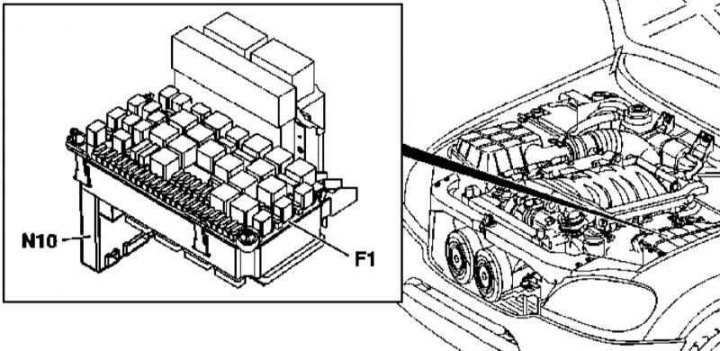
General Activity Module (AAM) Installation Details
1. The details of the AAM module installation are shown in the illustration, to which all references in the text refer.
2. If the AAM module is to be replaced, read its coding using a special diagnostic scanner (see Chapter Engine electrical systems).
3. Remove the covers of the main mounting block in the engine compartment (see Section Removal and installation of mounting blocks).
4. Remove the two mounting bolts and the main fuse/relay module (F1).
5. Carefully disconnect the electrical wiring and bidirectional radio antenna from the AAM module (N10).
6. Carefully separate the AAM module from the assembly (F1). Try not to bend the contact terminals - the connector locks are located at the top edge of the flat area in the center of the module.
7. Installation is carried out in the reverse order - when installing a new module, do not forget to code it using a diagnostic scanner.
Extended Activity Module (EAM)
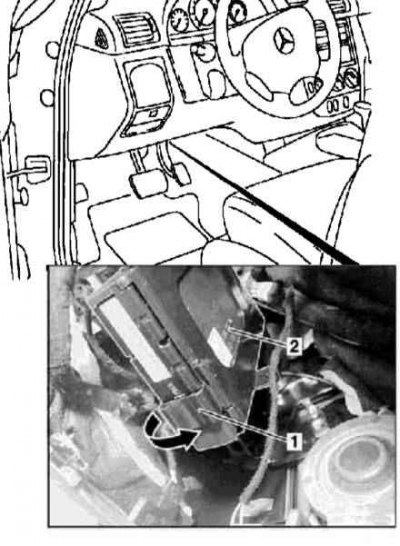
Extended Activity Module (EAM) Installation Details
1. The details of the EAM module installation are shown in the illustration, to which all references in the text refer.
2. If the EAM module is to be replaced, read its coding using a special diagnostic scanner (see Chapter Engine electrical systems).
3. Remove the cover on the left under the instrument panel (see Chapter Body).
4. Release the lock (1) securing the EAM module (2) to the support bracket.
5. Pull down to remove the EAM module (2) from the support bracket.
6. Disconnect the electrical wiring connectors.
7. If necessary, remove the Driver Authorization Module (FBM/DAS) (see below).
8. Installation is carried out in the reverse order - when installing a new module, do not forget to code it using a diagnostic scanner.
Driver Browsing Module (FBM)
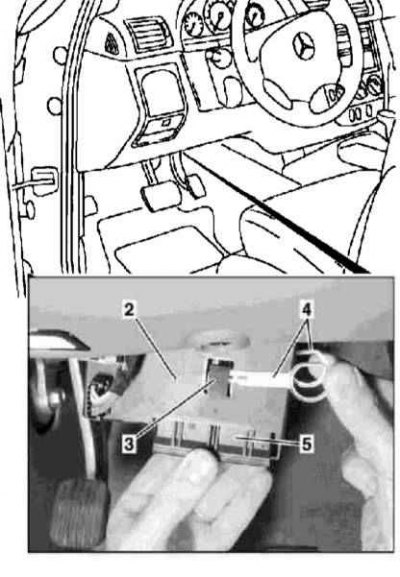
Driver Authorization System (FBM/DAS) Control Module Installation Details
4 - Devices for removing the module
1. The FBM/DAS installation details are shown in the illustration to which all references in the text refer.
2. Remove the Extended Activity Module (EAM) (2) (see above).
3. Release the latches (3) and separate the FBM/DAS (5) from the EAM module.
Note: Before replacing the FBM/DAS module, check whether the keys have been authorized and make sure that the coding matches the replacement unit - a new module is ordered based on the vehicle chassis number.
4. Installation is carried out in reverse order.
5. After completing the installation, check the engine start function with the keys.
Supplemental Restraint System (SRS) Control Module
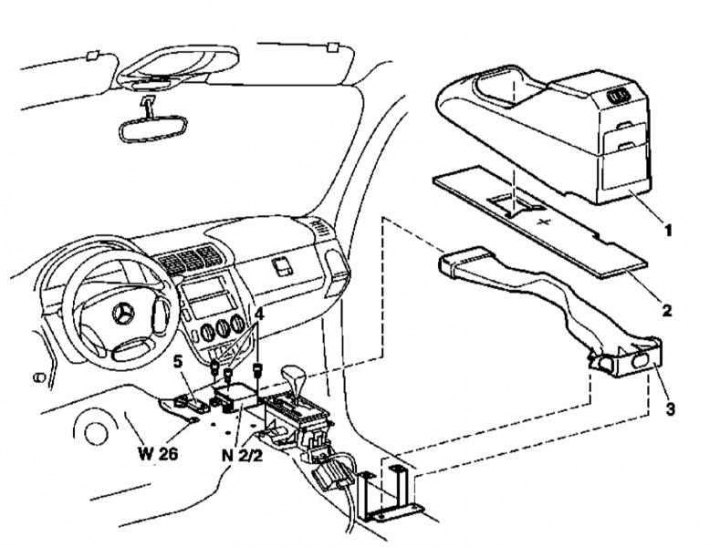
SRS Control Module Installation Details
1. This module controls the deployment of the airbags and the emergency tensioners of the front seat belts. The installation details of the SRS control module are shown in the illustration, to which all references in the text refer.
2. To prevent a diagnostic trouble code (DTC) from being stored in the control module memory, turn the ignition key to position 0.
3. Disconnect the negative cable from the battery.
4. Remove the center console (1) (see Chapter Body).
5. Depending on the equipment, remove the soundproofing panel (2)/lift its front edge.
6. If equipped appropriately, remove the two rear mounting screws and remove the heating/ventilation/air conditioning duct (3).
7. Disconnect the SRS control module (N₂/2) electrical wiring connector (5).
8. Remove the mounting screws (4) and remove the SRS control module (N₂/2) from the transmission tunnel.
9. Installation is carried out in the reverse order - the arrow on the module body should point in the direction of vehicle movement. Do not forget to place the ground terminal (W26) under the left rear screw of the module fastening.
10. Finally, program and parameterize the new SRS control module.
Emergency call system control module (E-call)
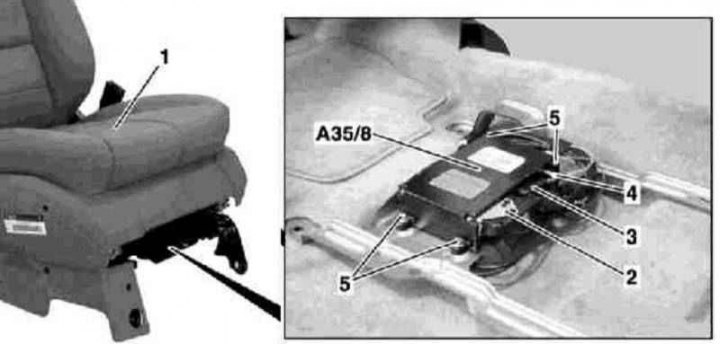
Installation details of the control module of the emergency call system (E-call)
1. Details of the installation of the emergency call System control module (E-call) are shown in the illustration, which includes all references found in the text.
2. Remove fuse F8 in the fuse/relay box.
3. Remove the screws on the right front seat console (1).
4. Tilt the seat assembly rearward until it rests against the rear seat cushion and secure it in this position with the rear seat belt. Release the E-call speaker wiring harness from its support bracket and cover the carpet floor panel behind the front seat assembly to prevent contamination.
5. Disconnect the electrical wiring connector (2) and the antenna connector (4) on the E-call module assembly (A35/8), - do not bend or pull the fiber optic cable, immediately install protective caps on the connectors.
6. Loosen the fastening screws (5) and remove the E-call control module (A35/8).
7. Installation is carried out in reverse order.
Front seat adjustment control modules
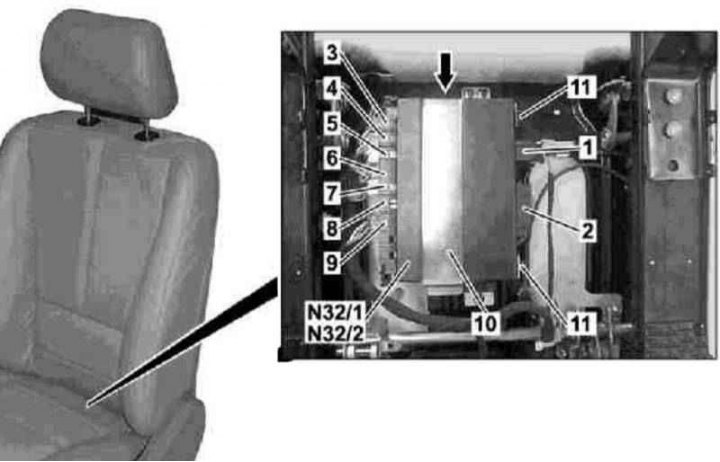
Seat cushion rear edge height adjustment electric motor connector
4 - Connector for electric motor for adjusting the seat position in the horizontal plane; 5 - Connector of the electric motor for adjusting the height of the front edge of the seat cushion; 6 - Seat belt buckle wiring connector; 7 - Connector for electric motor for adjusting the backrest tilt; 8 - Child seat installation registration system wiring connector (for passenger seat); 9 - Seat heating system connector
1. The installation details of the front seat adjustment control modules are shown in the illustration to which all references in the text refer.
2. Slide the seat assembly forward as far as it will go and lift the rear edge of the cushion to its extreme position.
3. Disconnect the power switch connector (1) and the interior wiring harness connector (2) at the seat adjustment control module (N32/1 or N32/2).
4. Unscrew the mounting bolt (arrow) and remove the support bracket (10).
5. Release the clamps (11), disconnect the electrical wiring and remove the control module (N32/1 or N32/2) from the seat frame.
6. Installation is carried out in reverse order.
7. Finally, check the proper functioning of the seat adjustment drive and the function of entering the selected position into the module memory.
Headlight Optical Axis Direction Adjustment Control Module
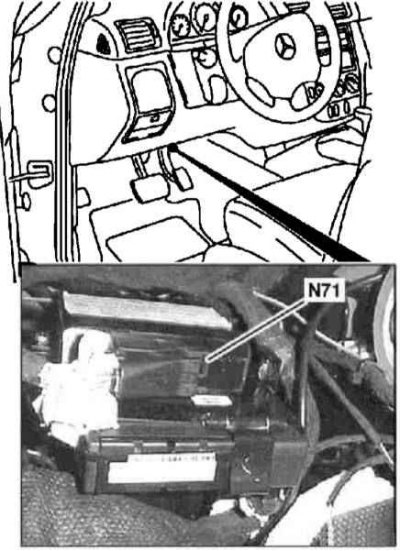
Installation details of the headlight aiming control module (N71)
1. The details of the installation of the headlight beam adjustment control module are shown in the illustration, to which all references in the text refer.
2. Remove the cover on the left under the instrument panel (see Chapter Body).
3. Disconnect the electrical wiring from the headlight range adjustment module (N71).
4. Remove the two mounting nuts and remove the module (N47) from the General Activity Module (EAM) support (see above).
5. Installation is carried out in reverse order.
6. Finally, using a diagnostic scanner (see Chapter Engine electrical systems) reset the headlight position to zero, then make the necessary adjustments.
Xenon headlight control module
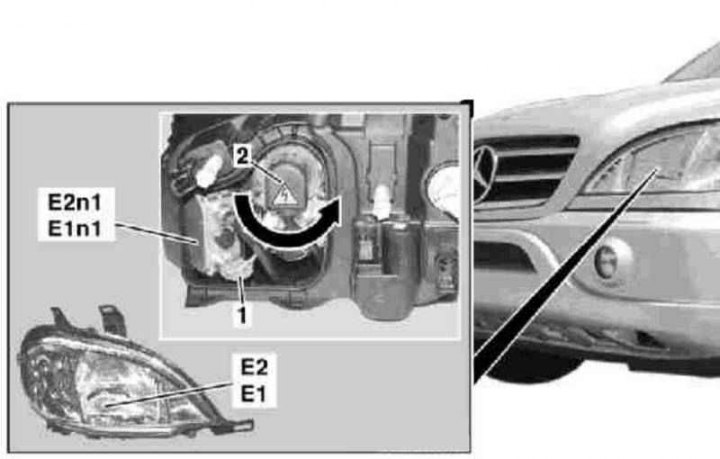
Xenon Headlight Control Module Installation Details
1. The details of the installation of the xenon headlight control module are shown in the illustration, to which all references in the text refer.
2. Remove the corresponding headlight (E1 or E2) (see Section Removal and installation of headlights, replacement of lamps).
3. Remove the rear cover of the headlight.
4. Turn counterclockwise to disconnect the wiring connector (1 or 2) of the corresponding control module (E1n1 or E2n1).
5. Remove the control module (E1n1 or E2n1), carefully squeezing it out of the support using a suitable wedge.
6. Installation is carried out in reverse order.
7. Finally, using a diagnostic scanner (see Chapter Engine electrical systems) reset the headlight position to zero, then make the necessary adjustments.
Loudspeaker Amplifier Control Module
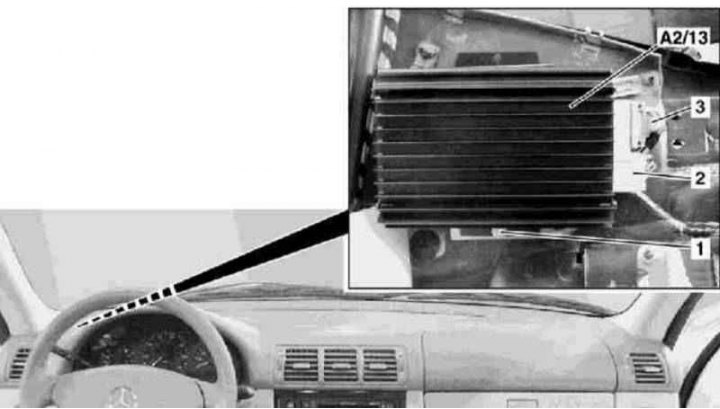
Xenon Headlight Control Module Installation Details
1 - Bolt
2, 3 — Electrical wiring connectors
A2/13 - Sound amplifier
1. The installation details of the speaker amplifier control module are shown in the illustration to which all references in the text refer.
2. Remove the cover on the left under the instrument panel (see Chapter Body).
3. Remove the screw (1) and remove the audio amplifier (A2/13) from the support bracket, put the insulation aside.
4. Disconnect the electrical wiring connectors (2 and 3) - on models with VIN A289565, X754620, one connector is used.
5. Disconnect the D2B connector - do not bend or pull the fiber optic cable, immediately install the protective caps on the connectors.
6. Remove the sound amplifier (A2/13) - try not to damage the wiring.
7. Installation is carried out in reverse order.