



Attention! Before removing the radio receiver, it is necessary to find out and write down its anti-theft code. Otherwise, the radio receiver can only be switched on at a Mercedes service station or by the manufacturer of the radio receiver.
Note: Since mid-2002, the Mercedes-Benz company has not equipped radio receivers with security codes, since the on-board electronics automatically recognize the radio receiver after connecting the battery.
Removal
1. Disconnect the negative (-) battery cable with the ignition off. The cabin air filter box must be removed first.
Warning! Before disconnecting the cable, find out the radio receiver security code, if any, refer to Section Replacing the battery.
2. Remove the upper center console cover, refer to the relevant section.
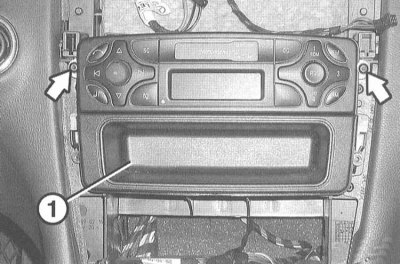
3. Remove 2 screws (arrows in the illustration).
4. Remove the radio from the mounting opening.
Note: The pocket (1) located under the radio receiver is removed together with the radio receiver.
5. Disconnect all connectors and the antenna cable from the back of the radio. Remove the radio from the center console.
6. Connecting with fiber optic cable: Carefully disconnect the fiber optic cable connector from the back of the radio.
Caution! Do not bend, pull or crush the fiber optic cable. Do not contaminate or scrape the fiber optic cable transition areas. Protect the contact areas with covers and plugs.
Installation
1. Connect the radio connector or connect the fiber optic cable.
2. Insert the pocket into the mounting opening.
3. Carefully insert the radio into the mounting opening and secure it to the center console.
(Read more on the website: MERCEDESMAN)
4. Install the center console cover, refer to the relevant section.
5. Connect the battery ground (-) cable with the ignition off. Reinstall the cabin air filter box. If necessary, enter the radio code and set the clock.
Navigation device with screen
Removal
1. Disconnect the negative (-) battery cable with the ignition off. The cabin air filter box must be removed first.
Warning! Before disconnecting the cable, find out the radio receiver security code, if any, refer to Section Replacing the battery.
2. Remove the upper center console cover, refer to the relevant section.
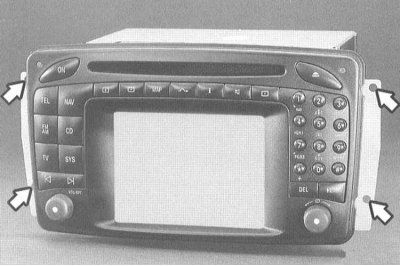
3. Remove 4 screws (arrows in the illustration).
4. Remove the navigation device from the mounting opening.
5. Disconnect all connectors and the antenna cable from the back of the radio. Remove the radio from the center console.
6. Connecting with fiber optic cable: Carefully disconnect the fiber optic cable connector from the back of the radio.
Attention! Do not bend, pull or crush. Do not contaminate or scrape the fiber optic cable transition areas. Protect the contact areas with covers and plugs.
Installation
1. Installation is performed in the reverse order of removal.
2. Connect the battery ground (-) cable with the ignition off. Reinstall the cabin air filter box. If necessary, enter the radio code and set the clock.