



Contents: Air humidity sensor ↡ Refrigerant temperature and pressure…↡ Evaporator temperature sensor ↡
Caution! Observe all necessary precautions related to servicing the A/C systems (see Section General information and safety precautions)!
Air humidity sensor
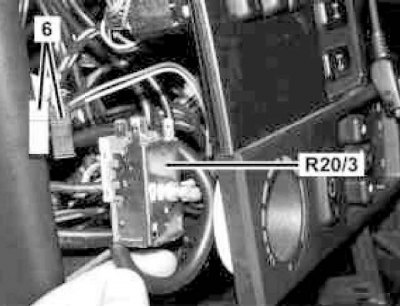
Air humidity sensor installation details (B31/2)
1. Open the hood.
2. Remove the air tract resonator chamber with the water collector (see Chapter Fuel and exhaust systems).
3. Turn it 45° in the direction indicated by the arrow in the figure, remove the air humidity sensor (B31/2) and disconnect the electrical wiring from it.
4. Installation is carried out in the reverse order - make sure that the sensor wiring does not get under the evaporator casing.
Refrigerant temperature and pressure sensor
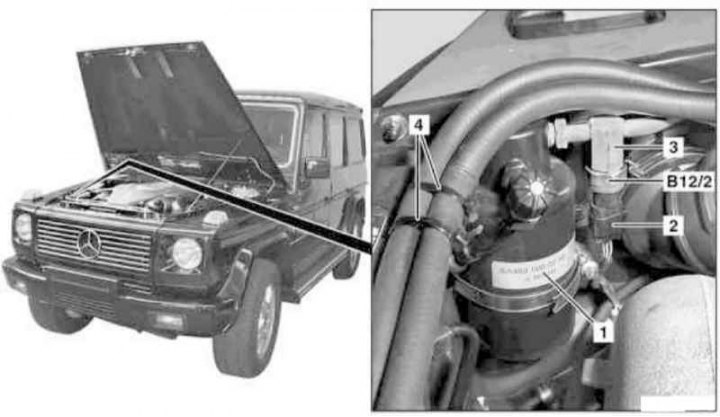
Refrigerant Temperature and Pressure Sensor Installation Details
1. The need to replace this sensor arises when refrigerant leaks develop, as well as when the air conditioning system fails.
Attention! When replacing the sensor, do not allow moisture to enter the working circuit of the system!
2. Open the hood.
3. Remove the receiver-dryer (1) (see Section Removal and installation the receiver-dryer), - immediately seal the open ends of the refrigeration lines with suitable plugs.
Attention! The receiver-dryer must be replaced every time the working circuit of the air conditioning system is opened - do not forget to take into account the volume of the receiver when refilling the system (see Specifications)!
4. Release the retaining straps (4) and move the cooling system hoses to the side.
5. Disconnect the electrical wiring (2) from the refrigerant temperature and pressure sensor (B12/2).
6. While holding the pressure line (3) from turning, unscrew and remove the sensor (B12/2).
7. Installation is carried out in the reverse order - do not forget to replace the sealing rings, lubricating them together with the threaded connections with compressor oil before installation.
8. Finally, check the proper functioning of the air conditioning system.
Evaporator temperature sensor
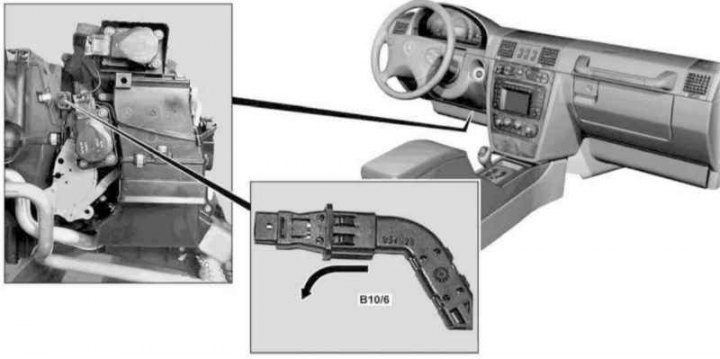
Installation details of the evaporator temperature sensor (B10/6)
1. On models with the corresponding configuration (code ET2), activate the service mode of the TELE AID emergency call system (see Section Activation/deactivation of the service mode of the TELE AID emergency call system).
2. Turn on the auxiliary battery and connect it to the standard battery, then disconnect the negative cable from the battery.
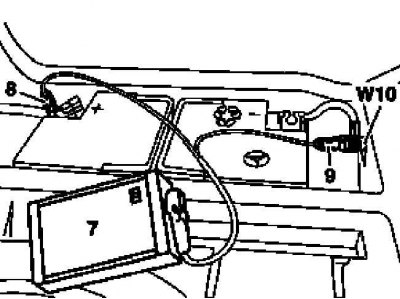
7 - Auxiliary battery
8 — Positive wire terminal of the module
9 — Terminal of the negative wire of the module
W10 - Battery ground
3. Remove the cover on the left under the instrument panel (see Chapter Body).
4. Pull in the direction indicated by the arrow in the picture to remove the temperature sensor (B10/6) from the evaporator housing, then disconnect the electrical wiring from it.
5. Installation is carried out in reverse order.
6. Finally, deactivate the service mode of the TELE AID system (see Section Activation/deactivation of the service mode of the TELE AID emergency call system) and clear the memory of the on-board diagnostic module (see Chapter Engine electrical systems).