



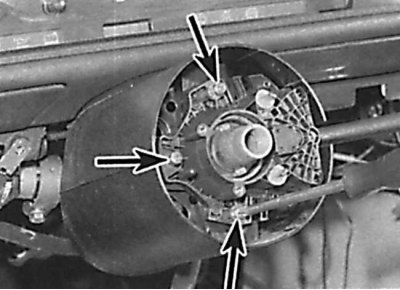
Location of the multi-function switch mounting screws
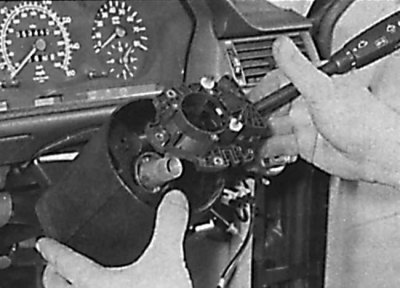
Removal the multifunction switch from the steering column
1. Remove the steering wheel.
2. Remove the headlight beam adjuster.
3. Lift up the floor mat, then unscrew the mounting screws and remove the covering located around the pedals.
4. Remove the hood release lever mounting screw and lever from the driver's side instrument panel lower trim and disconnect the hood release cable from the lever. Remove the screws securing the parking brake lever to the instrument panel.
5. Carefully remove the ignition switch trim panel.
6. Remove the screws and driver's side lower instrument panel trim. Disconnect the cable from the rear of the parking brake release lever and remove the trim panel and lever.
7. Release the electrical wiring from the mounting brackets and disconnect the electrical connector from the multifunction switch.
8. Loosen the screws and remove the steering column cover, then remove the multi-function switch (see Fig. Location of the screws securing the multifunction switch, Removing the multifunction switch from the steering column). If necessary, remove the speed control switch from the main multifunction switch.
9. The switch is installed in the reverse order of removal.