



Contents: Removal ↡ Installation ↡
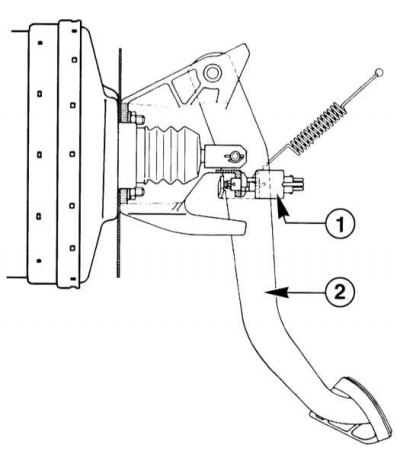
1 - Brake light switch
2 — Brake pedal
The brake light switch is located on the brake pedal support. Check the operation of the brake light switch.
Removal
1. Turn off the ignition.
2. Remove the cover under the instrument panel on the driver's side.
(Full article available on the resource: mercedesman.ru)
3. Disconnect the brake light switch connector (1).
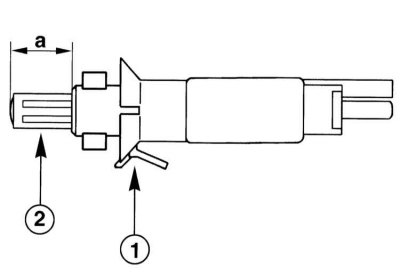
4. Press in the stopper (1), turn the switch to the right and remove it from the holder.
Installation
1. Pull out the push rod (2) of the new brake light switch until it stops. This creates the maximum stroke value "a".
2. Fully depress the brake pedal. Insert the switch and turn it to the left until the stopper (1) locks.
3. Release the brake pedal. The pusher stroke will be set automatically.
4. Connect the brake light switch connector.
5. Check if the brake light comes on when you press the pedal slightly.
6. Reinstall the cover under the instrument panel on the driver's side, refer to the appropriate section.