



Contents: Removal ↡ Installation ↡
Removal
This chapter provides the procedure for removing and installing the instrument cluster, various switches, and the car radio, including speakers and antenna.
1. Disconnect the negative (-) terminal of the battery cable. The ignition must be off.
Warning! When you disconnect the battery from the radio, the security code is deleted, as well as all automatic settings on the radio station. If the code is unknown or not written down, then the radio can only be put into operation by resorting to the help of a workshop or the manufacturer of the radio. Therefore, make sure in advance that the code is known.
Cars manufactured before 21 01
2. Unscrew the two screws 1 that secure the deflector trim on the driver's side and remove the trim (see illustration).
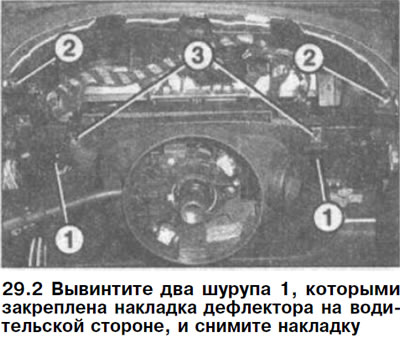
Please note: The illustration shows the instrument panel with the cover removed.
3. Unscrew the two screws 2 with heads for a multi-sided socket wrench and remove the upper instrument panel trim (see illustration 29.2).
4. Unscrew the two screws 3 with socket heads that secure the instrument panel (see illustration 29.2).
5. Move the instrument cluster into the passenger compartment, release and disconnect the connectors on its rear side and remove the cluster.
Cars produced since 01/03
Depending on the model, two special removable brackets are required to remove the instrument panel, with the help of which the instrument panel trim is removed. These brackets, which have the article number 140 589 02 33 00, are inserted to the stop to a depth of approximately 35 mm into both slots on the right and left sides of the instrument panel trim.
After this, the brackets should be turned 90° and carefully pushed towards you so that they enter the recesses on the back of the overlay. After this, pull both brackets simultaneously and remove the overlay.
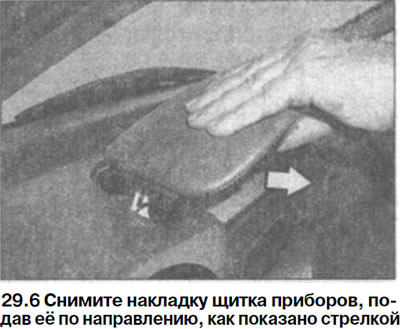
6. Remove the instrument panel cover by pushing it in the direction shown by the arrow in the illustration.
7. Remove temperature sensor 1 from its mounting location on the instrument panel (see illustration).
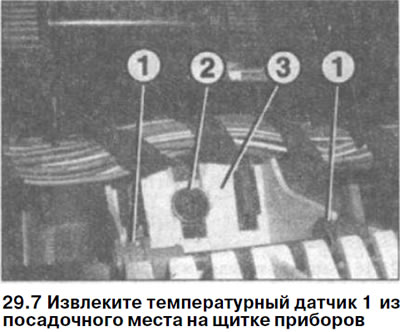
8. Unscrew bolt 2, press clamp 3 and lift the instrument panel (see illustration 29.7).
9. Unlock the connectors on the back of the instrument panel by pressing the clip and disconnect the connectors.
10. Remove the instrument panel.
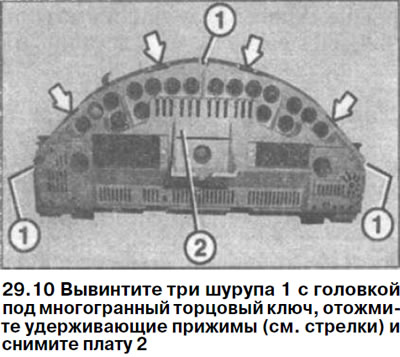
If the electronic board is to be removed from the shield housing, then to do this you should unscrew three screws 1 with a head for a multi-sided socket wrench, press the retaining clamps (see arrows in the illustration) and remove board 2.
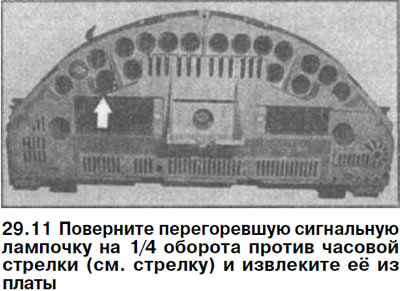
11. Turn the burnt out indicator light 1/4 turn counterclockwise (see arrow in illustration) and remove it from the board.
Installation
12. Install the electronic board into the dashboard housing, if it was removed, and secure it. Make sure that the glass on the dashboard housing is not dirty from the inside.
13. Secure the board to the panel using three socket head screws.
14. Insert the new bulb and secure it in place by turning it 1/4 turn clockwise.
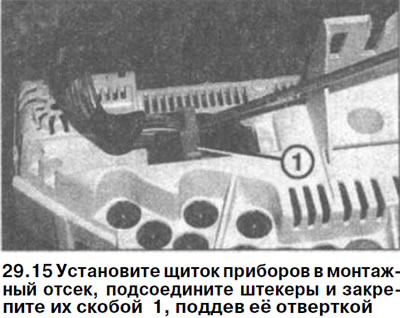
15. Install the instrument panel into the mounting compartment, connect the plugs and secure them with bracket 1, prying it off with a screwdriver (see illustration).
16. Cars manufactured before 02/01. Secure the instrument panel with two socket head screws.
17. Cars produced since 01/03. Secure the instrument panel to the mounting compartment with one screw.
18. Cars produced since 01/03. Replace the temperature sensor.
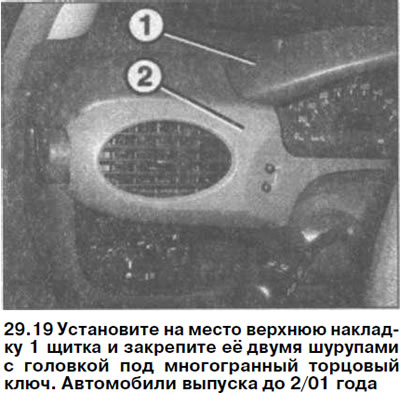
19. Cars manufactured before 02/01. Install the upper trim of the 1 shield in place and secure it with two screws with a head for a socket wrench (see illustration).
[Material created based on the website: MercedesMan]
20. Cars manufactured before 2/01. Install the instrument panel trim 2 in place and secure with two screws (see illustration 29.19).
21. Cars produced from 01/03. Install the upper instrument panel trim in place and secure it.
22. Connect the negative (-) terminal of the battery, making sure that the ignition is off.
23. Enter the security code into the radio and set the clock.