



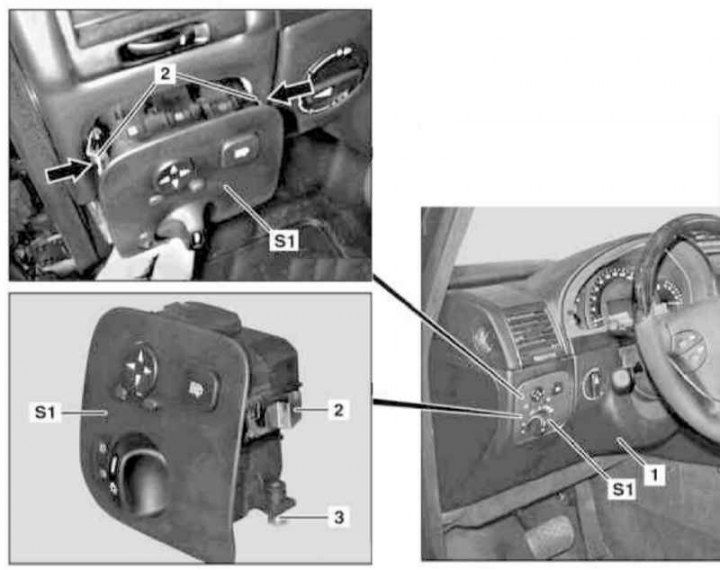
Details of installation of the switch group on the left side of the instrument panel
1 - Left lower section of instrument panel trim; 2 - Spring clamps; 3 - Screw; S1 - Switch group on the left side of the instrument panel
1. On models with the corresponding configuration (code ET2), activate the service mode of the TELE AID emergency call system (see Section Activation/deactivation of the service mode of the TELE AID emergency call system).
2. Turn on the auxiliary battery and connect it to the standard battery, then disconnect the negative cable from the latter.
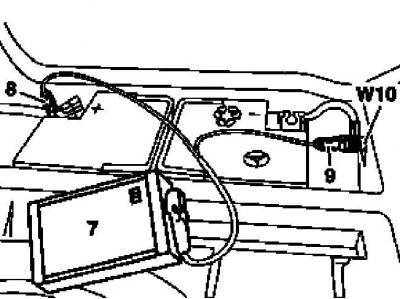
7 - Auxiliary battery
8 — Positive wire terminal of the module
9 — Terminal of the negative wire of the module
W10 - Battery ground
3. Remove the left lower section (1) of the instrument panel trim (see Chapter Body).
Note: It is not necessary to remove the Electronic Ignition Switch (EIS/EZS) control module from the panel (1).
4. On models 463.246/249 with the appropriate equipment, remove the knee support (see Chapter Body).
5. Unscrew the fastening bolt (3), press the spring clips (2) in the directions indicated by the arrows and, using a suitable wedge, release the switch group assembly (S1) from the instrument panel.
6. Installation is carried out in the reverse order - on models with the corresponding configuration (code ET2) deactivate the service mode of the TELE AID system (see Section Activation/deactivation of the service mode of the TELE AID emergency call system).
7. Finally, read the DTC codes and clear the on-board diagnostic system memory using the STAR DIAGNOSIS scanner (6511 1801 00) (See Chapter Engine electrical systems) and enter the required basic settings of the on-board equipment.
Material created based on the website mercedesman