



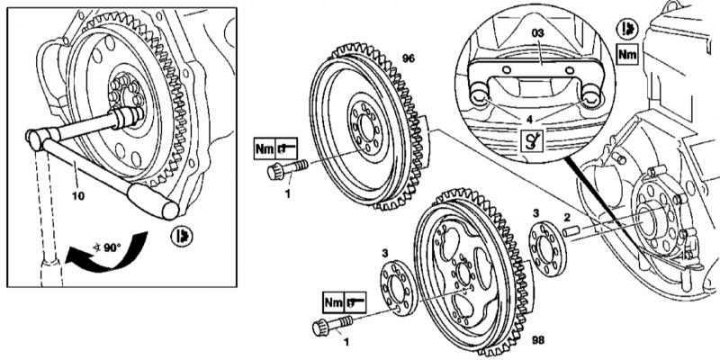
Flywheel/Drive Plate Installation Details on 111 Series Engine
1. The flywheel/drive plate installation details on the 111 Series engine are shown in the illustration to which all references in the text refer.
2. Remove the transmission (see Chapter Manual gearbox and Automatic transmission).
3. On models with manual transmission, remove the clutch (see Chapter Transmission line).
4. Install the blocker (3).
5. Unscrew the mounting bolts (1).
6. Remove the flywheel (86) (one-section or two-section)/drive disk (98).
Information copied from the website: MercedesMAN.ru
7. On models with AT, remove the rear washer (3).
8. Installation is carried out in reverse order.
Note: The mounting bolts must be replaced.
M112/113
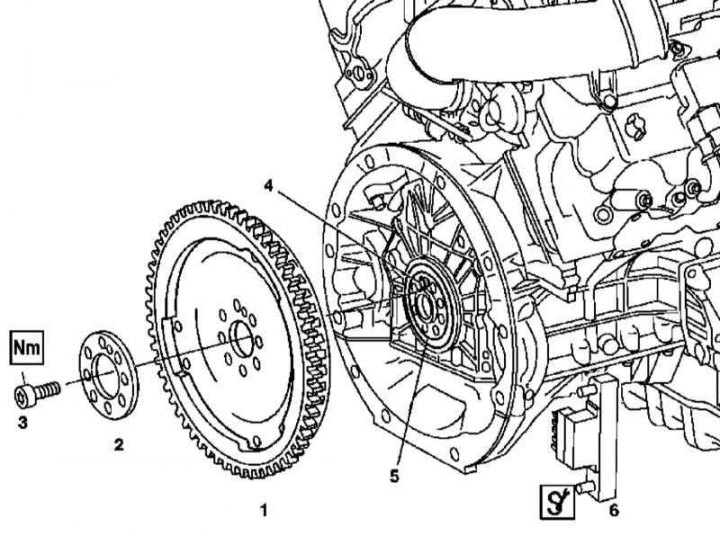
Drive Disc Installation Details for Series 112 and 113 Engines
1. The drive disc installation details on series 112 and 113 engines are shown in the illustration to which all references in the text refer.
2. Remove the transmission (see Chapter Automatic transmission).
3. Install the blocker (6).
4. Unscrew the bolts securing the drive disk (1) to the end of the crankshaft journal (5).
5. Remove the washer (2).
6. Remove the drive disc (1).
7. Installation is carried out in the reverse order - the unambiguous fit of the disk is guaranteed by the presence of a cylindrical pin (4).
Note: The mounting bolts must be replaced.