



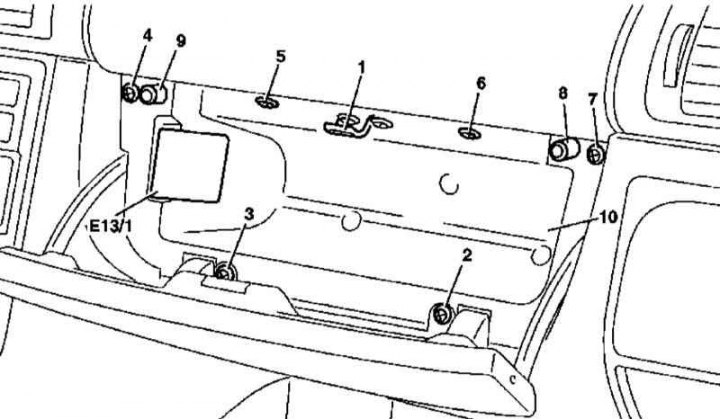
Main storage compartment installation details (models 163.136/154/172 with VIN to A145272, X708318)
8, 9 — Buffer stops
1. Installation details of the main storage box version 1 (models 163.136/154/172 according to A145272, according to X708318) are shown in the illustration, to which all references found in the text refer.
2. Open the box lid.
3. Release the drawer light (E13/1) from its clips and disconnect its electrical wiring.
4. Remove the lock striker (1).
5. Remove the screws (2-7).
6. Pry the drawer (10) from below and remove it from the instrument panel.
(Original material on the website mercedesman)
7. Installation is carried out in the reverse order - check the proper functioning of the lock, if necessary, adjust the cover (see Section Removal, installation and adjusting the main storage compartment cover (models produced up to 31.08.99)).
Version 2
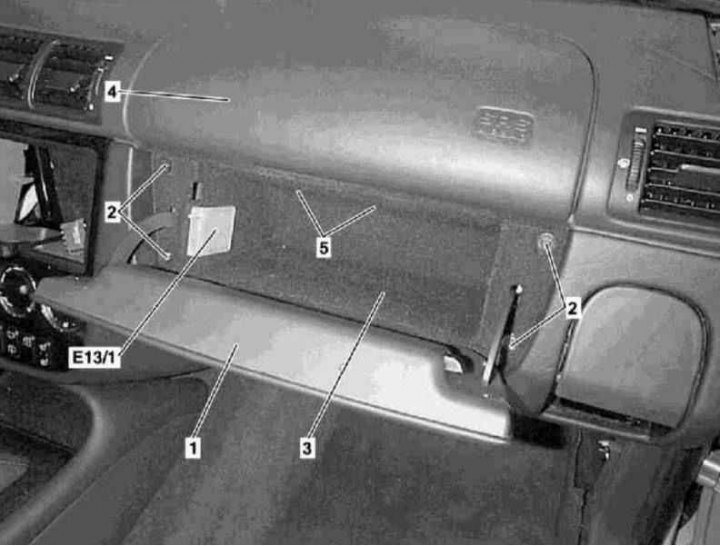
Main storage compartment installation details (models 163.113/128/157/174/175 and 163.136/154/172 with VIN A145273, X708319)
1. Installation details of the glove box version 2 (models 163.113/128/157/174/175 and 163.136/154/172 with A145273, with X708319) are shown in the illustration, to which all references found in the text refer.
2. Open the cover (1).
3. Release the drawer light (E13/1) from its clips and disconnect its electrical wiring.
4. Remove the screws (2).
5. Remove the upper pull-out rivets (5) of the glove box fastening (3) - to remove the rivet, press the 4 mm pin upwards and move the retainer body downwards.
6. Remove the storage compartment (3) from the instrument panel (4).
7. Installation is carried out in the reverse order - make sure that the upper edge of the cover (1) is correctly aligned with the cut of the instrument panel (4).