



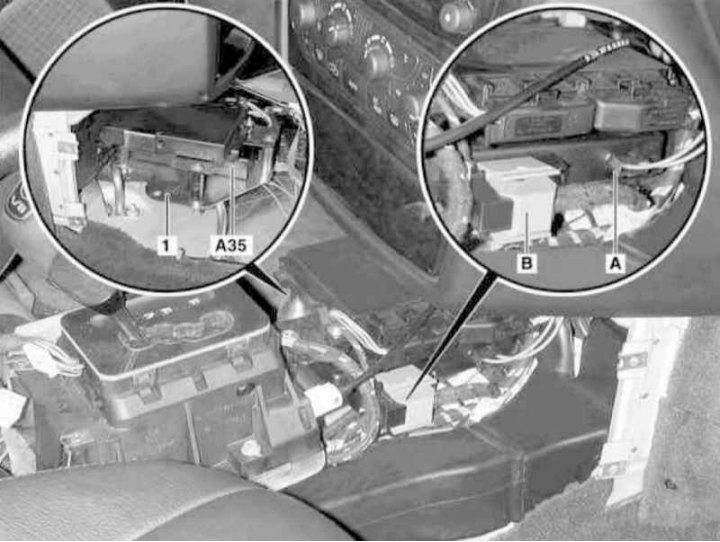
Handsfree Mobile Phone System Transceiver Installation Details
1 - Mounting bracket; A - Fiber optic cable connection connector; B - Electrical wiring connector; A35 - Transceiver
The described devices are used on models equipped with mobile telephone communication based on Nokia 6210 devices (equipment code ET7) and 3110 (code EV7).
1. Turn on the auxiliary battery and connect it to the standard battery, then disconnect the negative cable from the latter.
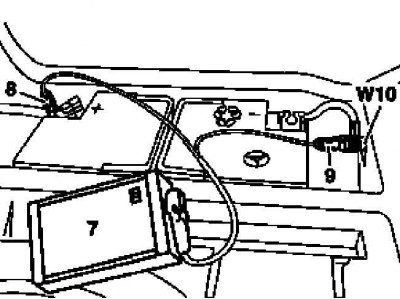
7 - Auxiliary battery
8 — Positive wire terminal of the module
9 — Terminal of the negative wire of the module
W10 - Battery ground
2. Remove the center console assembly (see Chapter Body).
3. Disconnect the fiber optic cable (A) from the transceiver (A35) - immediately seal both waveguides with special light-proof caps.
4. Squeeze the latches to disconnect the transceiver wiring connector (B).
5. Give away the fasteners (two screws and one nut) and remove the mounting bracket (1) from the transmission line tunnel.
6. Unscrew the two bolts located under the bracket (1) and remove the transceiver (A35).
7. Installation is carried out in reverse order.
8. Finally, read the DTC codes and clear the on-board diagnostic system memory using the STAR DIAGNOSIS scanner (6511 1801 00) (See Chapter Engine electrical systems).