
Cars BMW Cars Volkswagen Cars Chevrolet Cars Land Rover Cars Lada Cars Honda Cars Peugeot
English Русский
Български
Беларускі
Український
Српски
Hrvatski
Română
Polski
Slovenský
Magyar
Bookmark News and articles Sitemap Feedback Site search
MercedesMan.ru


A-Class C-Class E-Class G-Class M-Class S-Class Others
W463 (1999-2019)
  • Main
  • G-Class
  • W463 (1999-2019)
  • Electrical equipment
  • Audio system and navigation
  • Removal and installation of antenna units

Removal and installation of antenna units (Mercedes-Benz G-Class W463)

0
Contents: Roof mounted cell phone antenna (eV5…↡ Outdoor radio/cell phone antenna…↡ Front Global Positioning System…↡

Roof mounted cell phone antenna (eV5 equipment code)
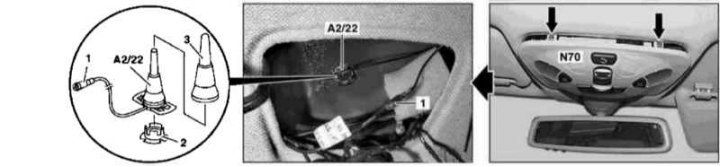


Details of installation of a stationary antenna of a cell phone (eV5 equipment code)

Details of installation of a stationary antenna of a cell phone (eV5 equipment code)
1 - Connector; 2 - Retainer; 3 - Protective cover; A2/22 - Antenna; N70 - Overhead console panel


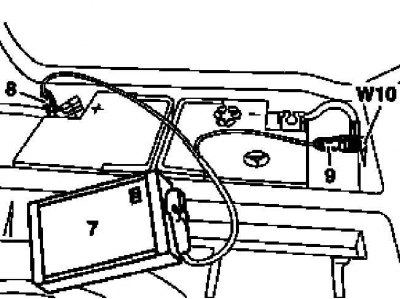
1. Turn on the auxiliary battery and connect it to the standard battery, then disconnect the negative cable from the latter.
Text republished from the website [www.mercedesman.ru]

7 - Auxiliary battery

7 - Auxiliary battery
8 — Positive wire terminal of the module
9 — Terminal of the negative wire of the module
W10 - Battery ground


2. Remove the overhead console panel (N70) (see Section Removal and installation the overhead console panel).


3. Disconnect the connector (1) of the upper telephone antenna wiring (A2/22).

4. Remove the retainer (2).

5. Remove the protective cover (3), then use a special puller (210 589 04 33 00) release and remove the antenna assembly (A2/22).

6. Installation is carried out in the reverse order - a special mandrel is used to fit the protective cover (3) (210 589 05 33 00).

7. Finally, read the DTC codes and clear the on-board diagnostic system memory using the STAR DIAGNOSIS scanner (6511 1801 00) (See Chapter Engine electrical systems).

Outdoor radio/cell phone antenna (convertible models)
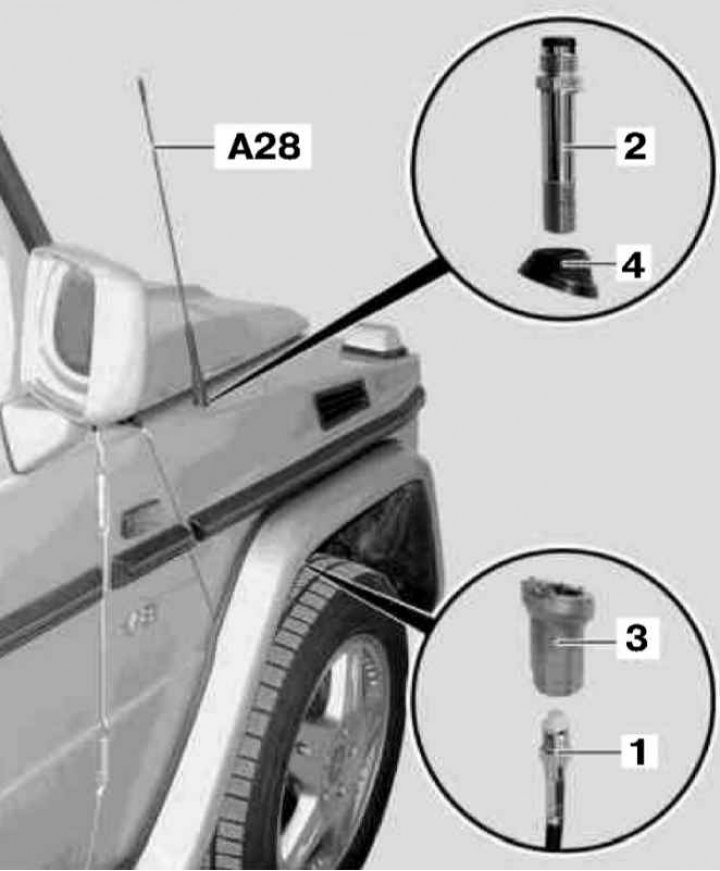


Installation details of the external antenna unit on Convertible models of the corresponding…

Installation details of the external antenna unit on Convertible models of the corresponding configuration (codes EF1÷EF4 and EF7)
1 - Antenna cable; 2 - Screw; 3 - Nut; 4 - Holder; A28 - Antenna Node


The antenna unit discussed here is used on Convertible models equipped with Audio 10/30 RDS and Handsfree systems for Nokia 6210 portable telephones (equipment codes EF1÷EF4 and EF7).

1. Unscrew the antenna assembly (A28).

2. Remove the right front wheel arch protection liner.

3. Turn the steering wheel all the way to the right.


4. Using a wrench, disconnect the antenna cable (1) from the screw (2) through the wheel arch.

5. Having secured the nut (3) from below, unscrew the screw (2).

6. Remove the holder (4) and nut (3).

7. Installation is carried out in reverse order.

Front Global Positioning System (GPS) Antenna
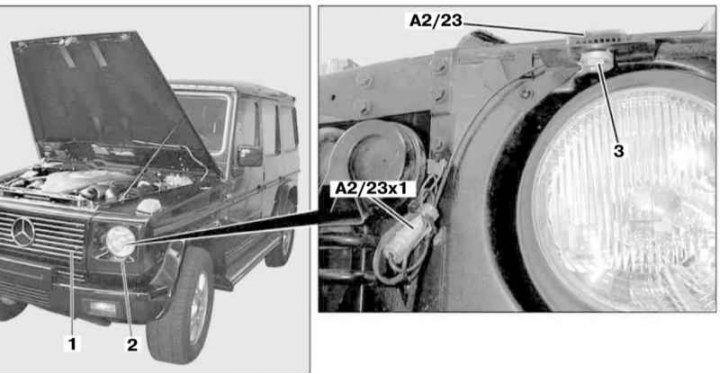


GPS Navigation System Antenna Installation Details

GPS Navigation System Antenna Installation Details
1 - Front grille; 2 - Headlight cover; 3 - Fastening nut; A2/23x1 - GPS connector; A2/23 - GPS Antenna


1. Remove the front grille (1) and trim cover (2) of the left headlight (see Chapter Body).

2. Disconnect the connector (A2/23x1).

3. Loosen the fastening nut (3) and remove the antenna assembly (A2/23).

4. Installation is carried out in reverse order.
This article is available at: russian, bulgarian, belarusian, ukrainian, serbian, croatian, romanian, polish, slovak, hungarian
The article has been verified: Polyakov Zakhar Grigorievich
Share with friends:
◀ Previous
G-Class W463 / Audio system and navigation
Next ▶

Removal and installation of antenna amplifiers
Removal and installation CD changer / TV tuner
Removal and installation the radio
Removal and installation the antenna splitter
Removal and installation speakers
Removal and installation of the transceiver of the Handsfree mobile telephone system
Removal and installation the mobile phone interface
Removal and installation a cell phone holder
More similar articles for repairing other models

☛ Roof Radio Antenna — Removal and Installation Mercedes W168 (1997-2004)
☛ Automatic Antenna Telescope — Removal and Installation Mercedes W202 (1993-2000)
☛ Removal and installation the distributor sensor Mercedes W123 (1976-1985)
☛ Removal and installation the antenna splitter Mercedes W163 (1997-2005)
☛ Removal and installation the cylinder head Mercedes W140 (1991-1998)
☛ Removal and installation the cylinder head Mercedes Sprinter (1995-2000, diesel)
Link in different formats to this article
Comments and feedback from visitors
No comments yet


How much will 10 + 27 ?


W463 (1999-2019) 
  • General information
  • Introduction to the guide
  • Controls and instruments
  • Driving and operation
  • Maintenance
  • Power unit
  • Engine repair
  • Cooling system
  • Heating and ventilation
  • Power system (gasoline)
  • Fuel system (diesel)
  • Exhaust system
  • Ignition and control system
  • Charging and starting system
  • Transmission
  • Automatic gearbox
  • Transfer case
  • Axles front and rear
  • Chassis
  • Brake system
  • Front suspension
  • Rear suspension
  • Steering
  • Body
  • Exterior (external elements)
  • Interior (internal elements)
  • Doors, locks and windows
  • Electrical equipment
  • Equipment and devices
  • Switches in salon
  • Headlights and lighting
  • Audio system and navigation
  • Electrical circuits
 
MercedesMan.ru © 2017–2026 · Mobile version · Read about Mercedes · Sitemap: EN BG BY UA RS HR RO PL SK HU · Feedback · Site search · Bookmark A-Class (W168) · C-Class (W201) · C-Class (W202) · C-Class (W203) · E-Class (W123) · E-Class (W124) · E-Class (W210) · G-Class (W463) · M-Class (W163) · S-Class (W116, petrol) · S-Class (W126, petrol) · S-Class (W140) · S-Class (W220) · Sprinter · Vito 1 · Vito 2 · Vario 814D ·
 
We only use cookies without which some of the site's features may not be available.