



Note: The scheduled maintenance indicator informs about the OPTIMAL time for performing maintenance and its readings are in no way related to the engine oil level.
Note: If the battery is disconnected, the time the vehicle is parked is not included in the calculation of the scheduled maintenance period - in order to maintain the frequency of routine maintenance procedures, this period of time must be taken into account.
Approximately one month before the next maintenance is due, when the ignition is turned on, the odometer reading field of the digital display of the speedometer displays the value of the remaining mileage for approximately 10 seconds (in kilometers), or the time (in days) until the next maintenance procedure is performed.
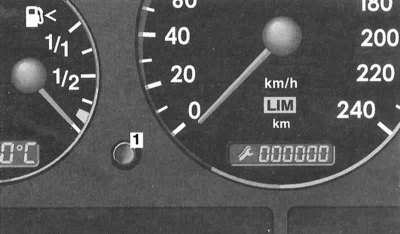
Information about the scheduled maintenance dates is displayed in the odometer reading field of the digital display built into the speedometer dial
1 — Button to switch the display to odometer mode
In this case, the output of the icon to the front field of the display
 means that the planned execution of work on List A is pending, and
  - according to List B (see Section Schedule of current maintenance). The main display field shows the mileage remaining before the maintenance in kilometers (for example, 1000), or the number of days after which the planned volume of work must be completed (for example, 10). The data output format is determined by the vehicle operating conditions.
The display switches to odometer mode automatically after 10 seconds, or by pressing the button (1).
If the maintenance deadline is overdue, the indicator starts to flash, and a minus sign appears in front of the digital data.
It is also possible to display service readings manually, for which the instrument cluster must first be activated (see Section Instrument cluster, gauges and control lamps and indicator lights), and then press the display switch button twice within 1 second. Returning the display to normal mode (odometer mode) happens automatically after 10 seconds, or by pressing the same button.
The indicator is reset at the Mercedes-Benz service station where the scheduled maintenance was performed.
If necessary, the indicator can be reset by the car owner himself: Turn the key in the ignition switch to position 2 and immediately press the display switch button twice within 1 second, the display screen will display the latest data on the scheduled maintenance date. Turn the key to position 0. Next, press the button and, holding it down, turn the key to position 2, - the display screen will continue to display the indication of the previous maintenance date, then, after about 10 seconds, after a beep, the date of the next maintenance will be displayed, - release the button. After about another 10 seconds, the display will automatically switch to the odometer mode.
If the scheduled maintenance due date indication is accidentally reset, the function can be reactivated at a Mercedes-Benz service station.
The amount of mileage remaining before the next maintenance is determined by the driving style and ranges from 15,000 to 22,500 km (365÷730 days). An economical driving style at medium engine speeds and avoiding short-distance trips contribute to its increase.
[Information copied from the website MercedesMan]
The schedule of current vehicle maintenance is presented in Section Schedule of current maintenance.